A multimodal API lets an application process or generate more than one type of content, such as text, images, video, and audio.
That description covers several different workflows.
An application might analyze a photograph and return text. It might generate an image from a prompt, transcribe an audio file, or create a video from a reference image. A broader product may combine several of these operations.
The integration challenge extends beyond calling the models.
Media must remain accessible while it is being processed. Asynchronous jobs need durable state. Generated files must be retrieved, validated, and stored. Later stages need the correct versions of earlier outputs.
A production design therefore connects model capabilities, execution contracts, and asset lifecycles.
This guide explains how to build that connection across modalities while preserving the differences each operation requires.
Before You Read
These guides provide useful context:
For platform context, the Token360 overview describes access to language, image, video, and audio workloads through its gateway.
Multimodal Workflows at a Glance
These are workflow categories, not a guarantee that every multimodal service supports every row.
Distinguish Understanding, Generation, and Composition
Three kinds of work often appear in the same product.
Understanding
The model interprets an input asset.
Examples include describing a photograph, extracting information from a document image, or identifying events in a video.
The output may be ordinary text or structured data. Support for image input does not establish support for image generation.
Generation
The model creates a new output.
Examples include synthesizing speech, generating an image, or producing a video using a prompt and reference assets.
Each operation has its own controls, limits, and delivery behavior.
Composition
The application combines or transforms assets.
Adding narration to a generated video, aligning subtitles, and exporting a final file are composition tasks. They may use ordinary media-processing tools rather than a model.
A platform can provide understanding and generation endpoints without providing application-level composition.
Keep these stages explicit so their failures, costs, and ownership remain understandable.
Verify Capabilities Per Model and Endpoint
“Multimodal” is too broad to serve as an integration specification.
Maintain a reviewed capability record for each operation.
Use the selected endpoint’s documentation rather than generalizing from a model family.
For example, Google’s model documentation provides separate model entries for different capabilities. Those entries are useful starting points, but your integration still needs the detailed contract for the chosen operation.
Treat catalog discovery as candidate discovery. A newly listed model should not automatically become an approved production dependency.
Choose Execution Modes by Workflow
A modality does not determine one universal execution mode.
Text can run asynchronously. Image generation can return immediately or create a job. Audio streaming can mean one-way output delivery or an interactive session.
Synchronous requests
Use a synchronous flow when the endpoint and product latency requirements support it.
Define connection and overall request timeouts, and distinguish transport success from a usable result.
Streaming
Streaming can reduce the wait for useful output, but it introduces partial-result handling.
A stream closing is not necessarily a successful completion. Preserve the endpoint’s terminal signal and define what the application does with incomplete content.
Asynchronous jobs
Persist the job identifier and recover state through supported status checks or notifications.
Keep generation completion separate from application readiness. The output may still need downloading, validation, storage, or composition.
Live sessions
Interactive audio or video requires session state, transport management, and interruption handling.
Do not assume that an endpoint capable of streaming an audio file also supports bidirectional real-time conversation.
Design Media Inputs as Controlled Assets
Treat uploaded media as an asset with identity, ownership, validation status, and an access lifecycle.
A practical input path is:
Receive → validate → store → authorize model access → submit.
Validation should include the properties relevant to the operation:
-
File size and accepted media type.
-
Actual decodability.
-
Image dimensions or audio/video duration.
-
Supported codecs and container formats.
-
Ownership and authorization for the intended use.
-
Resource limits for decoding and transformation.
-
Additional scanning appropriate to the upload surface.
A MIME header or filename extension alone does not establish the file’s contents.
Apply upload and processing limits before expensive downstream generation.
Choose the transfer method deliberately
Use the method the endpoint supports and the workflow can operate reliably.
Match Media Access Lifetime to Processing Time
A signed URL must remain usable when the provider actually fetches the asset.
That may happen after submission, after queueing, or during a documented retry.
An overly short lifetime can produce a request that is accepted but later fails to read its input. An unnecessarily long lifetime increases exposure.
Choose the access window from the endpoint’s processing contract. Where supported, use a durable provider upload or a refreshable access mechanism when the fetch window cannot be predicted adequately.
Keep three lifetimes separate:
A customer download link does not need to share the same permissions or expiry as a model-input link.
Control URL fetching
In components you operate, validate destinations and redirects, restrict network access, and prevent external URLs from reaching internal services or metadata endpoints.
OWASP’s SSRF prevention guidance provides implementation considerations for server-side fetching.
These controls apply to your fetchers. Do not assume you control how an external provider resolves or retrieves URLs. Prefer application-controlled assets when that produces a clearer access boundary.
Model the Product as Linked Operations and Assets
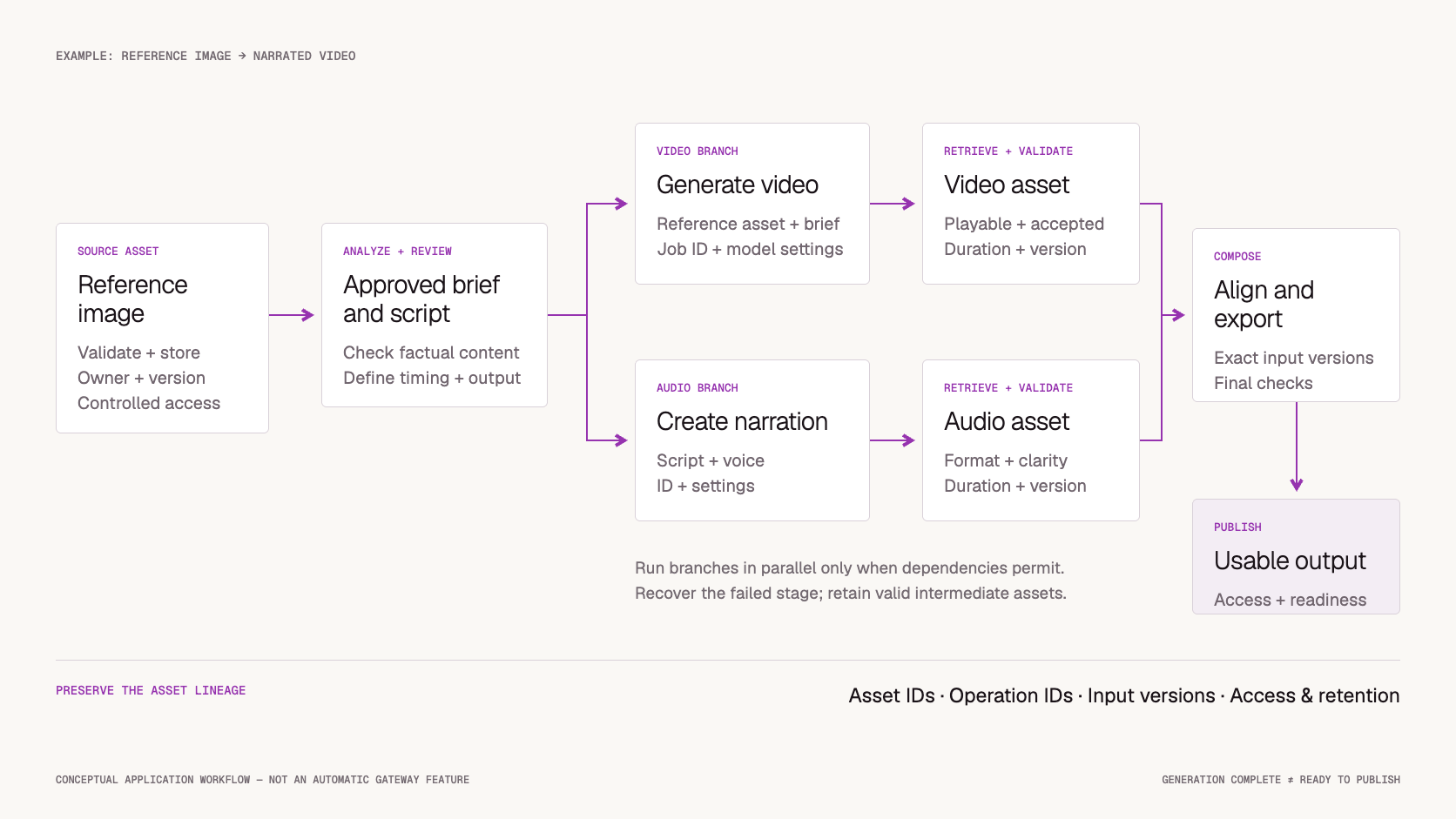
Consider a product that turns a reference photograph into a narrated video.
The workflow might be:
-
Validate and store the photograph.
-
Analyze it to create a reviewed description.
-
Generate a video from the approved inputs.
-
Generate narration from an approved script.
-
Retrieve and validate both media outputs.
-
Compose and publish the final asset.
The video and audio branches can run independently only when their prerequisites and timing requirements permit it.
Keep one internal workflow identity and separate identities for each operation, attempt, and asset.
A single gateway credential does not create these relationships automatically.
Preserve Model-Specific Controls Behind Shared Operations
Normalize operational concepts where doing so improves the application:
Preserve capabilities that change the meaning of the request.
A required reference-video mode should remain an explicit dependency. A voice identifier, aspect-ratio option, or duration setting should be validated against the selected endpoint.
Do not silently remove unsupported settings to make a request succeed.
A shared platform can expose several endpoint families while still simplifying authentication and operations. There is no requirement to force every media request into a chat schema.
This is the same boundary described in Multi-Model API Guide: standardize stable concepts while retaining differences that affect the product outcome.
Retrieve, Validate, and Store Outputs Before Publishing
A provider-hosted output URL is not necessarily a durable application asset.
When generation completes:
-
Retrieve the output through the supported mechanism.
-
Validate its type, format, and decodability.
-
Check required properties such as duration or dimensions.
-
Store an application-controlled copy when permitted and needed.
-
Record a stable asset reference and integrity checksum.
-
Mark the operation ready only after the required checks pass.
A checksum can identify exact bytes and detect changes. It does not prove ownership, authenticity, or creative quality.
Token360’s video download documentation describes retrieval through the video content endpoint. Integrations should use the documented retrieval flow rather than treating an earlier temporary URL as permanent storage.
Validate the deliverable, not just the file
A playable video can still fail the brief. A readable transcript can omit important speech. A valid audio file can contain incorrect pronunciation.
Use the workload’s acceptance criteria before publication, drawing on the process in AI Model Evaluation Framework.
Recover the Failed Stage
A multimodal pipeline should preserve usable intermediate results when recovery permits it.
If narration fails after video generation succeeds, retry or replace the audio stage under its approved policy.
If composition fails because of an encoding issue, reuse the verified source assets.
If a completed output cannot be downloaded, recover retrieval before launching a new generation.
This reduces duplicate cost and avoids changing assets that already passed review.
Track dependencies when inputs change
Reusing intermediates is safe only when their dependencies remain valid.
If the script changes, the narration may need regeneration. If the creative brief changes materially, the existing video may no longer be acceptable.
Record input versions and invalidate affected descendants deliberately. Do not combine a newly generated narration track with an older video simply because both files are available.
For ambiguous submissions and fallback limits, use the recovery principles in AI API Fallbacks.
Manage Provenance, Access, and Retention
An asset record should explain where the file came from and how it can be used.
Useful fields include:
Internal lineage is not the same as externally verifiable provenance. Record precisely what the system knows.
Apply the product’s approved policies for content review, authorized use of source material, voice or likeness permissions, and output disclosure.
Keep model-generated descriptions and transcripts as untrusted content when they feed later stages. They should not acquire authority to change access permissions, execute tools, or override workflow instructions.
Make deletion follow the asset graph
A source asset may have thumbnails, transcripts, temporary copies, generated derivatives, and cached outputs.
Use the recorded relationships to determine which copies must be removed or retained under the applicable policy.
Deleting the application’s source file does not prove that every external copy was deleted. Track provider-side deletion capabilities and confirmation separately.
Measure the Full Workflow
A text, image, video, and audio pipeline can consume several billing units.
Preserve the unit and source for every step rather than combining them into one unlabeled “usage” value.
Track:
-
Model usage and applicable charges.
-
Retries and replacement attempts.
-
Retrieval and storage activity.
-
Composition work.
-
Quality-review overhead.
-
Accepted and rejected final outputs.
Keep direct API charges separate from broader operating-cost estimates.
For latency, measure the user-visible path. If audio and video run in parallel, adding both durations together overstates elapsed time. Record branch timings and the actual end-to-end readiness interval.
Also track incomplete workflows. A dashboard containing only published assets can hide expensive abandoned branches and long-pending jobs.
Use AI API Observability for correlation design and AI API Cost Management for reconciliation and budget controls.
Where Token360 Fits
Token360’s overview describes shared access across language, image, video, and audio models.
For a multimodal integration, begin with the model catalog, then verify the endpoint contract for each required stage.
Shared access can simplify the model-call layer. Your application still needs to define the workflow’s asset ownership, dependencies, composition, acceptance checks, and final publication state.
Evaluate one complete path from source input to usable output. That reveals integration requirements a playground prompt cannot show.
A Practical Implementation Checklist
Before launching a multimodal workflow:
-
Define the input-to-output contract for every stage.
-
Verify model and endpoint capabilities.
-
Select appropriate request, job, stream, or session handling.
-
Validate media before expensive processing.
-
Match provider access lifetime to the actual fetch window.
-
Maintain separate workflow, operation, attempt, and asset identities.
-
Preserve required model-specific controls.
-
Retrieve and validate outputs before publication.
-
Record asset dependencies and configuration versions.
-
Recover only the stages that need replacement.
-
Track deletion and retention across derived assets.
-
Measure final readiness, acceptance, and total attributed usage.
Frequently Asked Questions
Does multimodal mean one model handles everything?
No. A product may combine specialized models through one access layer. Another may use a single model that accepts several input types.
Is a multimodal API the same as a multi-model API?
No. Multimodal describes content types. Multi-model describes access to several models. A platform can provide either or both.
Does image understanding imply image generation?
No. An endpoint that accepts an image and returns text may not generate images. Verify input and output capabilities separately.
Can large media be sent as base64?
Some endpoints support inline data, but it increases payload size and may complicate transfer and logging. Check endpoint limits and compare with supported uploads or controlled URLs.
How long should a signed input URL remain valid?
Long enough for the documented fetch window, including relevant queueing and retries, while limiting unnecessary exposure. There is no universal duration for every provider.
Can a completed generation be shown to the user immediately?
Only when the required output is retrievable, valid, and ready for the product. Generation completion and application readiness can be separate states.
Should a failed final stage restart the entire workflow?
Usually only if earlier results are no longer valid or reusable. Preserve verified intermediate assets and recover the affected stage when safe.
Should every asset have the same retention period?
No. Source files, intermediates, final outputs, and diagnostic records can have different needs. Define retention by asset purpose and applicable policy.
What to Read Next
-
Image Generation API Guide from Prompt to Saved Asset — for reliable image retrieval and storage.
-
Speech to Text API Guide for Usable Transcripts — for transcript structure and downstream usability.
-
Video Extension API Guide for Continuous Scenes — for workflows that build on existing video assets.
Use AI Model Evaluation Framework when selecting a configuration for any of these stages.
Start With One Complete Input-to-Output Path
Choose one workflow, verify each stage’s contract, and preserve the links between source assets, model attempts, and the final result.
Expand the workflow after that path is reliable and explainable.
Explore multimodal models on Token360.


 Tutorial
 Tutorial
 Prompt Guide