To use the Seedance API through Token360, create a video task, save its ID, check that task until it finishes, and download the output. Treat generation as background work: your application should track the job independently of the browser request that started it. This guide walks through that integration and explains how to avoid duplicate submissions and lost results.
Scope: This tutorial uses Token360's API, with seedance-2.5 as the documented model example. It is not a tutorial for ByteDance's native API. Examples were checked against public documentation on September 17, 2026; they have not been executed against a paid account.
What you need before your first request
Prepare a Token360 API key, a server-side environment, curl, and Python 3 with the requests package. Keep your key in an environment variable or secret manager. Your frontend should call your backend rather than include the provider credential in browser code.
The current Seedance 2.5 model page provides a playground and API example. Use it to confirm the model you intend to integrate. Account access, accepted options, and successful generation still need to be verified in your environment.
Start with one short, uncomplicated scene. A minimal first request helps separate integration errors from creative problems. Add reference assets, sound, and more elaborate instructions only after that first workflow succeeds.
Understand the job lifecycle
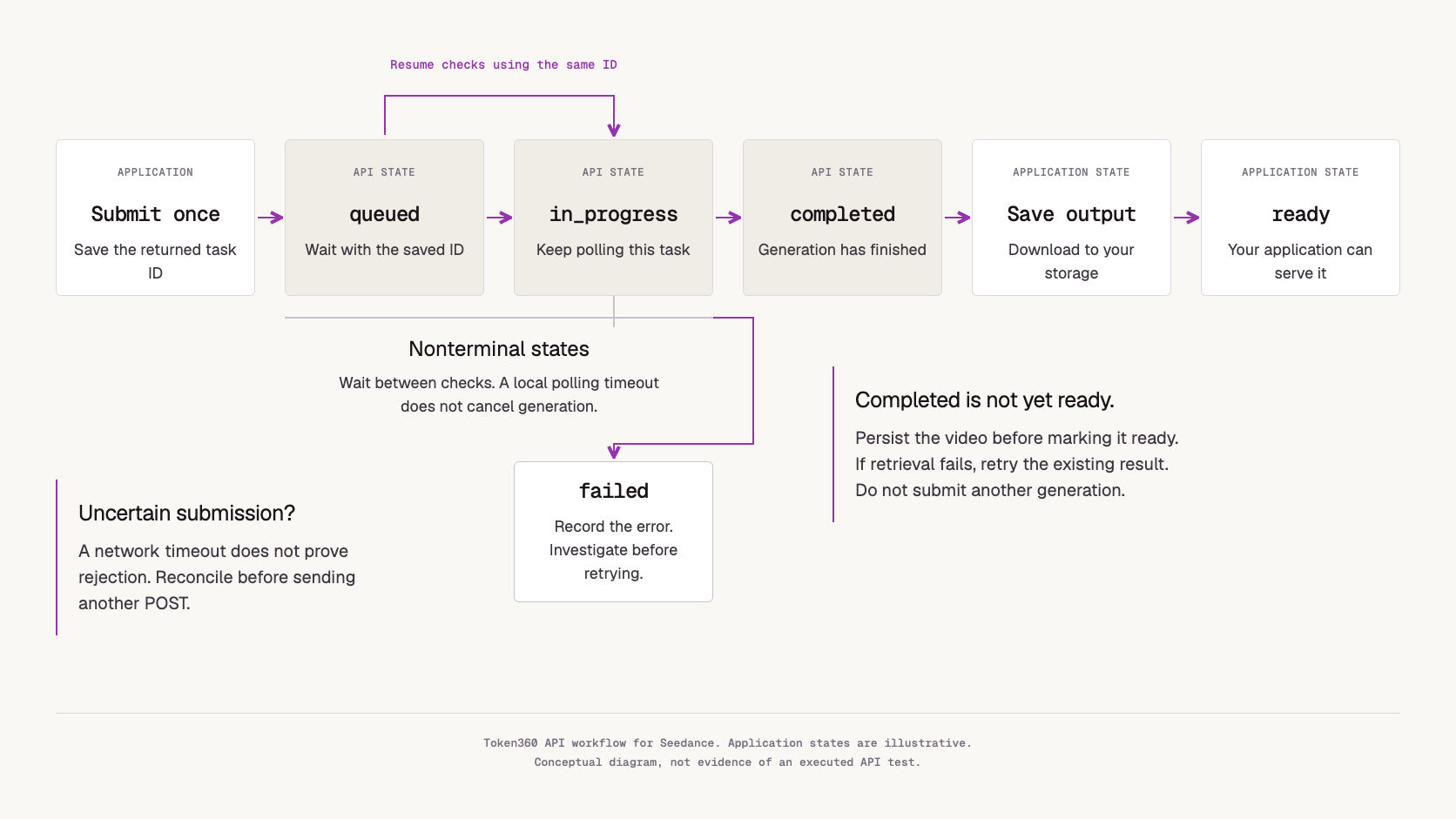
Your application has two related jobs: asking for a video and managing the resulting task. A successful submission is not yet a finished video.
Token360 documents these task states:
| API state |
What your application should do |
queued |
Keep the saved task ID and wait |
in_progress |
Continue checking the existing task |
completed |
Retrieve and persist the output |
failed |
Record the error and decide whether a new attempt is appropriate |
The task ID returned at submission is the identifier used for subsequent status checks. Video status reference.
For a user-facing product, add your own states such as “saving result” and “ready.” That lets you distinguish a provider's completed generation from a file your application can actually serve.
Step 1: Set your API key
Set TOKEN360_API_KEY securely in your environment before running the examples. Avoid committing it to a repository or putting it in a shared notebook.
The examples use:
https://api.token360.ai/v1
Token360 documents this base URL in its platform overview.
Step 2: Submit a small text-to-video request
curl --fail-with-body --silent --show-error \
  https://api.token360.ai/v1/videos \
  -H "Authorization: Bearer ${TOKEN360_API_KEY}" \
  -H "Content-Type: application/json" \
  --data '{
    "model": "seedance-2.5",
    "prompt": "One ceramic cup rests on a wooden table. Steam rises slowly. The camera remains still in soft morning light.",
    "duration": 8,
    "resolution": "720p",
    "aspect_ratio": "16:9",
    "generate_audio": false
  }'
Save the returned id before doing anything else. This example follows the documented submission format. Optional settings depend on the model; inspect GET /v1/models/{model_id} and its parameter schema before choosing other values. Submission reference.
Do not interpret a transport timeout as proof that submission failed. The service may have accepted the request before the response was lost. Automatically repeating an ambiguous submission can create a second billable job.
Step 3: Check the saved task
Set VIDEO_ID to the ID returned by the previous request, then run:
curl --fail-with-body --silent --show-error \
  "https://api.token360.ai/v1/videos/${VIDEO_ID}" \
  -H "Authorization: Bearer ${TOKEN360_API_KEY}"
If the task is still running, wait before checking again. A browser refresh should resume monitoring this task rather than submit another one.
Step 4: Download the completed video
After completion, the content endpoint can stream the output directly:
curl --fail-with-body --silent --show-error \
  "https://api.token360.ai/v1/videos/${VIDEO_ID}/content?format=binary" \
  -H "Authorization: Bearer ${TOKEN360_API_KEY}" \
  --output seedance-output.mp4
The download reference also documents redirect and signed-URL modes. For production use, persist the result in storage your application controls; a temporary delivery URL should not be your only copy.
Python example: submit once, then resume by ID
Install requests in your Python environment. Save the following as seedance_example.py. Run it without arguments to submit a job, or pass a saved task ID to resume checking an existing job.
This is a small integration example. It deliberately stops on transport errors instead of automatically repeating a potentially accepted submission. The 15-minute monitoring window below is a local example setting, not a published generation-time promise.
import json
import os
from pathlib import Path
import sys
import time
from urllib.parse import quote

import requests

BASE = "https://api.token360.ai/v1"
session = requests.Session()
session.headers["Authorization"] = (
    "Bearer " + os.environ["TOKEN360_API_KEY"]
)

def checked(response):
    response.raise_for_status()
    return response.json()

def submit_once():
    response = session.post(
        BASE + "/videos",
        json={
            "model": "seedance-2.5",
            "prompt": (
                "One ceramic cup sits on a wooden table. "
                "Steam rises slowly. Static camera, soft daylight."
            ),
            "duration": 8,
            "resolution": "720p",
            "aspect_ratio": "16:9",
            "generate_audio": False,
        },
        timeout=(10, 60),
    )
    return checked(response)["id"]

def wait_for_video(video_id):
    path_id = quote(video_id, safe="")
    deadline = time.monotonic() + 15 * 60
    while time.monotonic() < deadline:
        task = checked(session.get(
            BASE + "/videos/" + path_id,
            timeout=(10, 30),
        ))
        status = task.get("status")
        print("Status:", status, flush=True)
        if status == "completed":
            return
        if status == "failed":
            raise RuntimeError(json.dumps(task.get("error", {})))
        if status not in {"queued", "in_progress"}:
            raise RuntimeError("Unexpected state: " + str(status))
        time.sleep(5)
    raise TimeoutError(
        "Local monitoring window ended; resume this same task ID."
    )

def download(video_id):
    path_id = quote(video_id, safe="")
    target = Path("seedance-output.mp4")
    partial = target.with_suffix(".mp4.part")
    with session.get(
        BASE + "/videos/" + path_id + "/content",
        params={"format": "binary"},
        stream=True,
        timeout=(10, 120),
    ) as response:
        response.raise_for_status()
        with partial.open("wb") as output:
            for chunk in response.iter_content(1024 * 1024):
                if chunk:
                    output.write(chunk)
    partial.replace(target)
    print("Saved:", target)

if __name__ == "__main__":
    video_id = sys.argv[1] if len(sys.argv) > 1 else submit_once()
    print("Save this task ID:", video_id, flush=True)
    Path("seedance-task-id.txt").write_text(video_id, encoding="utf-8")
    wait_for_video(video_id)
    download(video_id)
Use a durable database instead of the local task-ID file when adding concurrency. The sample's fixed output filenames are intended for one job at a time. If submission fails before an ID is returned, investigate the uncertain result before running the submission again.
Add image inputs after the basic integration works
An image can serve different purposes: establishing the opening composition, specifying an ending frame, or providing a visual reference. Those intentions should not be treated as interchangeable.
Token360's submission API distinguishes frame_images from input_references. Check the selected model's schema and the relevant workflow example before adding either. The common API field list is not a guarantee that every model supports every combination. Video request fields.
For your first image-based experiment, use one clear asset and describe a single motion. If the image already establishes the setting, focus the prompt on what should change over time. The companion Seedance Prompt Guide provides copyable creative starting points.
Troubleshoot the right layer
Separate request rejection from a job that fails after acceptance.
For HTTP errors, inspect the status and machine-readable code. Invalid credentials, unsupported parameters, insufficient balance, and temporary rate limits require different fixes. Preserve correlation information for support, while excluding secrets and sensitive prompt content from routine logs. Error-handling reference.
For an accepted job, keep the task ID and error record. Repeating the same invalid asset or unsupported setting will not improve the outcome. Correct the cause first, then make a deliberate decision about a new generation.
If generation succeeds but the download fails, retry retrieval of that existing result. Do not pay to generate the clip again simply because your storage worker had a temporary problem.
Plan cost around usable results
A successful HTTP request is not the same as an acceptable creative result. Track both technical completion and editorial acceptance.
For an evaluation batch, calculate:
Cost per accepted clip = total batch spend / accepted clips
Define acceptance criteria before reviewing outputs: subject identity, motion, composition, audio, and any brand requirements. Keep duration and other settings comparable across test candidates. If no clip meets the brief, report zero accepted clips rather than a misleading unit cost.
This metric is a suggested evaluation method, not a claim about Seedance pricing or performance.
Frequently asked questions
Is the Token360 Seedance API the same as ByteDance's native API?
No. This guide uses Token360's endpoint, credential, and request format. When integrating directly with another provider, follow that provider's documentation rather than mixing payloads or credentials.
Can I call Seedance from Python?
Yes, using HTTP requests as shown above. Validate the example with your account before making it part of a production service.
Does a polling timeout cancel generation?
The local timeout in this example only stops the Python polling loop. It does not send a cancellation request. Keep the ID so the same job can be checked later.
Should I retry a failed POST automatically?
Only when you can establish that repeating the operation is safe. An uncertain network outcome requires reconciliation; a saved task ID should be used to inspect the existing job.
Which resolution and duration should I request?
Use options accepted by the current model schema and account. Begin with the documented example settings, then test the combinations your product actually needs.
Start with one complete workflow
Get one clip from submission to durable storage before adding more creative controls. That gives your application a foundation for handling additional prompts and model options without losing track of jobs.
Open Seedance 2.5 on Token360.
For the broader lifecycle, continue with the Text-to-Video API Production Guide. For creative iteration, use the Seedance Prompt Guide.



 Tutorial
 Prompt Guide
 Tutorial