Last updated: September 29, 2026
A reliable Kling API integration needs more than a prompt and a successful submission response.
Choose the serving platform and exact model route, validate the inputs, save the returned task identifier, and recover the result without creating another generation. Then retrieve and validate the video before marking the operation complete for your user.
The model name alone does not identify the authentication method, request schema, queue behavior, or asset-delivery contract.
This guide uses fal’s documented Kling 3.0 Pro interface for concrete JavaScript examples. The application design also applies when evaluating another serving platform, but its credentials, endpoints, and fields must be mapped explicitly.
The examples are documentation-based and have not been run against a paid account.
Before You Read
Read AI Video API Architecture if you are still designing the relationship between your application, background workers, provider tasks, and asset storage.
Here, the focus is a single integration: turning an approved text or image input into a recoverable task and a usable video file.
Kling API Integration at a Glance
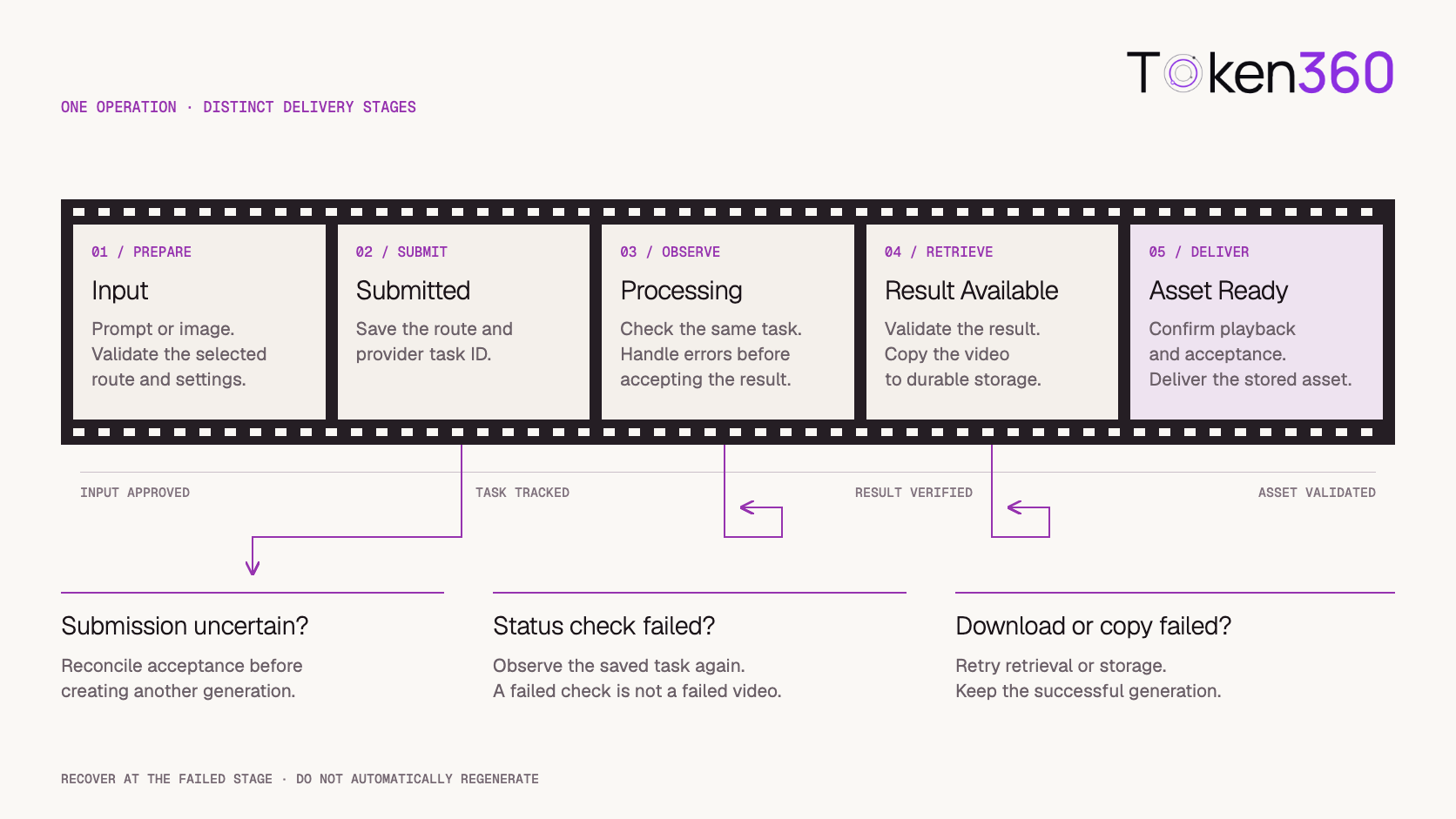
Keep these stages separate. A failed download should return to asset retrieval, not to video generation.
Choose the Serving Platform Before Writing the Request
Treat a Kling integration as a specific combination of platform, route, version, and account.
Kling’s own service and third-party serving platforms have separate integration contracts. Do not assume that a website subscription provides API access or that credentials issued by one platform work on another.
Create a short integration record before implementation:
Avoid copying a request from a different Kling version because the names look similar. A field that is valid for one route may be unsupported or behave differently elsewhere.
Start With One Generation Mode
Choose the first mode according to the input your product already controls.
Text to video is useful for exploring a scene without preparing a source frame. Image to video is useful when the opening composition matters, such as a product presentation or an approved visual asset.
Neither mode removes the need to review the output.
For the first integration, use a short, simple shot. Prove that submission, recovery, and storage work before adding more complex motion, audio, or multi-shot controls.
Submit a Small Text-to-Video Request
For the example below, install the server-side client:
npm install @fal-ai/client
Configure FAL_KEY in the server environment. Keep it out of browser bundles and client-visible configuration.
The following request uses the route and fields in fal’s Kling 3.0 Pro text-to-video API reference.
import { fal } from "@fal-ai/client";

const route = "fal-ai/kling-video/v3/pro/text-to-video";

const job = await fal.queue.submit(route, {
  input: {
    prompt:
      "A ceramic bowl on a wooden table. " +
      "The camera slowly moves closer to reveal the glaze. " +
      "Soft daylight. One continuous shot.",
    duration: "5",
    aspect_ratio: "16:9",
    generate_audio: false,
  },
});

console.log({
  route,
  requestId: job.request_id,
});
This is a submission example, not a complete production worker.
Replace console output with durable persistence before returning success to the application. Record the route and request ID together so that a later worker can recover the same task.
Set important options explicitly. That makes experiments easier to compare and reduces dependence on defaults that may change.
Create an Application Operation Before Submission
Give each user-requested generation its own internal operation ID.
Create the operation record before contacting the provider, then attach the provider request ID when submission succeeds. This lets your application distinguish an intended generation from its provider-side execution.
An illustrative record could contain:
operation_id
owner_id
provider
route
request_configuration_version
input_asset_reference
provider_request_id
application_status
last_observed_provider_status
output_asset_reference
billing_status
created_at
updated_at
These are application fields, not a required Kling schema.
Make repeated clicks or browser refreshes resolve to the existing application operation where appropriate.
There is still a failure window: the provider may accept a request before your application receives or stores its identifier. Mark that outcome as uncertain and investigate it. An internal operation ID alone does not make an external submission idempotent.
Do not automatically issue another generation whenever the submission response is missing.
Observe the Saved Task Without Resubmitting
Status checks should use the saved route and provider identifier.
This function performs one observation. A background worker can schedule another check when the task remains pending.
import { fal } from "@fal-ai/client";

export async function inspectVideoTask(route, requestId) {
  const status = await fal.queue.status(route, {
    requestId,
    logs: false,
  });

  if (status.status !== "COMPLETED") {
    return {
      kind: "pending",
      providerStatus: status.status,
    };
  }

  if (status.error) {
    return {
      kind: "generation_failed",
      message: status.error,
    };
  }

  const result = await fal.queue.result(route, {
    requestId,
  });

  const video = result.data?.video;

  if (!video?.url) {
    throw new Error("The result does not contain a video URL.");
  }

  return {
    kind: "result_available",
    video,
  };
}
The caller must handle thrown transport, API, and result-validation errors. A failed observation should not automatically be recorded as a failed generation.
fal documents IN_QUEUE, IN_PROGRESS, and COMPLETED; a completed status can also carry an error. Inspect the result rather than treating the status label as proof of a successful video. See its asynchronous inference documentation.
Use bounded polling intervals and a defined observation deadline. If that deadline expires, retain the task for reconciliation rather than silently creating a replacement.
Add Image-to-Video Through Its Own Schema
For image-to-video, prepare an approved starting image before submission.
fal’s Kling 3.0 Pro image-to-video reference documents a separate route with start_image_url and an optional end_image_url.
import { fal } from "@fal-ai/client";

export async function submitImageVideo(startImageUrl) {
  const route = "fal-ai/kling-video/v3/pro/image-to-video";

  const job = await fal.queue.submit(route, {
    input: {
      start_image_url: startImageUrl,
      prompt:
        "The camera moves gently closer to the product. " +
        "Keep its shape, color, and printed details consistent. " +
        "The background remains still.",
      duration: "5",
      generate_audio: false,
    },
  });

  return {
    route,
    requestId: job.request_id,
  };
}
Persist the returned values through the same operation workflow used for text-to-video.
Field names belong to the selected interface. Do not automatically translate start_image_url into another platform’s request without checking that platform’s schema.
Also avoid adding parameters merely because the text-to-video route accepts them. Validate the image-to-video contract independently.
Make Input Images Reachable for the Whole Processing Window
An image that opens in your browser may still be inaccessible to the serving system.
The browser might have authentication cookies. A signed URL might expire while the generation waits in a queue. A host might block automated retrieval.
Check the actual delivery mechanism used by the selected route.
Where temporary URLs are used, size their lifetime for the expected processing window and operational uncertainty.
Keep the source asset reference in your application. A temporary delivery URL is a transport mechanism, not a complete asset record.
Describe Motion Without Fighting the Source Image
For image-to-video, the starting image already supplies much of the scene.
Use the prompt to describe what changes: camera movement, subject motion, environmental movement, and pacing.
A product shot might need only a gentle camera move and a stable background. Asking simultaneously for a different product shape, a new label, dramatic rotation, and complex hand movement makes the intended result harder to evaluate.
Change one major variable at a time during early testing.
Review the full clip, especially moments involving occlusion, rotation, hands, text, and small details. A convincing first frame does not establish consistency throughout the video.
Prompt instructions are requests, not guarantees. If brand details must remain exact, include explicit acceptance checks and consider whether conventional compositing is needed after generation.
For deeper creative guidance, continue with the Kling Prompt Guide for Motion and Shot Control.
Separate Result Availability From Asset Readiness
A returned URL is not yet a durable, customer-ready asset.
Use separate application states for provider result availability, asset copying, technical validation, and publication readiness.
fal notes that its media URLs are subject to expiration settings. Download assets you need to retain before they expire. Its queue documentation describes this behavior.
Your retrieval worker should verify a successful download and inspect the file before marking it ready. Depending on the product, checks may include:
-
Non-empty content and a decodable video stream.
-
Expected duration and dimensions.
-
Required or intentionally absent audio.
-
Successful storage and authorized retrieval.
-
A completed creative review.
Store the resulting asset under a durable application reference.
If your storage service is temporarily unavailable, retry the copy or retrieval stage. Do not regenerate an otherwise successful video.
Recover According to the Failed Stage
A single “retry” button can hide several very different operations.
Use the recorded state to select the recovery action.
A revised generation is a new attempt with its own provider ID and cost. Keep it linked to the original application operation or creative brief.
If you add webhooks, follow the chosen platform’s verification and delivery contract. Do not copy signature assumptions from another provider. Make event processing safe to repeat and preserve polling or reconciliation where appropriate.
Evaluate Cost Per Usable Video
The lowest listed generation price does not necessarily produce the lowest cost per accepted asset.
Track all attempts associated with a deliverable, including failed generations, rejected outputs, and deliberate revisions. Keep platform charges separate from application storage and processing costs.
A useful internal metric is:
Cost per accepted video =
  attributable generation and processing cost
  ÷ accepted video count
Define what “accepted” means before comparing configurations.
Record the route, duration, audio setting, request time, and applicable pricing reference for each experiment. Confirm the serving platform’s current rates rather than importing prices from another Kling service.
Start with a bounded test budget and a small input set. Expand only after the application reliably recovers tasks and the outputs meet the intended quality threshold.
Test the Entire Delivery Path Before Launch
A successful submission proves only one part of the integration.
Run a small authorized test set that covers:
Retain the request configuration, provider identifiers, observed outcomes, and costs.
Do not label the integration production-ready until the application can deliver a playable file and explain what happened when a stage fails.
Using Token360 as the Access Layer
Token360’s API overview documents video generation alongside language, image, and audio access.
When evaluating it for a Kling workflow, confirm the exact model ID, available version, supported inputs, and account access in the live catalog and selected endpoint documentation.
The fal route strings in this article are not Token360 model IDs.
For Token360’s documented video resource interface, review video status polling and video downloading. These use Token360’s own resource contract; they are not replacements for fal SDK methods without an adapter change.
Keep platform-specific details inside the adapter while preserving your application’s operation, asset, and billing records.
This guide does not establish that every Kling version or fal control is available through Token360.
Kling API Implementation Checklist
-
[ ] Confirm the platform, exact route, model version, and API entitlement.
-
[ ] Keep credentials on the server.
-
[ ] Validate each generation mode against its own schema.
-
[ ] Create an application operation before submission.
-
[ ] Persist the route and provider request ID.
-
[ ] Separate observation failures from generation failures.
-
[ ] Verify image accessibility throughout processing.
-
[ ] Check result contents before declaring generation success.
-
[ ] Copy and validate outputs before marking assets ready.
-
[ ] Retry the failed stage instead of automatically regenerating.
-
[ ] Track revisions and final costs.
-
[ ] Test restart recovery and duplicate user actions.
Frequently Asked Questions
Can I use a Kling website subscription as an API credential?
Do not assume so. Confirm API access, credentials, and billing with the serving platform you select.
Is image-to-video a text-to-video request with one extra field?
It may use a separate route and schema. Implement the documented interface for the selected version and platform.
Does COMPLETED always mean the video succeeded?
For the fal queue used here, a completed status can include an error. Check the error information and retrieve a valid result before marking generation successful.
Should I resubmit a task that appears stalled?
First inspect the saved task. A delayed response or failed status check does not prove that the original generation was never accepted.
Can I use the fal example directly with Token360?
No. Confirm Token360’s model identifier, authentication, inputs, and resource lifecycle, then map them in a separate adapter.
What if generation succeeds but the download fails?
Keep the generation result and retry the retrieval or storage stage. A download failure does not normally require another generation.
Does image-to-video guarantee exact product details?
No. Review shape, color, text, and temporal consistency across the entire clip before accepting the output.
What to Read Next
Build a Recoverable Video Workflow
Start with one short generation and a durable operation record. Prove that the application can recover the same task, retrieve its result, and deliver a validated asset before expanding the workflow.
Read Token360 API documentation.


 Tutorial
 Comparison
 Comparison