Last updated: October 8, 2026
A reliable Hailuo API integration starts with a specific model and API contract.
For the Hailuo 2.3 workflow covered here, your application submits a generation request, saves the returned task ID, checks its status, and uses the resulting file ID to retrieve the video. Each stage needs its own validation and recovery behavior.
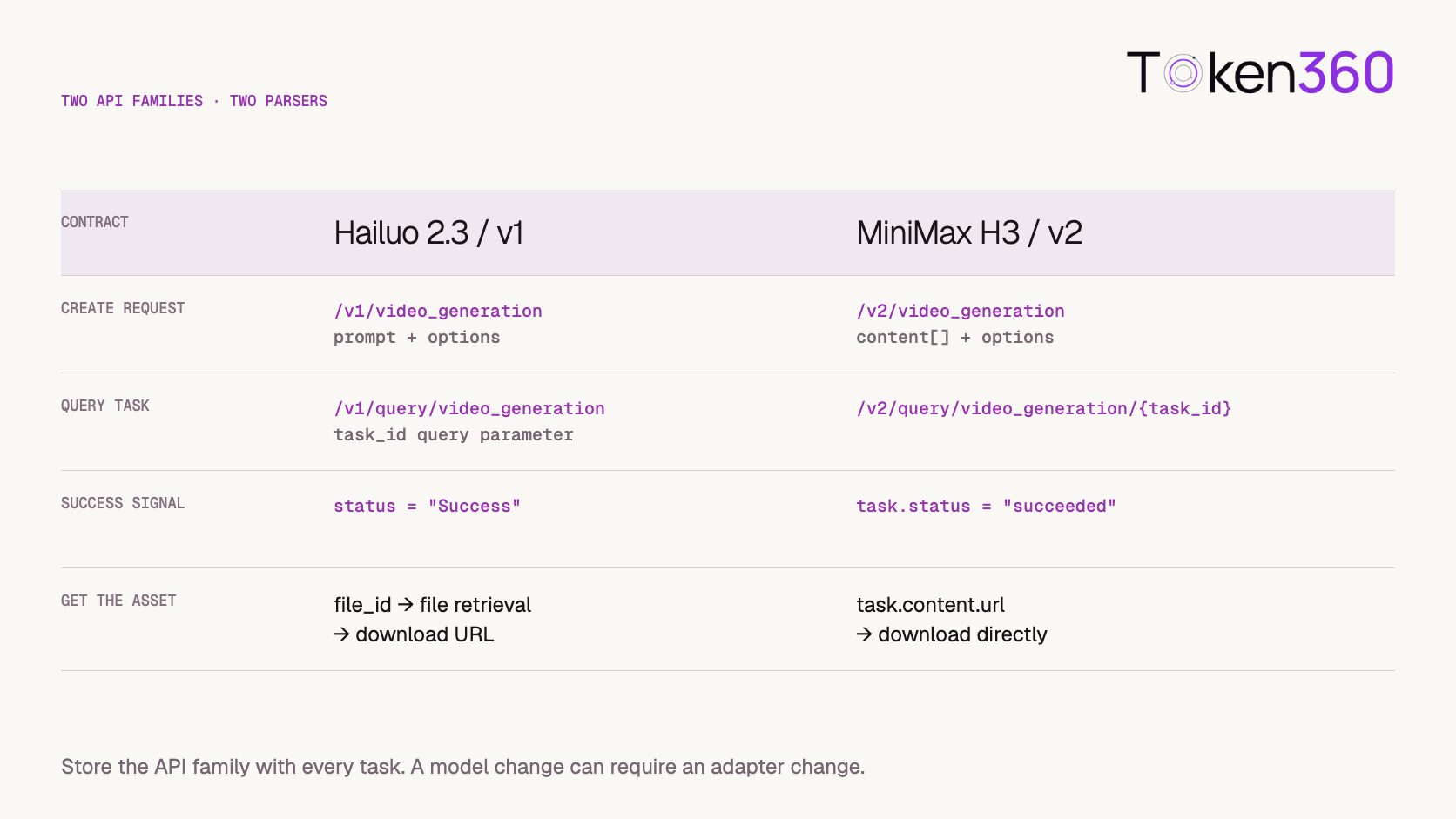
That distinction matters when moving between model families. MiniMax’s H3 interface uses a different request structure and result path. Changing a model name without updating the surrounding adapter can leave an application querying the wrong endpoint or waiting for a field that will never appear.
This guide uses MiniMax’s documented Hailuo 2.3 v1 interface for its Python examples. It also explains the boundary with H3 so that future upgrades remain deliberate.
The examples have not been executed against a paid account.
Before You Read
Read AI Video API Architecture if you are still designing the relationship between application requests, provider tasks, background workers, and asset storage.
Here, the goal is to make one Hailuo workflow recoverable from submission through delivery.
Hailuo API Integration at a Glance
Keep the provider task and the local asset as separate records. Generation can succeed while downloading or storage still needs recovery.
Separate Hailuo 2.3 From the H3 Contract
The Hailuo 2.3 example in this guide deliberately targets MiniMax’s v1 video interface. It is not presented as the newest MiniMax model or as a template for every video route.
MiniMax’s H3 workflow guide documents a v2 interface using a multimodal content array. Its successful task response exposes the video URL through task.content.url.
The Hailuo v1 workflow instead returns a file_id after success, followed by file retrieval.
Use separate request builders and response parsers. Shared application logic can sit above those adapters, but it should not guess the API family from whichever fields happen to be present.
Validate the Configuration Before Submission
Create a small configuration record for the workflow you intend to support.
Include the platform, account reference, API family, model ID, generation mode, and supported option combinations. Keep credentials in your secret-management system.
For a first integration, choose a simple scene with modest motion. Avoid testing model migration, image input, complex camera movement, and output-setting changes simultaneously.
The six-second, 1080P configuration below is documented for the selected Hailuo 2.3 request. It should not become a universal default for every MiniMax model. See the text-to-video API reference.
Validate requests before sending them. An unsupported configuration is easier to explain as an input error than as a generic generation failure discovered later.
Submit One Hailuo 2.3 Task
Install the HTTP client:
pip install requests
Set MINIMAX_API_KEY in the server environment.
import os
import requests

BASE_URL = "https://api.minimax.io"
HEADERS = {
    "Authorization": f"Bearer {os.environ['MINIMAX_API_KEY']}"
}

response = requests.post(
    f"{BASE_URL}/v1/video_generation",
    headers=HEADERS,
    json={
        "model": "MiniMax-Hailuo-2.3",
        "prompt": (
            "A folded paper bird slowly opens its wings "
            "on a clean desk. Soft daylight. [Static shot]"
        ),
        "duration": 6,
        "resolution": "1080P",
    },
    timeout=(10, 30),
)

response.raise_for_status()
data = response.json()

if data.get("base_resp", {}).get("status_code") != 0:
    raise RuntimeError(f"Submission rejected: {data.get('base_resp')}")

task_id = data.get("task_id")
if not task_id:
    raise RuntimeError("Submission returned no task ID.")

print(task_id)  # Replace with durable persistence.
This follows MiniMax’s documented submission contract.
HTTP success is one validation layer. The application-level response and task identifier must also be checked.
The timeout tuple sets connection and read limits for this request; it is not a video-generation deadline. If the response is lost, acceptance may be uncertain. Do not automatically repeat the submission.
Save More Than the Task ID
A task ID needs enough context to be useful after a restart or deployment change.
Store it with the API family and adapter version that created it. Otherwise, a worker upgraded to H3 could accidentally try to interpret an older Hailuo task through the new parser.
An illustrative application record could contain:
operation_id
owner_id
provider
account_reference
api_family
adapter_version
model_id
request_configuration
provider_task_id
provider_status
file_id_or_result_reference
asset_status
billing_status
Create the application operation before the external request, then attach the provider ID as soon as it is returned.
This does not eliminate the failure window between provider acceptance and local persistence. Record uncertain submissions distinctly and retain enough request context to investigate them.
Repeated browser actions should resolve to the same intended application operation where appropriate, rather than creating uncontrolled duplicate generations.
Query Status With the Matching Parser
For the v1 interface, MiniMax documents Preparing, Queueing, Processing, Success, and Fail. Successful results include a file_id. The query is scoped to tasks created under the authenticated account. See the task-status reference.
The following function performs one observation:
def inspect_hailuo_task(task_id):
    response = requests.get(
        f"{BASE_URL}/v1/query/video_generation",
        headers=HEADERS,
        params={"task_id": task_id},
        timeout=(10, 30),
    )
    response.raise_for_status()
    data = response.json()

    if data.get("base_resp", {}).get("status_code") != 0:
        raise RuntimeError(f"Status query rejected: {data.get('base_resp')}")

    status = data.get("status")

    if status in {"Preparing", "Queueing", "Processing"}:
        return {"state": "pending", "provider_status": status}

    if status == "Fail":
        return {"state": "generation_failed", "details": data}

    if status == "Success":
        file_id = data.get("file_id")
        if not file_id:
            raise RuntimeError("Successful task returned no file ID.")
        return {"state": "result_available", "file_id": file_id}

    raise RuntimeError(f"Unexpected task status: {status!r}")
The function assumes the configuration from the submission example. Its exceptions must be handled by the caller.
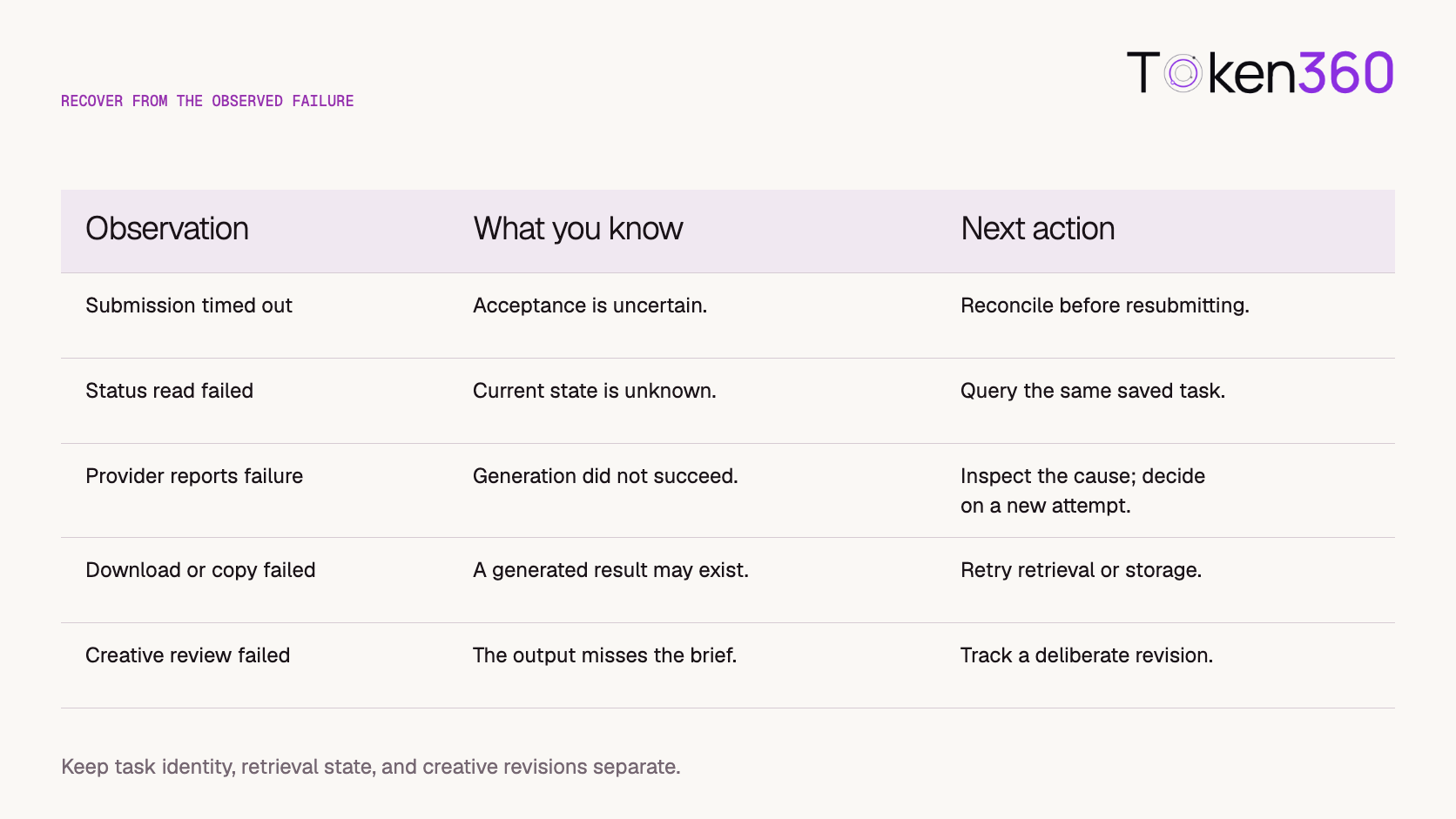
A network error means that this observation failed. It does not establish that the generation failed. Schedule another status read under a bounded recovery policy while retaining the original task.
Retrieve the Video Through the File Interface
For a successful v1 task, use the returned file ID with the matching retrieval endpoint.
def get_video_download_url(file_id):
    response = requests.get(
        f"{BASE_URL}/v1/files/retrieve",
        headers=HEADERS,
        params={"file_id": file_id},
        timeout=(10, 30),
    )
    response.raise_for_status()
    data = response.json()

    if data.get("base_resp", {}).get("status_code") != 0:
        raise RuntimeError(f"File retrieval rejected: {data.get('base_resp')}")

    url = data.get("file", {}).get("download_url")
    if not url:
        raise RuntimeError("File retrieval returned no download URL.")

    return url
MiniMax’s video download reference documents the file-retrieval endpoint and file.download_url response.
Download the returned media through a separate request. Do not automatically forward the MiniMax API authorization header to an asset host.
Use an operation-specific destination, validate the downloaded file, and publish it only after storage succeeds. Treat the URL as a retrieval reference rather than the sole permanent record of the generation.
Recover From the Failed Stage
Design recovery around what is known.
Set a finite observation window and retry budget. When the worker stops waiting, keep the task available for reconciliation.
A local deadline is not proof of upstream cancellation. A user leaving the page is not proof that the task stopped either.
Retries of billable creation requests require particular care. Operational recovery and creative regeneration should remain distinct in the application and in cost reporting.
Introduce Image-to-Video as a Separate Test
MiniMax’s Hailuo image-to-video reference documents first_frame_image for the selected v1 workflow. Check its image requirements and model-specific options before constructing the request. See the image-to-video API reference.
Do not copy a field name such as start_image_url from another serving platform.
Prepare an approved source image and verify:
-
The serving system can access the input.
-
Temporary access remains valid through processing.
-
The subject and intended composition are clear.
-
The file meets the selected route’s requirements.
-
The application is authorized to process the asset.
For a product close-up, approve the source image before evaluating motion. An unclear label or ambiguous shape in the input cannot be reliably corrected by a more elaborate animation prompt.
Begin with restrained motion, then inspect the full clip for changes in edges, text, color, and geometry.
Keep Creative Controls Separate From Delivery Checks
A prompt can describe the intended motion, but it does not establish that the resulting clip satisfies the brief.
For early tests, choose one principal action and a clear camera instruction. Keep the background and subject requirements stable while evaluating a change.
Then review technical and creative outcomes separately.
If creative review fails, preserve the rejected attempt and its configuration. Create a new revision deliberately rather than hiding repeated generations behind an automatic retry.
Continue with the Hailuo Prompt Guide for Motion and Reference Inputs for deeper prompting guidance.
Treat a Move to H3 as an Adapter Migration
A model upgrade may affect more than output quality.
The request builder, status lookup, success parser, result locator, and supported input combinations can all change. H3’s documented v2 flow therefore needs its own integration tests.
Keep the previous adapter available for tasks it already owns. Switching new traffic to H3 does not change the contract of a Hailuo task accepted earlier.
Evaluate an authorized set of representative briefs on the candidate configuration. Compare output acceptance, retrieval success, end-to-end latency, and actual cost.
Version the model, prompt, and adapter together in evaluation records. That makes it possible to identify whether a regression came from a creative change or an integration change.
Only expand traffic after the candidate path can deliver and recover work reliably.
Measure Cost per Accepted Video
Track the full set of attempts required to produce a usable asset.
A lower per-generation price can be offset by more rejected outputs, longer processing, or additional manual review. For production decisions, cost per accepted video is often more useful than cost per submitted request.
Keep generation charges, application processing, and storage costs identifiable. Reconcile uncertain or late-finishing tasks rather than dropping them from reports.
Avoid hard-coding another model’s pricing assumptions into the adapter. Confirm the serving platform’s current billing rules for the selected configuration.
A small initial budget and a controlled test set help establish both integration reliability and creative suitability before broader use.
Test the Workflow Before Launch
Run a small authorized acceptance suite:
The examples in this article are implementation references, not results from a completed paid test.
Using Token360 for MiniMax Video Workflows
Token360’s model catalog currently lists MiniMax H3-family video entries. The catalog inspected for this article did not show a Hailuo 2.3 entry, so this guide does not claim that the exact v1 example is available through Token360.
Confirm the current model ID, account access, supported inputs, and video resource contract before mapping the workflow.
Use the Token360 API overview as the integration starting point. Do not paste MiniMax v1 paths into a different base URL and assume that the request will work.
Your application can keep stable operation, asset, and cost records while each provider adapter handles its own API details.
Hailuo API Implementation Checklist
-
[ ] Confirm the API family, model ID, and permitted configuration.
-
[ ] Keep credentials on the server.
-
[ ] Validate HTTP and application-level responses.
-
[ ] Persist task ID, account context, and adapter version.
-
[ ] Parse the documented status values.
-
[ ] Handle missing or unexpected result fields explicitly.
-
[ ] Retrieve v1 outputs through the file interface.
-
[ ] Separate generation, retrieval, storage, and review states.
-
[ ] Recover uncertain submissions without blind resubmission.
-
[ ] Test image input separately.
-
[ ] Preserve the old adapter for its active tasks.
-
[ ] Track final costs and deliberate revisions.
Frequently Asked Questions
Are Hailuo 2.3 and H3 request formats interchangeable?
No. The documented v1 and v2 interfaces differ in request structure, status handling, and result retrieval.
Is an HTTP 200 response enough to confirm submission?
No. Check the application-level response and verify that a task ID was returned.
Should I keep only the final video URL?
Keep the task ID, API family, model configuration, and file or result reference too. They support recovery, investigation, and cost reconciliation.
Does the six-second, 1080P example apply to every model?
No. It is a documented configuration for the selected Hailuo 2.3 example. Validate each model and mode separately.
Should a failed download trigger another generation?
Usually the next step is to retry retrieval or storage for the existing result. Create another generation only as a deliberate new attempt.
Can I upgrade to H3 by changing the model name?
Treat it as an adapter migration. Validate the new request, status, and output contracts while preserving access to old tasks.
Can I use this MiniMax example directly with Token360?
No. Confirm Token360’s current model identifiers and API contract, then implement the corresponding adapter.
What to Read Next
Explore MiniMax Video Options on Token360
Start with one documented configuration. Confirm the task lifecycle, prove retrieval recovery, and validate a usable video before expanding the integration.
Explore models on Token360.



 Tutorial
 Comparison
 Comparison