Last updated: September 28, 2026
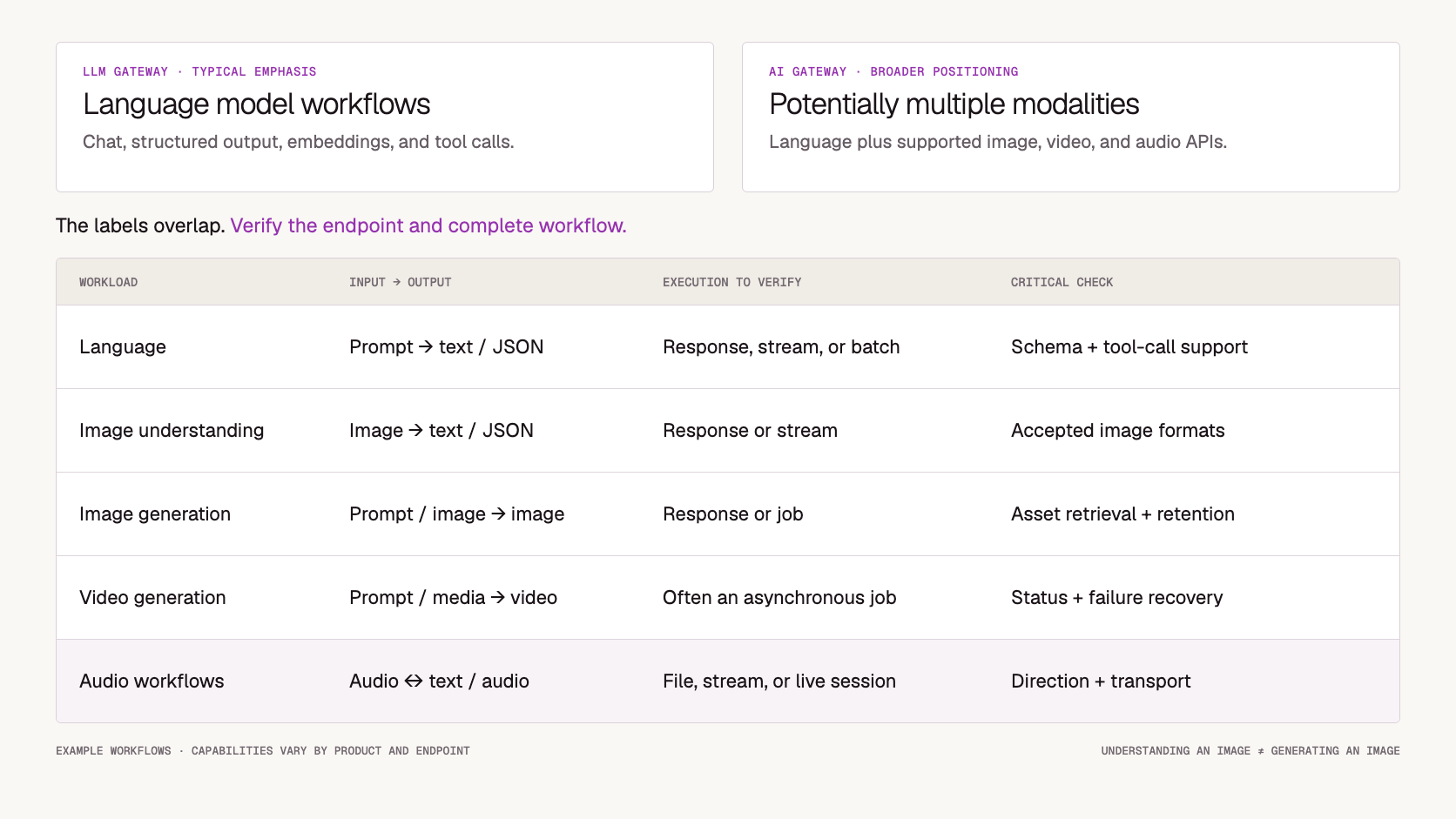
An LLM gateway usually emphasizes language-model workflows: chat, structured responses, embeddings, tool calls, and the controls needed to operate them.
An AI gateway is a broader label that may include those workflows alongside image generation, video generation, speech, and other model APIs.
The terms overlap. Vendors may use them interchangeably, and a product described as an LLM gateway may support multimodal models. A platform calling itself an AI gateway may still have much deeper support for language workloads than for media generation.
The practical difference appears in the workflows your application needs to complete.
Analyzing an image inside a conversation, generating an image file, and running an asynchronous video task involve different contracts. They require different inputs, execution behavior, output handling, and usage accounting.
A useful comparison therefore starts with the required endpoint families and their operating requirements. The category name comes afterward.
This guide explains where the terms overlap, which differences matter in production, and how to evaluate a platform without relying on its label.
Before You Read
For the surrounding concepts, start with:
For a concrete platform introduction, review the Token360 API overview.
This article focuses on what the gateway needs to support once you know which workloads will pass through it.
AI Gateway vs LLM Gateway at a Glance
This table describes common emphasis, not a certification system. Actual products can span both columns.
Why the Terms Are Often Confused
Language models are a major part of many AI applications, so the first gateway requirements often center on text: one access layer, consistent credentials, usage records, and supported routing controls.
As products add image inputs, speech, or media generation, their terminology may broaden without changing every part of the underlying interface.
“Multimodal” adds another ambiguity.
It can describe a model that understands multiple input types. It can also describe a platform that exposes several specialist models through different APIs. These are related capabilities, but they do not imply the same workflow.
A catalog containing a vision-language model does not prove that the platform can generate videos. A video endpoint does not prove that real-time audio sessions are supported.
Keep three questions separate:
-
What can the selected model do?
-
Which capabilities does the gateway expose?
-
What must the application implement around that endpoint?
Those questions remain useful even when vendors change their category names.
What Is an LLM Gateway?
Typical fit: Applications centered on language-model inference and its operational controls.
An LLM gateway sits between applications and supported language-model services. Depending on the product, it can normalize common requests, manage credentials, attribute usage, and apply routing or spending rules.
Its most relevant capabilities often include:
-
Chat and text-generation interfaces.
-
Structured-output and tool-call compatibility.
-
Embeddings access.
-
Token and context-limit handling.
-
Streaming response support.
-
Request logging and usage attribution.
-
Supported caching, retry, or fallback behavior.
Not every gateway provides all of these features.
A tool-call response also does not mean the gateway executes the tool. In many architectures, the application remains responsible for authorization, execution, and returning the tool result.
Likewise, recording token usage does not automatically produce accurate customer billing. The application still needs to connect usage to its own product rules.
Where it stands out: Products whose main requirement is operating language workloads consistently across applications or providers.
Potential limitation: Strong language-model controls do not establish support for media storage, asynchronous video recovery, or real-time audio interruption.
What Is an AI Gateway?
Typical fit: Applications that need a shared access layer across a broader set of model workflows.
AI gateway is an umbrella term. A product using it may support language models, image models, video generation, speech services, or selected combinations.
The gateway may centralize authentication, usage records, routing, and policy across those interfaces. The request and response contracts can still differ by modality.
For example, Cloudflare’s AI Gateway documentation describes shared observability and controls alongside multiple provider integrations. Its product name alone does not determine which operation is supported through a particular interface.
A broader catalog can be valuable when an application combines several AI capabilities. But breadth should be assessed together with the depth of each integration.
An endpoint that exposes generation without adequate status retrieval or output handling may require additional application work.
Where it stands out: Products combining language and media workflows under shared operational requirements.
Potential limitation: “AI gateway” does not guarantee complete native feature coverage, uniform schemas, or equal maturity across modalities.
Distinguish Multimodal Understanding from Media Generation
Primary purpose: Avoid selecting a platform based on an ambiguous capability claim.
A model can accept an image and answer a question about it without producing a new image or video.
Google’s image understanding documentation illustrates tasks such as captioning, classification, and visual question answering. These are examples of interpreting visual input.
Media generation has a different output contract.
An image-generation request may return a file, encoded data, or an asset location. A video-generation request may return a task ID that must be monitored before the video can be retrieved.
Compare the actual operation:
A gateway may support some of these without supporting the others.
Implementation consideration: Record input and output modalities separately. “Supports images” is too vague for an implementation requirement.
Compare Complete Workflows Across Modalities
Primary purpose: Determine whether the platform supports the operation from input to usable result.
For each required workload, inspect the endpoint contract and its surrounding lifecycle.
Support should be tested at this level rather than inferred from a model name in a catalog.
For example, Token360 documents a video task-status endpoint. An application integrating video should verify that status handling together with submission and output retrieval.
Implementation consideration: A successful request demonstrates one path. It does not establish recovery behavior, supported limits, or compatibility with every parameter.
Evaluate Execution Modes Separately from Modality
Primary purpose: Avoid assuming that text is always synchronous or media is always asynchronous.
Execution mode describes how work progresses and how the caller receives results.
A platform may offer synchronous responses, streaming, asynchronous jobs, or batch execution. Availability depends on the endpoint and model.
For interactive text, streaming can make partial output available while generation continues. For longer work, an asynchronous job can separate execution from the original connection.
Video commonly requires task tracking, but the same architectural pattern can also apply to other workloads.
Audio introduces another distinction: streaming generated audio is not necessarily equivalent to a bidirectional real-time conversation.
For every endpoint, establish:
-
What acknowledges acceptance.
-
Whether the connection must remain open.
-
How progress or completion is observed.
-
What interruption means.
-
Whether cancellation is available.
-
How the result is recovered.
Implementation consideration: Organize architecture documents by execution behavior as well as modality. This makes shared recovery logic easier to identify without forcing different operations into one lifecycle.
Match Usage Accounting to the Actual Workload
Primary purpose: Keep limits and cost reporting meaningful across endpoint families.
Token-oriented controls are useful for language workloads. They do not describe every media workload adequately.
Depending on the model, usage may be measured in tokens, generated images, duration, characters, resolution-dependent units, or other quantities.
Token360’s billing and usage documentation describes model-specific billing units and distinguishes estimates from final charges.
A common spending dashboard can be useful, but the underlying usage records should retain their meaning.
Do not force every modality into a synthetic “token” measure unless the product clearly explains the conversion and its limitations.
Also distinguish limits:
-
Request rate controls arrival frequency.
-
Concurrency controls simultaneous work.
-
Token limits constrain applicable language usage.
-
Spending limits constrain recorded or enforced financial exposure.
-
Application reservations can account for admitted but unsettled work.
Implementation consideration: Compare cost per useful outcome within the workload. A text response, accepted video, and delivered audio session are different product units.
Separate Gateway Controls from Application Responsibilities
Primary purpose: Evaluate the complete system without expecting every responsibility to live inside the gateway.
A gateway can be useful even if it does not permanently store final assets or manage user-facing job readiness.
The requirement is clear ownership, not universal centralization.
Write down which side owns each responsibility before comparing platforms.
A missing gateway storage feature may be acceptable if your application already has the required asset pipeline. Missing task recovery may be a blocker if no supported mechanism can resolve unfinished work.
Implementation consideration: A shared API key does not establish end-user access control. Requests still need to be associated with the correct application user or workspace.
Verify That Controls Apply to the Required Endpoint
Primary purpose: Avoid assuming that a platform-wide feature works identically everywhere.
A product may support logging, guardrails, caching, or fallback for some endpoint families but not others.
Ask whether each required control applies to the exact operation and payload type.
For example:
-
Does content inspection support uploaded media or only text fields?
-
Does logging retain full media, a reference, or metadata?
-
Does fallback preserve the required input and output capabilities?
-
Does a spend limit include asynchronous work consistently?
-
Can the selected route process the required data location?
-
Are unsupported parameters rejected clearly?
Routing deserves particular care. Switching between models can change capabilities, quality, or cost. Token360’s routing and reliability documentation describes the boundaries of its routing behavior rather than promising arbitrary cross-model fallback.
Implementation consideration: Record unsupported combinations explicitly. A capability matrix is more useful than an unchecked list of platform features.
Which Type of Gateway Does Your Application Need?
Start with the hardest required workflow.
For a text-focused application, prioritize language-model behavior: streaming, structured output, tools, usage accounting, and operational controls. The platform’s broader category label may have little practical effect.
For a document assistant with image inputs, test image understanding and private-file access. Do not assume that image or video generation is also necessary.
For a creative product combining chat, images, and video, evaluate each endpoint family and the transitions between them. Shared authentication alone does not complete the media workflow.
For a voice application, test audio delivery, interruption, and session recovery. A successful transcription upload does not demonstrate interactive voice support.
Choose the platform that covers the required workflows with acceptable operating responsibilities. A broader label is not inherently a better fit.
How Token360 Fits into This Comparison
Token360 describes itself as a unified AI gateway with access to language, image, video, and audio models. Its overview documents common access, routing, metering, and billing responsibilities.
That makes it relevant to applications evaluating more than language-only traffic.
However, shared access should not be interpreted as one universal request schema or identical behavior across all models. Evaluate the endpoint, supported parameters, execution mode, and output handling required by each feature.
For video, that includes task tracking and retrieval. For language workloads, it may include streaming or structured responses. For speech, it includes the specific input and delivery contract.
Use the platform category as context, then validate the selected workflow.
Validate the Hardest Modality Before Committing
A pilot should demonstrate the requirement most likely to reveal an integration gap.
For a chat-and-video product, a successful text response is not enough. Run the full video path, including input access, status tracking, retrieval, and recovery.
For voice, test interrupted connections and audio delivery. For structured text, test schema behavior and failures rather than checking only that JSON was returned.
Keep a record of gaps, workarounds, and ownership.
If a feature requires another adapter or direct provider path, describe that explicitly. It may still be an acceptable architecture, but it should be part of the evaluation.
Implementation Checklist
Before selecting a gateway, confirm that you have:
-
Listed required input and output modalities separately.
-
Identified the endpoint families used by the product.
-
Verified execution modes and interruption behavior.
-
Tested model-specific parameters.
-
Checked usage units and applicable limits.
-
Assigned storage and recovery responsibilities.
-
Verified controls for each required endpoint.
-
Documented unsupported capabilities.
-
Tested the hardest production workflow.
Frequently Asked Questions About AI Gateways and LLM Gateways
Is every LLM gateway also an AI gateway?
In broad usage, an LLM gateway can be described as a type of AI gateway. Product labels are not consistent enough to establish capability by themselves.
Are LLM gateways limited to text input?
Not necessarily. A gateway can expose language models that accept images, audio, or other inputs. Verify the selected model and interface.
Does multimodal support include video generation?
Not automatically. Understanding visual input and generating a video are different operations.
Does an AI gateway use one request format for every model?
Not necessarily. It may share authentication and operational controls while exposing several endpoint families and model-specific parameters.
Does video support require permanent storage inside the gateway?
No. The gateway may provide task execution and output retrieval while the application handles long-term storage and user access.
Are token-based spending controls enough for media workloads?
Not on their own. Preserve the applicable billing units and account for asynchronous or unsettled work where necessary.
Can one gateway cover chat, images, video, and speech?
A product may support all of them, but each required workflow still needs testing. Catalog presence does not prove complete native feature coverage.
Which label should we use in our architecture documentation?
Describe the actual scope first—for example, “shared access for chat, image generation, and asynchronous video.” Then include the vendor’s product category.
What to Read Next
Continue with the guide that matches the next implementation decision:
These readings move from category comparison to the workflows and controls your application must operate.
Ready to Check Your Required Model Workflows?
List the endpoint families your product needs, then verify their inputs, execution modes, outputs, and operating requirements.
Use the catalog to build a shortlist, and test the complete workflow before selecting a platform.
See the Token360 model catalog →


 Tutorial
 Tutorial
 Prompt Guide