Last updated: October 8, 2026
A reliable Veo API integration preserves the identity of a video generation task from submission through delivery.
Submit the request, save the returned operation name, observe its progress, inspect the terminal outcome, and retrieve the video. Keep those stages separate so that a worker restart or a failed download does not trigger another generation.
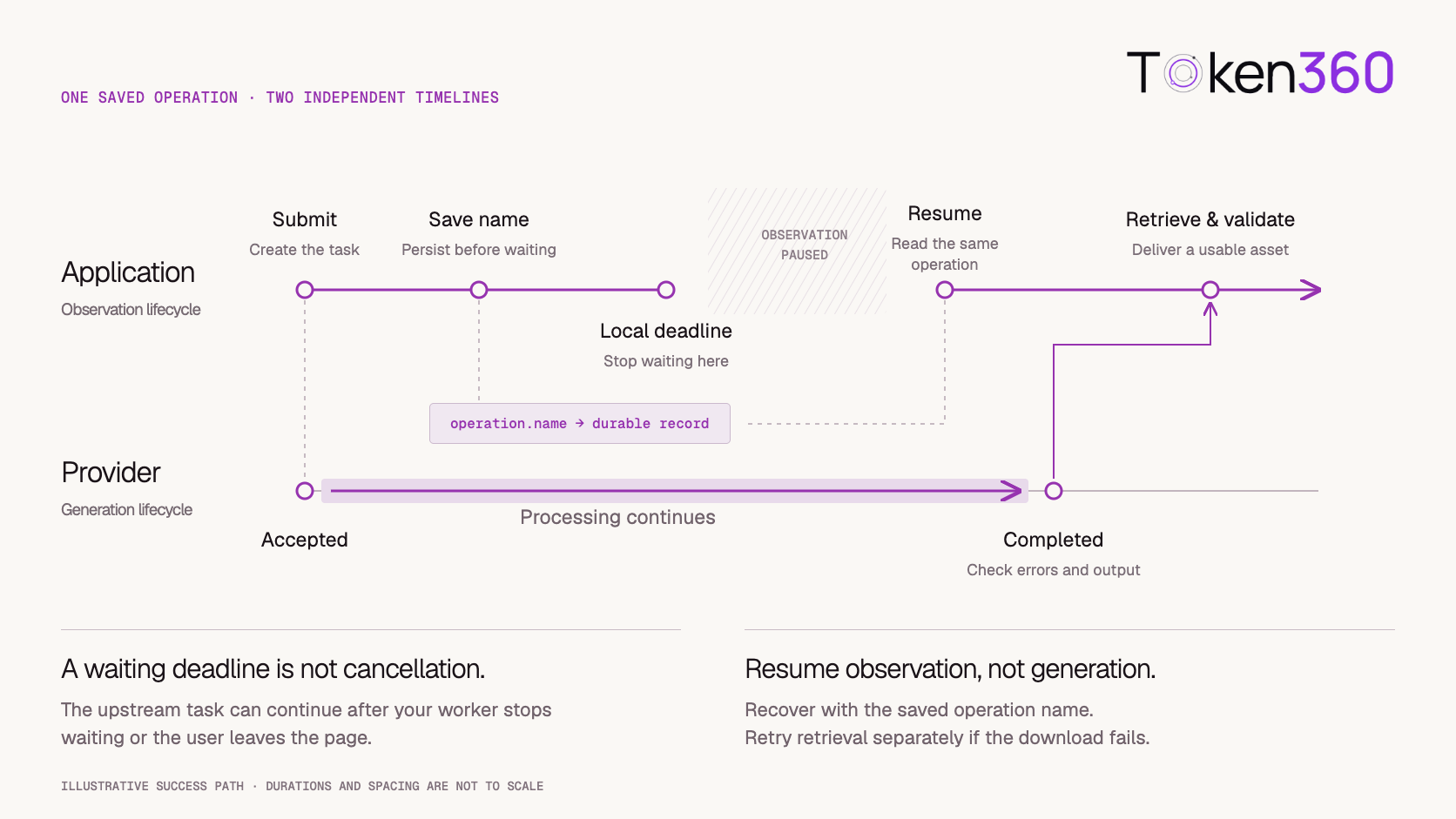
The important distinction is between the provider’s work and your application’s observation of that work. A browser can close while generation continues. A status request can time out while the operation remains healthy. A local waiting deadline can expire without cancelling anything upstream.
This guide uses the Google Gemini API’s documented Veo workflow for its Python examples. Other serving platforms may expose the same model family through different credentials, inputs, task identifiers, and retrieval methods.
The examples have not been run against a paid account.
Before You Read
Read AI Video API Architecture if you are still deciding how requests, background workers, provider jobs, and asset storage fit together.
This guide focuses on making one Veo integration recoverable: a submitted operation should remain discoverable until its actual outcome is known.
Veo API Integration at a Glance
Do not collapse all of these into a single “generating” state. Distinct stages make failures easier to diagnose and recovery less expensive.
Select the Exact API Route and Model
Treat the integration as a combination of serving platform, API contract, model identifier, and account access.
A Veo model name does not tell your application which credentials to use or how to retrieve the output. Confirm those details before designing the request.
For the first implementation, choose a basic text-to-video workflow. Add image inputs, reference images, frame controls, or video extension only after checking support for the exact model and route.
Google’s Veo guide documents the long-running generation workflow and model-specific capabilities. The example below follows its veo-3.1-generate-preview interface.
Keep the model identifier in configuration and record it with each operation. A preview identifier should not become an untracked dependency embedded throughout the application.
Define the Operation Record Before Writing the Loop
Create an application operation before submitting work to the provider.
That record gives the user’s intended generation a stable identity, even if your process crashes or the initial response becomes uncertain.
An illustrative record might contain:
operation_id
owner_id
provider
account_reference
model_id
request_configuration_version
input_asset_references
provider_operation_name
application_status
last_observed_at
output_asset_reference
billing_status
These are application fields, not a required Google schema.
Keep secrets in your credential system rather than the operation record. The account reference should identify which authorized integration can resume the task.
Once the provider returns an operation name, persist it immediately. If submission may have succeeded but no operation name was captured, record that uncertainty instead of automatically issuing another generation.
Your application ID does not, by itself, make the provider’s create request idempotent.
Submit a Minimal Veo Request With Python
Install the SDK in your project environment:
pip install google-genai
Configure GEMINI_API_KEY on the server and keep credentials out of browser code, notebooks shared publicly, and request logs.
This minimal submission follows Google’s documented interface:
import os
from google import genai

client = genai.Client(
    api_key=os.environ["GEMINI_API_KEY"]
)

operation = client.models.generate_videos(
    model="veo-3.1-generate-preview",
    prompt=(
        "A paper lantern sways above an empty courtyard. "
        "One steady wide shot. Soft evening light. "
        "Quiet wind and distant footsteps."
    ),
)

print(operation.name)
Use the official Veo example as the request reference.
The printed name is useful for a local demonstration. In production, attach it to the application operation in durable storage before reporting that submission has been recorded.
Lock the SDK version after validation. The Google Gen AI Python SDK documentation covers client setup and SDK usage; check the documentation applicable to the version installed in your project.
Resume the Saved Operation After a Restart
Recovery should not require submitting the prompt again.
The following function accepts a saved operation name and performs a bounded observation loop. It returns the completed operation for a separate retrieval stage.
import time
from google.genai import types

def wait_for_saved_operation(
    client,
    operation_name,
    wait_seconds=600,
    poll_seconds=10,
):
    operation = types.GenerateVideosOperation(
        name=operation_name
    )
    deadline = time.monotonic() + wait_seconds

    while True:
        if time.monotonic() >= deadline:
            raise TimeoutError(
                "Observation ended; retain the operation "
                "name for later reconciliation."
            )

        operation = client.operations.get(operation)

        if operation.done:
            if operation.error:
                raise RuntimeError(
                    f"Generation failed: {operation.error}"
                )
            return operation

        remaining = deadline - time.monotonic()
        if remaining > 0:
            time.sleep(min(poll_seconds, remaining))
Google documents reconstructing a GenerateVideosOperation from its name in the operation-handling section.
The ten-minute window and ten-second interval are application choices. They are not provider completion guarantees.
A transport exception deliberately propagates to the caller here. Your worker should classify it, preserve the operation, and schedule another observation where appropriate. It should not reinterpret every exception as generation failure.
Separate Three Different Time Limits
A production integration has several clocks.
None of these automatically proves that the provider cancelled the generation.
Configure finite network timeouts in the client or transport. A loop deadline cannot interrupt a network call that is already blocked.
If the product deadline expires, keep the task discoverable. The application may need to collect an eventual result, reconcile usage, or explain a late completion.
Cancellation, where available, is a separate documented action whose outcome must also be checked.
Classify Failures by What You Actually Know
Use observed facts to choose the next action.
Avoid replacing these distinctions with a generic “Something went wrong—try again” action that always creates a new generation.
A user-requested creative revision is different from operational recovery. Record it as a new attempt with its own provider identity and cost.
Retrieve the Result Without Assuming an Output Exists
Check the response before indexing into its video list.
The following retrieval fragment uses the completed operation returned by the observation function:
response = getattr(operation, "response", None)
videos = getattr(response, "generated_videos", None)

if not videos:
    raise RuntimeError(
        "The operation returned no video. "
        "Inspect and record the provider response."
    )

video = videos[0].video
if video is None:
    raise RuntimeError("The returned video object is missing.")

client.files.download(
    file=video,
    destination="courtyard.mp4",
)
Google documents this download pattern in its Veo guide.
The fixed filename is suitable for a small local demonstration. Production workers should use operation-specific destinations and avoid overwriting another task’s output.
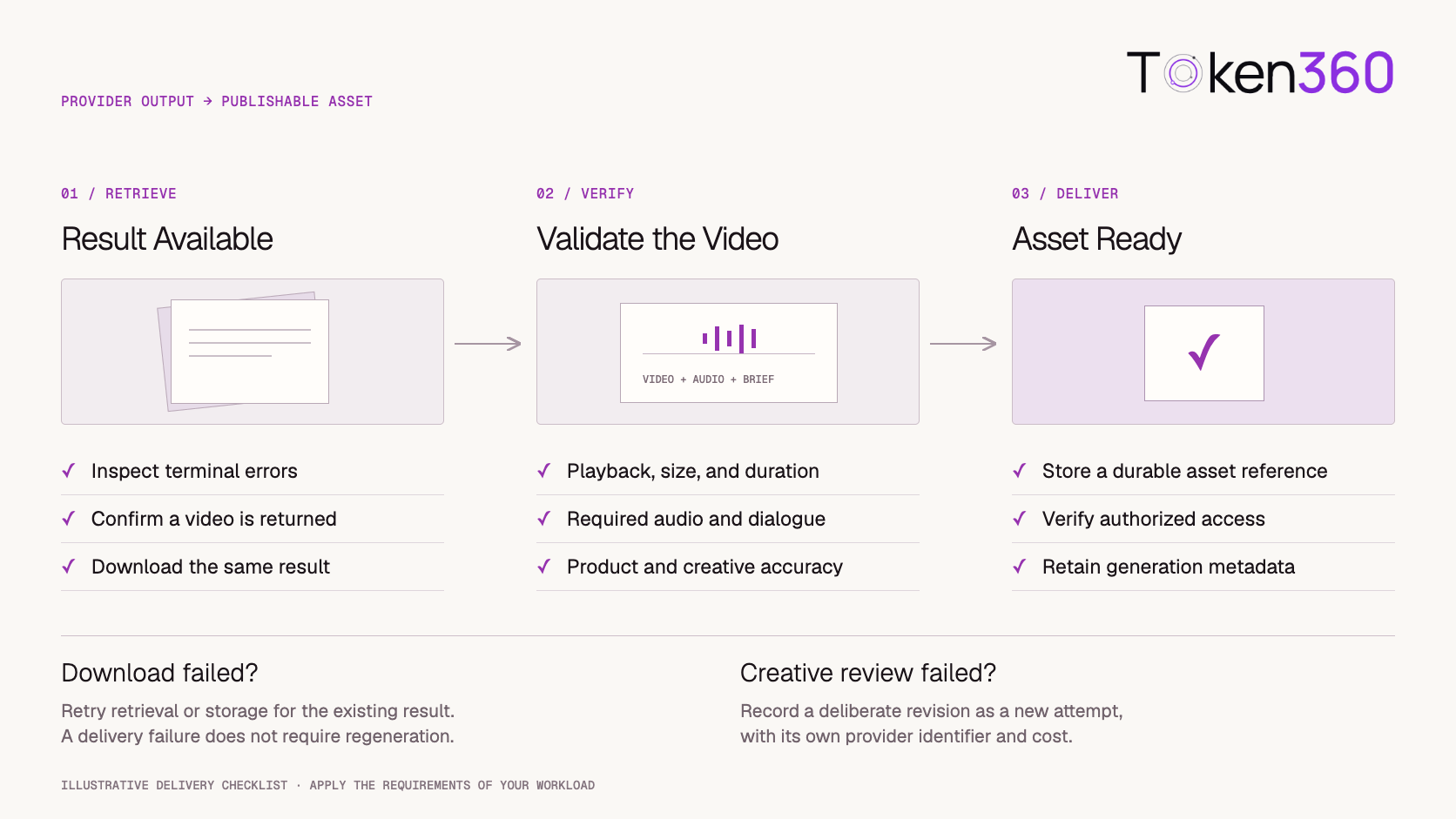
Keep retrieval separate from creation. If downloading fails, resume from the saved operation and its result rather than running the submission code again.
Validate the Asset Before Marking It Ready
A downloaded file is an intermediate result until it passes the checks your product needs.
Technical checks can include:
-
Successful decoding of the video container and streams.
-
Non-empty media content.
-
Expected dimensions and duration.
-
The required audio track, when applicable.
-
Successful storage and authorized playback.
Then review the creative requirements.
For an advertising workflow, inspect product appearance, logos, on-screen text, spoken words, and continuity. A technically valid file can still fail the brief.
Use separate application states such as result_available, asset_stored, and ready. If human review is required, include that stage explicitly rather than marking the asset ready as soon as storage succeeds.
Store generation metadata alongside the asset reference so the result remains traceable to its model, prompt, and configuration.
Add Audio and Image Features Incrementally
Start with a request that is easy to inspect.
Once the core lifecycle works, introduce one feature at a time: an image input, a different framing requirement, dialogue, or an extension workflow.
Maintain a capability record for each approved configuration:
Do not combine parameter examples from different model variants.
For dialogue, review wording, pronunciation, speaker assignment, and timing. For image-based generation, examine the whole clip rather than judging only its opening frame.
Detailed scene and sound direction belongs in the Veo Prompt Guide for Scenes and Native Audio.
Measure Delivery Time and Cost per Accepted Asset
Measure the workflow your user experiences.
Useful timing boundaries include submission, first observed terminal outcome, successful retrieval, completed validation, and publication readiness.
Polling introduces observation delay, so a locally measured interval is not automatically the provider’s exact generation time. Label it according to what your system actually measured.
For cost, connect all attempts and revisions to the deliverable. Account for generation charges and relevant storage or processing expenses without assuming that one API request equals one accepted video.
Keep unresolved tasks in reconciliation. A user leaving the page does not remove the need to determine whether the operation completed or incurred charges.
Use the selected serving platform’s current pricing rules. Do not carry a price or billing assumption from one Veo route into another.
Verify Recovery Before Expanding Traffic
A useful acceptance test covers more than the happy path.
Start with a small authorized test budget and record the exact configuration and observed behavior.
These are recommended checks, not results from tests performed for this article.
Using Veo Through Token360
Token360’s model catalog currently lists Veo-family entries, including Veo 3.1, Veo 3.1 Fast, and Veo 3.1 Lite. Confirm the selected model’s current schema and your account’s access before integrating it.
Its API overview documents video generation as part of the platform’s multimodal interface.
Keep the Google integration in a separate adapter. Google operation names, SDK objects, and credentials should not be sent to Token360 video endpoints.
Your application can preserve its own operation and asset records while changing the provider-specific submission, observation, and download implementation. Treat that change as a new integration boundary with its own acceptance tests.
Catalog presence does not establish that every Google feature or parameter is available through the corresponding Token360 route.
Veo API Implementation Checklist
-
[ ] Confirm the serving platform, model ID, and account access.
-
[ ] Validate and lock the SDK version.
-
[ ] Keep credentials on the server.
-
[ ] Create an application operation before submission.
-
[ ] Persist the returned provider operation name.
-
[ ] Recover saved operations without resubmitting.
-
[ ] Separate network, observation, and product deadlines.
-
[ ] Distinguish observation failures from generation failures.
-
[ ] Check terminal errors and missing outputs.
-
[ ] Retry retrieval independently of generation.
-
[ ] Validate video, audio, and creative requirements.
-
[ ] Reconcile late outcomes and final usage.
-
[ ] Test restart recovery before broader rollout.
Frequently Asked Questions
Can I call Veo like a chat completion?
Use the video-generation contract documented for the selected serving platform. The example here uses a long-running operation rather than a completed text response.
Does the ten-minute deadline cancel the provider task?
No. It ends the local observation window. Retain the operation name and reconcile its eventual outcome.
What should I save to recover after a restart?
Save the provider operation name alongside the application operation ID, model, configuration, and account reference needed to access it.
Should a failed status request trigger another generation?
No. A failed observation does not establish generation failure. Check the same saved operation again under your recovery policy.
What if the operation finishes without a video?
Record and inspect the response. Do not assume that completion guarantees an output or index into an empty list.
Can the same Python code call Token360?
Do not assume so. Implement Token360’s documented model and video resource contract in its own adapter.
Is a playable file ready for publication?
Only after it satisfies the product’s acceptance requirements, including any creative, brand, or audio review.
What to Read Next
Explore Video Models on Token360
Start with one supported configuration and a recoverable operation record. Confirm that the application can survive a restart, retrieve the same task’s result, and deliver a validated asset.
Explore models on Token360.



 Tutorial
 Comparison
 Comparison