A multi-model API gives an application a shared way to access several AI models. It can reduce repeated integration work, simplify credential management, and make model evaluation easier to organize.
That shared interface has limits. Two models may accept similar requests while differing in structured output, tool calling, supported media, execution time, and billing units. Changing a model identifier can be a small code change with a much larger product impact.
For production systems, the useful question is therefore more specific than “Can we access multiple AI models through one API?”
It is: Which parts of the integration can stay consistent, and which differences must the application still understand?
This guide explains that boundary, shows how to build an inspectable capability contract, and outlines a practical way to introduce a second model without weakening the customer experience.
Before You Read
If you are still deciding what kind of access layer your application needs, start with:
For product context, the Token360 overview describes its shared access layer for language, image, video, and audio workloads.
Multi-Model APIs at a Glance
These are evaluation dimensions, not features guaranteed by the term “multi-model API.”
What Does “One Interface” Actually Mean?
“One interface” can describe several different levels of integration.
At the simplest level, a service may offer shared authentication and a common base URL. Your application still uses separate endpoint families for chat, image generation, video jobs, and audio processing.
A more extensive implementation may also standardize request fields, response envelopes, error categories, and usage records.
The distinction matters because shared access does not necessarily create shared semantics.
Consider two models that both accept a structured-output request. One may support the schema constraints your application requires. Another may accept only a narrower subset. A successful HTTP response does not establish that both produced an acceptable result.
The same issue appears in media generation. Two video models may differ in supported reference assets, duration options, or output retrieval. Those differences remain relevant even when the requests pass through the same service.
An example of shared access with task-specific interfaces appears in Hugging Face Inference Providers. Its documentation separates chat completion, feature extraction, image generation, and other tasks, and shows differing provider coverage.
The practical implication is to define a shared contract for each operation your application needs. Avoid forcing every workload into one universal request shape.
Multi-Model, Multimodal, and Routing Are Different Capabilities
These terms describe different properties of an integration.
A platform exposing several text models is multi-model even if it has no image-generation endpoint.
A single model accepting text and images can be multimodal without creating a multi-model offering.
Likewise, a catalog can give your application choices while leaving model selection entirely to your code.
Evaluate these capabilities separately. Otherwise, a large catalog can be mistaken for a complete reliability or governance strategy.
Where a Multi-Model API Creates Practical Value
The benefit usually comes from removing repeated integration and operational work.
Shared application plumbing
Without a common access layer, teams may repeatedly implement authentication, request tracking, response parsing, error mapping, and usage collection.
A shared interface can reduce that duplication, especially when several applications use overlapping sets of models.
Consistent evaluation
A common evaluation harness makes it easier to send representative inputs to eligible models and collect comparable results.
The harness should measure the same product outcome. For example, a document-extraction workflow should compare valid fields and factual correctness, rather than simply whether each model returned text.
Centralized operational visibility
A shared integration can give teams a common place to associate requests with a product feature, environment, or customer.
This becomes more useful when usage records can be reconciled with the system that actually bills the requests.
More controlled migrations
Keeping model selection in reviewed configuration can make a model change easier to deploy and reverse.
However, configuration changes still need approval criteria and tests. The interface reduces the mechanics of switching; it does not prove that switching is safe.
Best fit: teams with repeated integration work, several approved model options, or a need for consistent operational records.
Main limitation: the shared layer introduces its own contract and dependency. For a narrow workload relying heavily on one provider’s distinctive features, the added abstraction may offer less value.
Set a Clear Normalization Boundary
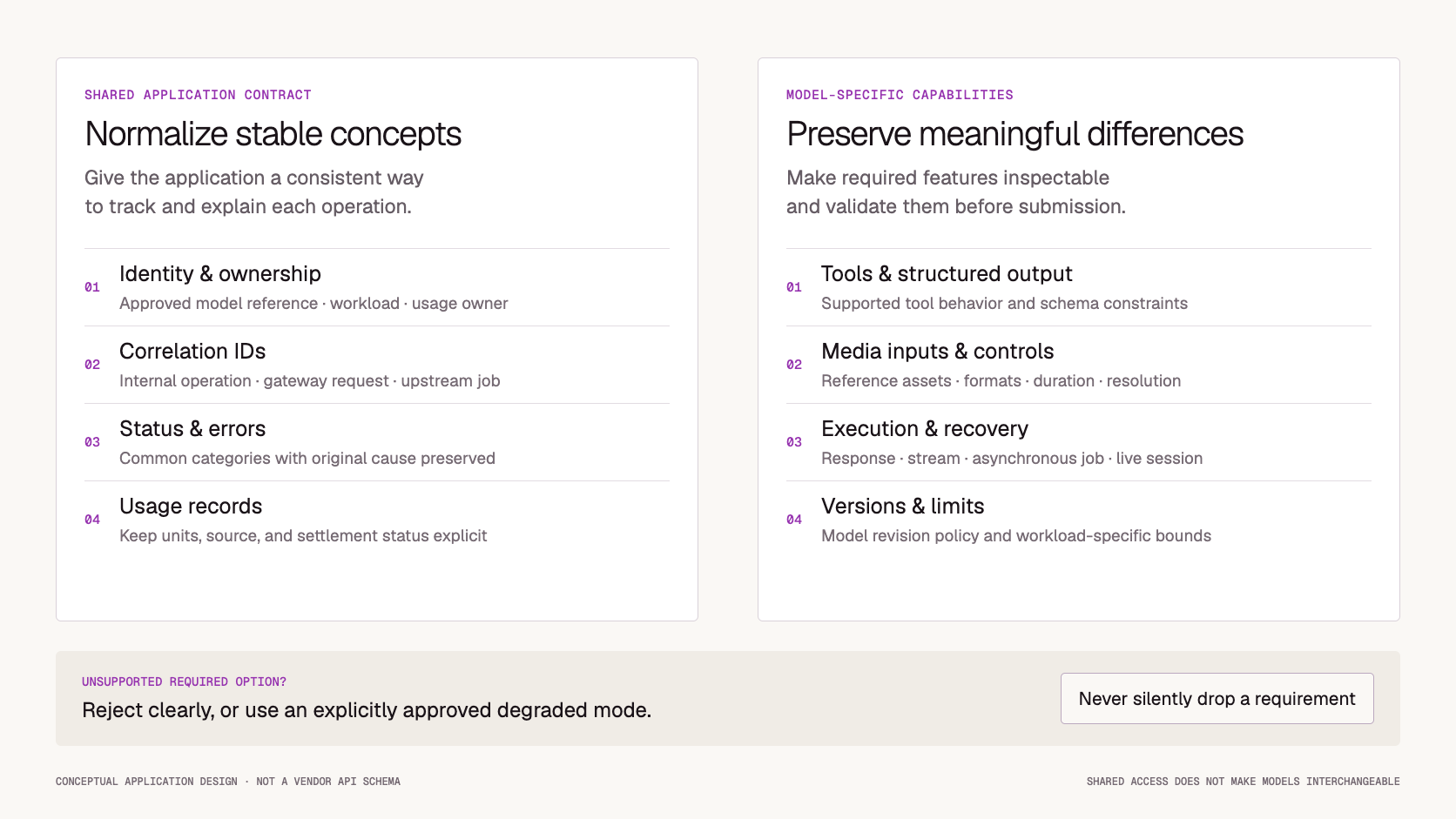
Normalization is useful when it makes stable concepts easier to consume without hiding information.
A practical boundary has three parts.
Standardize common operational fields
Your application can benefit from consistent fields for:
These fields help your product track work even when upstream response shapes differ.
Preserve capability-specific options
Some options belong to a particular model, endpoint, or modality.
A reference-video mode, audio voice identifier, or specialized tool-calling option should remain an explicit capability. Treating such options as generic fields can create the impression that every adapter implements them.
If the operation requires a feature, validate that support before submission.
Make unsupported behavior visible
An adapter should not silently remove a required parameter to make a request succeed.
Suppose a product promises an output matching a strict schema. Removing an unsupported schema constraint changes the operation, even if the model returns plausible JSON.
Prefer a clear validation error. If degraded behavior is acceptable, define it as a deliberate product mode with its own acceptance criteria.
The same principle applies to operational data: unknown is different from zero. Missing usage information should not become a zero-cost request in your internal records.
Build a Capability Contract Your Application Can Inspect
A model catalog answers which models are listed. An application capability contract answers which models are approved for a particular job.
Maintain a reviewed record containing:
For example, an invoice-extraction service might require valid output under a particular schema, acceptable handling of missing fields, and a defined maximum response time.
A creative-writing model could be available in the same catalog without being eligible for that operation.
Discovery can help populate candidate records. It should not automatically promote newly listed models into production.
A useful workflow is:
Discover → validate → approve → deploy → monitor.
Each stage answers a different question.
Keep a Stable Internal Result Without Losing Evidence
Your product should not need to understand every upstream response format. It does need enough evidence to explain what happened.
The following is an illustrative application record, not a vendor API schema:
{
  "operation_id": "op_example_001",
  "workload": "invoice_extraction",
  "requested_model": "approved-model-a",
  "reported_model": null,
  "gateway_request_id": "request_example_001",
  "state": "completed",
  "output_ref": "internal://results/op_example_001",
  "usage": {
    "status": "pending",
    "measurements": [],
    "final_charge": null,
    "currency": null
  },
  "error": null
}
Several design choices matter here.
First, the requested model and reported model are separate. If the service does not report the serving identity, leave that value unknown.
Second, completion and billing settlement are separate states. A usable output does not necessarily mean the final charge is already available.
Third, an output reference can point to a controlled internal resource rather than copying a potentially temporary upstream URL into permanent application records.
Preserve original diagnostic information only where needed, with appropriate access controls, redaction, and retention. A normalized record should make routine operations easier without becoming a reason to retain every prompt and output indefinitely.
Preserve Differences in Execution and Failure Behavior
A shared API should not encourage your application to treat every operation as a short request followed by a complete response.
Different workflows may involve:
-
A synchronous response.
-
A stream that can stop before completion.
-
A queued job with a durable identifier.
-
A batch containing independently successful and failed items.
-
A live session with a separate connection lifecycle.
For asynchronous work, preserve the upstream task ID as soon as it is available. Your internal operation ID and the upstream task ID serve different purposes.
Also distinguish a confirmed failure from an unknown submission outcome.
If the connection times out after submission, the operation may already be running. Blindly resubmitting can create duplicate work and additional charges.
Similarly, a partially delivered stream is not equivalent to a request that never started. Replacing it with another model may change the output and confuse the customer.
Define recovery at the operation level: what can be retried, what must be reconciled, and when the user should see an incomplete result.
Compare Usage Without Erasing Billing Differences
A unified usage view can be useful while still containing different measurement units.
Tokens, generated images, audio duration, and video duration should not be collapsed into an unlabeled “usage” number.
Record the unit, source, and settlement status alongside the value.
For evaluation, connect these records to a product outcome. An extraction workflow might measure:
Total cost of evaluated attempts ÷ number of outputs that pass acceptance checks.
Include retries and rejected outputs when calculating that cost. Otherwise, a lower per-request price can appear attractive while producing a more expensive usable result.
Token360’s Billing and Usage documentation distinguishes model-specific meters, estimates, and final charges. It also notes that asynchronous billing may settle after the resource first reaches a terminal state.
That distinction should remain visible in your application rather than disappearing behind a normalized response.
Introduce the Second Model Through Contract Tests
The second model is a useful test of whether your abstraction represents the workload or merely wraps the first integration.
Choose two models already considered eligible for one operation. Use representative inputs, including edge cases, and evaluate both against the same acceptance criteria.
For tool-using workflows, validate arguments and application authorization before executing any action. A model’s ability to emit a tool call is not permission to perform it.
For generative outputs, avoid requiring identical wording. Test the properties the product depends on: factual accuracy, valid structure, required content, or human-reviewed quality.
Do not configure the second model as a fallback until it passes those checks.
Evaluate the Platform Beyond Its Model Count
A production evaluation should examine how the platform handles change and incomplete information.
Ask for evidence relevant to your workflow: documentation, response examples, request records, and a working pilot.
A demonstration that produces one attractive answer does not establish how the integration behaves during a timeout, a model update, or a billing discrepancy.
Where Token360 Fits
Token360 is relevant to teams evaluating shared access across language and media workloads. Its documentation describes common access alongside separate operation families. Start with the Token360 overview, then check the endpoint required by your application.
Keep model access and route behavior separate during evaluation.
According to Token360’s Routing and Reliability documentation, public model names resolve to eligible upstream routes. A stable public identifier does not guarantee a fixed upstream provider, and cross-model fallback should not be assumed unless explicitly contracted.
For a pilot, select one operation and two eligible models. Validate their required capabilities, capture correlation IDs, reconcile usage, and record which responsibilities remain in your application.
That produces a more useful decision than comparing catalog size alone.
A Practical Implementation Checklist
Before moving a multi-model integration into production:
-
Define the application operation and its acceptance criteria.
-
Keep external model identifiers in reviewed configuration.
-
Maintain an approved model list for each workload.
-
Validate required capabilities before submission.
-
Reject unsupported options or expose an explicit degraded mode.
-
Preserve operation, request, and job identifiers.
-
Record reported serving information when available.
-
Distinguish incomplete, failed, and unknown outcomes.
-
Preserve usage units and settlement status.
-
Test replacements before enabling fallback.
-
Keep a rollback path for model and adapter changes.
Frequently Asked Questions
What is a multi-model API?
A multi-model API provides a shared access interface for several AI models. The shared contract may cover authentication, requests, responses, or operational records, depending on the platform.
Does one API make models interchangeable?
No. Models can differ in supported features, output quality, input limits, execution behavior, and pricing. A replacement must satisfy the application’s requirements.
Is a multi-model API the same as a multimodal API?
No. Multi-model describes access to several models. Multimodal describes support for multiple types of input or output. A service can support either or both.
Does a multi-model API automatically choose the best model?
Not necessarily. Automatic selection, routing policies, and fallback are separate capabilities. Verify whether they exist and which constraints they enforce.
Should the application query the model catalog at runtime?
Catalog discovery can support administration and validation. Production requests should still use an approved configuration rather than automatically adopting newly discovered models.
Is changing the model identifier enough to migrate?
Sometimes it is enough to send a request successfully. It is not sufficient evidence that the new model preserves schema behavior, quality, latency, and cost requirements.
What should happen to unsupported parameters?
Required options should produce a clear validation failure when unsupported. Any degraded behavior should be explicit and tested.
Does a unified API guarantee one consolidated bill?
No. Billing arrangements are a separate product capability. Confirm who bills each request and how final charges are reconciled.
What to Read Next
Choose the next guide based on the work ahead:
For an implementation check, review Token360’s routing behavior and billing reconciliation alongside the selected model’s operation documentation.
Start With One Operation and Two Eligible Models
Define the customer outcome, approve two models that can deliver it, and test the shared contract under both successful and failed requests.
Expand the integration once those results are reliable and explainable.
Explore models available through Token360.


 Tutorial
 Tutorial
 Prompt Guide