Last fact-checked: September 29, 2026
AI API key security starts with one architectural rule: a general provider credential belongs in a controlled server environment, not in code delivered to a browser, mobile application, desktop bundle, public repository, or client-visible network request. Moving the key to a backend is necessary, but it is not sufficient. The backend must also authenticate callers, authorize operations, constrain spend, protect logs, and make credential misuse detectable.
This guide covers the full credential lifecycle: where AI API keys leak, how to separate and store them, how to rotate without an outage, what to monitor, and what to do when exposure is suspected.
The short answer
To protect AI API keys in production:
-
keep general provider credentials server-side;
-
use workload identity or short-lived credentials when the platform supports them;
-
separate keys by environment, workload, owner, and trust boundary;
-
grant the narrowest provider and secret-store permissions available;
-
keep secrets out of source control, build artifacts, logs, tickets, and analytics;
-
put authentication, authorization, rate limits, budgets, and input constraints in front of the provider call;
-
rotate credentials through a tested, observable deployment process;
-
detect abnormal usage and maintain a credential incident runbook;
-
revoke suspected exposed keys and verify that every consumer actually lost access.
The objective is not merely to keep a string private. It is to reduce the probability of exposure, limit what an exposed credential can do, detect misuse quickly, and restore service through a known clean path.
What an AI API key protects
An AI API key commonly authorizes requests that create cost, process customer data, access particular models, or invoke account-level quotas. Depending on the provider and account design, one leaked key may expose more than inference traffic. It may also reveal usage metadata, permit file operations, or affect multiple applications sharing the same credential.
Treat the key as an identity with a capability set—not as a configuration value. For every production credential, record:
| Inventory field |
Question it answers |
| Internal key ID or fingerprint |
Which credential generated this traffic without logging the secret? |
| Owner |
Who is accountable for its lifecycle? |
| Purpose |
Which application operation needs it? |
| Environment |
Development, staging, or production? |
| Provider and account |
Where is it valid? |
| Permissions |
Which models, endpoints, or administrative actions can it use? |
| Consumers |
Which services, jobs, notebooks, or pipelines retrieve it? |
| Budget and rate policy |
How much damage can abnormal use create? |
| Created and last rotated |
Is it stale or outside policy? |
| Revocation procedure |
How is access removed without guessing during an incident? |
If the team cannot answer these questions, it cannot reliably attribute traffic, rotate the key, or prove that revocation is complete.
Where AI API keys leak
Most key exposure happens through ordinary engineering workflows rather than a sophisticated attack.
Frontend and distributed application bundles
Environment variables do not protect a secret that is inserted into browser JavaScript during a build. The delivered bundle and its network requests are visible to the user. The same principle applies to mobile and desktop binaries: obfuscation may slow extraction, but it does not turn a distributed secret into a server-held credential.
A key embedded in client code should be treated as exposed. Move the provider call behind an authenticated backend. If the product requires a direct client-to-storage or client-to-upload path, use a narrowly scoped temporary credential or signed URL with a short expiration, size limit, content restriction, and one intended operation.
Source control and collaboration systems
Keys leak through committed .env files, example configuration, test fixtures, copied terminal output, notebooks, issue trackers, chat messages, and documentation. Removing the value in a later commit does not remove it from history, forks, caches, or copies.
GitHub secret scanning can detect supported credential patterns in repository content and history, while push protection can block supported secrets before they are pushed. These controls reduce risk; they do not replace revocation after a real secret has been exposed.
Logs, traces, and analytics
Authorization headers, request dumps, exception objects, proxy logs, browser telemetry, and support captures can all reproduce a secret. Redact at ingestion rather than relying on every downstream viewer to handle the value correctly.
Log an internal credential ID, provider request ID, or non-secret fingerprint for attribution. Never log the full key. Be cautious with partial-key logging too: provider prefixes and suffixes may reveal more than expected or become sensitive when combined with other data.
CI/CD and automation
Build jobs often have broad repository, cloud, and deployment access. A malicious or mistaken pipeline change can print a secret, write it into an artifact, or send it to an external destination. Forked pull requests and third-party actions require particularly careful secret boundaries.
Give each pipeline a dedicated identity with only the secrets and deployment operations it needs. Prefer short-lived workload identity over stored cloud credentials. Restrict who can modify production workflows, review changes to secret-consuming steps, and make pipeline activity attributable to a person or service.
Developer machines and local tools
Shell history, plaintext configuration, local proxy capture, screenshots, AI coding tools, and synced folders can spread a key beyond its intended boundary. Use development-only credentials with low budgets and no production data access. A developer should not need a shared production key to run the application locally.
Keep provider credentials behind an authorized backend
The secure default is a three-party flow:
-
the client authenticates to your application;
-
your backend authorizes a specific operation for that user or workspace;
-
the backend retrieves or receives the provider credential and calls the AI service.
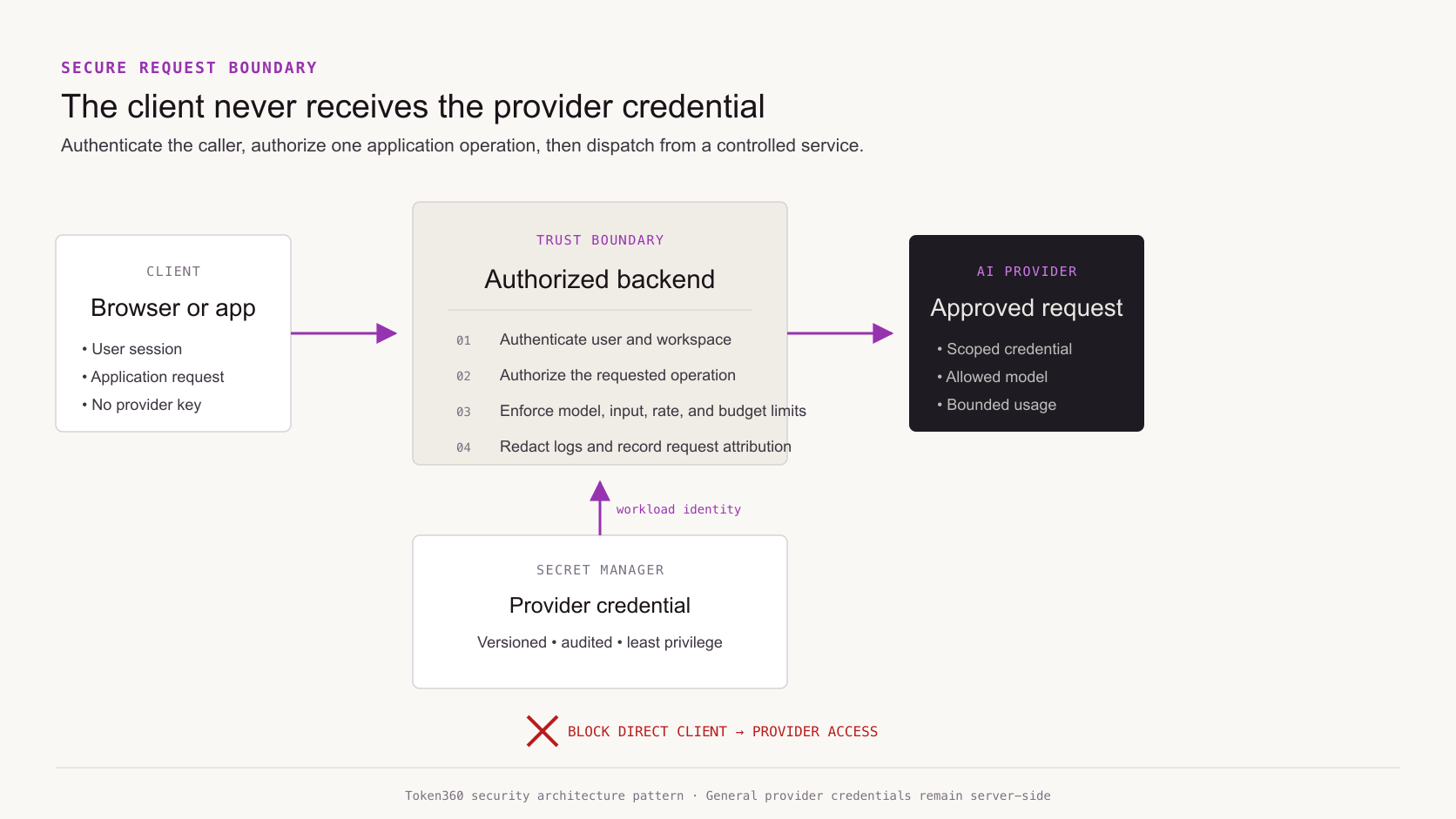
The backend should decide which operation, model family, input size, tools, and spending limit are allowed. The client may request an application-level capability such as generate_product_image; it should not receive an unrestricted way to choose every provider endpoint and parameter.
| Boundary |
Practical control |
| Browser or app to backend |
User authentication, workspace membership, operation authorization |
| Backend to AI provider |
Server-side credential with minimum available permissions |
| Workload to secret store |
Workload identity and least-privilege secret access |
| Diagnostic pipeline |
Header and body redaction with restricted log access |
| Direct public upload |
Temporary signed access with expiration, type, and size controls |
| Background job |
Dedicated service identity, bounded queue payload, and per-job budget |
A server-side proxy can still be unsafe
Moving the key to /api/proxy does not solve AI API key security if any caller can relay arbitrary provider requests through it. An unrestricted proxy lets an attacker spend through your server without ever seeing the upstream key.
Before dispatch, validate:
-
authenticated user and active workspace;
-
allowed application operation;
-
allowed model or model class;
-
maximum input, output, media size, and job duration;
-
tool and file permissions;
-
per-user, per-workspace, and global limits;
-
abuse, safety, and policy checks appropriate to the product;
-
destination host and endpoint, so the proxy cannot become a general request forwarder.
Return only the response fields the client needs. Do not expose upstream authorization details, internal provider errors containing sensitive configuration, or reusable result URLs beyond their intended audience.
Separate credentials by trust boundary
One shared organization key creates a large blast radius and poor attribution. Separate credentials when a boundary changes:
-
development, staging, and production;
-
customer-facing application and internal tooling;
-
interactive traffic and background batch work;
-
high-cost media generation and low-cost text operations;
-
independent teams or business units;
-
workloads with different data classifications;
-
deployment automation and runtime inference.
Separation does not require a unique provider key for every function if the provider cannot support that model. A gateway can keep a smaller set of upstream credentials while issuing application-level keys or identities with narrower policy. The important outcome is that one consumer cannot silently use another consumer's budget or permissions.
Use provider scopes, model allowlists, project boundaries, budget controls, and rate limits when available. Fill provider gaps at the application or gateway layer rather than assuming the key itself enforces a boundary it does not have.
Store and retrieve secrets safely
Use a managed secret store or a dedicated secrets-management system for production credentials. The store should provide access control, versioning, auditability, encryption, and a workable rotation path.
Google Secret Manager best practices recommend least-privilege access and separation of applications and environments. They also prefer platform identities and workload identity over exporting another long-lived service-account secret. Apply the same principles regardless of cloud or secret-store vendor.
Prefer identity to another stored credential
If a workload can authenticate to the secret store through its runtime identity, use that mechanism. Otherwise the team creates a bootstrap problem: it must protect a long-lived credential whose purpose is to retrieve another credential.
Limit secret retrieval to the exact runtime identity and secret versions needed. Engineers who can deploy a service do not automatically need permission to read its production secret value.
Decide when the application reads the secret
Common patterns include:
-
Deployment binding: resolve a specific secret version during release and deploy that version reference.
-
Startup retrieval: fetch the configured version when the process starts and keep it in memory.
-
Continuous refresh: periodically retrieve a current version while the process runs.
Deployment binding is predictable and works with gradual rollout and rollback. Startup retrieval reduces pipeline handling but can cause new instances to fail if the current secret is invalid. Continuous refresh reduces propagation delay but can spread a bad rotation to the entire fleet quickly.
The right choice depends on rotation urgency, process lifetime, availability requirements, and whether the application supports more than one valid provider key at a time. Pin and observe secret versions rather than relying blindly on a mutable latest reference.
Keep the value out of durable application state
Do not write the key to databases, job payloads, analytics events, cache entries, or crash reports. Keep it in memory only as long as required. Ensure debug endpoints and process-inspection tooling cannot reveal environment or secret-store contents to unauthorized users.
Plan API key rotation as a deployment
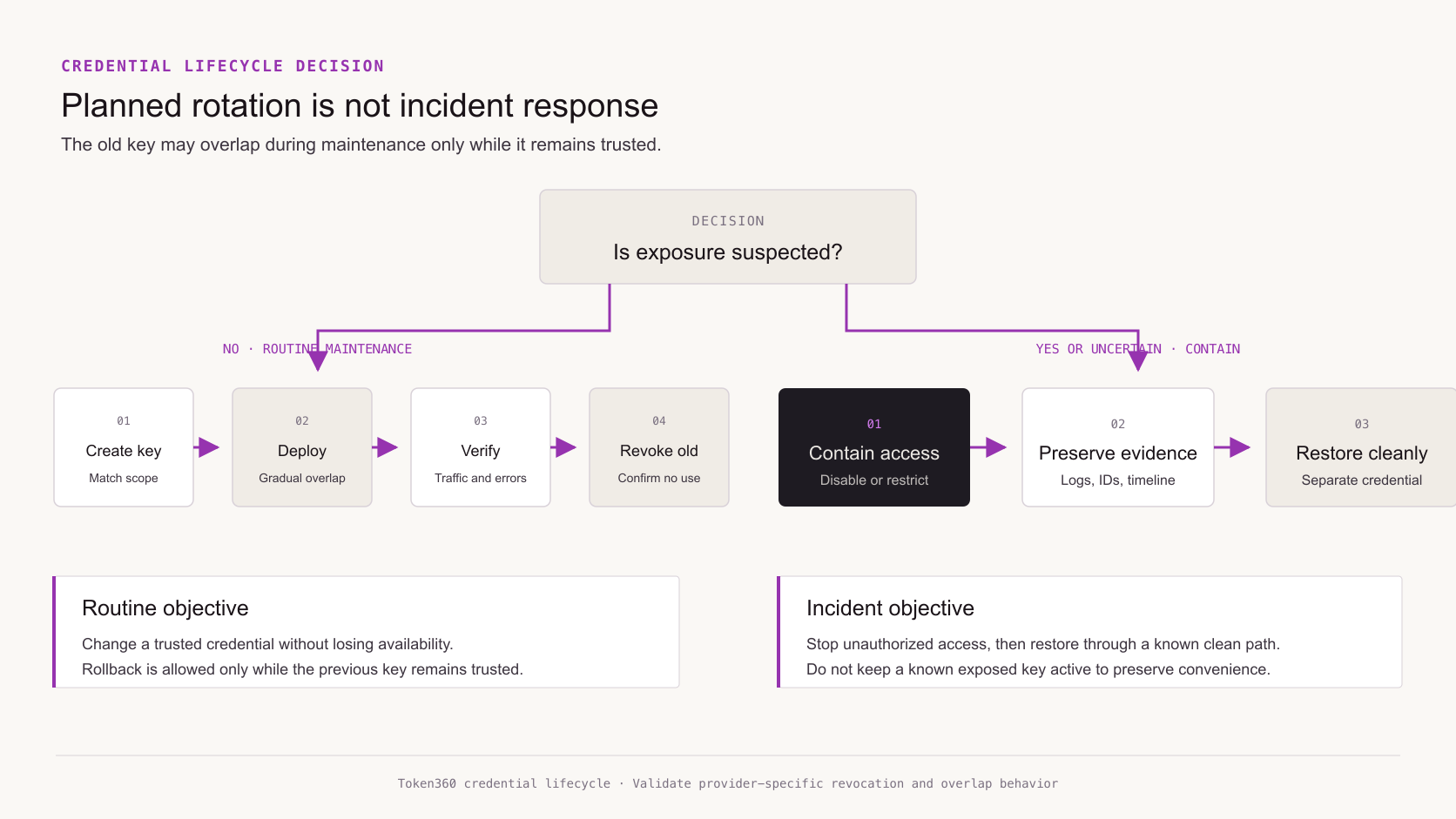
Rotation is a coordinated change between the credential issuer, secret store, workloads, and monitoring. Treat it like a release, not a calendar reminder.
When the provider allows two valid keys during transition, a routine rotation can follow this sequence:
-
create a replacement key with the intended owner, scope, and budget;
-
store it as a new version without changing running workloads;
-
deploy the new version to a small portion of traffic;
-
verify authentication success, expected models, usage attribution, and error rates;
-
expand the rollout until every known consumer uses the new key;
-
disable or revoke the old key;
-
verify that no legitimate traffic still presents the old credential;
-
remove the retired value from the secret store according to retention policy.
Google's rotation recommendations describe version binding, gradual rollout, rollback considerations, and disabling an old version before destruction. The exact provider procedure will vary, but the operational principle is consistent: verify adoption before irreversible cleanup.
Choose rotation frequency by risk
There is no universal number of days appropriate for every AI API key. Consider:
-
whether the credential is static or short-lived;
-
breadth of permissions and spend;
-
number of people and systems that can access it;
-
likelihood that it appears in developer workflows;
-
quality of detection and revocation;
-
contractual or regulatory requirements;
-
operational reliability of the rotation process.
Automation matters more than an aggressive schedule that repeatedly causes outages or is quietly skipped. The OWASP Secrets Management Cheat Sheet recommends lifecycle management, least privilege, and automation to reduce both exposure time and manual error.
Planned rotation is not incident response
Routine rotation assumes the old credential remains trusted during a controlled overlap. A suspected compromise changes the priority from smooth transition to containment.
| Situation |
Primary goal |
Old key treatment |
| Scheduled maintenance |
Reduce age and test lifecycle |
Keep briefly only if the provider supports safe overlap |
| Owner or team change |
Remove access no longer required |
Rotate promptly and check copies held by the former boundary |
| Confirmed public exposure |
Stop unauthorized use |
Revoke or contain immediately |
| Suspicious usage without confirmed leak |
Limit damage while preserving evidence |
Restrict, investigate, and be ready to revoke |
| Broken new credential |
Restore known-good service |
Roll back only if the previous key is still trusted |
Do not keep a known exposed key active merely to avoid downtime. Restore service using a separately created clean credential. Check every location that may contain the old value: runtime services, scheduled jobs, CI/CD, notebooks, local configuration, secret replicas, and copied operational documentation.
Detect misuse and reduce blast radius
Prevention will not catch every exposure. Detection should combine provider telemetry with application context.
Monitor for:
-
request volume or spend outside the workload baseline;
-
unexpected geography, network, user agent, or execution environment when available;
-
new models, endpoints, tools, or media types;
-
traffic outside expected deployment or job windows;
-
repeated authorization, quota, or policy errors;
-
use of a retired credential fingerprint;
-
one workspace consuming another workspace's expected budget;
-
sudden changes in input or output size;
-
secret-store reads by unusual identities or from unusual locations.
Budgets and rate limits reduce financial impact but do not protect data already processed. Combine them with authorization, data minimization, provider and application logs, and alerts that reach an accountable owner.
Measure cost per successful application operation rather than only provider spend. A stolen key may generate valid provider responses while producing no legitimate product outcome.
Respond to suspected API key exposure
A practical incident runbook should be short enough to use under pressure and specific enough to avoid improvisation.
1. Identify the credential and affected boundary
Use a non-secret key ID, owner, provider account, environment, and consumer inventory. Determine whether the event involves a development key, one production workload, or a shared organization credential.
2. Contain access
Revoke, disable, restrict, or replace the suspected credential according to the evidence and business risk. Tighten rate limits or disable affected operations if immediate revocation would leave an unsafe unknown state.
3. Preserve evidence
Retain relevant provider logs, application traces, secret-store access events, deployment history, and alerts. Preserve request identifiers and timestamps without copying the secret into the incident record.
4. Restore through a clean path
Create a separate credential, store it through the approved system, deploy it to verified consumers, and confirm normal authentication and attribution. Do not simply re-enable the exposed value.
5. Investigate impact
Determine which models and endpoints were used, the cost incurred, what inputs may have been processed, what outputs or files were created, and whether customer or regulated data was involved. Follow the organization's privacy, legal, and notification procedures.
6. Remove copies and close the cause
Removing a key from one file is not enough. Clean repository history where appropriate, delete unsafe artifacts, correct log pipelines, update developer workflows, and add prevention or detection for the path that failed.
Verify that revocation really works
A revoked key should fail everywhere, but hidden consumers and alternate credentials often complicate the result.
Test the procedure with a nonproduction credential:
-
enumerate known services, jobs, and pipelines using the key;
-
record their current credential fingerprint or internal key ID;
-
disable the key;
-
confirm that direct provider requests fail;
-
check caches, gateways, fallback providers, and proxy credentials;
-
verify that alerts identify the failed consumers;
-
restore through the documented clean path;
-
update the inventory with any consumer discovered during the test.
This exercise validates both revocation and observability. A runbook that has never been exercised is a hypothesis.
AI API key security checklist
Architecture
-
[ ] General provider keys never reach browsers, mobile bundles, or desktop clients.
-
[ ] Every provider call passes through authenticated and authorized server logic.
-
[ ] The backend exposes application operations, not an unrestricted provider proxy.
-
[ ] Direct uploads use narrow, temporary, expiring access.
Credential lifecycle
-
[ ] Production, staging, and development use separate credentials.
-
[ ] Every key has an owner, purpose, environment, consumers, and revocation procedure.
-
[ ] Provider scopes, allowlists, budgets, and rate limits are applied where available.
-
[ ] Keys are stored in an approved secret manager and retrieved through workload identity where possible.
-
[ ] Rotation is automated or supported by a tested deployment procedure.
Detection and response
-
[ ] Authorization headers and known secret patterns are redacted at ingestion.
-
[ ] Repository secret scanning and push protection are enabled where available.
-
[ ] Provider usage and secret-store access are monitored for anomalies.
-
[ ] Alerts route to an accountable owner.
-
[ ] The incident runbook covers containment, evidence, restoration, and impact review.
-
[ ] Revocation has been tested with a nonproduction credential.
Frequently asked questions
Can environment variables protect a frontend API key
No. A build-time variable used by browser code is normally included in the delivered application or visible in its requests. Environment variables are useful for server configuration, but they do not make a client-distributed value secret.
Is it safe to call an AI API directly from a mobile app
Not with a reusable general provider key. Route the operation through your backend or use a provider-supported temporary credential restricted by scope, lifetime, and operation. Assume values embedded in the app can be extracted.
Is moving the key to a backend enough
No. Authenticate callers, authorize operations, constrain model and parameter choices, validate inputs, apply user and workspace limits, and prevent the endpoint from acting as an unrestricted relay.
How often should AI API keys rotate
Use a risk-based policy. Rotate immediately after suspected exposure or an ownership-boundary change. For routine rotation, consider credential lifetime, scope, access breadth, monitoring, provider capabilities, and compliance requirements. Automate and test the process.
Should API keys appear in logs
No. Redact authorization headers and known key patterns at ingestion. Log a provider request ID, internal credential ID, or approved fingerprint for attribution instead of the secret value.
What should happen if a key is committed to Git
Treat a real committed key as exposed. Revoke or contain it, replace it through the approved secret path, investigate use, and remove it from current files and history as appropriate. Deleting the latest line does not invalidate copies.
Should every service have its own AI API key
Separate keys when ownership, environment, permissions, data sensitivity, or budget boundaries differ. If the provider cannot issue sufficiently granular keys, enforce service-level identity and policy through a gateway or backend.
Are spending alerts enough to secure an AI API key
No. They can detect or limit financial misuse, but they do not prevent unauthorized data processing. Combine budgets with least privilege, application authorization, rate limits, logging, anomaly detection, and revocation capability.
Secure one production workflow end to end
Start with one feature. Trace its credential from creation through the secret store, deployment system, runtime service, provider request, logs, rotation, and revocation. Remove unknown consumers, split inappropriate sharing, and test the incident path before repeating the process for the rest of the inventory.
Review the Token360 API documentation, explore available models in the Token360 model catalog, or talk with the enterprise team about account structure, governance, budgets, and production access.


 Tutorial
 Tutorial
 Prompt Guide