A text to video API workflow connects a creative request to a video your team can actually use. That requires more than submitting a prompt and receiving a download link.
Your application needs to preserve the brief, validate generation settings, track a long-running job, retrieve the output, collect a review decision, and deliver the approved version. Each step answers a different question—and can fail independently.
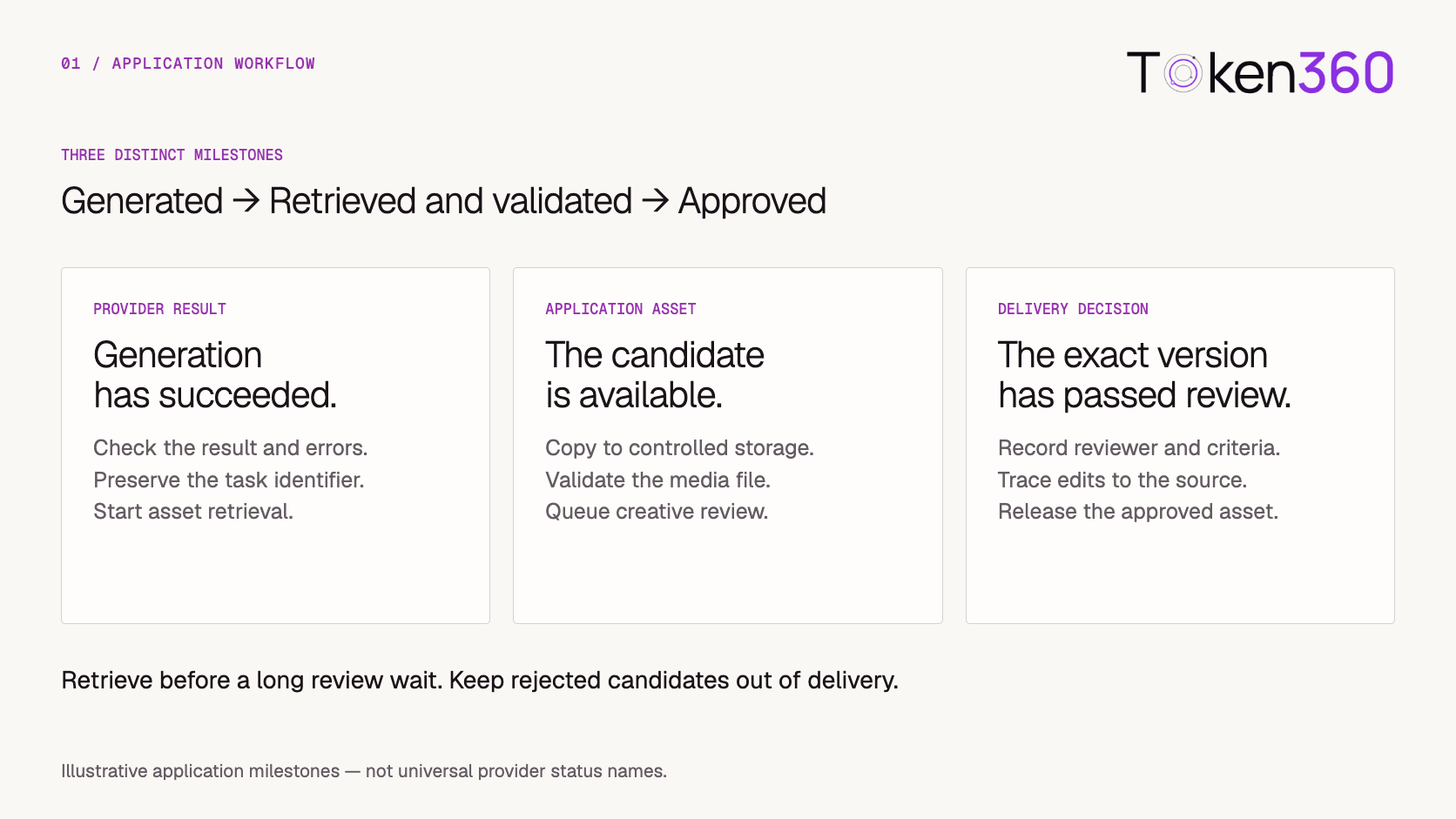
A useful starting point is to separate three milestones:
-
Generated: the provider returned a successful generation result.
-
Retrieved and validated: your application saved a usable candidate.
-
Approved: the required reviewer accepted a specific asset version.
This guide walks through that workflow using a short product campaign as an example.
Before you read: If you are still choosing a model or provider, start with Best Text-to-Video APIs:. To explore integration options, see the Token360 API documentation.
For the complete asynchronous job lifecycle, start with AI Video API Architecture: A Production Guide to Asynchronous Generation.
Turn the creative request into a reviewable brief
“Create a launch video for our new bottle” leaves too many decisions unresolved.
A developer can submit those words to an API, but the resulting clip may reveal disagreements that existed before generation: which product view matters, whether text must be readable, how much motion is appropriate, and what the final video is supposed to communicate.
Capture the minimum information needed to evaluate the output.
The product requirement deserves an explicit decision. A text-only description does not reliably preserve an exact label, logo, or packaging design.
If exact appearance is essential, use an appropriate reference-based workflow or an approved product layer in post-production. Make that choice before spending generation attempts on a requirement the selected workflow cannot reliably satisfy.
Separate shot instructions from API configuration
A prompt describes what should happen in the scene. API parameters configure the generation request.
For the bottle campaign, the shot instruction might be:
A single unbranded reusable bottle stands on a pale stone surface. The camera slowly moves closer while soft morning light travels across the background. Keep the bottle centered, the motion restrained, and the scene free of lettering.
This describes subject, action, camera behavior, and visual constraints. It does not replace explicit configuration for aspect ratio, duration, resolution, or audio where those fields exist.
Before submission, validate the selected route:
-
Does it support text-to-video?
-
Which duration and aspect-ratio values are accepted?
-
Does audio generation exist for this model and endpoint?
-
Are any settings mutually exclusive?
-
What output and task-tracking fields should the application expect?
Use the selected model’s current schema. A parameter accepted by one model should not automatically appear in another model’s request.
The Token360 model documentation is a starting point for checking the model route you intend to integrate.
Agree on a baseline before generating variations
The first attempt should test an agreed brief.
If the creative team has not decided whether the bottle should feel outdoorsy, technical, or luxurious, producing ten variations creates more material to review without resolving the underlying choice.
Record a baseline with:
For example, the first candidate may only need to demonstrate a stable silhouette and a useful opening shot. Final music and product messaging can remain separate production tasks.
This gives the reviewer a concrete question: Does this candidate satisfy the baseline?
It also makes later changes explainable. A revision should respond to a recorded issue, rather than an unbounded request to “make it better.”
Create an internal operation before calling the provider
Your application should have a durable record of the user’s request before sending a generation request.
Separate the business operation from its generation attempts. One approved brief may produce several attempts, and each attempt may produce a candidate that receives its own review.
A minimal internal structure could look like this:
{
  "operation_id": "video_op_1042",
  "brief_version": 3,
  "attempt_id": "attempt_01",
  "model_route": "<selected-route>",
  "submission_state": "pending",
  "provider_task_id": null,
  "candidate_asset_id": null,
  "review_state": "not_ready"
}
This is an illustrative application record, not a provider request payload.
Keep the resolved prompt and generation configuration with the attempt. Store the provider task identifier when it becomes available.
The browser can display progress using the internal operation ID. Closing a tab should not erase the job or its relationship to the brief.
Track generation, asset readiness, and approval separately
A single done flag is too ambiguous for production.
It might mean the provider stopped processing, a video was generated successfully, a file was downloaded, or a reviewer approved it. Those events are not interchangeable.
Provider status names also need interpretation. For example, fal’s queue documentation describes asynchronous request tracking and documents error information that can accompany a completed request. A terminal queue state therefore needs result inspection before your application records generation success.
Keep provider status alongside your own workflow state. This preserves useful diagnostics without forcing every business decision into the provider’s status vocabulary.
Handle uncertain submissions without blindly generating again
One difficult failure occurs when a submission times out before your application receives a task ID.
The provider may have accepted the request. Sending the same request immediately can create a second generation and a second charge.
Treat that outcome as submission uncertain.
The recovery path depends on the provider’s documented capabilities:
-
Preserve the attempt and available request metadata.
-
Use supported idempotency or request-lookup mechanisms where available.
-
Reconcile whether a task exists.
-
Create another attempt only when the recovery policy permits it.
Local deduplication can prevent repeated clicks from creating multiple application operations. It cannot, by itself, prove that a remote provider processed a request exactly once.
Once a task ID is known, subsequent status or download failures should normally recover that task. They should not automatically create a new generation.
For callbacks, implement the provider’s documented verification method, process repeated events safely, and prevent delayed events from moving the job backward. Use bounded polling as a fallback when appropriate.
Retrieve the candidate before a long review begins
Save the generated file promptly after a successful result.
Waiting for a reviewer to approve a provider-hosted preview can create an avoidable failure: the output may no longer be available when the application tries to retrieve it.
Provider retention policies vary. Replicate’s data-retention documentation illustrates why output availability should be treated as an explicit integration concern.
Copy the candidate into storage controlled by your application, then validate it. Keeping a candidate for review does not mean publishing it.
Useful technical checks include:
-
The file exists and can be decoded.
-
Dimensions and duration meet delivery requirements.
-
Required audio is present, or absent when expected.
-
The output is not empty or obviously truncated.
-
Review playback works through the application’s access controls.
If retrieval fails, retain the provider task ID and result information. Retry retrieval within the available window. Classify this as an asset-retrieval problem rather than a creative rejection.
Review the exact candidate against the brief
Technical validation establishes that a candidate can be used. Creative review determines whether it should be used.
For the bottle campaign, the reviewer can check:
Record specific rejection reasons. “Camera movement is too fast for the opening caption” is actionable. “Not quite right” is not.
Attach the decision to an immutable asset version or file hash. Approval should identify what the reviewer saw, along with the applicable brief version and review criteria.
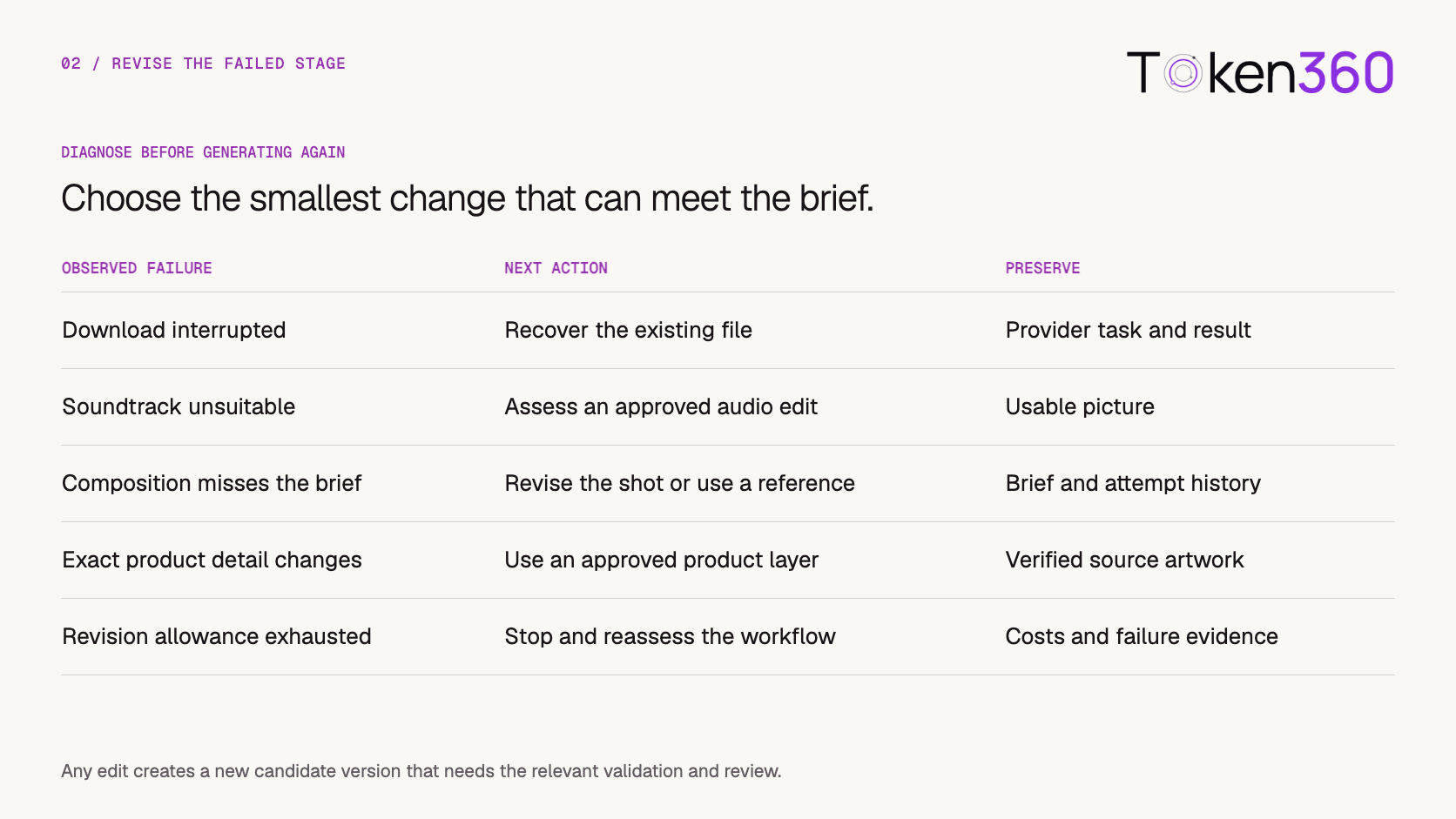
If an editor changes the crop, soundtrack, captions, or picture afterward, create a new version and apply the required checks again.
Choose the smallest revision that addresses the problem
Regeneration is one possible response to a failed review. It is not the default response to every problem.
Preserve usable work when the selected correction allows it.
When another generation is necessary, link the new attempt to the rejected candidate and record the intended change. Holding other variables stable makes the revision easier to assess.
Set limits before generating variations: maximum attempts, reserved spend, and conditions that require reassessing the workflow. Enforce the chosen limit before submitting another request, including when several jobs run concurrently.
Deliver an approved version with its provenance
The final asset should have a stable identity inside your application.
That identity can resolve to an appropriately authorized download or playback URL. It does not require a permanently public storage URL.
Preserve enough information to explain the delivered file:
-
The source brief and its version.
-
The prompt and generation configuration.
-
The provider task and internal attempt IDs.
-
The retrieved candidate.
-
Subsequent edits and resulting asset versions.
-
The review decision attached to the delivered version.
This matters when a team asks which clip ran in a campaign, why a particular version was selected, or whether a new edit still has valid approval.
Use lifecycle rules for rejected candidates and intermediate files according to your retention requirements. Keep the final delivery record connected to the evidence that supports it.
Connect model access to application-owned workflow
Token360 can provide the model-access layer for supported routes. Your application still needs to own the brief, operation records, review rules, asset versions, and delivery state.
A practical implementation sequence is:
-
Integrate one documented model route.
-
Persist one operation and its first attempt.
-
Track the remote task to a verified result.
-
Save and technically validate the candidate.
-
Record approval for that candidate version.
-
Deliver it through the application’s asset record.
Before broadening model support, test the failure paths that threaten correctness:
These checks establish a useful production boundary: the application can explain what happened, recover the appropriate step, and identify exactly what it delivered.
Start with the Token360 API documentation, then validate the selected route against its documented capabilities.
Frequently asked questions
Is a successful text-to-video response a publishable asset?
No. A successful generation still needs retrieval, technical validation, and whatever review your publishing workflow requires. Record these as separate milestones.
When should a text-to-video workflow switch to image-to-video?
Consider a reference-based workflow when the starting composition or subject appearance needs stronger control. Validate the selected model’s supported reference inputs, and still review the result for the details that matter.
Should every rejected video trigger another generation?
No. Retrieval problems, unsuitable audio, and missing approved graphics may have more focused remedies. Regenerate when the picture or motion needs a change that the current production workflow cannot reasonably make.
Should candidate files be saved before approval?
Yes, when you need to preserve them for review. Retrieve generated outputs within the provider’s availability window and keep candidates under appropriate access controls. Approval determines whether a particular version can move into delivery.
Can one workflow support multiple providers?
Yes, but provider adapters still need to handle route-specific parameters, task statuses, errors, retrieval behavior, and callback requirements. Shared application milestones help maintain a consistent review and delivery process.
Ready to connect the generation step? Explore the Token360 API documentation.
Related production video guides


 Tutorial
 Tutorial
 Tutorial