An image to video API workflow turns a still image into motion while preserving the details that make the source useful.
For a product photograph, those details may include the silhouette, handle, label, surface pattern, and relationship to the background. A video can play correctly and still fail the brief because one of those details changes halfway through the clip.
A production workflow therefore needs to answer four questions:
-
Which source image was actually submitted?
-
What role does that image play in the selected model?
-
What movement should the model add?
-
Which details must remain acceptable throughout the result?
This guide uses a blue ceramic teapot to show how to prepare the input, control the request, review continuity, and preserve the relationship between the source and the delivered video.
Before you read: Start with Best Image-to-Video APIs if you are still choosing a model. For the broader job, review, and delivery lifecycle, read Text to Video API Workflow: From Brief to Approved Asset:.
For the complete asynchronous job lifecycle, start with AI Video API Architecture: A Production Guide to Asynchronous Generation.
Define what should move—and what should stay consistent
Begin with an approved still and a clear production purpose.
For the teapot, the goal might be a short opening shot for a product page: a thin stream of steam, a restrained camera move, and enough space for a later caption.
Write down the intended changes alongside the details that require preservation.
These are acceptance criteria, not guarantees created by mentioning them in a prompt.
Some requirements may call for a different production method. If every letter on a small label must remain exact, plan for an approved graphic or product layer where feasible. If the shot requires an accurate view of the back, obtain suitable reference material or use a production method that represents the actual geometry.
Making this decision early avoids spending multiple attempts on an unsuitable input.
Approve and version the prepared source image
Inspect the source at the intended display size before generating video.
Check edges, reflections, surface details, existing text, and any visible defects. A small inconsistency that disappears in a thumbnail can become distracting when the camera moves closer.
Preserve both the original and the prepared input. Cropping, retouching, background extension, or format conversion should create a traceable derivative rather than silently replacing the source.
For a vertical placement, inspect the proposed crop before submission. A square teapot photograph may lose the handle or spout when cropped automatically.
If preparation introduces new background content, review that content too. An approved original does not automatically make every derivative suitable.
Choose the input role before uploading
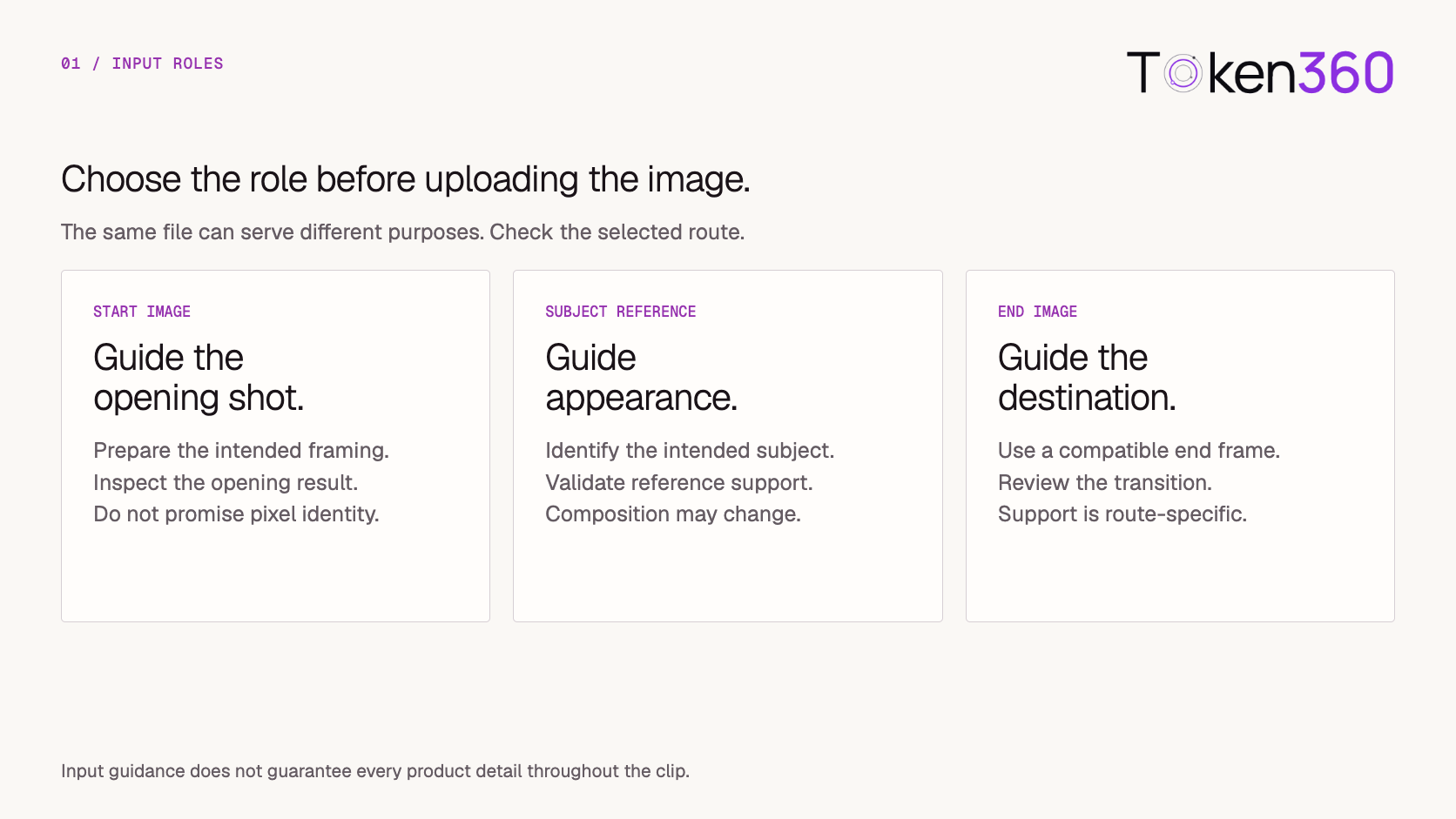
A starting image and a subject reference serve different purposes.
A starting image guides the opening composition. A subject reference guides appearance through a mode designed for that purpose. An ending image, where supported, adds a target for the clip’s destination.
The selected endpoint determines which roles exist and how they are expressed.
For example, fal’s Kling V3 Standard image-to-video schema documents separate start_image_url, end_image_url, and elements inputs. That distinction belongs to the documented route; it should not be assumed to apply identically across models.
In your application, make the role visible. “Starting image” communicates a different intention from a generic “Upload reference” button.
Avoid promising that a first-frame input locks every pixel or preserves every detail throughout the clip. Review the actual result.
Make the exact input available to the provider
Your asset ID and the provider’s fetch URL have different jobs.
The asset ID identifies the prepared source inside your application. A fetch URL gives the provider access to the bytes needed for a particular attempt.
If the endpoint retrieves an image from a URL, confirm that the URL returns the file without requiring a browser login. Account for queueing and possible delayed retrieval when choosing the access window.
The fal file-input documentation on the model page describes hosted URLs, data URIs, and upload options. Validate the supported transport for the route you actually use.
A useful preflight checks:
-
The file decodes successfully.
-
Its actual format matches what you intend to submit.
-
The prepared version passes the route’s size and dimension requirements.
-
The provider can access the chosen delivery mechanism.
-
The referenced object cannot change underneath an active attempt.
Do not make an entire asset library public to submit one image. Use an appropriately scoped mechanism supported by the provider, and keep temporary access credentials out of routine logs.
Describe the change that follows the image
Use the prompt to explain the intended movement and the details that matter.
For the teapot:
Keep the blue ceramic teapot resting in the same position on the table. A thin stream of steam rises from the spout while the camera moves slightly closer. Preserve the shape of the body, handle, lid, and painted pattern. Keep the background quiet and introduce no new objects.
This gives the shot a coherent direction. It does not ask the model to change the product, relocate the scene, and invent an interaction at the same time.
Keep generation configuration separate from the motion brief. Duration, output dimensions, audio, and other controls should use the selected route’s supported fields.
Also check for conflicts between the image and the prompt. Asking for a full orbit while requiring the visible composition to remain unchanged creates competing instructions.
For the first attempt, choose one primary movement. Add complexity only when the shot needs it and the baseline result is acceptable.
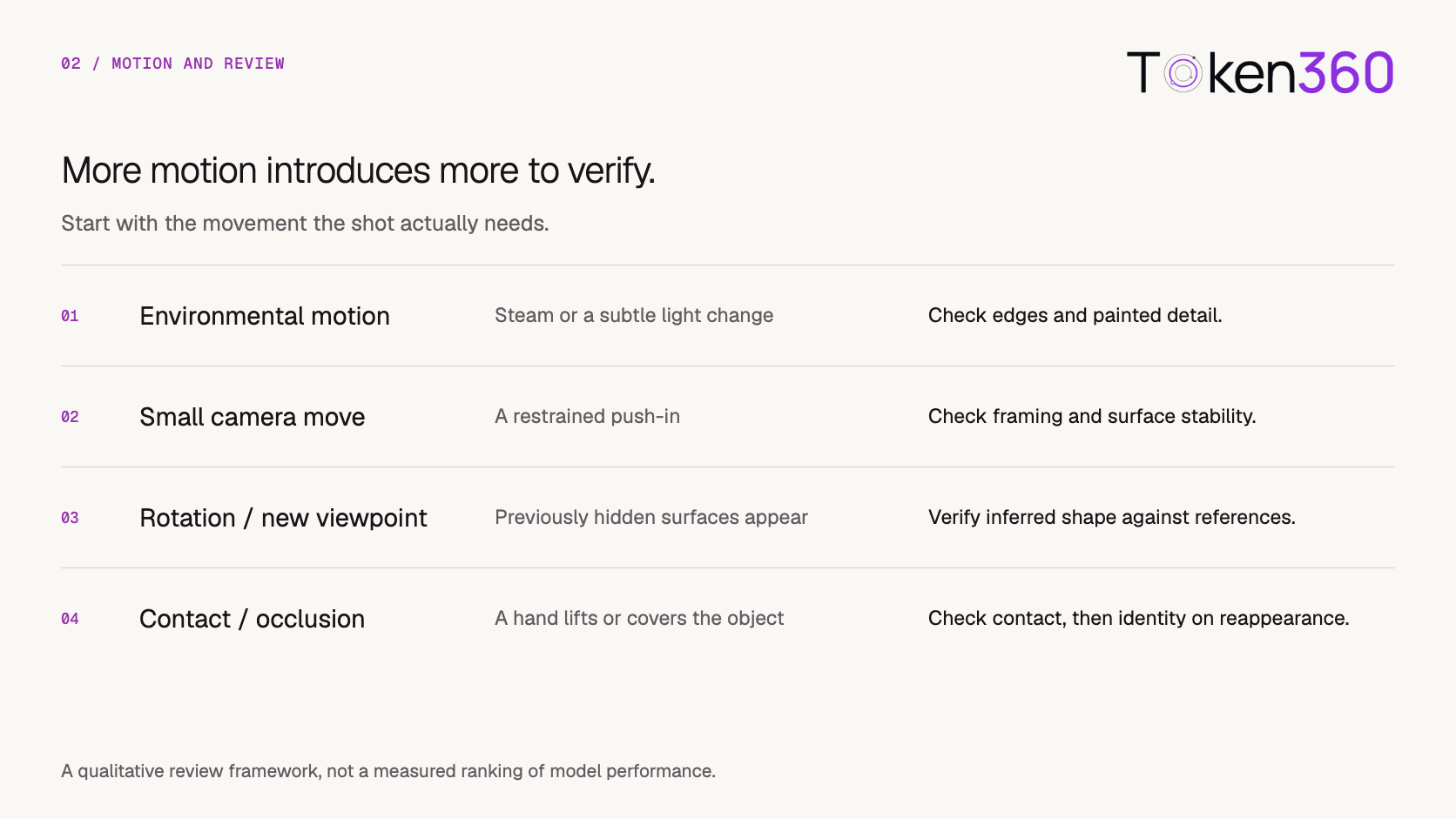
Increase motion complexity deliberately
Different movements introduce different review problems.
Environmental motion may leave much of the source composition intact. A camera move reveals changing perspective. Rotation introduces surfaces absent from the image. A hand interaction adds contact and occlusion.
The following is a planning framework, not a measured ranking of model performance.
A full rotation from a single front photograph asks the model to infer unseen geometry. A plausible result is not evidence that the back of the real product looks that way.
When accuracy matters, use additional approved views if the selected mode supports them, constrain the movement, or choose another production method.
Store the source-to-attempt relationship
Create a durable operation before submitting the request.
Each generation attempt should point to the prepared image version, its input role, the motion prompt, and the resolved model settings. This makes it possible to distinguish a changed source from a changed request.
An illustrative internal record might contain:
{
  "operation_id": "i2v_op_2042",
  "source_asset_id": "teapot_hero",
  "prepared_source_version": 3,
  "source_sha256": "<hash-of-submitted-file>",
  "input_role": "start_image",
  "attempt_id": "attempt_01",
  "model_route": "<selected-route>",
  "motion_brief_version": 2,
  "provider_task_id": null,
  "candidate_asset_id": null
}
This is an application record, not a provider API payload. Store the actual prompt and generation configuration alongside it.
Once a provider task ID is known, use it to recover status and retrieve the output. A polling or download failure should not automatically create another generation.
If submission times out before the task ID arrives, preserve the uncertain attempt and reconcile it using the provider’s supported mechanisms. Blind resubmission may produce duplicate work.
For a fuller treatment of these states, see Text to Video API Workflow: From Brief to Approved Asset:.
Review continuity across the entire clip
Retrieve the successful output promptly and save a candidate for review.
First, check that the media file can be decoded and meets the intended delivery requirements. Then review the visual result against the prepared source.
Do not rely only on the opening and closing frames. A product can look correct at both endpoints while deforming during an interaction.
Watch normal-speed playback, then inspect suspicious intervals more closely. A few extracted frames can help locate defects, but they cannot establish continuity on their own.
Record the timestamp and observed issue:
After the hand crosses the handle, the handle reappears with a different attachment point.
That finding supports a focused revision. “The product looks wrong” provides much less direction.
Match the correction to the failure
A failed review does not always require a new prompt.
When another attempt is necessary, record the intended change and keep other variables stable where possible.
For example, replace an orbit with a small push-in while retaining the prepared source and other settings. This makes the result easier to interpret.
Set an attempt or spend limit before iteration. If a required product detail repeatedly fails, reconsider the workflow instead of adding more preservation adjectives to the prompt.
Preserve lineage through editing and delivery
The delivered video may include trimming, captions, sound, compositing, or reframing.
Record those changes as new asset versions. A review decision should identify the exact version accepted for delivery.
Maintain a traceable relationship:
Original image → prepared source → generation attempt → retrieved candidate → edited version → delivered asset
This relationship supports practical maintenance. If a product image is replaced or withdrawn, the application can identify the videos derived from it and route them for review.
A new source version should not silently rewrite the history of an old generation.
Keep source files, candidates, and production records according to the applicable retention policy. Use a stable application asset ID for delivery, with access URLs managed separately.
Implement one controlled workflow on Token360
Begin with one supported route and one approved source.
Use the Token360 model documentation to identify the intended model, then check its documented inputs and request behavior through the API documentation.
Expose only the input roles and controls supported by that route. A shared interface can simplify model selection while still explaining route-specific limitations.
Before expanding the workflow, verify these behaviors:
-
A source replacement does not change an existing attempt’s input.
-
The user previews the actual prepared crop.
-
Unsupported input roles are rejected before submission.
-
An unavailable input produces a recoverable, understandable failure.
-
A known task survives a browser refresh.
-
Review decisions remain attached to the correct output version.
Then test one modest motion and inspect the whole result. Broader model support is easier to manage once this source-to-delivery path is reliable.
Frequently asked questions
Does uploading an image lock every product detail?
No. The image guides the selected generation mode. Important shapes, patterns, labels, and interactions still need review throughout the clip.
Is a starting image the same as a subject reference?
No. A starting image guides the opening scene, while a subject reference is used by a supported mode to guide appearance. Check the route’s documentation and keep these roles distinct in the application.
Can a model accurately show the back of a product from a front photograph?
It may generate a plausible view, but the source does not establish the hidden geometry. Use appropriate reference material or another production method when factual accuracy is required.
Should the application keep the original and the cropped input?
Retain them according to your asset policy and preserve their relationship. The attempt should identify the prepared file actually submitted.
What is a useful first motion to test?
Choose a modest movement that serves the shot, such as restrained environmental motion or a small camera move. Evaluate it against the source before adding rotation or contact.
When is compositing preferable?
Consider it when a required product element must remain exact and the intended shot can accommodate an approved layer. Compositing still requires suitable perspective, lighting, and motion, so it should be planned as part of production.
Start with one approved source and one deliberate movement. Explore models on Token360.
Related production video guides


 Tutorial
 Tutorial
 Tutorial