AI video native audio generates a soundtrack alongside a video. Depending on the model and API route, that soundtrack may include dialogue, sound effects, ambience, or music.
It can reduce the work needed to assemble a short scene. However, a usable result requires more than audible sound: the words must be correct, the right character must speak, and the soundtrack must fit the action.
This guide explains the documented controls available on two example routes, how to plan an audio brief, and how to evaluate the delivered result.
Editorial note: Token360 publishes this guide. Specifications were checked against official documentation on October 9, 2026. The workflow and examples below are guidance, not results from a paid model benchmark.
Before you read: Start with Veo API Guide for Asynchronous Video Generation or Kling API Guide for Text and Image to Video if you first need to understand submission, task tracking, and output retrieval.
For the complete asynchronous job lifecycle, start with AI Video API Architecture: A Production Guide to Asynchronous Generation.
What does native audio include?
Native audio describes a generation capability. It does not establish every production control your application might need.
Separate these questions:
A model can generate convincing environmental sound while struggling with a particular name or line of dialogue. Evaluate the actual task instead of treating “audio supported” as a universal quality claim.
Documented Veo and Kling audio controls
The following is a dated specification comparison, not a quality ranking. These are provider-specific interfaces; do not assume another serving platform exposes identical settings.
Sources: Google Veo specifications and limitations, fal Kling V3 Standard input schema.
Check these details again when implementing or changing routes. Model names alone do not identify the API contract.
Choose between native audio and separate sound production
The appropriate workflow depends on the delivery requirement.
A video with an audio stream may contain a single mixed soundtrack.
Extracting that soundtrack does not turn it into separate dialogue, music, and effects. Stereo channels are also not equivalent to production stems.
If background sound masks the dialogue, reducing the whole mix reduces both. Source separation may help, but its artifacts need review.
For a wider view of how these assets fit together, see the Multimodal API Guide: Text, Image, Video, and Audio Workflows.
Build a sound brief with words, sources, and timing
Approve the sound requirements before writing the final generation prompt.
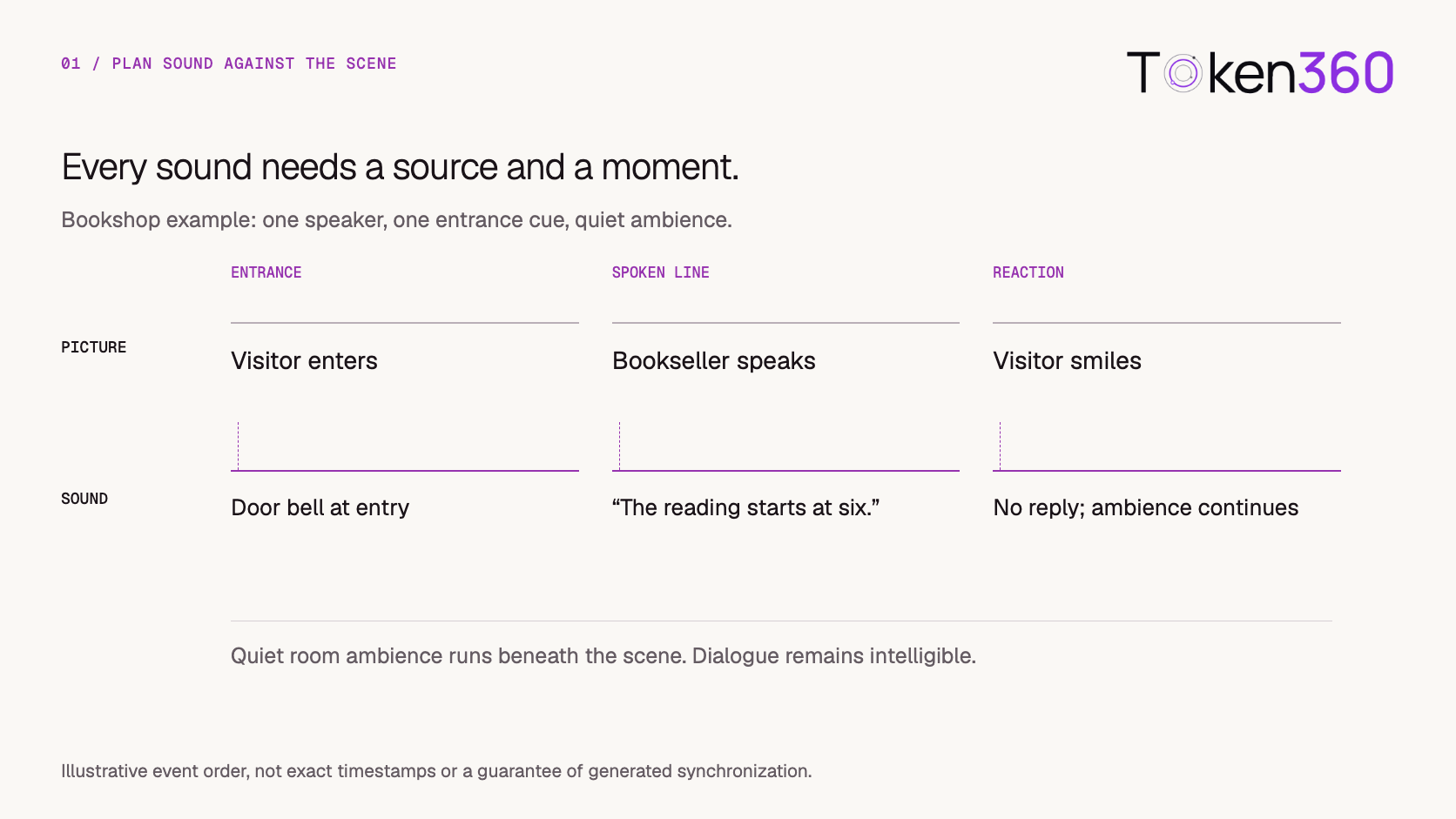
For a bookshop scene:
A corresponding prompt is:
A visitor enters a small bookshop and stops near the counter. A quiet door bell rings as the visitor enters. The bookseller looks up and says, “The reading starts at six.” The visitor smiles without speaking. Keep the room ambience soft and the dialogue clear. No music.
This is a suggested starting prompt, not a tested output example.
Read the line aloud at the intended pace. Budget time for the entrance, pauses, speech, and reaction. The entire clip duration is not available for dialogue.
Google’s audio prompting guidance distinguishes dialogue, effects, and ambience, supporting this explicit approach to the brief.
Keep speaker assignment separate from voice identity
Two different failures can occur:
-
The wrong character says the line.
-
The correct character speaks, but the voice is inconsistent with the intended character.
Specify who speaks, who remains silent, whether speech is on-screen or off-screen, and any supported voice-reference relationship.
Begin with one speaker. Add additional speakers and overlapping speech only after the baseline meets your requirements.
An off-screen narrator does not require visible mouth synchronization, but still needs correct words, delivery, and timing. A visible close-up requires all of those plus acceptable lip movement.
Do not assume that an appearance reference also specifies a voice. Use the selected route’s documented controls.
Validate the returned media before creative review
Save the result, then inspect the delivered file.
FFmpeg’s ffprobe can report container and stream metadata in machine-readable form. For example:
ffprobe -v error \
  -show_entries \
  stream=index,codec_type,codec_name,sample_rate,channels,channel_layout,start_time,duration:format=duration \
  -of json \
  final-video.mp4
This inspection can help establish whether audio and video streams exist and expose relevant properties. Some fields may be absent depending on the file. See the official ffprobe documentation.
Metadata alone does not establish that the soundtrack is audible, correct, or synchronized. Continue with listening and playback checks.
Keep distinct outcomes for:
A failed download should not automatically trigger another generation. The AI Video API Architecture guide explains how durable task and asset records support recovery.
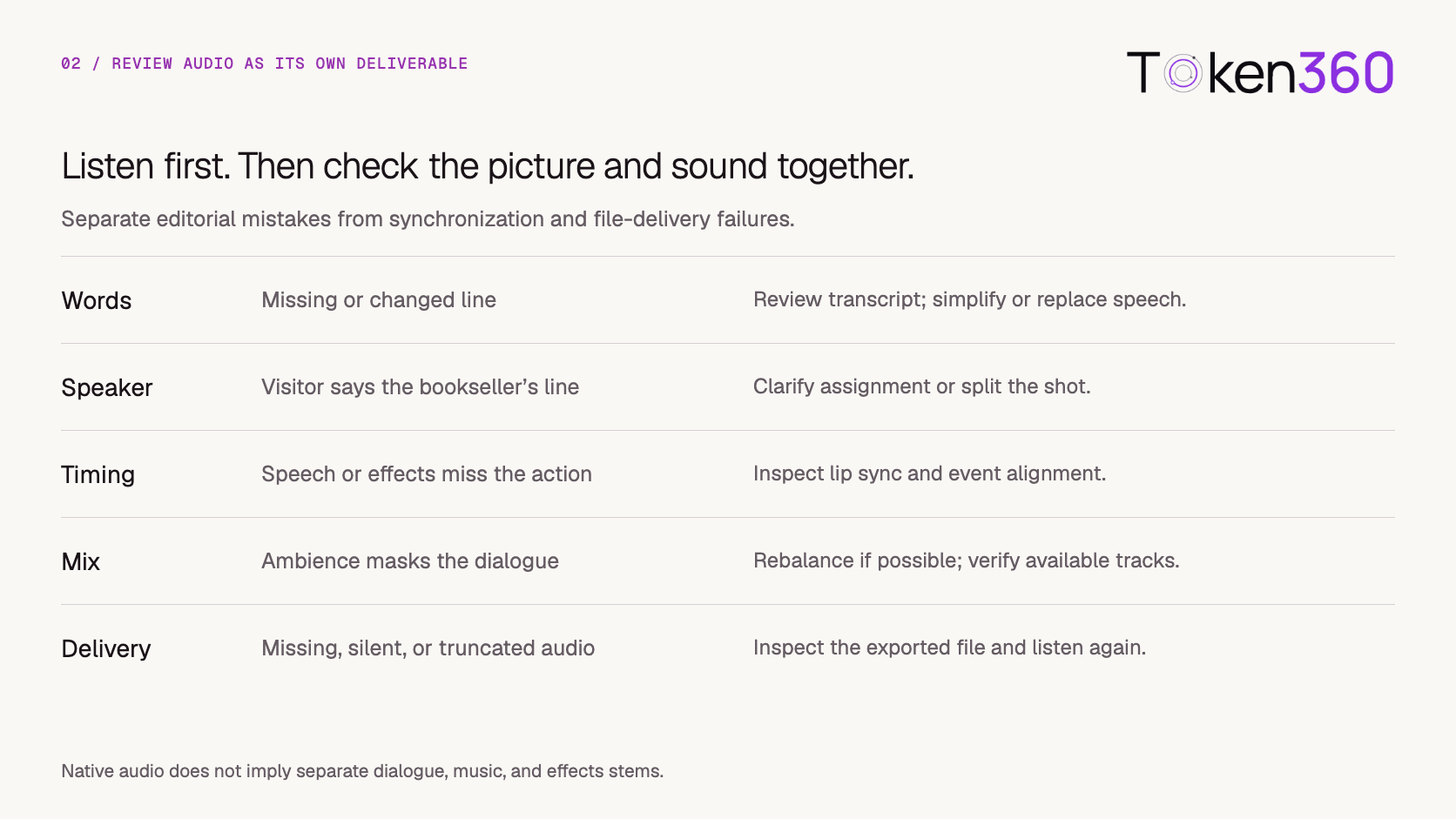
Review audio independently, then check synchronization
Use two review passes.
Audio-only review: Compare the spoken words with the approved script. Listen for pronunciation, unwanted speech, abrupt endings, distortion, and intelligibility.
Combined review: Check the visible speaker, lip movement, action sounds, and transitions with picture and sound together.
Automatic transcription can assist the first pass, but should not replace listening. It can misrecognize speech and does not establish acceptable delivery.
Subtitles must agree with the approved soundtrack. Displaying the intended words cannot repair an incorrect spoken line.
Measure usable output rather than successful requests
Collect data that reflects the production decision.
Always report the counts behind a percentage. Identify the model route, date, duration, language, and brief used.
Keep raw acceptance separate from approval after editing. Otherwise, extensive repair can make native generation appear more reliable than it was.
For discrete sound events, record:
Timing offset = sound-event onset − visual-event time
A positive offset indicates sound after the visual event. This is a diagnostic measure; not every event should have zero delay.
For a constant-frame-rate clip, one frame represents 1,000 ÷ fps milliseconds. At 24 fps, that is approximately 41.7 ms. This calculation describes timing resolution, not a universal acceptable-sync threshold.
No measured pass rates are claimed here. Apply these definitions to your own recorded attempts. For the cost model, read AI Video API Pricing: Calculate the Cost per Usable Clip.
Test localization with the actual script
Evaluate the exact language, line, and pronunciation required for delivery.
Translation can change speaking duration and emphasis. A product name, abbreviation, or number may behave differently from ordinary words.
Use a fluent reviewer to check meaning and pronunciation. For each language version, preserve the approved script and final soundtrack relationship.
When the same picture must support multiple languages, plan for differences in timing. Narration over a non-speaking scene is generally easier to replace than speech in a visible close-up.
Use authorized voice references only where the selected route supports the intended use. A voice input should not be assumed to establish exact reproduction.
Repair the failed component and recheck the final file
Preserve usable work when the production requirement allows it.
Replacing a mixed track also removes the sounds you may want to keep. Account for room tone, footsteps, and effects when rebuilding it.
Record the raw generation and edited output as separate versions. Review the actual export after trimming, audio replacement, captions, and transcoding.
Apply the destination’s required delivery specifications. Do not present one loudness target as appropriate for every platform.
Build the workflow around the delivery requirement
For a Token360 integration, begin with the model documentation and confirm the exact route through the API documentation.
Store three kinds of evidence:
-
Requested: Script, language, speakers, sound brief, model route, and audio settings.
-
Observed: Returned assets, stream metadata, transcript observations, and synchronization issues.
-
Approved: Final asset version, edits, review decision, and delivery checks.
Do not equate an audio-enabled request with an approved soundtrack.
A practical first trial uses one short line, one speaker, one action sound, and a predefined review rubric. Record every attempt rather than selecting only the best output for evaluation.
Frequently asked questions
What is AI video native audio?
It is audio generated alongside a video, potentially including dialogue, effects, ambience, or music. Available controls and output formats depend on the selected model and API route.
Which AI video models support native audio?
The documented examples in this guide are Veo 3.1 through Gemini API and Kling V3 Standard image-to-video through fal. Verify the exact route rather than assuming every variant exposes the same capabilities.
Can I turn native audio off?
That depends on the interface. Some routes expose an audio setting; others generate audio automatically. Check the documented request schema before adding a toggle to your application.
Does native audio provide separate dialogue and music tracks?
Not necessarily. A returned video may contain one combined soundtrack. Separate stems must be explicitly supported or produced through another workflow.
Does native audio guarantee accurate dialogue or lip synchronization?
No. Review the actual words, speaker, delivery, and mouth movement. Correct transcription and acceptable synchronization are separate checks.
Can I generate the same scene in several languages?
Only within the selected workflow’s capabilities. Confirm language support, test each approved script, and review pronunciation and timing in every delivered version.
Is video without sound always cheaper?
No. Pricing varies by model and route. Compare the complete cost per accepted deliverable, including any separate sound production and repair.
Should I regenerate the video if the soundtrack fails?
Not automatically. Suitable visuals may be preserved when audio replacement meets the brief. Visible speech can require additional synchronization work.
How should I measure audio-video synchronization?
For discrete events, compare the sound onset with the relevant visual event and record the offset. Review speech separately through listening and lip-sync inspection. Set acceptance criteria for the actual scene and destination.
Start with a short approved script and a measurable review process. Explore models on Token360.
Related production video guides


 Tutorial
 Tutorial
 Tutorial