Last updated: September 28, 2026
A lower price per generated second does not necessarily mean a lower cost per usable video.
A model may produce inexpensive clips that require several attempts before one meets the brief. A higher-priced route may need fewer revisions. Duplicate submissions, unnecessary final renders, and failed output delivery can add spending without adding usable assets.
Controlling AI video API cost starts with measuring the result your product actually needs: a completed video that meets a defined acceptance standard.
From there, the main levers are practical. Match generation settings to the stage of work, prevent accidental duplicates, account for jobs already in flight, and enforce limits before additional requests reach the provider.
The goal is to reduce spending that does not improve the customer outcome while preserving the quality and behavior the product promises.
This guide explains how to measure that outcome and connect it to production controls.
Before You Read
If you are still selecting models or building the integration, start with:
For Token360’s distinction between estimates, recorded usage, and settlement, review Billing and Usage.
AI Video API Cost Controls at a Glance
These controls address different problems. A spending cap can contain exposure, but it does not explain why most outputs are discarded. A cheaper preview can reduce per-attempt cost, but it may increase total workflow cost if users generate many more attempts.
Measure the complete workflow before declaring an optimization successful.
Why Price per Generated Second Is Not Enough
Provider pricing describes the charge for a billable unit. Your product needs to understand the cost of a useful outcome.
Those units may differ.
A generation can be billed by output duration, task, resolution, credits, or another model-specific measure. Your application may sell an exported video, a creative workflow, or a subscription that includes multiple attempts.
The FinOps Framework connects technology spending with business value and financial accountability. For an AI video product, an accepted asset is one useful unit for making that connection.
It helps distinguish spending that produces customer value from spending caused by repeated exploration, technical failures, or accidental duplication.
Keep two outcomes separate:
Technical completion: The task produced a retrievable video file.
Creative acceptance: The video met the defined brief or review criteria.
A technically successful generation can still be unusable. A creative rejection is not an API failure, but it remains part of the workflow’s economics.
Define What Counts as an Accepted Asset
Primary purpose: Make model and workflow comparisons meaningful.
Before calculating cost, define the denominator.
For a product-video workflow, acceptance might require correct product appearance, usable motion, the requested aspect ratio, and no disqualifying artifacts. Another product may care about character consistency or audio synchronization.
Use the same rubric when comparing routes. Otherwise, a model evaluated on easier briefs or more permissive criteria can appear more economical without serving the same requirement.
Record the brief, model version where available, settings, reviewer outcome, and rejection reason.
Do not automatically treat “downloaded,” “exported,” and “accepted” as interchangeable. An export event can be a useful proxy, but label it as a proxy unless it reliably represents the outcome you intend to measure.
The FinOps Foundation’s unit economics guidance provides the broader framework for connecting costs to defined business units. The acceptance rubric remains a product-specific decision.
Implementation consideration: Track technical completion and creative acceptance independently so teams can identify whether the problem is reliability, output quality, or user workflow.
Calculate Cost per Accepted Clip
Primary purpose: Compare routes using the results they actually deliver.
Start with a clearly labeled generation-only metric:
Generation cost per accepted clip = total generation spend ÷ accepted clips
The numerator should include spending on the cohort’s discarded generations and billable failed or retried attempts.
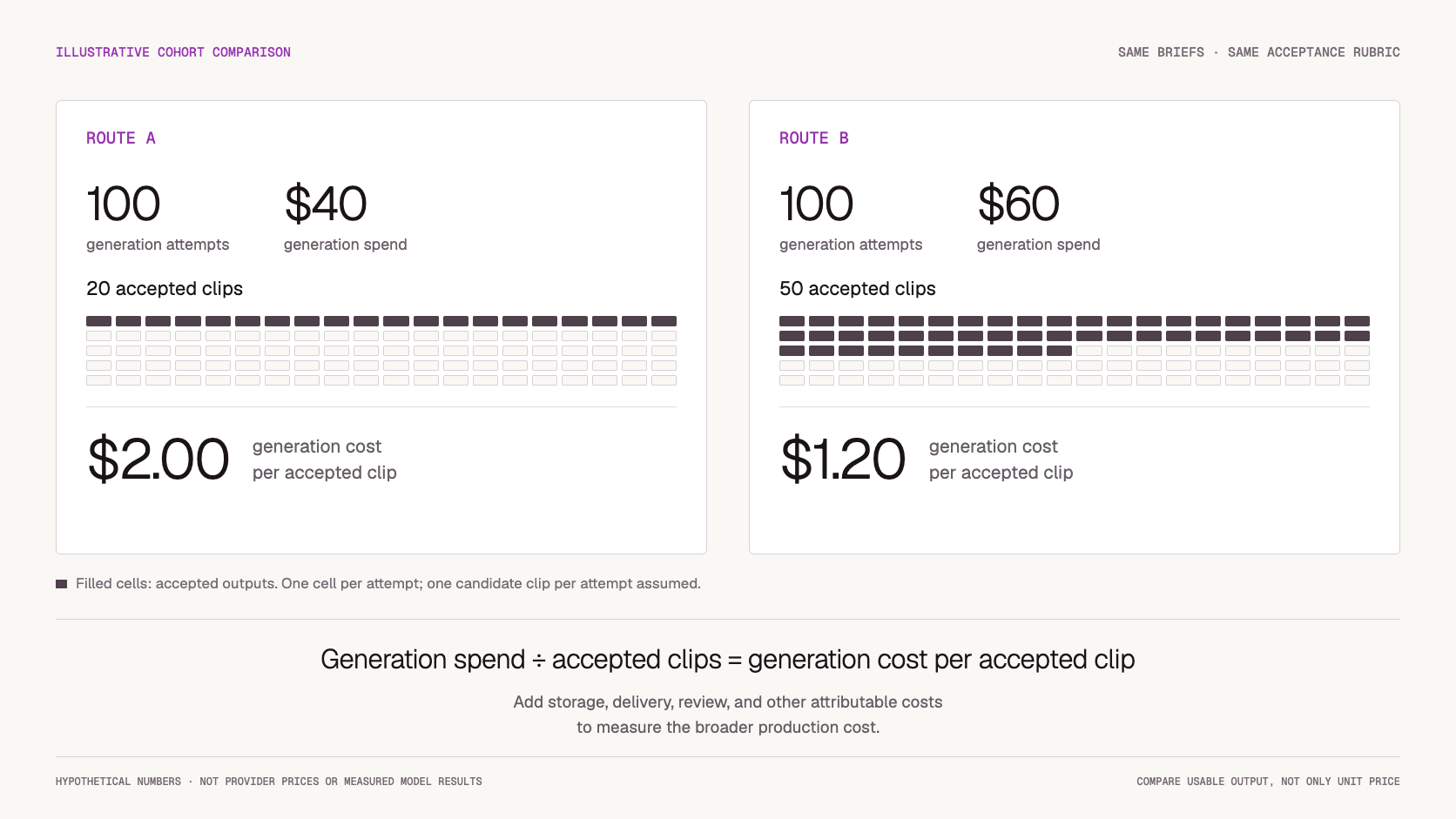
Consider this hypothetical example:
These are illustrative numbers, not provider prices or measured model results.
Route B spends more per cohort but less per accepted clip. The example shows why generation price alone can lead to the wrong decision.
For a broader production measure, add attributable costs:
Production cost per accepted clip = generation, storage, delivery, review, and other attributable costs ÷ accepted clips
Use a consistent allocation method for shared costs. If moderation or human review is material, excluding it can distort the comparison.
Also define the measurement window. Recent cohorts may contain clips that have not yet been reviewed. Comparing their acceptance rate with a fully reviewed cohort can create a misleading result.
Implementation consideration: When no clips are accepted, the ratio has no finite value. Report the spend and zero accepted outputs rather than showing a zero cost.
Separate Creative Exploration from Final Generation
Primary purpose: Avoid paying for final-output settings before the user needs them.
Many workflows benefit from an explicit preview stage.
Users can explore a concept with settings appropriate to that task, then deliberately request the final output. Depending on model support, this may involve shorter duration, lower resolution, or another suitable route.
The preview still needs enough fidelity to answer the creative question. A preview that cannot reveal the motion or composition being evaluated may save money per attempt while producing little useful information.
Label the model and settings clearly. Do not silently downgrade a paid workflow.
A preview also does not guarantee the final result. Changing resolution, duration, model, or other settings can change composition and motion.
Measure the total workflow:
Workflow cost = all preview attempts + all final attempts + associated delivery and review costs
If a preview stage adds many extra attempts without improving final acceptance, it may increase cost.
Implementation consideration: Make “Generate final video” a deliberate action and retain the preview configuration for comparison.
Prevent Accidental Duplicate Work
Primary purpose: Stop infrastructure and interface behavior from creating unnecessary generations.
Disabling a button after one click is useful, but it is not sufficient.
A browser can retry a request. A worker can restart. A submission response can be lost after the provider accepts the task.
Use a stable application operation ID and durable duplicate prevention. Apply provider-side idempotency only where the endpoint documents it.
A repeated delivery of the same operation should resolve to the existing job. An intentional request for another variation should create a new operation.
Do not identify intent from the prompt alone. Identical prompts can legitimately represent separate creative attempts.
When submission acceptance is unknown, investigate the existing request before sending another. Token360’s retry and timeout guidance explicitly distinguishes ambiguous submission outcomes from safe status checks.
Implementation consideration: Track accidental duplicates separately from intentional variants. Otherwise, legitimate exploration can be mistaken for a reliability problem.
Reuse Existing Assets Only When the Product Allows It
Primary purpose: Avoid regeneration without breaking expectations or access boundaries.
Asset reuse can reduce cost when a user requests an existing result or a workflow explicitly allows cached outputs.
It should not silently replace a request for a fresh variation.
A reuse decision may depend on:
-
Input media and its version or content identity.
-
Prompt and generation settings.
-
Model and version where available.
-
Seed where supported.
-
Ownership and access permissions.
-
Retention rules and current asset availability.
-
Whether the product promises a new generation.
For image-to-video work, matching prompt text while ignoring the reference image is clearly insufficient.
A matching seed is also not a universal guarantee of reproducibility across models or versions.
Keep asset reuse distinct from provider-side prompt caching. Serving a previously stored video avoids a new generation only because the application is reusing that existing asset.
Implementation consideration: Validate access again when serving a reused result. A cache match must never override workspace isolation or changed permissions.
Reserve Spend Before Admitting More Work
Primary purpose: Include in-flight exposure in the budget decision.
A budget based only on settled charges can miss substantial work already admitted to the queue.
For example, a workspace may have $20 remaining while several concurrent requests each independently decide that a $5 generation is affordable. Without an atomic admission decision, they can collectively exceed the intended limit.
Use an application reservation ledger:
-
Estimate the new operation’s cost.
-
Check remaining budget after existing reservations.
-
Reserve the amount and admit the job atomically.
-
Reconcile the reservation with recorded final usage.
-
Release unused allowance when the liability is resolved.
A useful planning expression is:
Available admission budget = budget limit − settled charges − outstanding reservations
Avoid double counting when a reservation becomes a settled charge. Update those records together.
An estimate is not a guaranteed billing ceiling. If usage is variable, reserve a conservative allowance and record the assumptions. If a hard ceiling is required, allow only operations with a sufficiently bounded cost or use a provider-enforced mechanism whose guarantees meet the requirement.
Do not release a reservation solely because the client timed out. The provider may still be generating.
Implementation consideration: These reservations are application accounting controls, not a claim that the provider holds or caps funds in the same way.
Separate Warnings, Blocking Limits, and Concurrency Controls
Primary purpose: Use the right control for the type of exposure.
A warning informs someone that spending is approaching a threshold. A blocking limit stops new work. A concurrency limit restricts how much work runs at once.
They are related, but they are not interchangeable.
Monthly budgets alone can react too slowly to a traffic spike. Combine them with shorter operational windows and clear ownership.
Token360 documents API-key limits and account controls in its API Keys and Workspaces guide. Workspaces organize keys; applications should still define their own customer-level attribution and admission policy where needed.
Implementation consideration: Do not bypass an active limit by silently switching keys or routes. Explain the blocking condition and provide an authorized recovery action.
Attribute Spend to the Workflow That Created It
Primary purpose: Explain why costs changed and where to intervene.
Total spend tells you the size of the bill. Attribution explains its cause.
Connect each generation attempt to the customer or workspace, feature, environment, model, configuration, and internal operation.
Store estimated cost, recorded usage, final charge when available, and settlement status separately. Preserve the pricing basis used for the estimate so later differences can be investigated.
For operational analysis, compare:
-
Spend by feature and model.
-
Attempts per accepted asset.
-
Preview-to-final conversion.
-
Cost of discarded outputs.
-
Accidental duplicate spending.
-
In-flight and unsettled exposure.
-
Production cost per accepted asset.
Segment the data by workload. A short social clip and a longer reference-heavy generation should not share one unexplained average.
Implementation consideration: Do not turn missing billing data into a zero. Keep unsettled attempts visible until their financial outcome is known.
Which Optimization Should You Start With?
Start with the largest measurable source of waste.
If accidental duplicates are common, fix operation identity and retry behavior before changing models.
If technical completion is high but acceptance is low, review the brief, model fit, and generation settings. A cheaper route may worsen the actual outcome.
If users repeatedly request final-quality outputs while exploring, test an explicit preview stage.
If spend spikes before billing catches up, improve reservations and admission controls.
If no one can explain which feature caused the increase, implement attribution first.
The best first change is the one tied to an observed problem and a measurable outcome. Changing several controls at once makes it harder to understand which one helped.
How Token360 Fits into Video Cost Management
Token360’s billing documentation distinguishes model-specific pricing, estimates, and final charges. It also notes that asynchronous billing can finalize after a task first reaches a terminal state.
For precise reconciliation, retain the returned request or generation identifier and use the documented request-level billing interface.
The platform also documents API-key spend limits and account-level spending protection. These controls can complement application reservations, but they do not replace a product’s definition of accepted output or its customer-level cost model. See Token360 Billing and Usage.
When evaluating a route, use the pricing applicable to that route and model configuration. Do not assume that an upstream provider’s public price is identical to the price charged through a gateway.
Your application should connect the recorded charge to the attempt, the resulting asset, and the acceptance decision.
How to Validate a Cost Optimization Before Rollout
Use representative briefs and consistent acceptance criteria.
Compare the proposed workflow with a baseline, keeping enough records to distinguish actual savings from changes in output quality or user behavior.
Track sample size and workload mix. Treat small differences as tentative until enough representative observations accumulate.
A reduction in raw spend is not automatically an improvement if fewer users finish the workflow or accepted output quality falls.
Implementation Checklist
Before scaling video usage, confirm that your application can:
-
Define and record asset acceptance.
-
Separate technical completion from creative acceptance.
-
Calculate costs using a consistent cohort.
-
Include discarded and retried attempts.
-
Label preview and final-generation settings.
-
Prevent accidental duplicate submissions.
-
Restrict reuse by inputs, intent, and permissions.
-
Reserve budget for admitted work.
-
Preserve unsettled exposure after timeouts.
-
Reconcile estimates with recorded charges.
-
Attribute spend to the responsible workload.
Frequently Asked Questions About AI Video API Cost
Is the lowest-priced model always the cheapest option?
No. Acceptance rate, repeated attempts, processing, and review costs affect the cost of a usable result.
What is the difference between cost per completed clip and cost per accepted clip?
A completed clip is a technical output. An accepted clip meets the defined product or creative criteria. Both metrics are useful, but they answer different questions.
Do preview tiers always save money?
No. They can reduce the cost of exploration, but the total must include every preview and final attempt. Additional experimentation can offset per-attempt savings.
Can a preview guarantee the final video?
No. Changes in model, duration, resolution, or other settings can change the result. Present previews as experiments rather than identical low-resolution versions of a guaranteed final render.
Should video budgets be monthly only?
Monthly budgets help with planning. Shorter spending windows, admission controls, and in-flight accounting help contain operational spikes.
Is a cost reservation a guaranteed spending cap?
No. It is an application estimate unless backed by a mechanism with the required enforcement guarantees. Variable usage and delayed settlement need explicit handling.
Can generated videos be cached?
Yes, when the product permits reuse and relevant inputs, ownership, settings, and retention conditions match. Do not reuse an asset when the user expects a new variation.
Should a timed-out job be removed from committed spending?
Not until its financial exposure is resolved. Generation may continue after the client loses the response.
What to Read Next
After establishing video-level unit economics, continue with:
These guides connect per-asset economics with the operational policies needed at scale.
Ready to Compare Video Models by Usable Output?
Build a shortlist, run the same briefs, and record which assets meet your acceptance criteria.
Compare the full workflow cost before choosing a default route, then use admission controls and usage attribution to keep that decision measurable in production.
Compare video models in the Token360 catalog →



 Tutorial
 Tutorial
 Prompt Guide