An AI video shot list turns a creative brief into separate, reviewable shots. Give each shot one narrative purpose, a clear action, a framing choice, reference requirements, and an acceptance rule. Then generate candidates for those shots rather than asking one prompt to produce an entire finished advertisement.
Read first: connect the creative plan to the text-to-video API workflow and the image-to-video workflow.
The backpack and film concept are fictional. Images illustrate the plan; they are not frames from a tested video model. No video generations or campaign-performance measurements were made for this guide.
Start with the job of the film, not a long prompt
For this example, the brief is a 30-second film introducing an everyday backpack. The viewer should understand its appearance, see a simple use action, and remember the product at the end. The visual direction is warm ivory, charcoal clothing, soft side light, and one restrained violet detail.
That brief does not claim the bag is waterproof, more durable, or more comfortable than competitors. Those would require product evidence beyond attractive generated imagery. Keep the film’s message aligned with what the real product can substantiate when you adapt the example.
Write the intended placement before planning shots. A landscape website film and a vertical social edit may need different compositions. Do not assume that cropping a finished landscape sequence will preserve every important action or leave room for captions.
Use the shot list to secure coverage
A shot list is the operational plan for what you need; a storyboard visualizes how shots might look. Neither is the finished edit. Adobe’s shot-list guide emphasizes coverage and fields such as shot identity, framing, camera angle, movement, scene description, and audio notes.
For AI generation, add the exact input version, selected model, supported settings, and review criteria. These additions help explain whether a failed candidate needs a prompt revision, a different reference, or another attempt. They also stop a visually impressive but irrelevant clip from quietly replacing a necessary story beat.
Keep the list short enough to use during review. Detailed prompt text can live in a linked record; the shot list should make the purpose and pass criteria easy to scan.
A six-shot plan for a 30-second backpack film
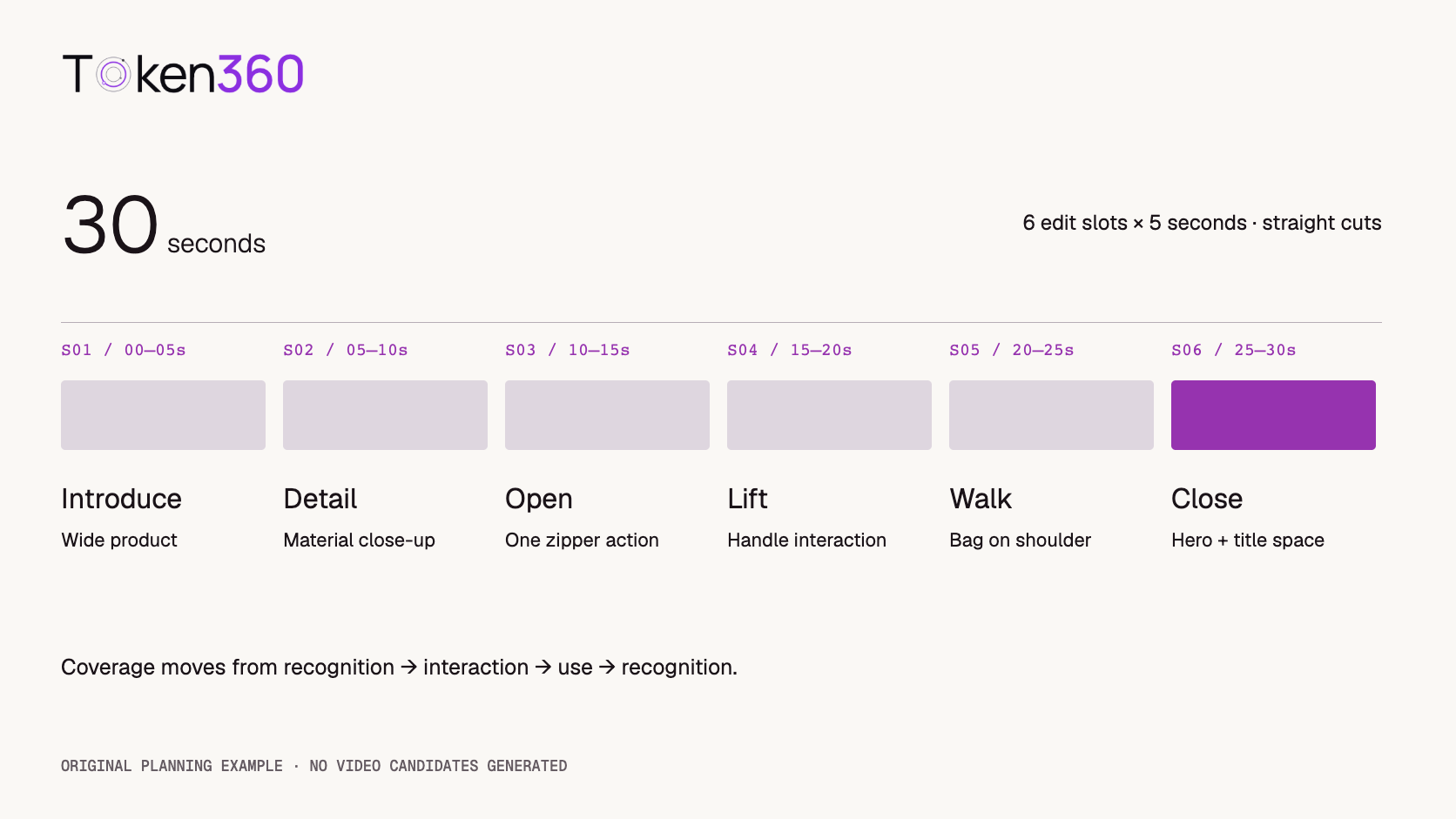
The following is an original planning example. Each shot receives five seconds in the proposed edit, with straight cuts and no overlapping transitions. Equal lengths make the arithmetic transparent; they are not a creative requirement. Adjust pacing after reviewing an initial assembly.
| Shot / edit time | Purpose and framing | Action | Acceptance point |
|---|
| S01 · 00–05s | Introduce the product; wide | Bag rests in a quiet studio | Complete silhouette is visible and stable |
| S02 · 05–10s | Show material; close-up | Slow camera move across a seam | Fabric, seam, and zipper detail remain consistent |
| S03 · 10–15s | Show an access action; medium close-up | A hand opens one zipper | One coherent opening action without geometry changes |
| S04 · 15–20s | Connect product to person; medium | Person lifts the bag by its handle | Hand contact and handle remain plausible |
| S05 · 20–25s | Show use in motion; wider view | Person walks with the bag already on one shoulder | Bag identity and walking direction remain consistent |
| S06 · 25–30s | Close with product recognition; hero view | Bag rests beside clear negative space | Stable product view and room for an edited title |
S03 and S04 contain interactions that deserve early inspection. S01 and S06 provide simpler coverage if the action shots are unsuitable. That is a planning choice, not a measured claim that one model will succeed more often on particular shots.
Separate the shared look from the action in each shot
Create a shared reference brief for the product and environment: bag shape, pocket layout, strap design, fabric appearance, accent color, lighting direction, background, and wardrobe. Keep the approved source assets and their versions available to every shot record.
Then write one shot-specific action. S03 is about opening a zipper; it does not also need a camera orbit, a wardrobe change, and a walk out of frame. Separating those actions gives you a clearer pass criterion and more control in the edit.
References are useful inputs where supported, but they do not guarantee identical objects across independently generated clips. Compare the output against the approved product views. If the real bag has a distinctive logo or label, plan a reliable compositing or filmed-product approach where needed instead of assuming generated lettering will be accurate.
Token360’s model-capabilities guide directs integrations to the selected model page and public schema. Confirm available durations, reference-image inputs, aspect ratios, and other settings there. Do not put unsupported controls into the request simply because they appear in a generic shot template.
Write prompts around a visible start, action, and finish
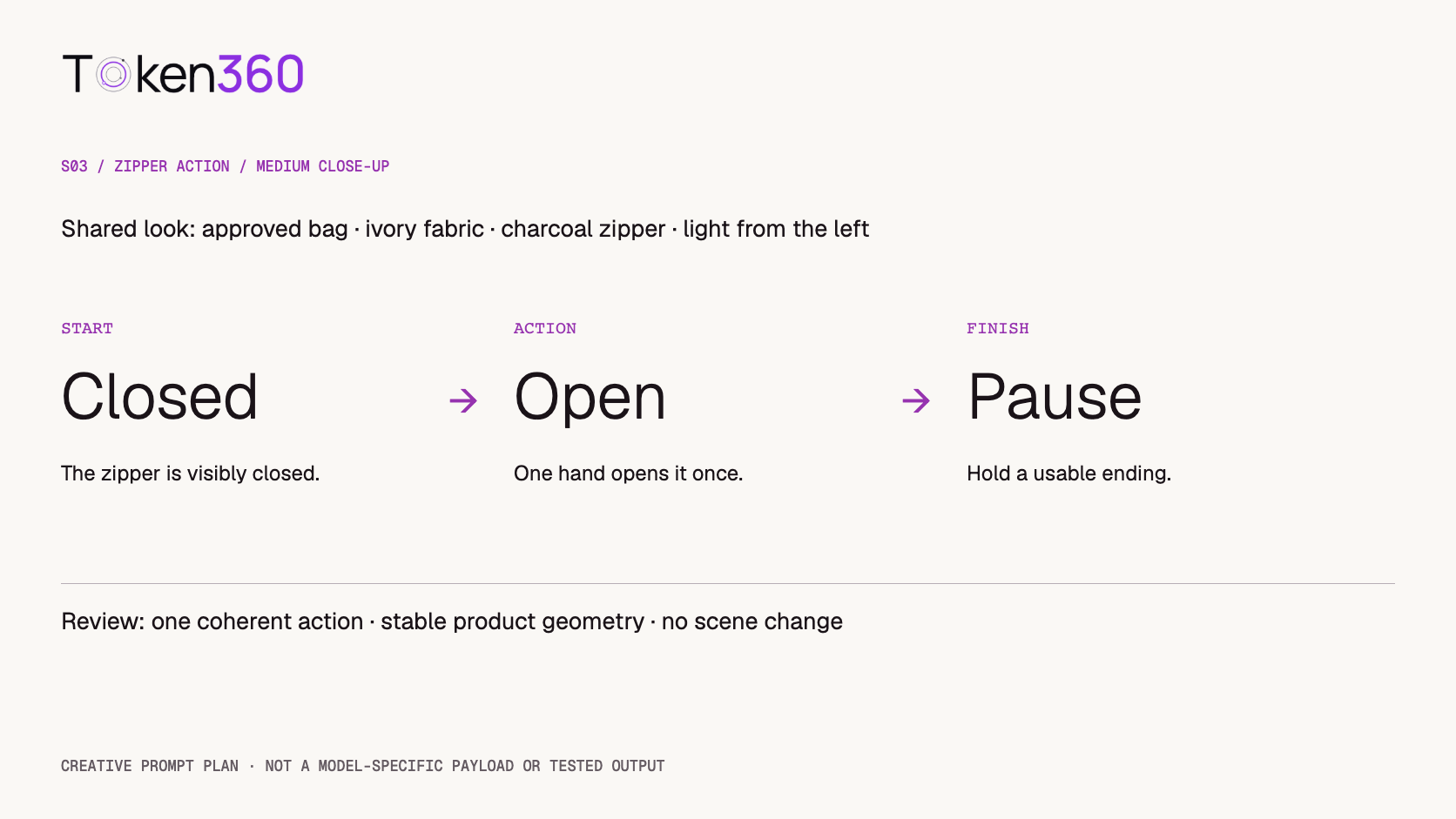
Use the following as a creative draft for S03, not a model-specific API payload. Adapt it to the chosen model’s supported inputs and prompt conventions.
A medium close-up of the approved ivory backpack on a warm neutral tabletop. The charcoal zipper is closed at the start. One hand enters from the right and pulls the zipper open in a single smooth movement, then pauses. Keep the bag’s shape, seam placement, and small violet zipper detail consistent with the supplied reference. Static camera, soft light from the left, no scene change.
The review questions follow directly: did the zipper begin closed, did one opening action happen, did the product keep its identity, and was the ending usable for a cut? A candidate that looks attractive but repeatedly opens and closes the zipper does not meet this shot’s action requirement.
For S05, start with the bag already on the shoulder. That removes the need to perform a lift, a strap adjustment, and a walk within the same shot. The lift has its own coverage in S04; the edit connects the actions.
Plan the cuts as carefully as the clips
Check the state at both ends of neighboring shots. If the bag is open at the end of one shot and visibly closed in the next, decide whether an omitted action is understandable or whether the transition creates confusion. Not every cut must show uninterrupted physical time, but the sequence should feel intentional.
Keep screen direction deliberate. If the person moves left to right in S05, avoid inserting unrelated movement that makes the subject appear to reverse direction without a reason. Use a neutral product detail as a transition only when it supports the story rather than hiding an unresolved mismatch.
Leave editing handles where practical: usable footage before and after the desired action gives the editor room to choose the cut. If the model’s supported generation length is longer than the intended edit slot, select the usable segment instead of filling the timeline simply because the clip exists.
First- and last-frame controls may help some supported workflows, but they should not be assumed to exist for every model. For the specific input method and its limits, see first and last frame video generation.
Distinguish final runtime from generated footage
Six five-second edit slots total 30 seconds. If you plan three candidates for every shot, that is 18 candidate clips. Under an illustrative five-second generation setting, those candidates contain 90 seconds of generated footage before selection. The 3:1 footage-to-edit ratio describes this plan, not a guarantee that one of three candidates will pass.
If the selected model instead supports eight-second clips for this workflow, the same 18 candidates contain 144 seconds before trimming. The final edit can still be 30 seconds. This is why the final runtime alone is insufficient for estimating generation work.
Neither example supplies a price. Calculate costs using the actual model’s billing rule and include retries or revised shots where applicable. Do not multiply by a generic “video price per second” unless that matches the selected route and settings.
You do not have to generate all 18 candidates immediately. First inspect the shots that carry the most important dependencies, such as the approved product look and interaction coverage. Stop and revise the plan if those results reveal a recurring problem. Three candidates per shot is a planning scenario, not a required minimum.
Review candidates in the context of the sequence
Give every candidate a shot ID and attempt ID, then retain the prompt, input references, and settings used. Mark it accepted, rejected, or suitable only after a specific edit. Keep rejection reasons concrete: a changing strap, a repeated action, a drifting camera, or an unusable ending.
Build an early rough cut from the strongest available candidate for each slot. Review the whole 30-second sequence as well as the clips individually. A set of good standalone shots can still have repetitive framing, inconsistent lighting, or weak pacing when assembled.
Separate missing coverage from poor execution. If the sequence never shows how the bag is used, polishing the hero shot will not solve the story gap. Revise the shot list. If the required shot exists but contains one flawed interaction, revise or replace that shot while preserving the accepted material around it.
Decide where audio and titles enter the workflow
Write audio intentions into the plan even if the film is generated silently. A zipper sound, footsteps, music, and a voiceover serve different purposes. Decide which are necessary and whether they come from supported native audio generation, separate production, or editing.
For this example, a restrained music bed and optional synchronized effects could support the action; dialogue is not required. That is a creative proposal, not a finished soundtrack. Review timing and rights for whatever assets you actually use.
Add the final product name and call to action in an editing workflow where you can control typography and spelling. S06 deliberately leaves room for this. Avoid relying on the generator to render the final brand treatment unless the result has been checked and accepted.
The contribution of this guide is the six-shot plan, its observable review criteria, and the candidate-footage calculation. The arithmetic was checked locally. The prompts and image concepts have not been validated through video generation, so this article makes no output-quality, acceptance-rate, or advertising-performance claim.
FAQ
What should an AI video shot list include?
Include shot identity, narrative purpose, framing, action, reference requirements, intended edit duration, generation settings, audio notes, and observable acceptance criteria.
Should I put the whole advertisement into one prompt?
For this workflow, plan separate shots so each action and transition can be reviewed. A single long prompt may be appropriate for another supported workflow, but it offers a different editing and revision tradeoff.
Does a 30-second film require only 30 seconds of generation?
No. Candidate clips, longer supported durations, trimming, and retries can produce substantially more footage than the final edit uses.
Do reference images guarantee product consistency?
No. Use them where supported, then inspect product geometry, materials, labels, and details across the selected outputs.
Must every shot be five seconds long?
No. Five-second slots make this example easy to calculate. Adjust pacing to the action and message while checking the actual runtime of the assembled edit.
Which shot should I generate first?
Start with the shot that resolves the most consequential uncertainty in your plan, such as product identity or a required interaction. Use the result to refine dependent shots before expanding the run.
Read next: formalize candidate review with the AI model evaluation framework and budget candidate generation with AI video API cost optimization.


 Prompt Guide
 Prompt Guide
 Tutorial