Good AI video lighting prompts describe where light comes from, how its shadows look, and what should remain stable while the scene moves. Start with one identifiable source, then specify softness, shadow detail, background brightness, and color. Across multiple shots, preserve the source’s position in the scene rather than repeating “camera-left” after every camera change.
This guide provides an original two-shot lighting brief, reusable prompt clauses, and an eight-candidate review plan. These are editorial examples, not results from a live model test. The illustrations explain the intended setup; they are not evidence that a video model follows it reliably.
Read first: establish the generation process with the text-to-video API workflow, or use the image-to-video workflow when an approved reference image already defines the lighting.
Turn a mood word into a lighting brief
“Cinematic” leaves many decisions open. A bright commercial scene and a dim suspense scene can both be cinematic, yet they demand different highlights and shadow depth. Describe the visible evidence you want the model to produce instead of stacking mood adjectives.
Lighting vocabulary provides a useful starting point. Adobe describes the key as the main source, fill as a way to reduce shadow contrast, and backlight as a way to separate the subject from the background. These are general lighting concepts, not AI generation controls. See Adobe’s explanation of lighting sources and arrangements.
| Decision | Useful prompt language | Review cue |
|---|
| Source and position | A tall window beside the subject’s right shoulder supplies the main light. | The illuminated side remains motivated by that window. |
| Shadow edge | Broad, soft transitions across the face. | Cheek shadows do not become abruptly hard. |
| Fill | Gentle room bounce keeps detail visible in the darker cheek. | Shadow detail remains readable without flattening the face. |
| Background | The wall stays slightly darker than the face. | The wall does not suddenly become the brightest element. |
| Color | Neutral daylight with natural skin tones. | No unexplained warm-to-blue shift. |
You do not need every possible light. A single motivated source and a clear description of its shadows often make a more understandable starting brief than several competing sources. Add complexity when it serves a specific shot.
Anchor light to the room, not every camera angle
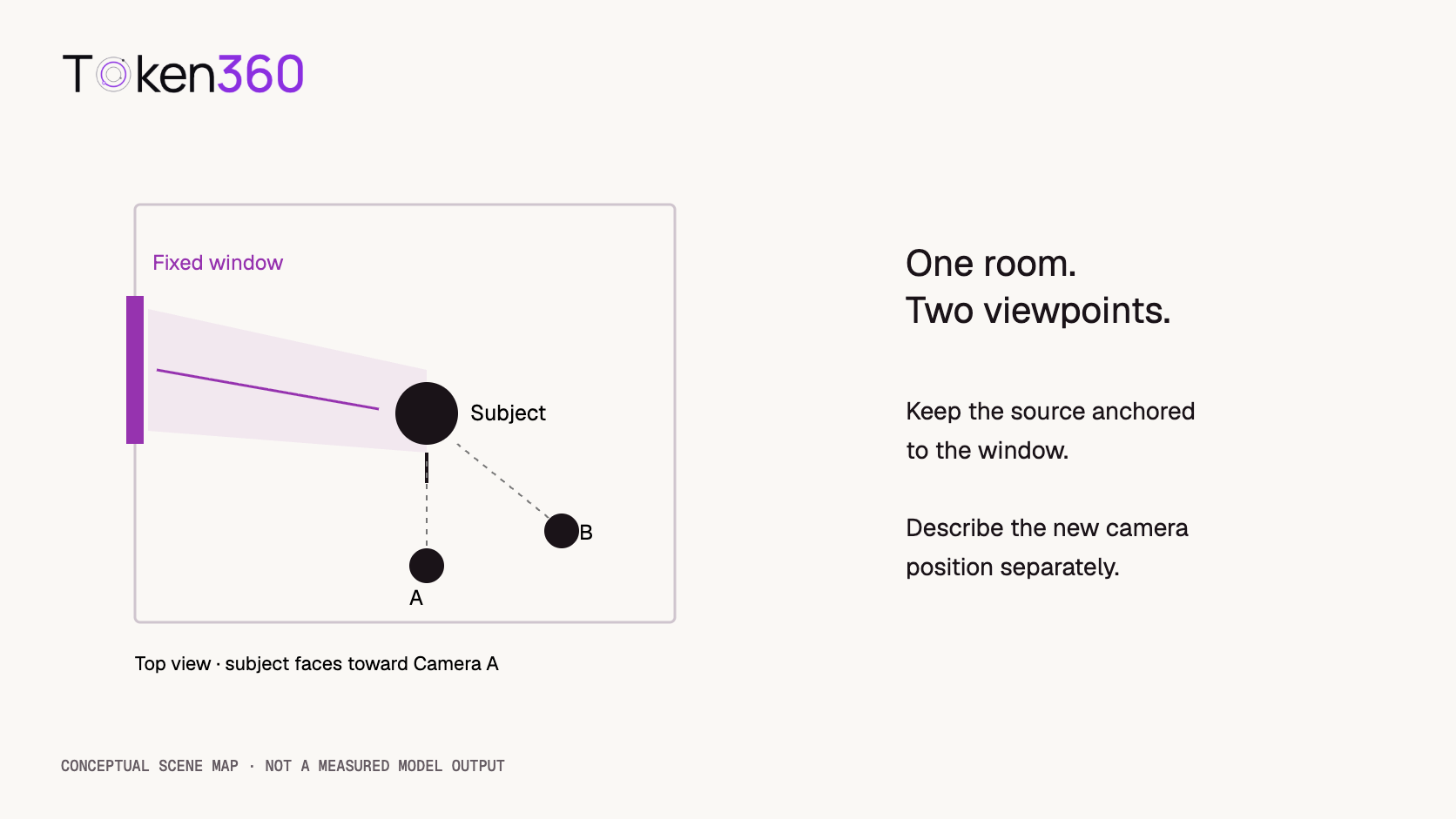
A window stays on the same wall when a camera changes position. Its apparent screen position can change. Repeating “light from the left” without defining the reference can encourage a different interpretation in each shot.
Use a physical anchor: “the tall window beside the seated subject’s right shoulder.” Keep the subject’s orientation stable in the initial test. If the subject turns, describe the turn and expect the distribution of light across the face to change naturally. Stable lighting does not mean every facial pixel stays equally bright.
For a reverse angle, repeat the room description and name the new camera position. Do not automatically demand the same screen-side highlight. Review whether the illumination still makes sense relative to the window. This is an editorial continuity rule, not a guarantee that the generator reconstructs a physically accurate three-dimensional room.
Build a shared brief for two shots
Consider a fictional interview-style sequence. An adult subject sits on a stool beside a tall window. The first shot establishes the upper body; the second moves closer to the face. There is no dialogue, wardrobe change, or deliberate change of time. The objective is to make the cut feel like the same session.
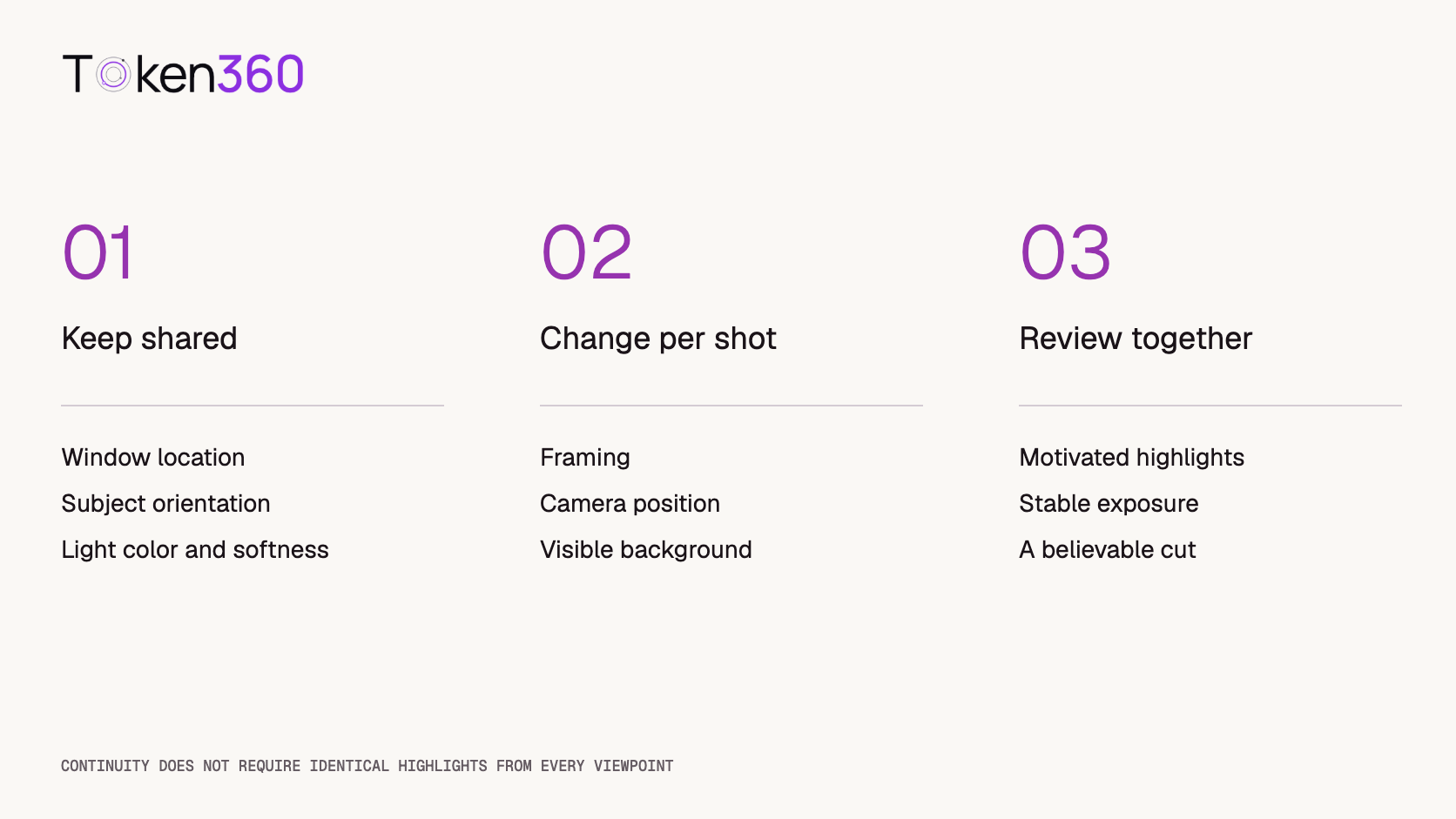
Write a shared block and reuse it verbatim. Change the framing block separately. This helps you identify whether a difference came from the shot description or an accidental rewrite of the lighting instructions.
An adult with short dark hair wears a charcoal jacket and sits upright on a stool in an ivory room. The subject faces forward and remains seated. A tall window beside the subject’s right shoulder provides soft neutral daylight. Gentle room bounce leaves detail in the darker cheek. The ivory wall remains slightly darker than the face. Natural skin tones. The window light, overall exposure, and color remain steady throughout the shot.
Shot A: medium composition
Medium shot from the front, showing the subject from the waist upward. The camera remains stationary. The subject breathes naturally and keeps the same seated orientation.
Shot B: closer composition
Close-up from a nearby front three-quarter viewpoint, showing the face and shoulders. The same window remains beside the subject’s right shoulder. The camera remains stationary. The subject maintains the same orientation and calm expression.
Combine the shared block with either shot block. Set duration, aspect ratio, and resolution using fields actually supported by the selected model. The prose is a creative brief, not a JSON schema. If you use image-to-video, choose a reference whose existing light direction agrees with this description.
Change one lighting property at a time
To compare shadow softness, keep source position, subject, framing, and color constant. Replace only the softness clause. These two alternatives are deliberately different; they are not meant to be combined in the same prompt.
Soft version: “Diffused window daylight creates broad, gentle shadow transitions on the face. The darker cheek retains visible detail.”
Defined-shadow version: “Direct window daylight creates clearly defined shadow edges on the face. Gentle room bounce retains detail in the darker cheek.”
Both versions still use the same window. The second asks for a different shadow character, not an extra lamp or a different time of day. A generator may change additional properties anyway; record those changes instead of treating the variation as a controlled physical experiment.
For a separate color comparison, keep the winning softness clause and change only the color sentence. Do not simultaneously add haze, a sunset, dramatic backlight, and a moving camera. When several variables change together, identifying the useful instruction becomes harder.
Separate reference-image conflicts from prompt failures
An image-to-video input can already show a hard shadow on one side of a face. Asking for soft light from the opposite side introduces a conflict. The result may retain the reference, partially relight it, or distort facial features while attempting the change. Do not interpret every such outcome as a failure of the lighting vocabulary alone.
Start with a reference that expresses the desired lighting. If relighting is the actual task, evaluate it separately from animation and identity preservation. Record that you intentionally requested a change. A reference-preserving animation and a relighting experiment have different acceptance criteria.
Inspect the exact model’s documentation before introducing reference weights, seeds, or lighting parameters. Token360’s model capabilities documentation directs readers to model-specific capabilities and parameters. A descriptive phrase does not establish support for a numeric light angle or a repeatable lighting rig.
Use an eight-candidate review plan
A small comparison can expose obvious problems without pretending to measure general model reliability. Generate two shot descriptions, each with two softness variants, and request two candidates per combination: 2 × 2 × 2 = 8 candidates. This is a proposed test, not a completed benchmark or a statistically representative sample.
Before generating, record the exact model ID, prompt version, supported settings, reference asset if any, and generation date. Keep the source position and color clauses identical. Name files with shot, variant, and candidate, such as A-soft-01 and B-defined-02.
Review each clip at the beginning, midpoint, and end, then watch it at normal speed. Sampled frames help comparison, but can miss brief flicker. Score light direction, shadow character, exposure stability, color stability, and subject integrity separately. Use pass, fail, or uncertain with a short reason rather than a single unexplained quality score.
Next, place Shot A beside Shot B for the same variant. Check whether the cut preserves the same apparent room and time. A clip can look attractive by itself but still fail the pairwise continuity check. Conversely, a changing cheek highlight can be appropriate when the viewing angle changes.
If you later publish results, report the exact count and denominator for each criterion. “Three of four soft-light candidates preserved the intended shadow character” would be a reporting format, not a result claimed here. Include rejected examples and describe who performed the review. Do not convert eight candidates into a universal success-rate claim.
Diagnose the mismatch before generating again
The light flips sides: clarify the physical source location and remove ambiguous left/right references. Check that the subject has not turned. If the camera crosses to another viewpoint, judge the room geometry before deciding that the light moved.
The face becomes brighter midway: remove competing instructions such as entering sunlight unless that transition is intentional. Keep the camera stationary for the diagnostic version. If brightness still changes, record the instability instead of claiming that adding “steady exposure” fixes it.
The background becomes a second light source: simplify glowing signs, bright windows, or decorative lamps. Specify the background’s relative brightness and inspect whether the chosen reference contradicts it.
The clip is stable but the cut feels wrong: compare the two shots together. Wardrobe, pose, framing, and background position may be responsible. Lighting continuity is one component of continuity, not a substitute for the rest of the shot plan.
Keep successful clips while revising the failing shot. If every new candidate changes the look unpredictably, reconsider the reference strategy or model rather than endlessly expanding the prompt. Preserve the original candidates so the next review can distinguish improvement from preference.
Frequently asked questions
What should an AI video lighting prompt include?
Specify the source and its physical position, shadow softness, shadow detail, background brightness, and color. Add what should remain stable during motion. Keep the instruction consistent with the scene and any reference image.
Does “cinematic lighting” guarantee a professional result?
No. It is a broad style phrase. Describe observable lighting characteristics and evaluate the generated clip against them. Visual quality and compliance with the requested setup should be reviewed separately.
Should I use the same camera-left instruction in every shot?
Not automatically. Camera-relative directions change with the viewpoint. Anchor the light to a window, wall, or other stable part of the scene, then describe each camera position separately.
Can I specify an exact color temperature?
You can include it as descriptive language, but that does not guarantee a calibrated result. Treat numeric control as supported only when the exact model schema documents it. Review visible color consistency in the output.
Why does the lighting change when the subject turns?
A turn changes which surfaces face the source, so some highlight and shadow movement is natural. Distinguish that from unexplained source relocation, exposure pumping, or a sudden color shift.
Can these prompts guarantee matching shots?
No. They create a clearer brief and review process. Matching shots still requires inspecting candidates together, selecting compatible outputs, and sometimes revising references or regenerating an individual shot.
Read next: explore first-and-last-frame video generation for endpoint constraints, then use the AI model evaluation framework to document acceptance criteria beyond lighting.


 Prompt Guide
 Tutorial
 Tutorial