AI video character consistency means a character remains recognizably the same as the camera, pose, action, and scene change.
A convincing opening portrait is only the beginning. The face may drift after a turn, a jacket pocket may move after an occlusion, or an accessory may disappear between two otherwise usable shots.
Reference assets can help guide generation, but they need clear roles and a review process. An appearance image, a movement clip, and a setting reference contain different information. Your workflow should explain what each contributes and check whether the generated result follows that division.
This guide uses a fictional courier in a blue jacket to show how to build a small reference pack, write a precise brief, and review continuity across a complete sequence.
Before you read: Start with Image to Video API Workflow for Production Assets: for source preparation and asset versioning. For model-specific prompting, see the Seedance Prompt Guide:.
For the complete asynchronous job lifecycle, start with AI Video API Architecture: A Production Guide to Asynchronous Generation.
Define what must remain consistent
Character consistency includes more than facial resemblance.
Before generating a shot, identify the details that establish the character and the changes the story permits.
For the courier, the brief might require a blue jacket with two chest pockets and a shoulder bag worn on the left side.
Those details make review concrete. A pocket changing sides is a different problem from the camera showing the same pocket from a new angle.
Avoid treating every visual change as an error. Perspective, lighting, expression, and movement should change naturally. The question is whether those changes remain consistent with the approved character.
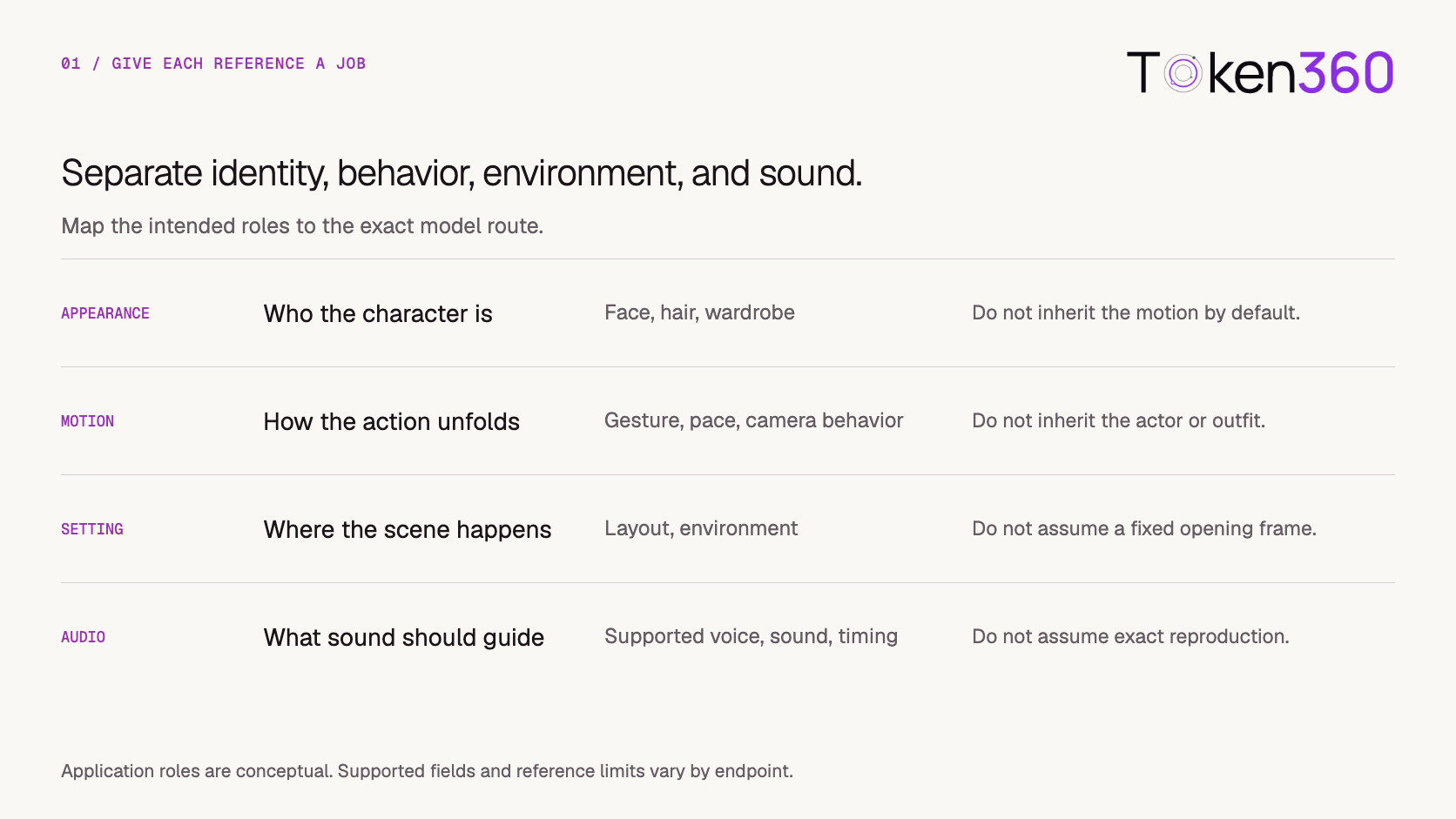
Separate appearance, motion, setting, and audio
Give every reference a clear purpose.
These are conceptual roles. The selected model and serving route determine which combinations are supported and how they must be submitted.
ByteDance’s Seedance 2.0 launch material describes mixed text, image, video, and audio inputs, including references for composition, movement, and other scene elements. That establishes a model-level capability description. It does not establish that every API route exposes every control.
For the courier example, a walking clip might be useful only for pace and the final wave. The generated character should still follow the approved appearance references.
Build a small, coherent reference pack
Start with the fewest assets needed to resolve the shot’s important details.
For a medium shot with a turn, a useful pack might contain a clear front view, a compatible three-quarter view, and a wider view showing the jacket and bag. Add other material only when it serves a specific supported role.
Inspect the pack for contradictions:
-
Different hairstyles or apparent ages.
-
Inconsistent jacket pockets or fasteners.
-
Accessories appearing on opposite sides.
-
Mirrored images that reverse distinctive details.
-
Retouching that changes facial structure.
-
Crops that hide the feature the shot needs to preserve.
More references can add ambiguity if they disagree.
Name and version each asset, and keep its intended use with the production record. For real people, use authorized references and follow the selected provider’s requirements for likeness inputs.
Keep the approved reference pack separate from generation candidates. A generated frame should not silently become the new source of truth, because it may already contain a small identity error.
Write a brief that explains what to take from each reference
A prompt should connect each reference to a specific instruction.
For the courier:
Use the approved character images for the courier’s face, hairstyle, blue jacket, and shoulder bag. Use the motion clip only for the slow walking pace and final wave; do not adopt its performer’s appearance or clothing. Use the courtyard reference for the setting. Create one continuous medium shot. Keep the bag on the courier’s left side and preserve the jacket design throughout the turn.
This distinguishes appearance from behavior and makes the continuity requirements visible.
The brief still needs to match the route’s actual input mechanism. Typing a filename into a prompt does not attach the file.
For example, fal’s Kling O3 reference-to-video documentation describes element and image references with corresponding prompt labels. Follow the documented syntax for that endpoint rather than carrying labels unchanged between providers.
If the route cannot express a required reference role, choose a supported workflow or simplify the request. Prompt wording cannot create an unavailable input capability.
Validate the route and preserve the reference mapping
Keep your application’s reference manifest separate from the provider payload.
The manifest describes the creative intent. An adapter translates that intent into the supported fields, attachment order, and labels for the selected route.
For example:
This is an application-level example, not an API request schema.
Before submission, validate supported media types, reference limits, file requirements, and any restrictions on combining inputs. Preserve the resolved prompt and the final attachment-to-label mapping with the generation attempt.
This matters when references are reordered. If a prompt points to the wrong attachment, an apparently creative failure may actually be a mapping error.
Store the public model identifier and relevant route settings too. Later troubleshooting should be able to distinguish a changed model from a changed reference pack.
Review the moments most likely to expose drift
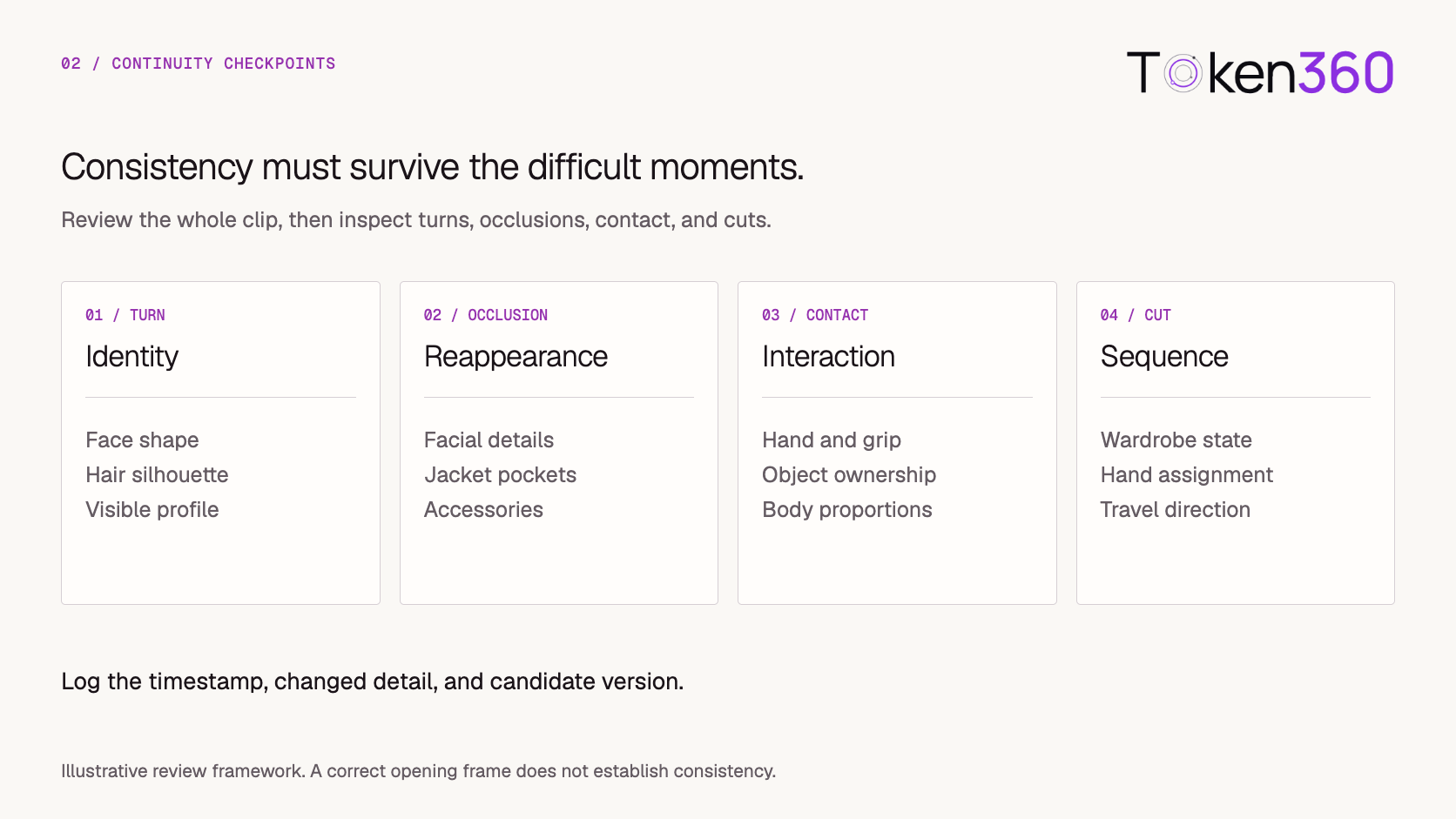
Watch the entire clip at normal speed, then inspect difficult moments more closely.
For the courier, the face may remain acceptable while the shoulder bag changes sides. Review those dimensions separately.
Record observations with timestamps and the candidate version:
At 3.2 seconds, after the courier turns back toward the camera, the jacket’s left chest pocket disappears.
That note supports a targeted revision. A single overall “consistency score” can conceal which detail failed and when.
Extracted frames can help compare features, but they should supplement playback. Temporal flicker or a brief transformation may be missed by sparse sampling.
Plan continuity across shots before generating them
Two individually acceptable clips can still fail when edited together.
A character may hold a parcel in the right hand in one shot and the left hand in the next. A bag may disappear, a jacket may become unzipped, or the direction of travel may reverse without explanation.
Create a short continuity plan for the sequence.
Use the same approved identity anchors across shots. A shot-specific subset of references may be appropriate when supported, but should remain traceable to the approved pack.
Review the assembled sequence as well as each clip. Similarity to a reference and continuity across an edit are related, but separate, acceptance decisions.
Revise the cause of the inconsistency
Match the correction to the observed problem.
When testing a correction, hold other variables stable where possible.
If you change the reference pack, camera movement, wardrobe description, and model together, you will have little evidence about what improved the result.
Set an attempt or spend limit before iterating. Repeated drift in a critical requirement should trigger a production decision, not an indefinite series of stronger prompt adjectives.
Use controlled production methods for non-negotiable details
Some requirements leave little room for generative variation.
If the character’s appearance must match an approved treatment exactly, consider approved footage, controlled animation, or a compositing workflow that preserves the critical element directly.
Generated environments and atmospheric motion may still contribute to the scene. The production method should assign exact requirements to a process capable of meeting them.
Compositing also needs planning: perspective, lighting, occlusion, and camera motion must work together. It is not an automatic fix for every difficult shot.
Choose the fallback based on the requirement that failed. A stable face, exact garment artwork, and a physically precise hand interaction may need different approaches.
Preserve the reference-to-delivery history
Keep the reference manifest, generation attempt, candidate, and review decision connected.
The final video may include trimming, reframing, color correction, sound, or compositing. Record those changes as asset versions and review the version actually intended for delivery.
A useful production history connects:
Approved reference pack → shot brief → resolved request → candidate → edits → approved sequence
Retrieve generated outputs promptly so review does not depend on a temporary provider URL remaining available.
If a source reference is replaced or withdrawn, the application should be able to identify its derived videos. Replacing a source file should not silently alter the history of earlier attempts.
Start with one controlled reference trial on Token360
Begin with one character, one simple shot, and a small approved pack.
Use the Token360 model documentation to identify a candidate route, then confirm the required reference capabilities through its instructions and the API documentation.
A practical first trial is:
-
Define the character’s stable details.
-
Select compatible references and assign their roles.
-
Validate the route’s supported inputs.
-
Generate a simple action with one deliberate turn.
-
Review identity and wardrobe before, during, and after the turn.
-
Record the result before adding interactions or additional shots.
For an application integration, verify that reference reordering preserves label mappings, unsupported roles are caught before submission, and review decisions remain attached to the correct candidate.
This gives you a controlled basis for testing more ambitious sequences.
Frequently asked questions
Do more reference images always improve character consistency?
No. Additional images are useful when they resolve missing information and agree with the approved character. Conflicting references can make the intended appearance less clear.
Is a character reference the same as a starting frame?
No. A character reference guides appearance through a supported mode. A starting frame guides the opening composition. Check how the selected route distinguishes them.
Is a motion reference the same as video extension?
No. A motion reference guides behavior or camera movement. Video extension continues an existing clip through a separately documented workflow.
Can one frame prove that the character is consistent?
No. Review the full clip, including turns, occlusions, interactions, and reappearance. For multiple shots, review the edit too.
Should a generated frame become the reference for the next shot?
Only after it has been deliberately reviewed and accepted for that role. Keep it linked to the original reference pack and avoid silently propagating small errors across a sequence.
What if facial identity looks right but clothing changes?
Treat wardrobe as a separate continuity failure. Record the affected detail and time, check the reference pack, and revise the relevant action or input.
Start with one coherent reference pack and one controlled shot. Explore models on Token360.
Related production video guides


 Tutorial
 Tutorial
 Tutorial