Browser access does not prove API access. Check the image response, authentication, URL lifetime and model input contract before retrying.
MULTIMODAL INPUTS · FILE ACCESS · BLOG 170
By Yuki Yu · Editorial update: November 6, 2026
An image opening in your browser does not prove that an AI service can retrieve it. The service needs an accepted input format and access to the actual image bytes, without relying on your browser session. Check the response, access controls and URL lifetime before changing the prompt or repeating the inference request.
OpenRouter’s FAQ on supported formats introduces URL and Base64 image inputs. Its Image Inputs guide distinguishes publicly accessible URLs from locally stored or private images. That distinction leads to a practical integration question: what can the receiving service actually fetch?
This article is a documentation-based diagnostic guide. The timing example below is constructed, not a measured Token360 incident. No live inference requests, availability tests or customer-file downloads were performed.
Read first: Token360’s model capability guide explains how to verify the selected model’s input types, supported file references and limits. Confirm those before investigating a URL.
Why can the browser open an image that the API cannot?
Your browser and the remote image fetcher are different clients. The browser may have an authenticated session, access to an internal network or a locally created object URL. Sending its address to an API does not automatically transfer that access. Establish which client can retrieve the resource before blaming image understanding or generation.
A product-review page might display a reference photo after you log in. Copying that page’s URL into an image field can give the remote client a sign-in page instead. The visible photo tells you what your session rendered; it does not tell you what an independent request receives.
fal’s hosted-file instructions warn that some hosts block requests, rate-limit them or treat them as bots. These are possible retrieval conditions, not proof that any particular failed Token360 call encountered one. Check the image host’s access logs when you control the host.
Observation
What it establishes
What remains unknown
The image appears in your browser
Your current browsing session can display it
Whether an independent client receives image bytes
Your backend downloads the image
That backend’s network and credentials can retrieve it
Whether the service’s retrieval path has the same access
The image request returns HTTP 200
The host returned a successful HTTP response
Whether the body is the intended image rather than HTML
The selected model accepts the image
The particular submission passed its input path
Whether the model will interpret or use the image correctly
Does the URL return an image or a page containing one?
Inspect the retrieved body, not only the filename or success status. A share link can return an HTML preview, login screen or error page. A direct image response should decode as the intended supported image. A URL ending in an image extension is a clue, not sufficient validation of its contents.
For an approved test asset, record the response status, redirect destination, declared content type and whether the downloaded bytes decode. If a redirect ends on an account page, replacing the prompt will not turn that response into an image. Obtain an authorized file-delivery URL or use a documented upload mechanism.
Keep a local hash of the approved source and retrieved file when byte-for-byte equality matters. Some delivery services transform images, so a different hash can reflect resizing or re-encoding; inspect the dimensions and content before calling it corruption. The diagnostic aim is to identify what was delivered, not to require every valid image service to preserve identical bytes.
A header-only check is useful preliminary evidence but does not verify decoding or the final body. Avoid repeatedly invoking a paid model merely to discover that the file host is serving a web page.
Can you send a local path or a browser blob URL?
A local path or browser-created object URL should not be treated as a remotely hosted image. It identifies data in a different access context. Use a file upload, asset reference or inline representation that the chosen API explicitly supports. A field named “URL” does not make every URI scheme usable by the receiving service.
MDN describes blob URLs as references associated with browser-managed objects. A preview beginning with blob: can be useful inside your web app without being an address a remote model can download. Similarly, a path on your laptop is not a hosted file just because it appears in a JSON string.
For Token360, do not assume every model accepts the same upload or asset syntax. Its capability documentation lists URLs, Base64, uploaded files and asset references as model-dependent possibilities. Use the selected model’s current schema to choose the representation.
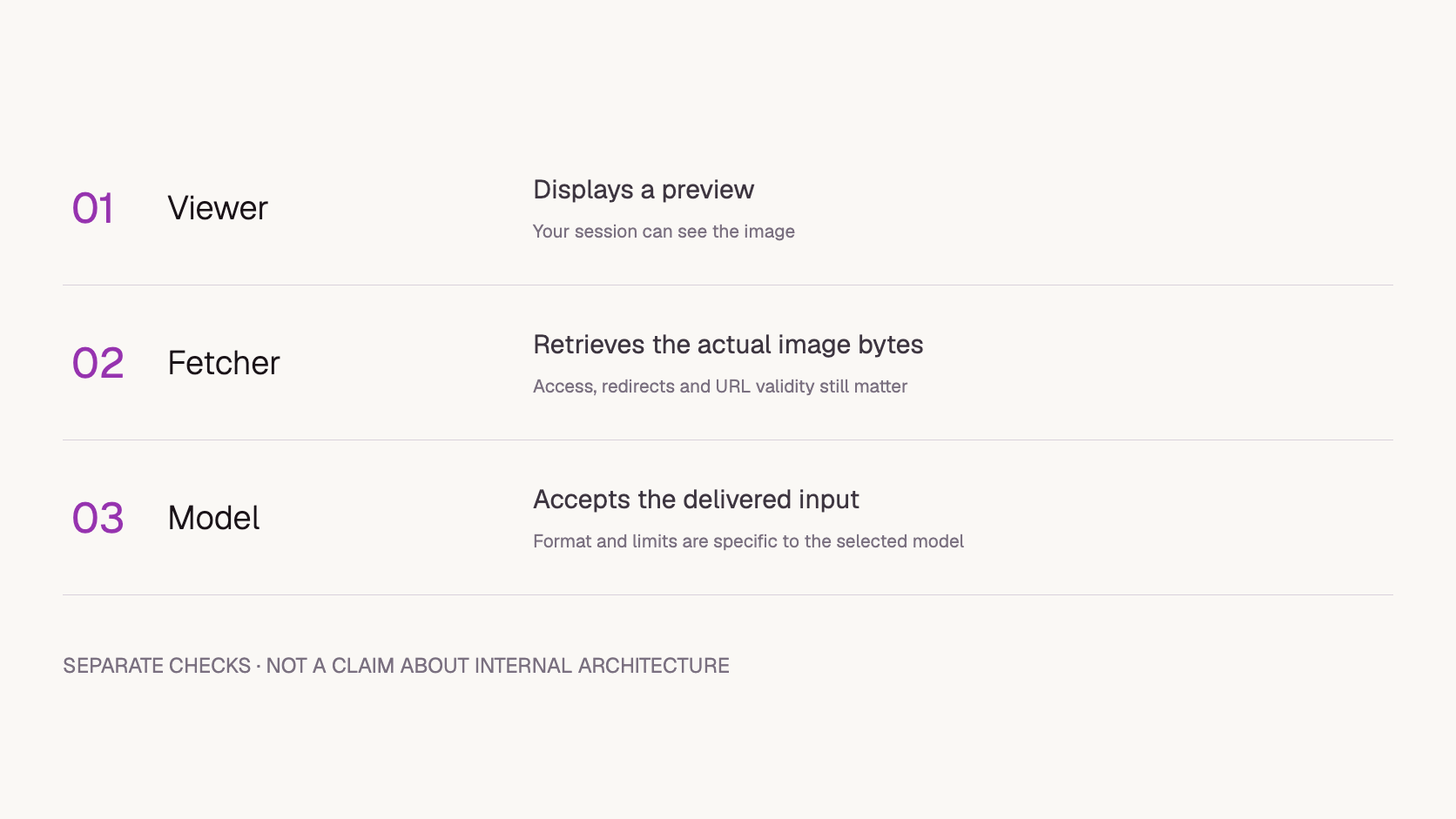
Three separate checks. A successful preview does not complete the retrieval and input-validation steps.
Can a signed URL expire before the image is fetched?
Yes, if retrieval begins after the URL is no longer valid. A link that worked when the request was prepared may fail later. Determine when the system retrieves the input rather than assuming submission time equals fetch time. Fetch timing and retry behavior depend on the documented workflow; this article does not establish Token360’s internal schedule.
Amazon S3’s presigned-URL documentation explains that access is time-limited and can end earlier when the signing credentials expire. It also treats these URLs as bearer tokens. Apply that evidence to S3 URLs specifically; other storage products can have different rules.
Constructed timeline
Event
Implication under these assumptions
12:00 UTC
A URL is issued with validity until 12:02
The access window begins
12:01 UTC
An application submits a request containing it
Submission falls within the stated expiry window; access still depends on permissions and signing credentials
12:03 UTC
A hypothetical worker first retrieves the file
The request now falls outside the assumed access window
This example demonstrates a dependency between retrieval time and access lifetime, not a measured queue duration or a recommended expiration setting. Select a lifetime that covers the documented processing path and permitted retries while meeting the asset’s access policy. If that cannot be reconciled, choose an approved alternative input method.
Do not publish the complete signed URL in screenshots or ordinary support logs. Retain a non-secret asset identifier, issuance and expiry times, and a redacted host/path record sufficient for investigation.
Is this a CORS problem?
Not necessarily. Browser cross-origin restrictions and a remote server’s ability to fetch an image are different issues. First locate where the failure occurred: browser upload, application submission or remote retrieval. Changing CORS headers does not grant authentication, restore an expired signature or convert an HTML preview page into a valid image.
MDN’s CORS guide describes the browser mechanism for controlling cross-origin script requests. A browser console error can matter when your app itself fetches an image. An inference service reporting that it could not retrieve a remote file needs evidence from that separate path.
Keep the API request error and the image-host response separate in your notes. An HTTP status returned to your application is not automatically the status returned by the image host. Without host logs or a detailed error, mark the remote fetch status as unknown.
When should you use Base64 or an uploaded asset instead?
Choose an alternative representation when it is supported and better matches the file’s access requirements. Inline data can remove a separate remote URL fetch, while an uploaded asset can use the platform’s documented file lifecycle. Neither choice removes model-format limits or establishes privacy guarantees. Verify the exact input contract and handling policy first.
Base64 increases request size and remains subject to payload limits. An asset reference may require a particular asset type, readiness state or account scope. Replacing one representation with another therefore needs its own validation; it is not a universal workaround for all image failures.
Token360’s security and data-handling guide separates application, gateway, provider and asset-storage boundaries. Sending bytes inline does not, by itself, make retention or downstream processing private. Keep confidential files in an approved handling path instead of making a storage bucket public to simplify a test.
How do you isolate the cause without changing the whole request?
Use the same approved image and keep the model, prompt and other parameters fixed. First verify retrieval independently; then compare supported input representations only if necessary. Record each observation and its limits. A successful replacement narrows the problem but does not, by itself, prove that authentication, expiry or another specific condition caused the original failure.
Confirm the image field, accepted formats and limits in the selected model schema.
Inspect an authorized retrieval without relying on your logged-in browser session. Record the client context.
Check the final body, content type, dimensions and decode result.
Compare URL validity and any known retrieval time. Leave unobserved timings unknown.
If permitted, test the same bytes through a supported upload or inline path. Change only that representation.
Keep the returned request ID and sanitized error. Do not repeat inference indefinitely when the file response is already wrong.
The downloadable
Copy image-url-diagnostic-worksheet.csv:
field,observation,evidence_or_limit
model_id,Not recorded,Use exact public ID
endpoint,Not recorded,Use selected model contract
input_representation,Not recorded,URL or supported alternative
independent_client_context,Not tested,Do not assume provider network equivalence
final_response_status,Unknown,Image host status not gateway status
content_type,Unknown,Check bytes as well
decode_and_dimensions,Not tested,Use authorized asset
url_validity_window,Unknown,Do not include signed query string
actual_fetch_time,Unknown,Do not infer from submission time
comparison_result,Not tested,Same image and fixed parameters
request_id,Not recorded,No API key
conclusion,Not established,Separate observations from causes
separates observations from inferred causes. It is an unfilled investigation template, not a test result or an API request body.
When escalating to support, include the model ID, endpoint, UTC time, request ID, input representation and sanitized error. Add whether the host returned bytes to an independent authorized client. For teams using Token360, that distinguishes file delivery from model behavior without exposing an API key or a private image link.
The suffix alone does not prove the response format. Follow the selected API’s URL requirements and verify the delivered bytes and accepted content type. Do not rename an HTML link and expect it to become an image.
Should I add my storage password to the prompt?
No. A natural-language prompt is not a file-authentication mechanism. Use a documented, authorized input path and keep credentials out of prompts and routine logs.
Does fetching the image prove the model understood it?
No. Retrieval, input acceptance and task quality are separate checks. Once the input is accepted, evaluate whether the model used the intended visual evidence correctly.


 Prompt Library
 Guides
 Guides