Changing an AI video from 16:9 to 9:16 changes what the viewer can see. A centered crop may preserve a subject at the start and lose it seconds later. Plan the destination composition before generation, check the entire action path, and choose between cropping, moving the crop, fitting the original frame, or generating a separate vertical shot.
This guide uses an original sailboat scene to make the trade-off visible. The crop calculations are derived from geometry, not a model benchmark. The cover and diagrams are illustrative assets; no generated video has been tested for this article.
Read first: use the text-to-video API workflow to prepare requests, or the image-to-video workflow when an input image establishes the composition.
Separate aspect ratio, resolution, and composition
Aspect ratio describes the relationship between width and height. Resolution describes the pixel dimensions. Composition describes where subjects and meaningful details sit inside the image. Changing one does not automatically solve the other two.
For square pixels, both 1920 × 1080 and 3840 × 2160 are 16:9. A 1080 × 1920 delivery is 9:16. Scaling a wide frame proportionally keeps its shape; it does not turn its composition into a tall one. Stretching it nonuniformly changes proportions and is usually unsuitable when the subject’s shape matters.
Before generating, record each required delivery size and what must remain visible. Confirm the exact model’s supported aspect ratios and resolutions in its schema. Token360’s model capabilities documentation makes the model page and public schema the source of truth. Do not assume a provider family supports every ratio or that a sentence saying “vertical” overrides the request settings.
Calculate what a full-height crop actually retains
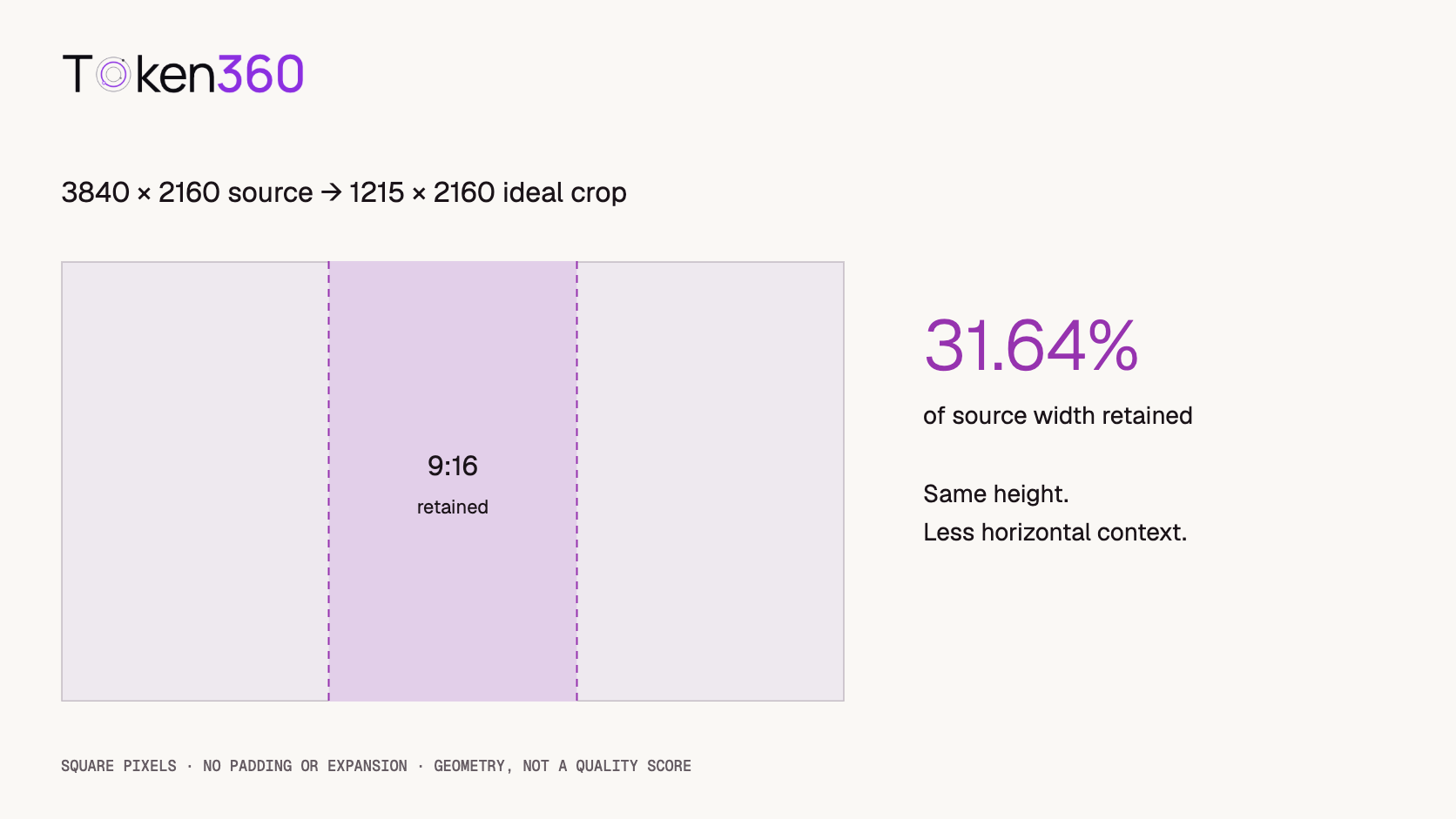
Assume a 16:9 source, square pixels, and a 9:16 crop that uses the full source height. There is no padding, rotation, or generated expansion. The retained width is the source height multiplied by 9/16.
Source: 3840 × 2160
Vertical crop width: 2160 × 9 / 16 = 1215
Retained width share: 1215 / 3840 = 31.640625%
Removed width share: 68.359375%
Because the height is unchanged, the retained area share is also 31.64%. This is a geometric statement about the source frame, not a statement that 68.36% of its storytelling value is lost. A simple centered subject may survive well; two widely separated subjects may not.
A centered crop retains approximately the middle 34.18%–65.82% of the source’s horizontal coordinate range. Fractional crop boundaries must be rounded or handled by the editing tool. The 1215-pixel crop width is an exact geometric result; it is not a recommendation to export an odd-width video if the chosen codec requires even dimensions.
Resolution also matters. A full-height crop from 1920 × 1080 has an ideal width of 607.5 pixels. Scaling that crop to 1080 × 1920 enlarges it by approximately 1.78× in each dimension. From 3840 × 2160, the ideal crop is 1215 × 2160, which can be scaled down to 1080 × 1920. These calculations do not measure perceived sharpness or compression quality.
Use the sailboat scene to identify what matters
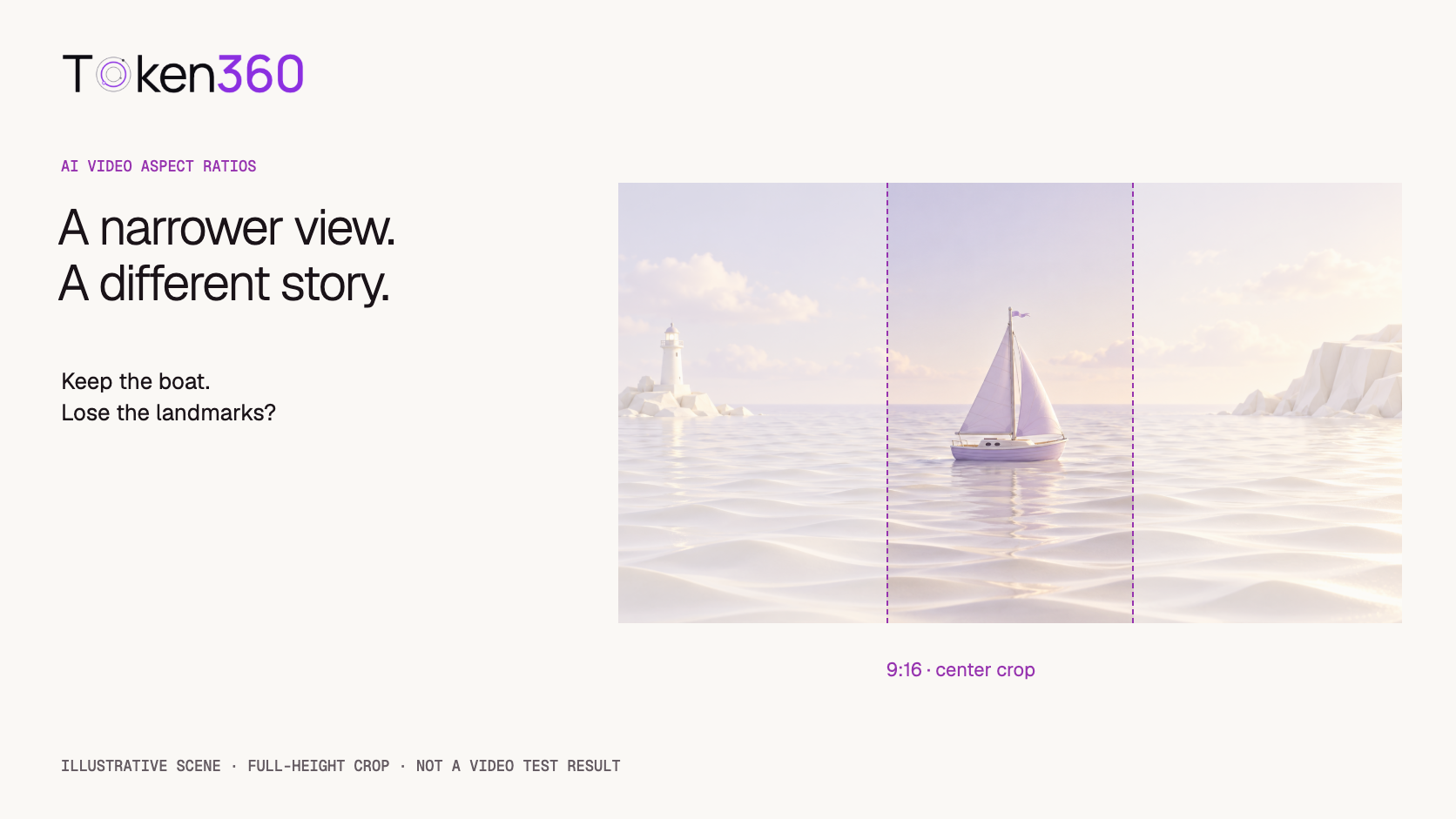
Imagine a wide scene with a small sailboat in the middle, a lighthouse on the left, and a cliff on the right. A centered vertical crop can retain the boat while excluding both landmarks. That is acceptable if the shot’s purpose is to show the boat. It is unacceptable if the purpose is to establish its passage between the lighthouse and cliff.
Write the shot’s essential information before choosing the crop. Separate required elements from optional atmosphere. “Keep the boat and its complete sail visible” is different from “show the boat traveling between two landmarks.” The second brief may need a different camera position or a separate vertical composition.
Next, consider motion. A boat that begins in the center and travels horizontally can leave a fixed crop. A boat approaching the camera may stay near the center but grow until its sail or hull is clipped. Both examples show why checking one attractive thumbnail is insufficient.
Check the whole action envelope
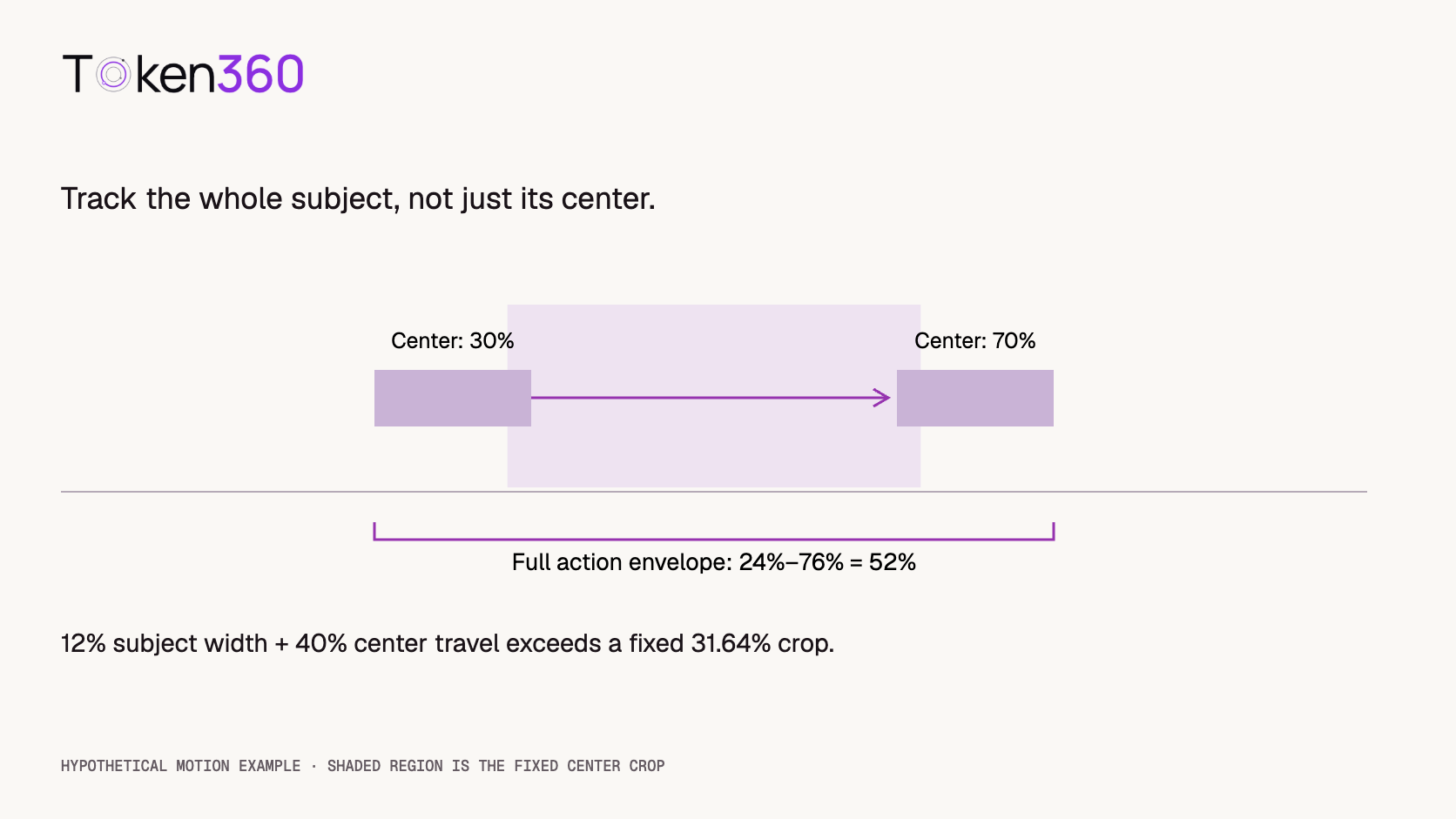
The action envelope is the region occupied by required subject parts across the clip. Include the full sail, hull, and any wake that carries important visual meaning. Do not track only the subject’s center point.
For a fixed crop, compare the union of those positions with the available width. As a hypothetical example, a subject occupies 12% of the source width and its center travels from 30% to 70%. Its full horizontal envelope runs from 24% to 76%, spanning 52%. That cannot fit inside a stationary crop retaining 31.64% of the source width.
A moving crop might follow it, because the subject’s width at any one moment is smaller than the crop. However, following changes the presentation: the background moves relative to the output, and another required landmark may disappear. A tracking crop is an editorial decision, not a neutral file conversion.
Choose a conversion method based on the shot
| Method | Useful when | Review carefully |
|---|
| Fixed crop | Required content stays inside one region. | Edges, growing subject size, and late movement. |
| Moving reframe | One subject moves through a wider source. | Tracking smoothness and competing subjects. |
| Fit the full frame | The entire wide composition must remain visible. | Smaller subject size and unused space. |
| Separate vertical generation | The tall format needs a different composition. | Identity, setting, and continuity across versions. |
Adobe describes Auto Reframe as identifying action and reframing clips for different aspect ratios. That is a useful editing capability, but automatic tracking still needs review against your intended story. It does not establish that a Token360 video endpoint offers reframing.
Generative expansion is another possible workflow when an appropriate tool supports it. It creates new surrounding content rather than recovering pixels from the original shot. Review invented background details, motion, and continuity separately; do not describe expanded regions as preserved original footage.
Write separate composition clauses for each format
Keep the subject and style brief shared, then adapt the composition and action for the destination. The following original prompts are planning examples, not tested model instructions.
Shared scene
A pale-lavender sailboat moves gently across calm ivory water in a stylized paper landscape. The complete sail and hull remain recognizable. Soft daylight and a quiet, restrained color palette remain consistent.
Wide composition
A wide view establishes the sailboat between a lighthouse on the left and a distant cliff on the right. The boat moves slowly across the water. The camera remains stationary and preserves the relationship between the two landmarks.
Vertical composition
A tall composition follows the sailboat approaching gently toward the camera. Keep the complete sail and hull visible with room above and below. Place distant coastal detail behind the boat rather than requiring widely separated landmarks at opposite sides.
The vertical version intentionally changes the shot design. It is not an identical event recovered from the horizontal clip. If exact action matching matters, a crop or carefully reviewed reframe may be preferable to a second generation. If the scene’s meaning requires both landmarks, redesign their placement explicitly instead of hoping a narrow output will contain them.
Plan a small comparison before producing a batch
Start with one approved wide candidate and compare two edits: a fixed crop and a moving reframe. If neither preserves the required information, create a separate vertical candidate using supported settings. This sequence is a proposed workflow; no such comparison has been run here.
Record the source file, source dimensions, destination dimensions, crop method, and any tracking or scale adjustments. For a regenerated version, record its model ID, prompt, reference inputs, and request settings separately. Do not label an independent generation as another crop of the same source.
Review each version at normal speed. Check complete subject visibility, meaningful background elements, stability of the crop, and readability after adding the intended captions or graphics. Inspect the opening, the most extreme movement, and the ending, then watch the whole clip for short edge collisions.
Keep comparison criteria tied to the brief. A version can retain the boat perfectly but fail to establish the location. Another can retain the landmarks while making the boat too small for the intended presentation. Document that trade-off instead of reducing every result to one unexplained quality score.
Validate the final delivery, including overlays
A subject inside the frame can still be covered by captions or interface controls. Reserve space using the destination’s current overlay guidance and the actual planned graphics. There is no universal margin that makes every placement safe on every platform and device.
Add essential text in the editing workflow when precision matters, then review it at the final size. Do not assume an area that was empty in the source remains useful after a moving crop. Check the complete export rather than only the clean generation output.
Finally, verify the delivered width and height, expected orientation, playback, and absence of unintended stretching. Check that any padding is intentional. If both wide and vertical assets are required, name them clearly and preserve their relation to the source or generation record. This prevents a valid file with the wrong composition from being mistaken for the approved version.
Frequently asked questions
Can I change 16:9 to 9:16 without cropping?
You can fit the entire wide image inside a tall canvas, leaving unused space, or use a supported expansion workflow that generates additional content. Neither is the same as filling a tall frame with preserved original pixels alone.
How much does a vertical crop retain?
For a 16:9 source cropped to 9:16 at full height, it retains about 31.64% of the width and area. The calculation assumes square pixels, no padding, and no rotation or expansion.
Should every subject be centered?
No. A fixed centered subject is convenient for a centered crop, but composition should serve the shot. Check the required subject parts and motion path, then choose a crop position or generate a dedicated layout.
Does higher resolution solve framing problems?
It can provide more pixels for cropping, but it does not bring excluded content into the destination composition. A wide action envelope can still exceed a tall crop even in a high-resolution source.
Can I reuse the same prompt for both ratios?
You can keep the shared subject and style description, but reconsider framing and motion. Use supported aspect-ratio settings and review each output independently. The same text does not guarantee the same composition or event.
When should I regenerate a vertical version?
Consider it when cropping or reframing cannot preserve the shot’s essential information at a useful size. Treat the new generation as a separate candidate and review continuity with the wide version rather than assuming they match.
Read next: the AI model evaluation framework helps define acceptance criteria; video API cost optimization helps budget additional candidates when a new composition is necessary.


 Prompt Guide
 Prompt Guide
 Prompt Guide