AI APIs for Print Shops: From Brief to Job Specification
Use AI APIs to clarify print briefs, quantities and artwork versions. Keep customer approval and technical preflight separate before production.
INDUSTRY USE CASES · PRINT PRODUCTION
Print shops can use AI APIs to extract job requirements from customer messages, identify missing specifications and prepare a reviewed production brief. Keep estimating, artwork approval and technical preflight separate. A convincing mockup does not establish the correct paper, dimensions, quantity or production-ready file.
For commercial printers, print-service networks and software vendors serving them, the useful opportunity is the handoff between sales and production. Customers describe outcomes—“a premium brochure like last time”—while the shop needs explicit specifications. An assistant can help resolve that gap without deciding what the customer meant or releasing a job to press.
Evidence boundary: This is a proposed workflow based on official print-software documentation checked November 13, 2026. The example is fictional. We have not tested a Token360 print-management connector, a production preflight integration or customer outcomes.
Start with intake and clarification: converting emails, forms and approved attachments into a structured job brief. The assistant should extract explicit requirements, link them to their sources and identify unresolved fields. This gives an estimator or production coordinator a reviewable starting point rather than a guessed specification disguised as a completed order.
Good candidate tasks include summarizing a long email chain, listing changes from a previous order, separating quantities by version and drafting a focused clarification email. These are language-heavy tasks that still benefit from an accountable reviewer.
For standard products, improve the order form first. If every business-card job needs the same fields, a required-field form may solve the problem more simply. Model APIs become more useful when customers mix specifications, references and revisions across messages that a form cannot conveniently capture.
Customer input
Useful assistant output
What must remain unresolved
“Same as last time, but heavier”
Retrieve the identified prior job and flag a stock change
Which stock and weight the customer wants
“Half English, half French”
List two artwork versions and request allocation confirmation
Whether quantity is total or per version
“Needed for Friday's launch”
Capture the event deadline
Required delivery date and production feasibility
Attached reference image
Describe the intended visual direction
Final dimensions, color requirements and file suitability
Which specifications should the brief preserve?
The brief should preserve product format, dimensions, stock, quantity, artwork versions, finishing and delivery requirements, with units and source references. Keep customer requests separate from shop recommendations. If a field is missing or inconsistent, mark it for confirmation rather than borrowing a default from an unrelated job or a plausible industry convention.
Build templates around the products your shop actually sells. A folded brochure needs different details from a sign or a decorated garment. Do not ask a general model to invent one universal print specification that supposedly covers every process.
For a brochure workflow, useful fields include flat size and finished size, orientation, page or panel arrangement, stock identity, print sides, quantity per artwork version, fold and other finishing, supplied file version, delivery address and required arrival date. Your production team should decide which fields are mandatory and which can be governed by a documented product template.
Maintain both the original wording and the normalized value where interpretation matters. “A4 folded” is not enough to decide whether A4 refers to the flat sheet or finished piece. Likewise, “matte” may describe stock, coating or lamination. The assistant should ask the precise question that resolves the ambiguity.
How can a short customer message create a costly mismatch?
A message can look complete while leaving several production decisions open. The assistant's job is to expose those decisions together, not answer each with an assumption. A useful clarification identifies the few unresolved details that affect the estimate, file preparation or delivery commitment and lets the customer confirm them explicitly.
Fictional example: A customer writes: “Please reorder 2,000 of the spring brochure, half in French, on heavier matte paper. Same size. We need them at the venue by Friday.” The prior job used one English artwork file. The customer attaches a French PDF and a screenshot of an updated cover.
Ambiguity
Tempting but unsupported assumption
Required clarification
Version quantities
2,000 copies of each language
Confirm total quantity and allocation by version
Paper change
Choose a heavier stock automatically
Confirm the proposed stock and finish
Updated cover
Screenshot replaces the old production file
Identify which final file contains the approved change
“Same size”
Use a similarly named historical job
Match the exact prior job and its dimensions
Friday requirement
Promise Friday delivery
Check approval cutoff, production capacity and delivery plan
A draft clarification could say: “Please confirm 2,000 copies total, split 1,000 English and 1,000 French. We also need confirmation of the heavier stock and the final English cover file. We will check the production and delivery schedule once these details are confirmed.” The quantity split is explicitly proposed for confirmation, not treated as an accepted instruction.
After confirmation, record the revised brief with its sources. Do not quietly overwrite the original request. The estimator, artwork team and production coordinator should be able to see which change was requested, what was agreed and which files it affects.
Proposed handoff checks. Passing one does not establish that the others are complete.
Can a vision model tell whether artwork is print-ready?
A vision model can help describe a preview or flag a visible mismatch for review, but a screenshot does not expose every property of the production file. Use technical preflight tools and the shop's approved checks for print readiness. Treat an attractive AI-generated preview as a concept unless it has passed the required production process.
Adobe describes Acrobat's Preflight tool as inspecting PDF contents against specified conditions, including features, fonts and formatting. That is a different operation from asking a model whether a rendered page “looks okay.” The proposed assistant may explain a preflight report, but it should not claim to have run checks it has not received.
Keep the actual file and the report linked by version or a reliable file identifier. A report for yesterday's PDF says nothing conclusive about a replacement uploaded this morning. If the model explains an error, preserve the tool's actual finding and the production team's remedy; do not automatically rewrite the artwork.
Image generation can be useful for early concept exploration when rights and usage requirements permit. It does not establish exact brand colors, accurate small text, correct dielines or compliance with the shop's process. Approve the concept separately from the file that will enter production.
How should quote, artwork and production approvals relate?
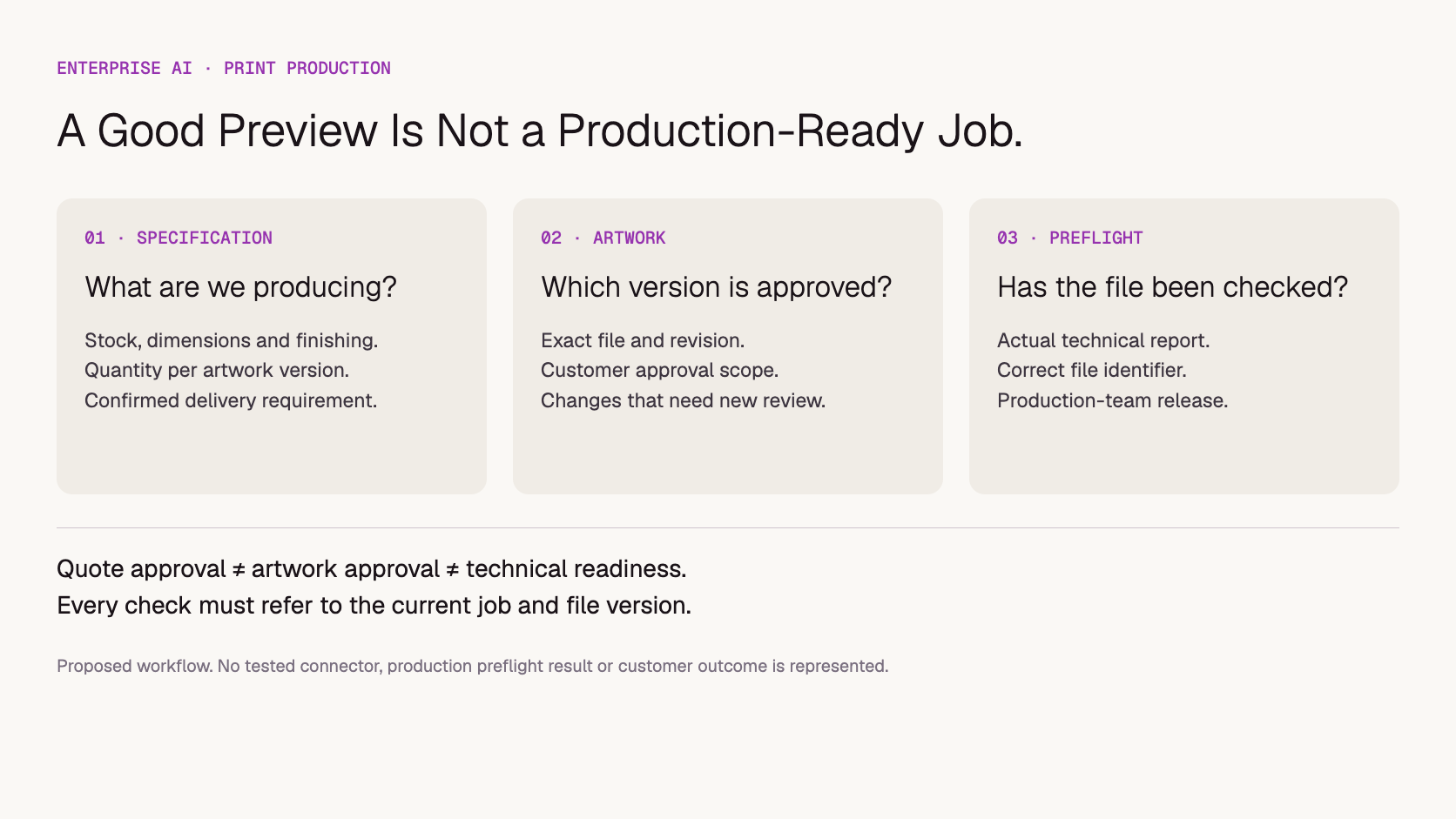
Track commercial approval, artwork approval and technical readiness separately, even if the software presents them in one job record. A customer accepting the price does not necessarily approve the artwork. A customer approving a preview does not prove that the supplied file meets production requirements. Each decision needs its own scope and current version.
Printavo's proof template and approval workflow is a useful industry example of making the customer's expected output explicit. Its workflow is oriented toward screen printing; adapt the review content to your own process rather than copying it as a universal commercial-printing standard.
For the proposed assistant, the release summary should show the confirmed specification, approved quote, approved artwork version and preflight outcome. Where any item is pending, the summary should say so. The application and authorized staff—not the model's prose—decide whether production can proceed.
Changes after approval need an explicit path. A quantity revision may affect price and schedule; a revised logo may require a new proof and file check. Define which decisions reopen when each kind of change occurs. The assistant can identify a change and prepare the review request, but should not silently inherit all approvals from an older version.
Should a print shop use existing software or a custom API?
Use existing print-management and preflight features when they already solve the problem. Evaluate a custom model API where unstructured intake or cross-system handoffs still require substantial interpretation. The purchase should include a clear owner for integration and evaluation; access to a model alone does not provide estimating, proof approval or production control.
Approach
Best starting condition
What to verify
Structured forms and templates
Repeatable products and known required fields
Whether missing information can be prevented at intake
Print-management software
Need connected orders, proof requests and job tracking
Supported approval states, revisions and integrations
Custom model API assistant
Messages and attachments require contextual interpretation
Source access, review workflow, data controls and maintenance owner
Before buying, test whether your current platform can expose the necessary job and file identifiers. Start with a read-only draft of the brief. Show the coordinator the source message beside each extracted requirement, then capture corrections. Writing changes into a production job is a separate capability that needs permissions and validation.
The AI software versus model API guide explains the procurement distinction in more depth. This article does not claim that Token360 includes a Printavo connector, an estimating engine or a preflight service.
How should you evaluate the first workflow?
Measure whether the assistant preserves specifications and reduces clarification work without creating silent assumptions. Use cases with changing quantities, multiple versions, ambiguous units and replacement files. Have an experienced coordinator define the expected result before reviewing drafts, and record serious production mismatches separately from style preferences.
Create an authorized evaluation set with customer data minimized. Include ordinary jobs alongside difficult cases: a reprint with a new stock, two attachments with conflicting sizes, a missing artwork version, a changed delivery address and a file replacement after approval. Keep the source records fixed for each comparison.
Completeness: Are required fields either populated from evidence or explicitly unresolved?
Numbers and units: Are dimensions and quantities preserved without unsupported conversion?
Version matching: Does each language or design variant have the correct file and quantity?
Approval scope: Does the summary distinguish price, artwork and technical readiness?
Scheduling: Does it avoid promising an unchecked production or delivery date?
Review effort: How much time is spent correcting and confirming the draft?
Copy the blank print brief review register below to track these checks. No results are prefilled. If a workflow saves drafting time but increases version errors, redesign it before scaling. Use pilot-to-production criteria for the broader deployment decision.
What should print businesses discuss with Token360?
Describe the input channels, document types, request volumes and staff review process. Token360 provides enterprise model access across text, image, audio and video. Negotiated pricing, dedicated capacity, contracts and compliance requirements are scoped to each engagement. Your print application still needs its operational data, estimating logic and production checks.
Begin with text extraction and clarification if email intake is the bottleneck. Add vision only when specific image-based inputs justify it and can be evaluated. Keep customer artwork and confidential launch material within the agreed access and data-handling scope; review retention and training as separate procurement questions.
The Token360 enterprise page distinguishes available model access and custom pricing from roadmap or sales-scoped services. Confirm the actual model, throughput and support terms for your workload. About Token360 provides company context.
Token360 does not charge a separate service fee, according to confirmed company positioning. Model usage, print software, integration and human review still belong in the budget. Prepare volumes with the enterprise quote checklist. No cost saving, print-quality improvement or turnaround reduction has been measured for this proposed workflow.
It can prepare structured inputs and explain a verified estimate. Pricing should come from the shop's approved estimating process, including stock, finishing and production assumptions. A language model should not invent a price from a vague brief.
Can AI-generated images go straight to print?
Do not assume that they can. Confirm rights, dimensions, text, color and the requirements of the actual production process. A pleasing preview is not evidence that those checks have passed.
Should the assistant assume standard bleed or paper settings?
Use a documented product template or the shop's explicit specification. If no applicable rule is available, request confirmation. A common setting is not automatically correct for every process or job.
Does artwork approval replace preflight?
No. Customer approval records acceptance within its stated scope. Technical preflight checks the file against production requirements. Both must refer to the correct file version.
Is this a tested Token360 printing solution?
No. This is a proposed workflow grounded in official documentation. A production connector, accepted-job results and measured business benefits have not been established here.
Read next: Use the AI API total cost framework to include review, integration maintenance and exception handling in the budget.
Enterprise AI
API
Bring your next idea to life.
Create a video scene in Creator, or explore models for images, audio, and text to find the right capabilities for your project.


 Guides
 Guides
 Guides