AI APIs for Accounting Firms: Check Client Document Packs
Use AI APIs to flag missing pages, duplicates and period mismatches in client documents. Compare intake workflows and keep accounting review separate.
INDUSTRY USE CASES · ACCOUNTING FIRMS
Accounting firms can use AI APIs to classify incoming client documents, extract candidate fields and draft requests for missing information. The useful output is an evidence-linked review queue, not a declaration that the books are correct. Check client identity, document period, page coverage and possible duplicates before handing a packet to the accounting team.
A folder full of files can look complete while still missing the last page of a statement. Two photographs can show the same receipt. A document labeled “October” can belong to a different entity. These are intake problems that can consume staff time before substantive accounting work begins.
This article is for accounting practices, outsourced bookkeeping teams and software companies serving those firms. It examines client-document intake and follow-up, not tax treatment, audit assurance or autonomous journal posting. The example and evaluation plan are proposed designs; no client deployment or measured extraction accuracy is claimed.
Which accounting intake task should an AI pilot own?
Give the pilot one bounded responsibility: turn a received batch into a document inventory and a list of questions for staff to review. Specify the client, expected period and requested document types first. Without that reference, a model can describe the files it sees but cannot establish whether the expected packet is complete.
A practical starting point is a monthly bookkeeping handoff for a defined client group. The firm supplies its existing collection checklist. The application records uploads, checks which files can be opened, and asks a suitable model to propose document types and source-linked fields. Staff resolve uncertainty and approve any follow-up message.
The output should say what was received, what appears to be missing and why. Avoid a single “ready” score that conceals unresolved details. A packet with clear receipt descriptions but an unreadable statement should remain visibly incomplete for the relevant task.
Intake output
Useful content
Boundary
Document inventory
File ID, proposed type, entity, period and page count.
A label is a proposal until verified where needed.
Field extraction
Candidate date, amount, currency and source location.
Extracted data is not an approved accounting treatment.
Exception queue
Unreadable pages, gaps, conflicts and possible duplicates.
Absence of a flag does not prove completeness.
Client follow-up draft
A specific request tied to an observed gap.
Staff approve the recipient, wording and attachments.
Staff handoff
Reviewed inventory plus unresolved issues and originals.
Intake completion is separate from reconciliation or posting.
What must be checked before the model reads the files?
Establish client scope, file access and the expected packet before extraction. Check whether each document opens, whether all supplied pages are available and whether the selected input route supports the format. Retain originals and stable file identifiers so extracted fields and later corrections can be traced back to the same evidence.
Do not let the model choose a client workspace from a name printed on a document. Assign uploads through the application’s authenticated client and engagement context, then flag any conflicting printed entity for review. A shared surname or similar company name is not a sufficient basis for moving a file between clients.
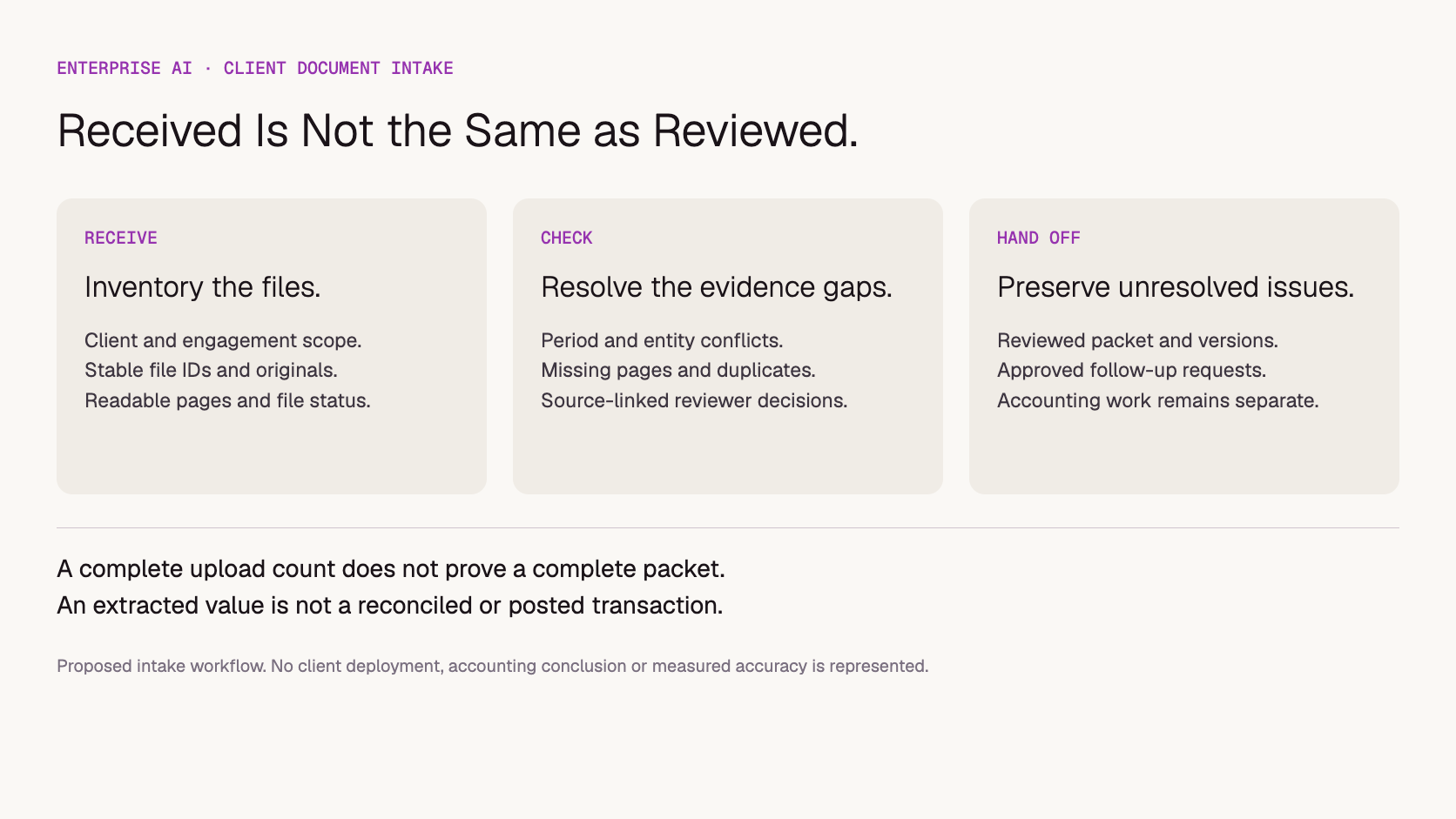
Separate deterministic checks from interpretation. A file hash can identify byte-for-byte repeats, and a PDF parser can count supplied pages. A model may help recognize that an uploaded page says “Page 1 of 3,” but that reading is a candidate observation. Two supplied pages do not prove that a three-page document has arrived.
Image-only PDFs, blurred photographs and password-protected documents need explicit handling. Record a failed read as a failed read rather than silently treating the file as empty. If the model cannot inspect the relevant visual content through the chosen route, changing the prompt will not supply the missing evidence. Review PDF input and scanned-page limitations when selecting the ingestion method.
The expected-document checklist must also be maintained by the firm. A missing upload could mean a collection gap, an inapplicable request or a changed engagement scope. Give reviewers a way to mark “not required” with a reason rather than forcing every case into received or missing.
How can a packet look complete and still fail review?
A packet can contain the expected number of uploads while lacking the expected evidence. Compare documents by entity, period and content, not just by filename or count. A duplicate upload must not fill a missing-document slot, and a document from the previous period must not satisfy the current-period requirement.
Consider this fictional, untested intake example. The firm expects an October bank statement for Client A and supporting purchase documents. Four files arrive:
Upload
Observed issue
Proposed intake action
October statement PDF
Two supplied pages; visible numbering suggests three.
Flag possible missing page and show the source location.
Receipt photo
Readable supplier, date and amount.
Record candidate fields with the original image.
Second receipt photo
Appears to show the same receipt from another angle.
Link as a possible duplicate; retain both pending review.
Statement named “October-final”
Printed period is September.
Flag a period mismatch; do not substitute it for October.
The packet should not be marked complete because four files were uploaded or because every file produced valid JSON. A useful review summary identifies the possible missing page, the duplicate candidate and the period mismatch separately. Each issue needs a source reference so staff can confirm or dismiss it.
After review, a follow-up draft might say: “The October statement upload contains pages 1 and 2, and the page numbering indicates a third page. Please upload page 3 or the complete statement.” That wording is appropriate only if a reviewer confirms the observation. It should not invent a missing transaction or assert that the client’s balance is wrong.
If a replacement statement arrives, link it to the earlier upload and record which version is used for handoff. Reopening an intake item is often better than allowing two competing “final” packets to circulate. The application should preserve review history without presenting obsolete exceptions as still outstanding.
Proposed intake stages. Receiving files, checking a packet and completing accounting work are different states.
How should duplicate and conflicting documents be handled?
Treat duplicate detection as a review aid with several levels of evidence. Exact file equality is different from two images of the same receipt, and matching amounts do not establish that two transactions are identical. Preserve the original records, link suspected duplicates and let an authorized reviewer decide what should proceed.
Xero’s Hubdoc documentation describes a potential duplicate indicator based on matching document fields such as date, supplier, amount and invoice number when used. This illustrates why duplicate detection needs defined criteria; it is not proof that a custom AI workflow will identify every duplicate. See Hubdoc’s document-status guidance, checked November 13, 2026.
A repeated invoice number can help staff investigate, but do not silently discard a file solely because an amount matches another document. Recurring charges and similar-looking receipts belong in the test set. A revised invoice also needs a version relationship rather than a generic duplicate label that hides the change.
When extracted fields disagree, display the conflict. For example, a filename may say one month while the printed period says another, or OCR text may disagree with the visible total. Keep observed text, proposed normalized values and reviewer corrections separate. This helps the team identify whether the problem came from ingestion, recognition or interpretation.
Use ordinary application logic for exact comparisons and arithmetic checks where appropriate. A model’s confident explanation is not a substitute for preserving the actual source values. The goal is a reviewable exception, not a polished narrative that erases disagreement.
When are existing accounting tools enough?
Evaluate existing capture and review tools before building a custom API layer. If the main requirement is uploading receipts and matching them to records, the current accounting platform may already cover it. A custom workflow is more relevant when the firm needs packet-level checks or coordinated follow-up across several document types and systems.
Intuit’s official QuickBooks Online guidance describes receipt extraction followed by review, editing, adding or matching to an existing transaction. That is a useful capability baseline when deciding what a separate workflow would add. It does not establish comparative accuracy or endorse bypassing review. See QuickBooks receipt-upload and review guidance, checked November 13, 2026.
Approach
Reason to evaluate it
Ownership question
Existing capture/accounting software
The required capture and review flow already fits the practice.
Which document types, clients and workflows are supported?
Checklist with manual intake
Volume is modest or files are highly variable.
Can staff maintain consistent evidence and follow-up records?
Custom workflow using model APIs
Packet completeness and exception handling span several systems.
Who builds ingestion, permissions, review, integrations and maintenance?
A model supplier provides inference, not the complete practice-management process. Read and write permissions, original-file storage, reviewer access and destination-system integration require separate implementation choices. No native Token360 integration with QuickBooks, Xero or Hubdoc is established by this article. Use the software-versus-model-API comparison to keep the buying scopes distinct.
How should a firm protect client boundaries during intake?
Enforce access and routing in the application before model requests are assembled. Send only the authorized client’s required material, control who can open source files and define how extracted data and logs are retained. A prompt asking the model to respect confidentiality cannot replace technical access controls or agreed processing terms.
Map the full path of a document: upload service, storage, preprocessing, inference provider, review interface, logs and backups. Determine which parties receive originals versus extracted fields and what retention settings apply to each. A deletion from the model-facing store does not necessarily remove copies from the client portal or logs.
For evaluation, use synthetic or appropriately authorized and minimized samples. Avoid putting full client documents into shared debug output simply to make troubleshooting easier. Keep enough traceability for review without unnecessarily duplicating sensitive content.
Commercial and compliance requirements must be confirmed for the intended engagement. Do not assume that an enterprise label establishes a particular certification, region, retention period or permission to process client information. The distinction between retention and model training is useful here because they are separate questions.
How do you measure whether the pilot helps staff?
Measure the quality and effort of the reviewed handoff, not just extraction speed. Use a test set with known gaps and conflicts, then record missed issues, incorrect flags and staff correction time. A workflow that reads documents quickly but sends unnecessary client requests may increase the practice’s workload rather than reduce it.
Include clean packets, missing pages, wrong periods, repeated photos, similar but distinct receipts, unreadable scans and conflicting entity names. Before testing, have a reviewer establish the expected result for each case. A model’s own evaluation of its answer should not be the sole acceptance signal.
Track two kinds of error separately: an actual gap that the workflow missed, and a complete packet that it incorrectly flagged. The first can delay downstream work; the second can create avoidable client follow-up. Also record source-link correctness and any cross-client exposure as separate review dimensions rather than averaging everything into one score.
Use the blank client-intake review register to retain expected issues, observed findings, reviewer decisions and handling time. The file is a proposed template, not a dataset of successful results. Compare it with the current process on comparable packet types and keep review standards consistent.
For a cost comparison, define the unit as a reviewed packet or a resolved intake exception. Include retries, preprocessing, storage and human correction effort consistently. A low cost per extracted page does not establish a low cost per completed handoff. Do not set an automation threshold from a model’s uncalibrated confidence score.
Where does Token360 fit in an accounting intake workflow?
Token360 can be evaluated for model access within a firm-owned intake application. Language and vision-language capabilities may support classification, extraction and follow-up drafting, depending on the selected model and input route. The firm or implementation partner remains responsible for client permissions, source handling, review, integrations and accounting decisions.
The Token360 enterprise page describes model access across text, image, audio and video and custom enterprise pricing. For this use case, evaluate the needed document capabilities rather than assuming every modality adds value. For company information, see About Token360.
An enterprise discussion can scope model mix, capacity, pricing, contracts and compliance requirements. Availability and commitments must be confirmed for the engagement; this article makes no blanket certification, data-residency or SLA claim. Token360 has confirmed no separate service fee, which does not mean inference or the complete intake application is free.
A buying brief should describe typical packet size, scanned-page share, languages, peak collection periods, retry expectations and reviewer turnaround. Distinguish scheduled intake work from urgent staff queries. Prepare usage information for an enterprise quote only after the pilot has clarified the required workload and acceptance criteria.
Frequently asked questions
Can AI confirm that a client has sent every required document?
It can help compare received files with a firm-maintained checklist and flag apparent gaps. It cannot establish completeness without knowing what is required, and an unflagged packet is not proof that everything is present. Staff should resolve exceptions and confirm the handoff.
Should possible duplicates be deleted automatically?
Not in the proposed pilot. Link suspected duplicates and preserve the source files until an authorized reviewer decides how to handle them. Two files may be different photographs of one document, revisions of a document or genuinely separate records with similar fields.
Is a successful extraction the same as a reconciled transaction?
No. Extraction proposes values from a source document. Matching, reconciliation and posting are separate activities with their own records and controls. An intake workflow should describe its output accurately and avoid using “complete” to imply all those steps have occurred.
Does the firm need a custom AI API if it already uses receipt capture?
Only if there is a meaningful unmet workflow need. Start by checking existing capture and review capabilities. Packet-level exceptions, cross-system collection and tailored follow-up may justify an additional layer, but they also create integration and maintenance responsibilities.
What should the first test exclude?
Keep autonomous posting, client-message sending and professional accounting judgments outside the initial intake test. First establish whether staff can trust the inventory, evidence references and exception list. Expand the scope only after the relevant additional controls and evaluation are in place.
Evidence note: official documentation checked November 13, 2026. The packet example, criteria and workflow are illustrative and untested. No client result, accuracy rate, accounting conclusion or savings claim is presented.
Enterprise AI
API
Bring your next idea to life.
Create a video scene in Creator, or explore models for images, audio, and text to find the right capabilities for your project.



 Guides
 Guides
 Guides