AI API Billing Reconciliation: Match Every Job to Its Final Charge
AI API billing reconciliation links jobs and attempts to settled charges. Keep estimates, reported usage, and actual billing in separate fields.
Quick answer: reconcile AI API billing by linking each application job to every provider attempt, matching those attempts to recorded charges, and separating settled amounts from unresolved records. Compare totals only after aligning currency, account scope, and time boundaries. Missing charge data is an unknown amount, not a zero-dollar result.
A successful AI response tells you that an output was returned. It does not, by itself, tell you the final cost of delivering that output. A customer action may create several attempts; an asynchronous job may finish before its billing record settles; and a dashboard total may cover a different time window from your application report.
This guide includes a worked reconciliation subtotal using 18 tester-reported Sonilo charges from our earlier audio pilots. The amounts were supplied by the tester in USD. We verify the arithmetic here; we have not matched those samples to an authenticated request-level billing export or invoice.
How do you keep estimates, usage, and charges in separate fields?
An estimate is a forecast based on expected inputs and a price assumption. Usage describes the metered work, such as input tokens, output tokens, or generated seconds. A recorded charge is the amount assigned to that work under the applicable billing rule. They answer different questions and should not overwrite each other.
Record
Useful for
Does not establish
Pre-request estimate
Budget approval before generation
The eventual settled amount
Response usage
Understanding metered work
Every pricing component or adjustment
Request-level charge
Assigning recorded cost to an attempt
A complete monthly invoice total
Customer acceptance
Calculating cost per usable output
Whether the provider billed the attempt
Token360’s Billing and Usage documentation distinguishes estimates from final charges, directs readers to the selected model’s pricing rules, and notes that asynchronous billing can finalize after a resource reaches a terminal state. Preserve that distinction in your own records.
For example, “HTTP 200, 18 total tokens” is useful execution evidence but still leaves the charge unknown if no amount is recorded. Do not substitute a public list price from a different provider route and label the result an observed cost. A reconstructed estimate can be useful, provided it remains labeled as an estimate.
How do you link one application job to every attempt?
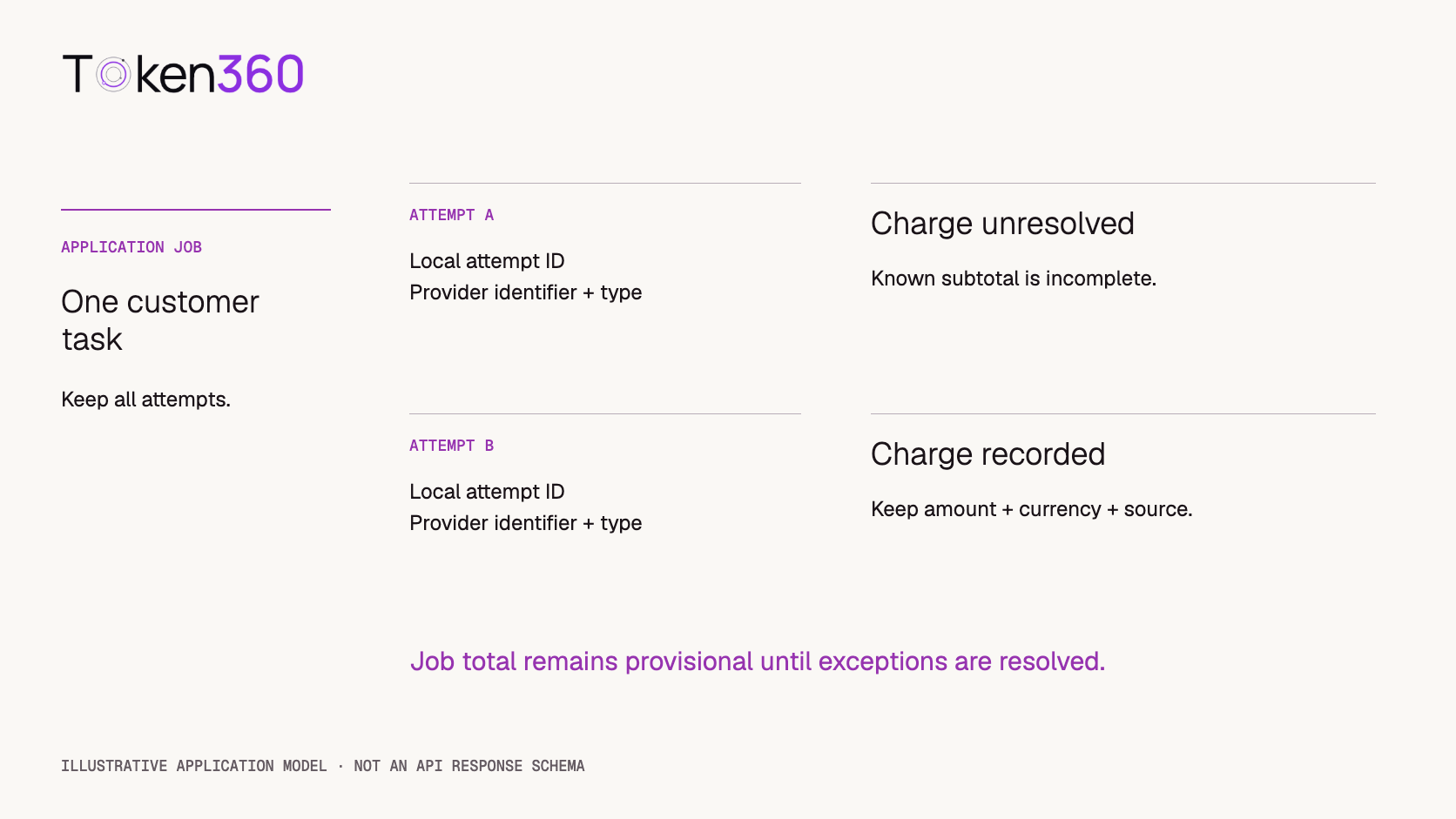
Create an application job identifier before submission. Give each outbound attempt its own local identifier, then attach the provider identifiers returned for that attempt. One user click can produce an original attempt, a retry after a timeout, and a fallback to another model. Keeping only the final successful response can hide the earlier work.
The following is a proposed application ledger, not a Token360 response schema. Adapt its fields to the actual metadata your endpoint returns.
Application field
Purpose
job_id / attempt_id
Connect the user-visible task to each outbound operation.
request_id / resource_id
Preserve returned identifiers with their original field names.
model_id / settings
Identify the requested route and relevant billing options.
submitted_at_utc / completed_at_utc
Define execution timing without substituting settlement timing.
execution_status / billing_status
Track completion and charge availability independently.
charge / currency / evidence_source
Store an amount together with its unit and provenance.
last_checked_at / owner
Make unresolved records actionable.
Keep the charge nullable. A confirmed zero is a value supported by a billing record; null means the amount is not yet known. Store money as exact decimal values at the precision supplied, rather than binary floating-point approximations.
Token360’s observability guidance identifies request, trace, and asynchronous resource identifiers as useful correlation data. Do not assume that every identifier is interchangeable. Preserve its type and verify which one the billing lookup accepts for the relevant operation.
Illustrative application data model. Two attempts do not automatically mean two charges.
How do you check settlement separately from execution?
Use the documented request-level lookup, GET /v1/billing/requests/{request_id}, to inspect whether billing is recorded and which usage and charge components are available. The billing documentation also describes account-level summaries through GET /v1/billing. Confirm the current API reference for authentication, identifier format, filters, and response fields before implementing an adapter; the ledger names above are not promised API fields.
A useful application state model is: awaiting reconciliation, amount recorded, discrepancy under review, and closed. These are your operational labels. An application job may be complete while its reconciliation record is still open.
If no charge is available, retain the record and check again within a bounded schedule appropriate to the service. Do not poll indefinitely or invent a fixed settlement deadline. Escalate an aged unresolved record with its identifiers and timestamps. A missing record could reflect an incorrect identifier, permission scope, or unsettled billing; it is not evidence that the generation was free.
Repeatedly fetching the same billing record should update the matching ledger entry, not append another full charge. Likewise, distinguish a revised total from a separate adjustment before adding it. Deduplicate by the billing record’s documented identity and preserve enough history to explain a changed amount.
Which failed or retried requests need a billing review?
Distinguish a rejected request, a client timeout, a partial response and a completed output that fails business review. Those outcomes do not establish the same billing treatment. Preserve each attempt and ask which policy applies to the exact model route; an application error alone does not prove that no processing was billed.
For procurement, request written treatment of partial results, resubmissions and quality rejection, plus the evidence needed for an adjustment. For an incident, supply the execution identifiers and observed outcome without secrets. Do not infer a refund from another supplier's policy or assume the final successful response is the only billable attempt.
Worked example: reconcile 18 reported audio charges
Our earlier Sonilo pilots contained nine sound-effect generations and nine music generations. The tester reported the same charge within each group and confirmed USD. The sample names are local labels, not provider request IDs.
This establishes the sum of the supplied amounts. It does not establish an independently reconciled account debit, tax-inclusive invoice total, current price, or a general price comparison between sound effects and music. The workloads differ, and we have not supplied billing-record identifiers for these 18 samples.
The next reconciliation step is to attach the corresponding request records and compare the reported amounts with their recorded charges. If all 18 match, that closes this sample ledger at the request level. A monthly statement may still contain other activity or adjustments outside the sample’s scope.
Why rounding every row changes this subtotal
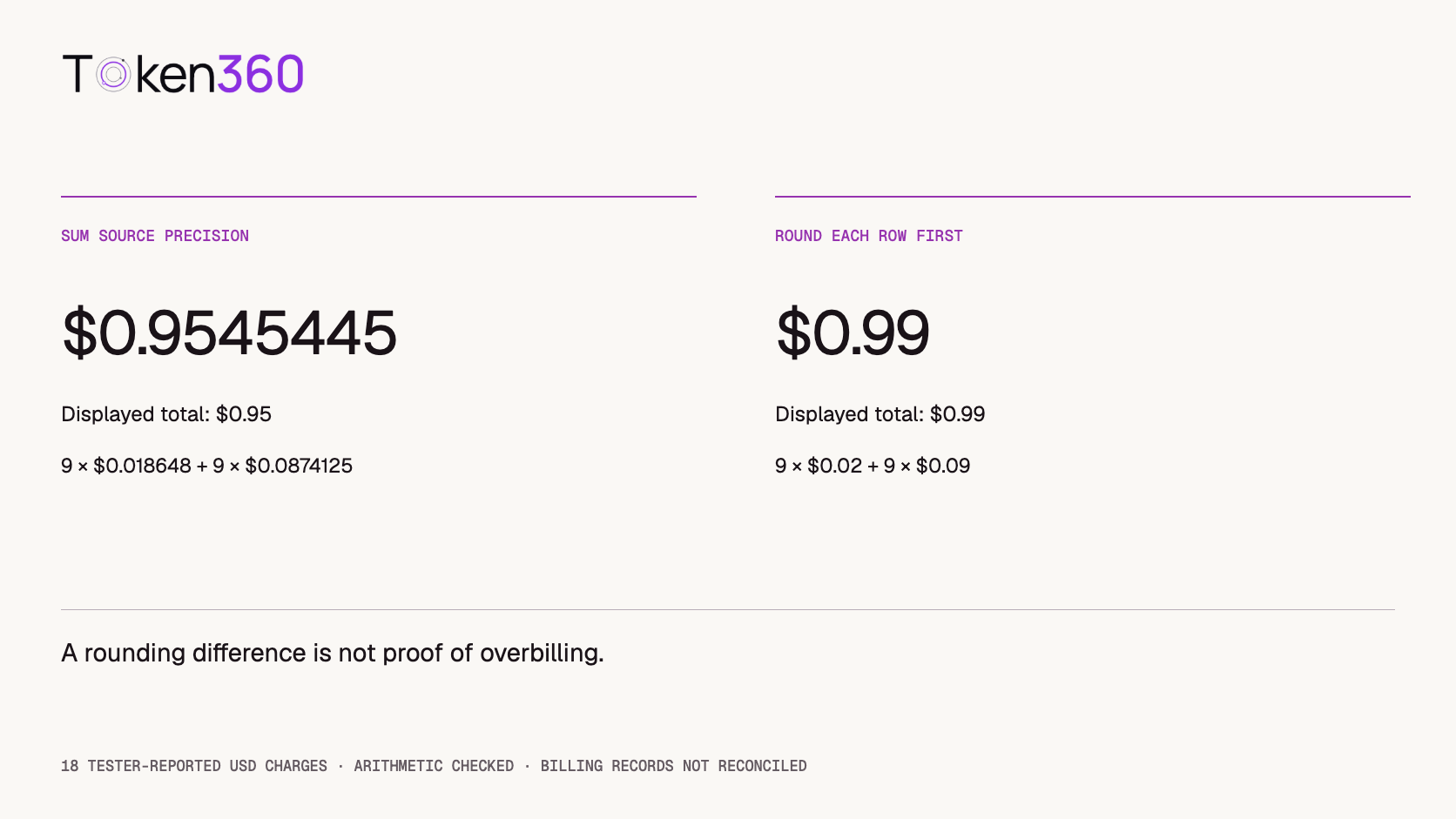
If an analyst first rounds each sound-effect charge to $0.02 and each music charge to $0.09, the summed display values become $0.99. Summing the supplied precision first gives $0.9545445, which displays as $0.95 at two decimals. The row-rounded sum is $0.0354555 higher than the unrounded subtotal; the two displayed totals differ by four cents.
This is a calculation artifact, not evidence of overbilling. Retain source precision in the ledger, apply the documented settlement rules when comparing financial records, and round separately for presentation. Do not force the provider’s ledger to match a locally rounded display.
Recomputed from tester-reported amounts; no invoice rounding policy is inferred.
How do you check that the agreed enterprise rate is active?
Match the accepted quote to the intended production account and model, then compare a representative settled request against the applicable rate and measured usage. Keep the effective date and billing unit with the record. A signed discount or a working API key alone does not prove that the application is using the agreed commercial terms.
Keep a non-secret account or key identifier, quote version, model and settings, expected payable rate, request ID and final charge together. Do not apply a discount twice to an already discounted rate. Leave pending charges unresolved rather than treating them as zero. Resolve differences before approving the affected pricing path.
The Token360 billing documentation provides request-level reconciliation; check current account pricing and the accepted schedule rather than importing an upstream vendor rate. This is an acceptance method, not a completed billing test.
How do you investigate differences in a fixed order?
Start with scope before investigating arithmetic. Compare the same account or workspace, currency, model set, and UTC window. Decide whether your report groups by submission time, completion time, or billing time. A job crossing midnight can belong to different daily reports without either report being wrong.
Observed difference
Check first
Avoid concluding
Dashboard total exceeds application total
Other callers, retries, missing attempts, and window boundaries
Every difference is duplicate charging.
Completed output has no charge yet
Identifier mapping and settlement state
The output was free.
Two records look similar
Distinct attempt IDs versus duplicate imports
Matching prompts identify the same request.
Usage-based estimate differs from recorded cost
Route, units, pricing components, and effective rule
The estimate is the authoritative amount.
Sum differs by a small fraction
Source precision and rounding stage
A tiny variance can be silently discarded.
Keep disputed amounts visible instead of deleting them to make totals agree. Assign an owner and resolution note. If a request’s usage is revised or a credit appears later, preserve the original observation and the subsequent adjustment so the reconciliation can be reproduced.
Also keep wallet movement separate from consumption. A deposit changes available funds without being an inference charge. A balance snapshot alone is not a request ledger, especially when other activity occurs between snapshots.
How do you separate provider cost from customer billing?
The cost of fulfilling one customer job may include several provider attempts. Whether you charge the customer for those attempts is your product’s pricing policy. A fixed-price product, a credit package, and a pass-through usage product can all allocate the same underlying cost differently.
Attach customer or project ownership before work is submitted, using identifiers that your application controls. An API key shared across customers is not enough to reconstruct customer ownership later. Avoid placing personal data or secrets in correlation fields.
The FinOps Foundation’s Allocation capability describes using account structures, tags, and metadata to assign costs to responsible teams or projects. Applied here, that means separating the evidence of a provider charge from the business rule that allocates it.
Define how you handle retries, quality failures, refunds, and shared overhead in the customer-facing policy. A technically successful output that fails a creative brief can still carry provider cost. Keep quality acceptance as a separate field; otherwise a “cost per accepted output” calculation can accidentally discard the expense of rejected attempts.
What must be resolved before closing a billing report?
A useful reconciliation report states its scope, currency, time basis, source precision, recorded-charge subtotal, and unresolved-attempt count. Unknown amounts should remain unknown; do not add invented estimates to a settled total.
For the audio example, the honest closing statement is: “18 tester-reported charges sum to $0.9545445 USD; request-level verification is outstanding.” That is more informative than claiming a fully reconciled bill because the arithmetic balances.
Before closing an actual reporting period, check that every application attempt either has supporting billing evidence or a documented exception. Match the report to the corresponding account summary only after accounting for differences in scope and timing. Retain a compact evidence bundle with identifiers, timestamps, amounts, and resolution notes, excluding credentials.
Next step: choose a small completed batch, preserve every attempt, and use Token360’s billing documentation to connect those records to their charges before scaling your reporting workflow.
Published by Token360, a platform providing shared access to supported language, image, video, and audio models.
Procurement scope reviewed November 20, 2026.
API
Billing
Cost Management
Bring your next idea to life.
Create a video scene in Creator, or explore models for images, audio, and text to find the right capabilities for your project.



 Guides
 Guides
 Guides