Choose a video-to-text API for dialogue, visible text or scene changes. Use a six-second clip to check what your Token360 workflow can hear and see.
By Yuki Yu
Play a product demo with the sound off. Can you still tell when the device becomes ready? Now close your eyes and listen. If either pass loses an important detail, a spoken transcript alone will leave a gap. Choose your video-to-text workflow by the evidence the reader needs: spoken words, visible events, or both on a shared timeline.
Read first. Token360’s multimodal API guide explains how input and output types map to operations. Here the output is always text. The choice is which parts of an existing clip the application must inspect.
What should a video-to-text API return?
Write down one question the finished text must answer. A support team searching interviews for a customer quote needs the words and their location. A technician checking whether an indicator changed needs a visible state and its time. A viewer reading an entire demo may need both, along with meaningful sounds.
Reader’s question
Evidence to inspect
Deliverable to request
What did the customer say about setup?
Speech in the audio
Verbatim transcript with timings if needed
Which warning appeared after the click?
Screen frames around the change
Exact visible wording and time interval
Did the chime sound before the indicator lit up?
Non-speech audio and frames
Separate, time-aligned observations
What does a reader need to follow the demo?
Dialogue, meaningful sound and visible action
Reviewed descriptive transcript
A summary can say that setup succeeded while dropping the precise warning a reader needs to search for. For a support index, keep the original wording and time reference alongside any summary. W3C also distinguishes a basic transcript of speech and relevant sound from a descriptive transcript that includes meaningful visuals. W3C’s transcript guidance.
Which Token360 route fits the source material?
For spoken words, extract the audio track if needed and use Token360’s POST /v1/audio/transcriptions. The published example uses glm-asr-2512. Supply a file or a file URL. With a URL, include the MIME type that matches the actual media. Check the selected model’s schema before depending on speaker labels or word-level timing. Token360 transcription request and response fields.
For a visible state change, choose a model whose Token360 detail page explicitly lists the input you intend to send. Verify video input for a whole clip, or image input if your application extracts frames. Record the public model ID, input format and example request. A family name or a video-generation listing alone gives you too little information to choose the analysis route. Token360’s model capability checks and model catalog.
If your verified route accepts still images, keep each frame’s source time. Two samples at seconds 2 and 4 can bracket a change between those observations. They cannot establish exactly when it happened. Extract intermediate frames before claiming a precise time. Likewise, if you submit frames alone, keep sound events out of the visual model’s answer.
What does a six-second clip reveal about the choice?
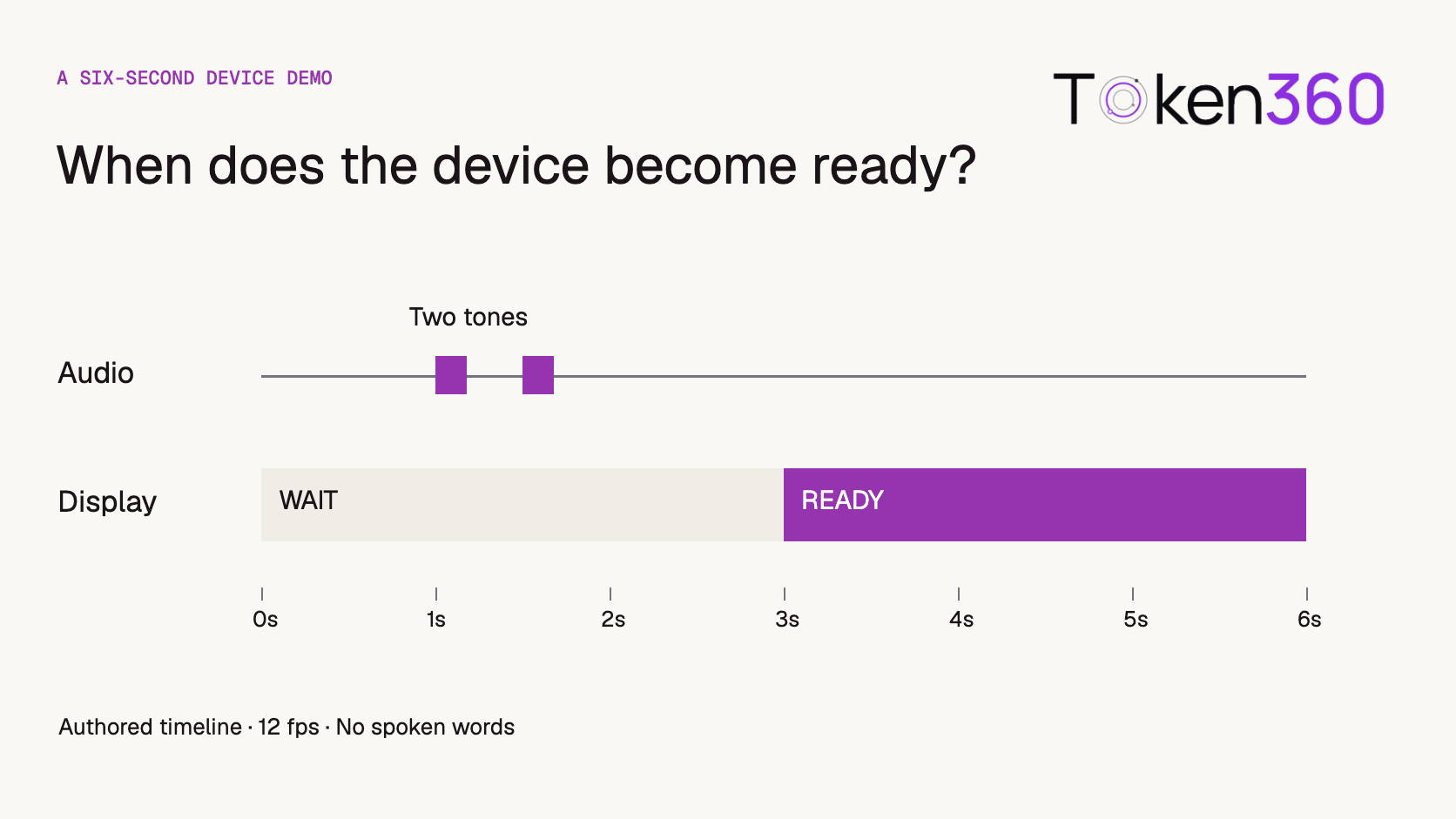
Try this original Token360 editorial fixture. Watch once muted, then replay with sound. The display starts at WAIT. Two short tones begin at 1.00 and 1.50 seconds. At 3.00 seconds the indicator turns purple and the display changes to READY. There is no spoken dialogue.
Two short tones sound in succession. The second is higher. The display still reads WAIT.
3.00–6.00 s
The indicator turns purple and the word changes to READY. The display holds until the clip ends.
These times come from the authored timeline. The color and label switch at zero-based frame 36 of 72. You can use this as a reference answer when testing your own integration. An empty spoken-word transcript is correct for this asset. A system that writes “the device says ready” has turned visible text into invented dialogue. A system that claims the chimes caused the change has inferred a mechanism the clip never shows.
The ordering is observable. What caused the change is outside the evidence.
How should you evaluate a candidate API?
Ask for observations that another person can verify against the clip. For this fixture, try the prompt below with a route that supports the inputs you send. When testing a frames-only path, give the frame timestamps and specify that audio was withheld.
List each visible status label in order. Give the earliest time you can verify the second label. Separately list any sounds you can verify. Put spoken words in quotation marks only if you hear them. Mark unavailable evidence as unknown.
Run three passes when your application permits them: audio alone, timestamped frames alone, then both tracks. Save the inputs and raw answers. Score the quoted dialogue, event order, exact labels and time uncertainty separately. For example, an answer that places READY at 1.50 seconds recognizes the label but confuses a sound event with the visual transition. That distinction tells you which part of the workflow to change.
Before selecting a production model, repeat with clips representative of your users. Include a narrated interview, a silent screen recording with small text, and a demonstration where the speaker describes an action before it happens. Set the required timestamp tolerance from the product need. Someone searching for a sentence generally needs a playable segment. Someone reviewing an individual frame needs finer evidence. The six-second example supplies a known reference for these checks. It supplies no model accuracy or latency estimate.
How should the result handle conflicting audio and picture?
Report each observation with its evidence channel and time rather than silently combining them. If a narrator says “ready” while the display still reads WAIT, the transcript and screen description can both be correct. A summary should preserve that mismatch when it matters to the reader.
A useful review record has four fields: the observation, whether it came from speech, non-speech sound or picture, its time interval, and any uncertainty. When only two frames were supplied, describe the transition as occurring between their timestamps. Do not invent a frame-accurate time from sparse images.
For a support search result, link the finding to a playable interval. For a compliance review, retain the exact source and have a reviewer resolve material contradictions. These are application acceptance rules; the six-second fixture demonstrates how to test them, not how any particular model performs.
Frequently asked questions
Can I transcribe a silent screen recording?
You can produce a visual description or extract visible text. A speech transcript may correctly contain zero words. Label the result as a screen description so that readers know what the words refer to.
Does the transcription endpoint describe sounds automatically?
Token360 documents the endpoint for audio transcription. If your deliverable needs a chime, alarm or door slam identified, validate that capability on the selected route or have a reviewer annotate the sound.
Can a single multimodal request cover both tracks?
Potentially, when the selected route accepts the clip and processes the audio and visual evidence you require. Test a clip with an audio-only fact and a separate visual-only fact. Check whether the response attributes each one correctly.
Should I use OCR for a status label?
OCR can help recover exact characters from a legible frame. Keep the source frame and its timestamp. Comparing adjacent observations lets you determine whether the label changed and bound the time of the change.
Is a subtitle file enough for a searchable demo?
It can index spoken instructions. Add time-linked observations for search terms that only appear on screen, such as an error code or status label. Preserve the distinction between speech and visual text in search results.
How can I reproduce the example?
Download the clip, mute it for the visual pass and play its audio separately for the listening pass. Compare the observations against the three reference intervals above. Record which inputs each model actually received.


 Prompt Library
 Guides
 Guides