A model listing does not validate your exact request. Check the model ID, endpoint, capabilities, account controls and available route in order.
MODEL ACCESS · DIAGNOSTICS · BLOG 169
By Yuki Yu · Editorial update: November 6, 2026
A model appearing in an AI catalog does not validate every request to it. The public model ID, endpoint, input format, optional capabilities, account controls and eligible service route must also match. Diagnose those layers separately before concluding that the model is missing or that repeated retries will fix the problem.
OpenRouter’s FAQ answers which models it supports by pointing readers to its model browser and API. That is a useful discovery step. This article addresses the next question: why can a model you found there still fail in an application?
This is a documentation-based diagnostic workflow, not a live availability report. The examples and downloadable worksheet are constructed for this article. No inference requests were run, and no model failure rate or current outage is claimed.
Read first: Token360’s model documentation explains the public identifier used in requests. Start from the current model entry rather than a name copied from another platform.
What does a model listing actually establish?
A listing establishes that the catalog describes a model or product entry. Read the entry for the capabilities and conditions it documents. Do not treat visibility as proof that your credentials, chosen endpoint and full request body can use it successfully at this moment. Discovery and execution answer different questions.
Layer
Question to verify
Evidence to retain
Catalog
Which exact public model entry did you select?
Model ID, source URL and check time.
Request contract
Does the model support this endpoint and input?
Endpoint and applicable schema.
Feature combination
Are all requested capabilities compatible?
Sanitized request body.
Account eligibility
Do applicable access and spend controls permit the request?
Non-secret key/account context and policy decision.
Execution
Can an eligible route serve the request now?
Error code, request ID and timestamp.
OpenRouter documents both a general model listing and a separate user-filtered listing in its API reference. That distinction reinforces why a public catalog and a particular account’s usable choices should not be assumed to be identical. It is an OpenRouter interface detail, not a claim that Token360 exposes the same endpoint.
Did you use the public model ID or a display name?
Use the request identifier documented by the platform receiving the call. A readable product name, upstream deployment name and another gateway’s model slug may refer to related technology without being interchangeable request values. Compare the exact string sent by your application with the current entry before changing other settings.
Token360’s Models page directs clients to use the public model name shown in its console catalog and public model list. Treat a saved application preset as a copy that can become outdated, not as the authoritative source.
In a diagnostic record, keep both display_name and request_model_id if the application uses both. That makes a mismatch visible without asking support to infer an ID from a screenshot. Do not guess a replacement by stripping suffixes or adding a publisher prefix.
A missing-model message is a reason to check identity first; it is not enough evidence to declare that the underlying model has been retired. Confirm removal or replacement through the platform’s documented model information.
Does the model support the endpoint you called?
A shared gateway does not make every model compatible with every API operation. Verify the selected endpoint as well as the model ID. A model that accepts one request protocol or modality can reject another, even when the application uses the same base URL and a valid credential.
Token360’s protocol compatibility guide states that only models and SKUs advertising an endpoint can use it. The endpoint determines the client-facing contract. That means changing from Chat Completions to another interface is an integration change, not merely a different spelling of the same call.
Check the request’s purpose too. An image-understanding model receives images to analyze; an image-generation operation produces images. A friendly product selector should not allow the user to choose a model for an operation it does not support just because both involve images.
For a multi-modal application, store the selected operation alongside the model. A request record saying only “model X failed” omits the information needed to tell whether the app attempted chat, image generation, video generation or another operation.
Can optional parameters make an otherwise valid request incompatible?
A model ID can be valid while the requested feature combination is not. Verify optional parameters, accepted values and input constraints against the model’s current schema. A generic SDK may let you construct a field that the selected model does not support. Client-side type acceptance is not proof of server-side capability.
Token360’s capability guide identifies the model detail page and public schema as the reference for inputs, outputs, parameters and limits. It also says not to assume tool support when the model page does not list it.
For a hypothetical chat integration, ordinary text may work while a request adding tool definitions or a constrained output format does not. For a media integration, the selected duration, resolution or reference-input combination may need checking. These are illustrative possibilities, not reports about a named model.
Record what changed between a working request and a failing one. “Added feature X” is a stronger diagnostic statement than “the model is unstable.” It still does not prove a cause until the comparison is reproducible and the returned error supports the explanation.
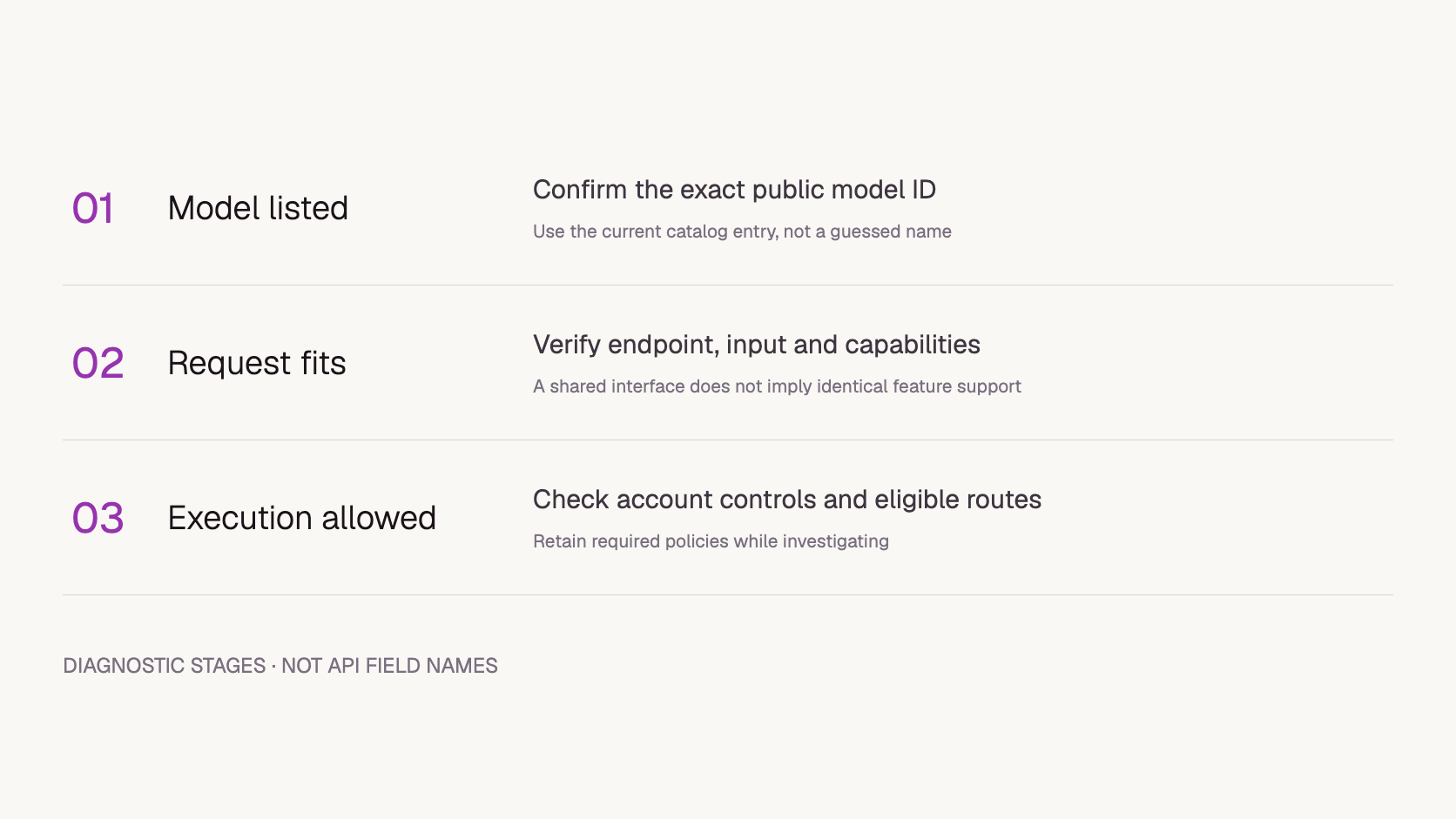
Diagnostic stages for the application team. The labels are editorial categories, not Token360 API fields.
Can account policy or route eligibility block a listed model?
Yes. A compatible request can still be disallowed for an account or lack an eligible execution path. Keep those possibilities distinct from malformed input. Read the actual error and review the applicable policy rather than relaxing controls to make an experiment pass. A deliberate restriction is not necessarily a service fault.
A concrete competitor example comes from OpenRouter’s in-region routing announcement: when no eligible regional endpoint can serve the model, the request fails rather than being routed outside the specified region. This illustrates eligibility filtering; it is not Token360’s error-code specification.
When a requirement is mandatory, retain it during diagnosis. Use non-sensitive test input and an approved environment if you need a separate comparison. Do not turn off a residency, access or privacy rule merely to obtain a successful screenshot.
How do you narrow the failure without changing everything?
Build a controlled comparison around the smallest request that should be valid for the selected model and task. Keep the account, endpoint, model and required policy fixed. Remove optional complexity, then restore one feature at a time. The goal is to identify the failing condition, not to obtain any successful response.
Save the failing request without credentials or sensitive input. Record the UTC time, endpoint and error body.
Verify the exact public model ID and documented request schema.
Construct a minimal, task-appropriate request using permitted test input. Keep mandatory policy settings unchanged.
If the baseline succeeds, restore optional features individually and record each result.
If the baseline fails, investigate identity, account eligibility and execution availability before adding features.
Stop when the evidence identifies a configuration issue or is sufficient for support. Do not run an unbounded retry loop.
This sequence is a proposed investigation method. It has not been executed against a Token360 model for this article. A baseline success narrows the investigation, but timing or capacity may differ between calls; a single paired result does not prove causation.
Copy the
Copy request-eligibility-worksheet.csv:
field,baseline,feature_comparison
record_type,Proposed diagnostic worksheet - not executed,Proposed diagnostic worksheet - not executed
utc_time,Fill after test,Fill after test
catalog_source_and_check_time,Verify current entry,Keep same verified entry
public_model_id,Copy exact ID,Same ID
endpoint,Verify supported operation,Same endpoint
account_context,Non-secret reference,Same approved context
required_policy,Keep all mandatory controls,Keep all mandatory controls
input,Permitted minimal test input,Same input where applicable
optional_feature,None unless required,Add one feature
http_status,Not tested,Not tested
error_code,Not tested,Not tested
request_id,Not tested,Not tested
observed_outcome,Not tested,Not tested
to keep the baseline and feature comparisons aligned. Its fields are application notes, not a request payload to send to the API.
What does a successful Playground run prove?
A successful Playground result establishes that that particular run worked under its actual settings. It does not establish that an application sent the same request or used the same identity and conditions. Compare model, endpoint, parameters, inputs, account context and timing before treating Playground success as a contradiction of an API failure.
The Token360 capability guide says model examples and Playground use the public parameter schema. Even so, an application can omit a required field, retain an old preset or supply a different value. Compare exported or recorded settings where available; do not infer equality from matching model labels.
Use a comparison table with two columns: Playground run and API attempt. Mark unknown values as unknown. If the interface does not expose a setting, that missing evidence is a reason to ask for clarification, not a reason to assume a default.
What should you send to support?
Send a compact record that lets support locate the request and understand the expected contract. Include the public model ID, endpoint, UTC time, available request ID, HTTP status, error code and a sanitized minimal example. State whether the model appeared in the catalog and which documented capability you expected to use.
Add the result of the baseline comparison if you ran one. Distinguish “not tested,” “request rejected” and “response generated but unsuitable.” Those outcomes lead to different investigations. Keep API keys and private files out of ordinary tickets.
For teams integrating Token360, this record is more actionable than a screenshot of a catalog tile. It connects the advertised model entry to the exact request that failed, without assuming the fault belongs to the model, gateway or application.
Should I retry a model-not-found response unchanged?
First verify the identifier and endpoint and inspect the error details. Repeating the same invalid request cannot correct its configuration. Transient execution failures need a different, bounded retry policy.
Does a working model from the same publisher prove this one supports tools?
No. Confirm the capability for the exact model and operation. A publisher name is not a capability contract.
Does this article mean a catalog listing is unreliable?
No. The catalog is the discovery reference. Request validation and execution add information about your particular call; separating those stages makes the catalog more useful, not less.


 Prompt Library
 Guides
 Guides