Choosing between Veo and Seedance starts with three questions: What assets must you provide? What controls does your chosen API route expose? What makes the finished video acceptable?
A visually impressive clip can still fail a production brief. The product may change shape, a speaker may deliver the wrong line, or the final frame may leave no room for an end card. A useful Veo vs Seedance comparison must connect model capabilities to those delivery requirements.
This guide separates documented capabilities from the results you need to measure. It explains how to shortlist specific versions, compare common inputs, test each candidate’s native workflow, and calculate the cost of producing usable deliverables.
Token360 publishes this guide and offers access to multiple model families. Documentation was checked on October 8, 2026. This article does not report an original benchmark or declare a measured quality, speed, or price winner.
Before you read: Start with the Seedance API Guide and Veo API Guide if you need the implementation context for either family. For available model entries, consult the Token360 model catalog.
Compare Exact Versions and Serving Routes
“Veo vs Seedance” is a useful search phrase, but it is too broad to identify a production configuration.
Your actual candidate is a combination of model version, serving provider, endpoint, generation mode, and settings. Two services can expose the same model family while supporting different parameters or operating limits.
Keep three types of evidence separate:
Record the exact model identifier and test date before generating anything. Preserve the endpoint documentation or schema used for the evaluation.
When a version or route changes, keep the old results labeled. Do not silently reuse them as evidence for the replacement.
What the Official Documentation Supports
Google’s Veo 3.1 API guide documents native audio, reference-image guidance, first-and-last-frame generation, and extension of previously generated Veo videos. These are useful starting points for evaluation, but their availability and combinations must be checked against the selected variant and mode. See the official Veo API guide.
ByteDance’s Seedance 2.0 page describes multimodal generation using text, image, audio, and video inputs. Treat this as evidence about that named version, then verify how your serving route exposes those inputs. See the Seedance 2.0 model page.
The Seedance 2.5 page separately describes audio-video generation, videos up to 30 seconds in a single generation, extension options, and reference and editing capabilities. These are vendor descriptions; they do not confirm the same controls on every API route or demonstrate superiority on your workload. See the Seedance 2.5 model page.
Use these sources to decide what to investigate:
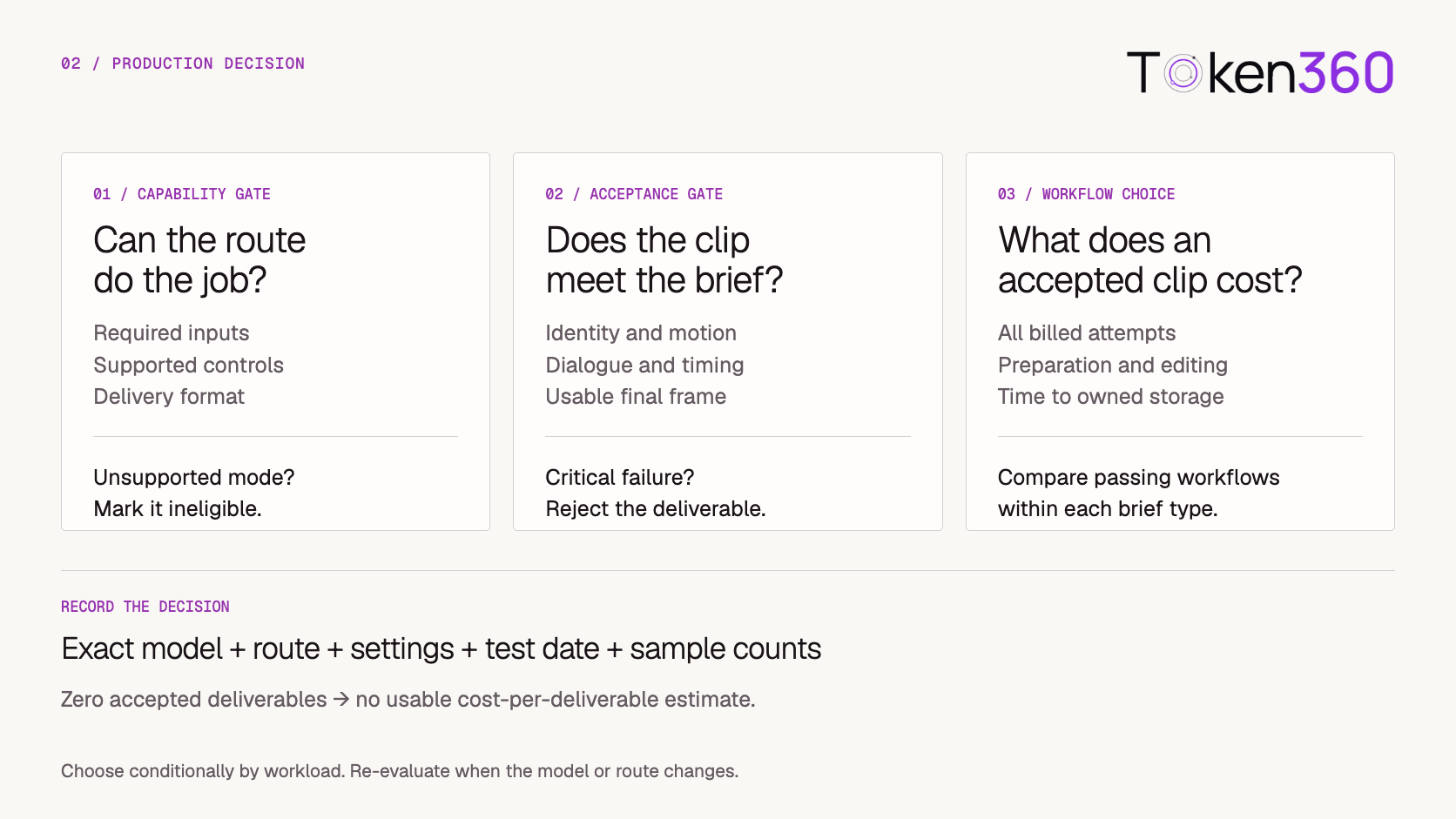
An unsupported mode makes a route ineligible for that requirement. It does not prove that its visual generation quality is poor.
Start With a Written Production Brief
A comparison becomes more useful when everyone agrees on acceptance before seeing the outputs.
Consider an illustrative product-video brief:
Create a short portrait clip from an approved product image. Preserve the product’s shape and color. Show one slow camera movement. End with a stable composition that leaves space for a separately added call to action. No dialogue is required.
This brief defines an outcome without assuming a particular model’s syntax.
Convert it into testable requirements:
Separate hard failures from preferences. An altered product feature may be a rejection; slightly different lighting may be acceptable.
For dialogue, write the exact lines and speaker assignments. For motion, identify the action that must happen. For continuity, specify which subject attributes must remain stable.
Without these rules, reviewers can reward attractive footage that does not solve the business problem.
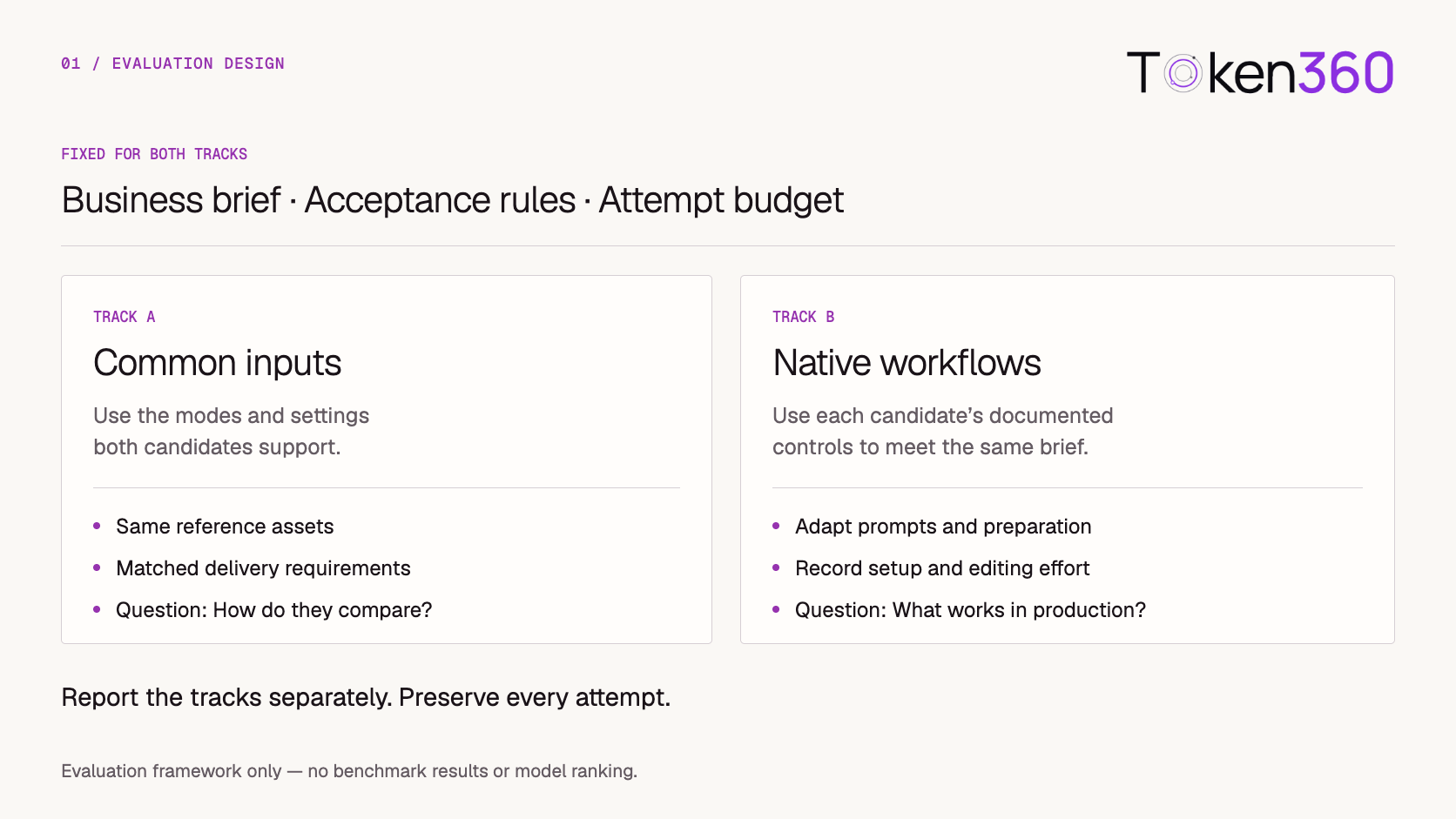
Run Two Evaluation Tracks
A single comparison method cannot answer both “How do these candidates perform with equivalent inputs?” and “What is the best usable workflow each offers?”
Run two tracks and report them separately.
Track A: Common inputs
Use generation modes and settings both candidates support. Keep the business brief, reference assets, target format, and acceptance rules aligned.
A shared prompt is appropriate when both interfaces support the same kind of instruction. Any required syntax adaptation should be recorded.
This track provides a controlled comparison within the overlapping capability set. It should not force an unsupported input into one candidate or silently remove a requirement.
Track B: Native workflows
Keep the business outcome fixed while allowing each candidate’s documented controls.
One workflow might require additional reference preparation. Another might use a frame-based control or a different prompt structure. Permit those differences, but record the preparation and editing effort.
This track measures what your team can accomplish with each complete workflow.
Set a maximum attempt budget before testing. If your team normally stops once it has an accepted deliverable, apply that stopping rule consistently. Also set comparable limits on prompt tuning so one candidate does not receive substantially more optimization.
Do not merge the two tracks into an unexplained overall score.
Test Representative Briefs and Preserve Every Attempt
Choose briefs from the work you actually expect to produce.
A useful starting set includes a product reveal, a moving subject, a dialogue scene, and a shot with a demanding transition. Include both routine work and known failure cases. Expand coverage before making a large deployment decision.
For each attempt, preserve:
-
Exact model identifier, route, settings, and test date.
-
Brief ID, prompt revision, and reference asset identifiers.
-
Task or operation identifier and final status.
-
Retrieved output, review result, and rejection reason.
-
Billed generation cost and preparation or editing time.
Keep errors and rejected outputs in the record. A selected showcase cannot reveal how many attempts were needed.
Distinguish request failures from creative failures. A malformed request needs an integration fix; a successfully generated clip that changes the product needs a creative rejection. Both affect delivery effort, but they call for different remedies.
Record policy-related refusals separately as well. Do not treat an ineligible or refused request as if reviewers had scored a finished video.
Review the Deliverable Against the Brief
When practical, hide model names during review and randomize viewing order. Use the same playback conditions and review rubric for both candidates.
Evaluate the full clip. A strong opening frame can conceal identity drift, broken motion, or an unusable ending.
Apply hard acceptance gates before preference scores. Beautiful lighting should not compensate for incorrect dialogue when the script is mandatory.
For subjective dimensions, use more than one reviewer where feasible and retain disagreements. A small evaluation with mixed judgments should not become a confident claim that one family is better.
Report results by brief type. A single average can hide the fact that one workflow fits product shots while another fits dialogue scenes.
Compare Cost per Accepted Deliverable
Request price alone does not tell you what a usable video costs.
Track generation spend separately from the broader production cost:
Generation cost per accepted deliverable = total billed generation spend ÷ accepted deliverables
Production cost per accepted deliverable = generation, preparation, review, editing, and delivery costs ÷ accepted deliverables
Use a consistent accounting boundary. If one workflow requires extra reference preparation, include that effort. If you monetize labor, use the same rate assumptions and disclose them.
Define the denominator carefully. If several outputs satisfy one brief but only one is delivered, do not count every acceptable variation as a separate business deliverable.
Also distinguish two success measures:
Request errors should remain visible alongside those metrics rather than disappearing from the report.
If no deliverables are accepted, cost per accepted deliverable is undefined. Report the spend, the number of attempts, and the zero-acceptance outcome.
For a deeper cost breakdown, continue with AI Video API Cost after this comparison.
Measure the Complete Delivery Path
The fastest generation is not necessarily the fastest usable delivery.
Measure the milestones your application depends on:
Keep machine delivery time separate from human review time. Both matter, but combining them without explanation makes diagnosis difficult.
Compare under similar load and record concurrency. Do not call a route faster because it was tested during a quieter period with fewer simultaneous requests.
Inspect recovery behavior too. Can the application resume tracking an existing task after a worker restarts? Can it distinguish retrieval failure from generation failure? Does it preserve enough information to investigate an unexpected charge?
A failed download should not automatically trigger a fresh generation. First determine whether the original output can still be retrieved.
These operational checks belong in the comparison because users experience the whole workflow.
Make a Conditional Choice
Choose a workflow for a defined class of work, using the evidence collected for that configuration.
Veo belongs on the shortlist when its verified controls match the assets and delivery process you need. Seedance belongs on the shortlist when the selected version and route expose the required reference or editing workflow.
Those are reasons to test, not conclusions about universal quality.
For product advertising, a hybrid process may be the better outcome. Generate atmosphere or background motion while preserving approved product photography and adding exact text in post-production.
Write the decision with its scope: which briefs, which route, which settings, which test period, and how many attempts supported it.
Evaluate Through Token360
Start with the current Token360 model catalog to identify candidate entries. Then verify the public model identifier and the request contract for the route you intend to use.
The Token360 API overview provides the integration starting point. Shared access can simplify testing, while creative controls and request limits remain specific to the selected model and endpoint.
Before running the evaluation, confirm that your implementation can:
-
Submit the required assets and supported parameters.
-
Preserve task identifiers and handle terminal states.
-
Retrieve and retain the resulting files.
-
Associate attempts with their costs and review outcomes.
Keep access convenience separate from creative performance in the report. A simpler integration is a valid operational benefit, but it does not establish better video quality.
Explore video models on Token360 and begin with one written brief before expanding the test set.
Frequently Asked Questions
Is Veo better than Seedance?
This guide does not establish a universal winner. The useful comparison is between specific versions and routes on your production briefs, using written acceptance rules and a consistent attempt policy.
Does using the same prompt make the comparison fair?
It helps with a common-input test when both candidates support the required mode. Also run a native-workflow test so you can measure the value of documented controls, while recording differences in preparation and tuning.
Should Seedance 2.0 results be reused for Seedance 2.5?
Keep them as historical evidence for the tested configuration. Evaluate the new version separately and confirm the endpoint’s supported controls before applying earlier conclusions.
Which model is cheaper?
Compare billed spend per accepted deliverable for the configuration you will use. Include retries and rejected outputs, and report preparation and editing effort separately or within a clearly defined production-cost calculation.
Can a shared API make the models interchangeable?
A shared API can reduce integration differences. You still need to validate model-specific inputs, controls, output behavior, and acceptance performance before switching a workload.
What to Read Next
Choose the next guide based on the decision you need to make:
To move into implementation, return to the Seedance API Guide or Veo API Guide for the family you selected.


 Tutorial
 Comparison
 Comparison