Image-to-Video API Input Validation: Check the Image Before You Generate
Validate image-to-video API inputs before generation. Check model requirements, image files, URL access, and crops with a worked 16:9-to-9:16 example.
A video can fail before the model has a useful reference image. The supplied URL may require a browser login, the file may not decode as expected, or a portrait crop may remove the very product detail the prompt asks the model to preserve. Rewriting the motion prompt will not fix those input problems.
Quick answer: validate the exact model’s input contract, decode the actual image bytes, verify the supported delivery method, and preview the final composition at the intended aspect ratio. Save the transformed reference and request settings before submission. A locally valid input reduces avoidable mistakes; it does not guarantee provider acceptance or output quality.
This guide includes a reproducible crop calculation and a proposed preflight test matrix. It does not report a new image-to-video generation experiment or claim a measured reduction in failed requests.
1. Validate against the exact model and input mode
A provider family name is not an input contract. Different versions or modes may accept a single reference image, multiple references, a first frame, or paired first and last frames. These inputs have different meanings even when they appear in a similar interface.
Token360’s Model Capabilities documentation directs developers to the selected model’s detail page and public schema. It identifies MIME types, file limits, supported input representations, and image-slot cardinality as model-specific checks. Sharing an endpoint does not establish identical capabilities.
Check
Record before submission
Avoid assuming
Model identity
Exact public model ID and chosen mode
A different version accepts the same request.
Input representation
Supported URL, upload, Base64, or asset reference
Every route accepts every representation.
Image role
Reference, first frame, last frame, or another defined role
A reference is a pixel-perfect starting frame.
File constraints
Published formats, byte limits, and dimension rules
One universal image size applies to all models.
Generation settings
Allowed duration, resolution, aspect ratio, and combinations
Individually valid values are always valid together.
Build a versioned validation profile from the current contract. Record when it was checked and which schema or model page informed it. If a required constraint is unpublished, mark it unknown and confirm it rather than quietly inventing a limit.
Separate blocking errors from warnings. An unsupported required field can block submission. A small subject or ambiguous background may deserve a composition warning. Presenting both as the same generic “invalid image” error makes it harder for the user to fix the actual problem.
2. Inspect the bytes you will actually send
A filename ending in .png does not prove that the content is a PNG image. Decode the downloaded or uploaded bytes using a maintained image library and inspect the resulting format, dimensions, and byte size. Reject corrupt files and unexpected content before entering the generation workflow.
Apply supported decoder resource limits so an unexpectedly large image does not exhaust the ingestion service. A byte-size check alone does not describe the memory needed to decode an image. Treat user-supplied files as untrusted inputs even when the visual content looks ordinary.
Normalize orientation deliberately. A photo may look upright in a viewer that honors metadata while another processing step reads the stored pixel orientation differently. Save and preview the normalized version used for the request. If you convert color space or transparency, make that transformation explicit rather than relying on an unknown default.
For transparent references, choose the intended background when the route requires an opaque image. A transparent product edge placed against an unintended dark background can change the visual brief. Do not flatten every image automatically if transparency is meaningful and supported.
Validate again after resizing or conversion. The source file may pass its checks while the submitted derivative has a different format, dimensions, or compression level. Keep the original and derivative linked, and avoid repeated lossy conversions that make small labels harder to inspect.
3. Confirm that the service can retrieve the reference
A URL opening in your logged-in browser proves only that your browser can access it. A remote model service usually does not have your session cookies, local filesystem, or private-network access. Use the selected route’s documented transport method.
If remote URLs are supported, test the expected retrieval path without relying on your browser session. A successful fetch from your own server is useful evidence, but it still does not prove reachability from the provider’s network. Region restrictions, access policies, redirects, and expiry can change the result.
Check that the response contains the image rather than a sign-in page or HTML error. Keep signed URLs and tokens out of public logs. If your application fetches user-provided URLs, enforce its outbound-network policy, including redirect targets; do not turn the validation service into an unrestricted fetcher for internal addresses.
Record expiration metadata when available. A link that is valid at submission may expire before an asynchronous worker retrieves it. Do not assume a universal fetch time or minimum validity period. Prefer a supported upload or managed asset mechanism when it better matches the documented workflow and your access requirements.
The same capability documentation notes that asset references may have additional group or state requirements. A syntactically plausible identifier does not establish that an asset is ready, belongs to the correct account, or is accepted by the selected mode. Check the route-specific input requirements.
4. Preview the crop before submitting the image
Input composition and output aspect ratio are separate choices. A route may crop, pad, resize, reject, or otherwise process a mismatched input. Confirm its documented behavior. If you prepare the reference yourself, show the exact derivative to the user before generation.
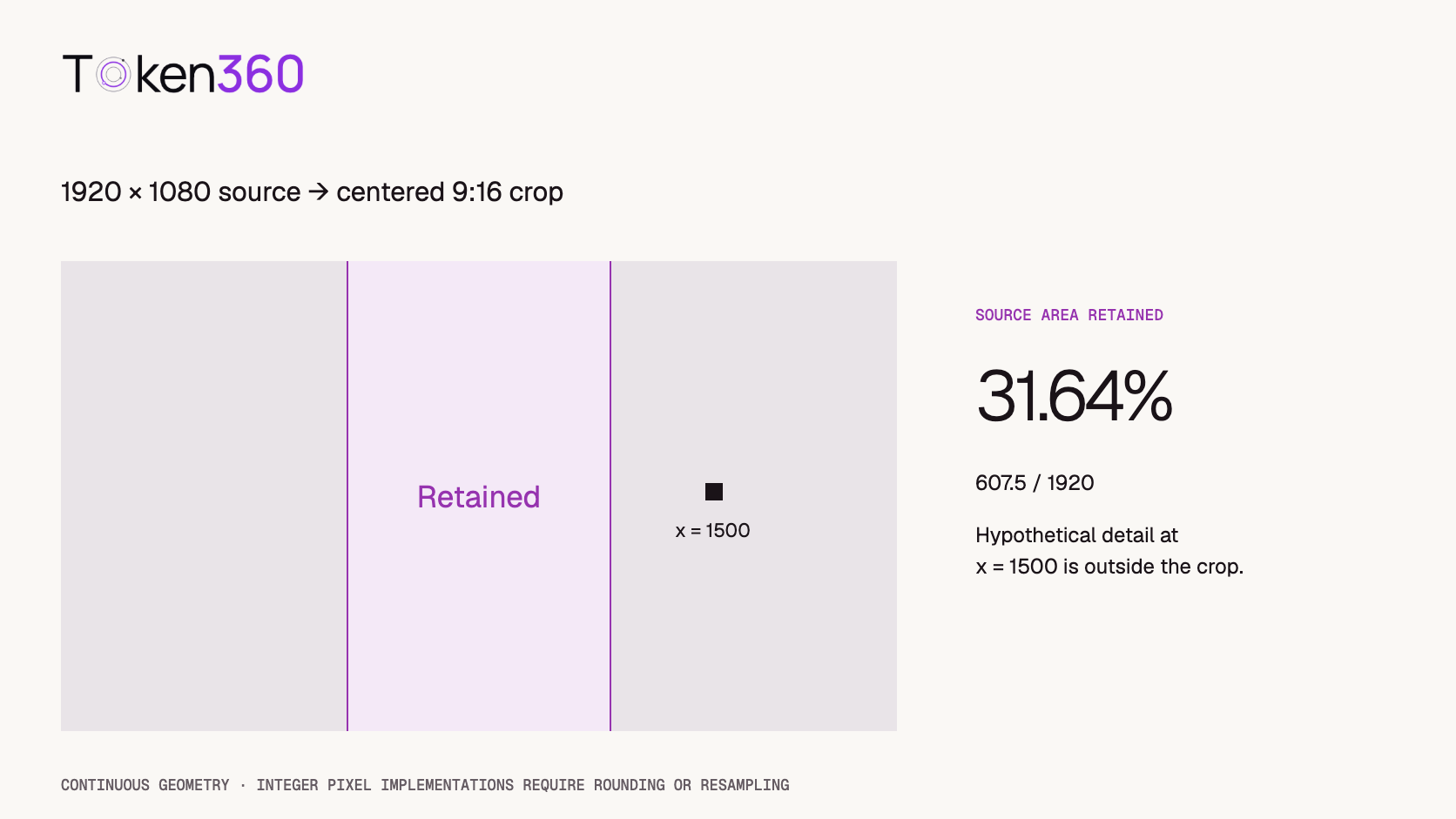
Consider a 1920 × 1080 landscape image prepared as a 9:16 portrait crop while preserving the full source height. The crop width is 1080 × 9 / 16 = 607.5 source-pixel units. The centered crop spans approximately x = 656.25 to x = 1263.75 in the original image.
Because the crop preserves the full height, the retained width fraction also gives the retained area fraction. These are continuous-geometry calculations; a real implementation must round or resample to integer pixels. This example describes an explicitly chosen crop, not a measured or assumed model behavior.
A hypothetical product detail located at x = 1500 lies outside that centered crop. No instruction to “preserve the label” can restore reference evidence that was removed before submission. It may be necessary to reposition the crop, choose another source image, or recompose the shot.
Calculated crop geometry. The marker is hypothetical, not a model-generated result.
In common image-processing terminology, cover preserves proportions while cropping to fill a target, contain preserves proportions while adding space as needed, and fill can stretch the image. These are documented options in Sharp’s resize reference. They illustrate preprocessing choices, not universal API parameters.
Padding keeps more source content but changes the composition and scale of the subject within the target canvas. Stretching may distort product geometry. Generative expansion introduces new content. None is automatically the right choice: inspect the prepared reference against the brief rather than treating “correct dimensions” as sufficient approval.
5. Check whether the visual reference supports the motion brief
Technical validity is only the first gate. The reference should make the intended subject, boundaries, and important details legible. If the camera is supposed to move around a product, recognize that a single view does not reveal every hidden surface. Do not promise exact unseen geometry based on one image.
Write down what must remain stable: silhouette, visible label, color, clothing, background, or spatial relationships. Then identify which details are actually visible in the submitted derivative. This turns “keep it consistent” into inspectable requirements.
Leave appropriate space for the intended action. A subject touching the crop edge can make an otherwise reasonable motion request harder to satisfy. More space is not always better, because shrinking the subject can also reduce detail. Review the final composition at the size you will submit.
Use the prompt to describe motion and constraints that agree with the reference. If the image shows a closed box but the brief requires a detailed view of its interior, the model must invent missing information. That may be acceptable for exploration but unsuitable for a product-accuracy requirement.
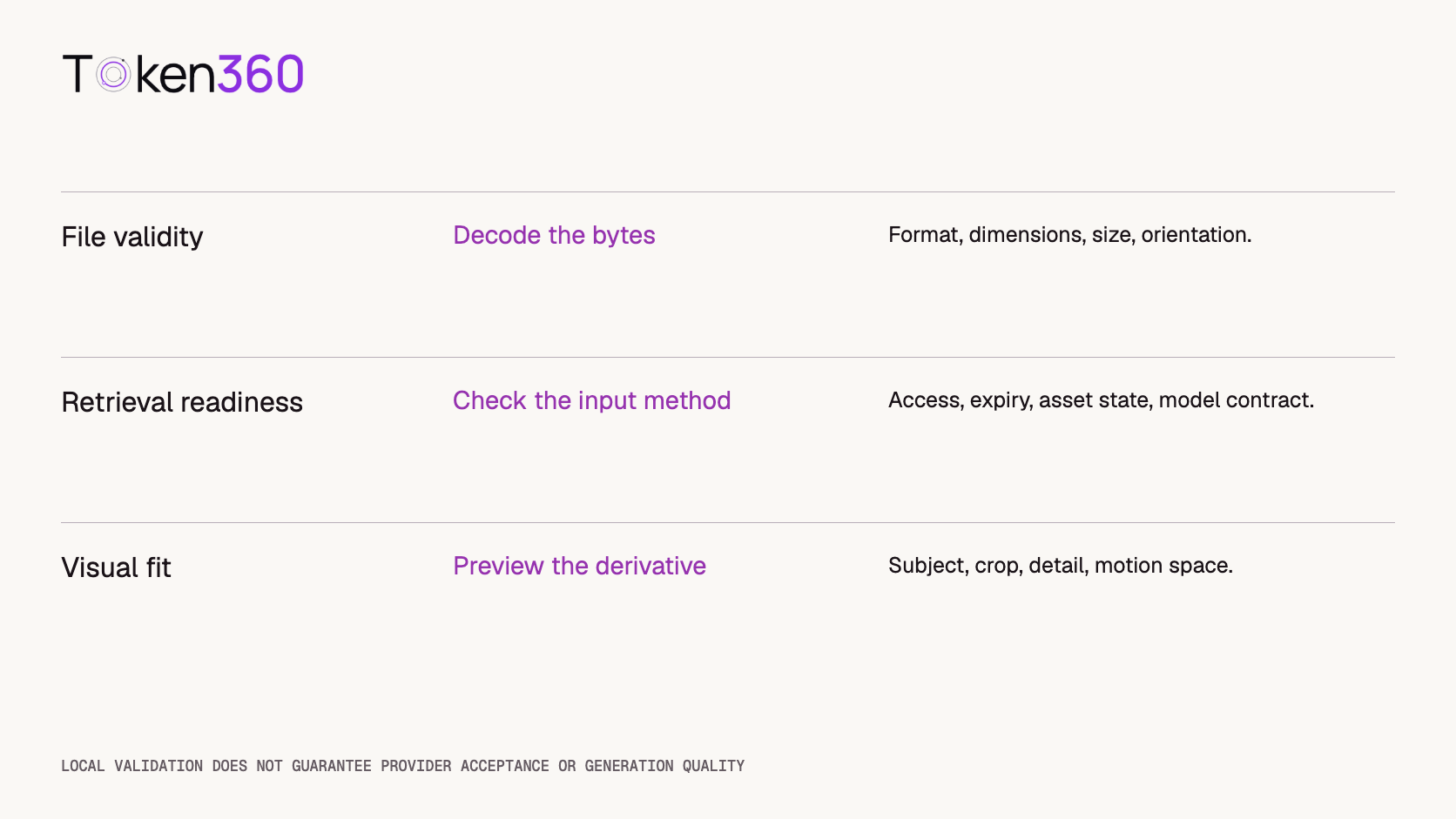
Pass technical checks and review the composition as separate decisions.
6. Save a preflight record that makes failures explainable
Keep an application asset ID, source and derivative checksums, transformation settings, decoded format and dimensions, selected model ID, and the validation profile version. Store the actual derivative where your retention policy permits. A screenshot of the original is not a substitute for the bytes used in the request.
Capture the distinction between “validated locally” and “accepted by the API.” If the provider rejects the request, retain its sanitized error and identifiers beside the preflight record. Do not automatically retry the same invalid input or silently change the image until something succeeds.
When changing a setting, preserve the previous record. Otherwise it becomes impossible to determine whether a later result improved because of a different crop, prompt, resolution, or model. A reproducible input record is useful even when the generation itself is stochastic.
Do not include API-key secrets or reusable access tokens in a public evidence bundle. Use internal identifiers for correlation and retain protected retrieval information only where it is needed operationally.
7. Validate the validator with a small case matrix
The following cases are proposed implementation checks, not completed Token360 tests. Run them in your own preflight layer before expanding a production workflow.
Case
Expected result
Valid supported reference
Pass local checks and display the final derivative.
HTML response named as an image
Reject based on decoded content.
Corrupt image or excessive decode resources
Stop safely with an actionable error.
URL requires a browser session
Request a supported retrievable input method.
Unsupported model parameter combination
Block with the relevant contract requirement.
Important detail outside the selected crop
Require a composition decision before generation.
Track the types of avoidable rejection over time, but do not publish a failure-reduction percentage without a defined before-and-after dataset. A local preflight check cannot reproduce every provider-side validation or quality decision.
FAQ
What image size works for every image-to-video API?
There is no universal requirement established here. Check the selected model and mode for format, dimensions, byte limits, and output settings.
Why does a URL work in my browser but fail in the API?
Your browser may have credentials or access that the provider does not. Check the actual response content, supported transport, access policy, redirects, and expiry.
Should I always crop the input to the output ratio?
No. Confirm the route’s expected behavior first. If you crop, inspect what is removed. Padding or choosing another reference may fit the brief better.
Does passing preflight guarantee an accepted request?
No. It establishes that your local checks passed against a recorded contract. Provider-side checks and operational conditions still apply.
Can a prompt recover a product label that was cropped away?
The removed pixels are no longer available as reference evidence. The model may invent content, but that is not verified preservation of the original label.
Should I replace the source after a failed generation?
First classify the failure. If you change the source, save a new derivative and record the change so later comparisons remain interpretable.


 Tutorial
 Tutorial
 Tutorial