AI video output validation checks whether a completed generation produced a retrievable, readable, technically suitable, and acceptable asset. Keep those checks separate: a successful job status is evidence about the generation workflow, not proof that the downloaded file meets your delivery requirements.
Read first: place validation within the text-to-video API workflow, then define quality criteria with the AI model evaluation framework.
Separate job success from delivery readiness
Your application may receive a terminal success state and an output reference. It still needs to retrieve the intended asset, inspect it, and decide whether it fits the use case. A download can fail after generation succeeds. A readable file can have the wrong dimensions. A technically valid video can still contain a continuity error or miss the requested action.
Represent these outcomes independently instead of storing one universal success flag. Suggested application states include generation completed, retrieval completed, technical review passed, and editorial review accepted. These are your workflow labels, not assumed Token360 response fields.
The distinction changes recovery. A retrieval problem calls for recovering the existing output where possible. A technical mismatch may need a different export or corrected settings. A creative rejection may justify revising the prompt. Treating all three as “generation failed” obscures the cause and can trigger unnecessary new work.
Define a delivery contract before inspecting outputs
Start with the requirements of the destination: an editing timeline, product page, social campaign, or customer download. Record required dimensions or aspect ratio, acceptable duration range, audio expectations, supported playback environment, and editorial criteria. Version this contract so an older output is not silently judged against newly changed requirements.
For illustration, a team might request a landscape preview with a duration near eight seconds, one primary video stream, and no required audio. Another project might require vertical video with audible dialogue. The absence of an audio stream could pass the first contract and fail the second. Neither rule is universally correct.
Token360’s model-capabilities guidance identifies the selected model page and public schema as the source of truth. Verify the exact model’s supported settings before requesting an output; do not assume every video model exposes the same resolution, duration, or audio controls. Keep your requested settings alongside the actual observed properties.
A tolerance is a policy decision, not a reason to ignore errors. If a workflow permits a small duration difference, document the allowed range and its rationale. Do not compare floating-point duration values for exact equality unless your contract genuinely demands that precision and your measurement method supports it.
Use four gates with distinct evidence
| Gate | Question | Evidence to retain |
|---|
| Retrieval | Did we obtain the intended output bytes? | Resource identity, transfer result, local asset identity |
| Media inspection | Can the file be recognized and decoded? | Stream report, decoder outcome, tool version |
| Technical fit | Does it meet this delivery contract? | Observed properties, contract version, mismatch reasons |
| Editorial acceptance | Does the content satisfy the brief? | Review rubric, reviewer, decision, timestamped notes |
Run inexpensive checks early, but avoid pretending each gate proves the next one. A nonempty file is not necessarily a video. A recognized video container is not proof that every frame decodes. A playable clip does not prove that the subject remains consistent or that a spoken line matches the script.
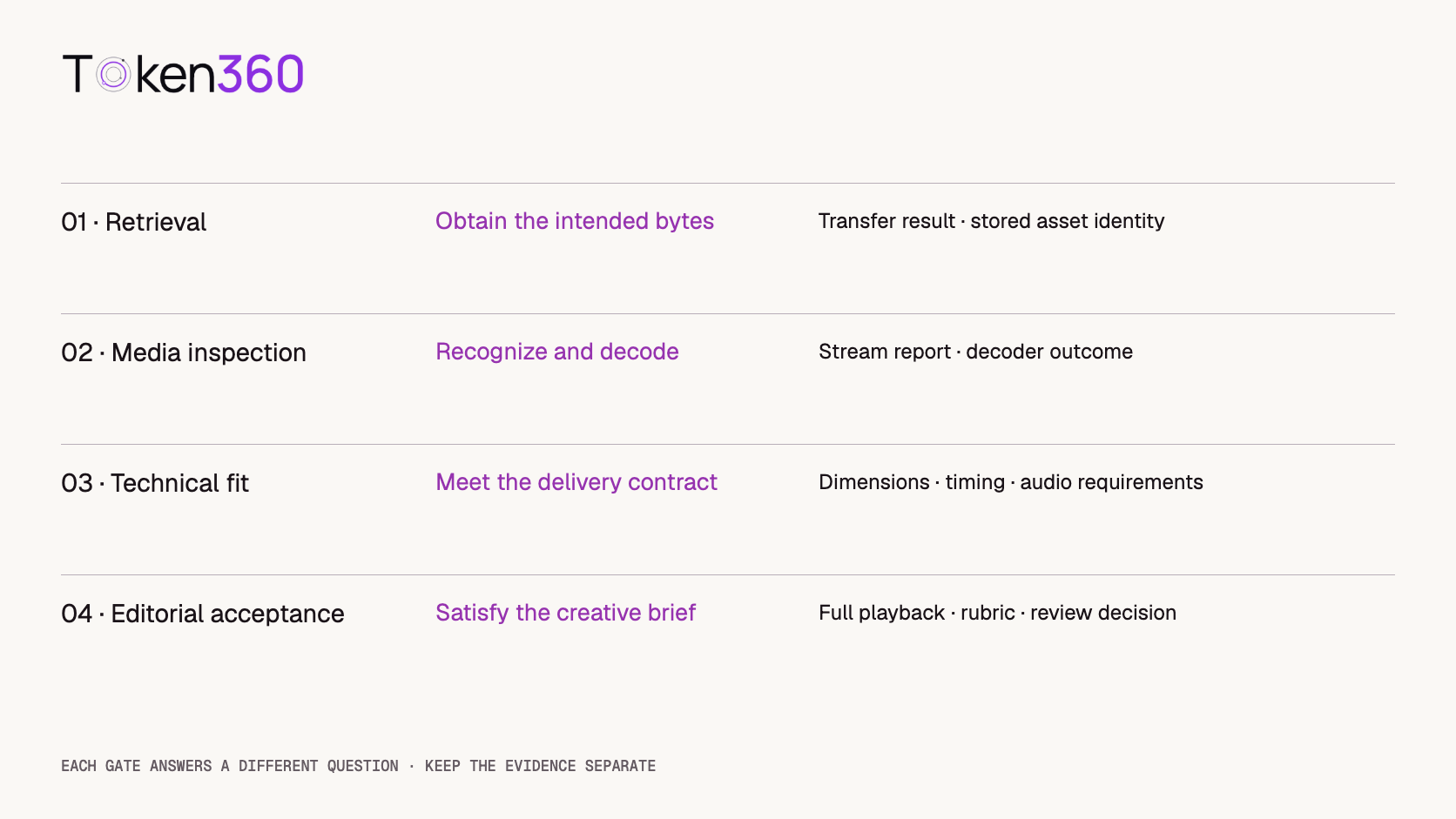
Preserve both the failed gate and the specific reason. “Technical fit failed: expected portrait, observed landscape” is more actionable than “invalid video.” Give infrastructure errors, incompatible output properties, and subjective creative judgments different reason codes so later reports remain interpretable.
Inspect the stored file, not just its filename
Save the completed transfer to a controlled local or object-storage location before marking it ready. Avoid exposing a partially downloaded file as the final asset. Keep the provider resource identity associated with the stored copy so a later investigation can distinguish generations, transfers, and exports.
A file extension is only a name. An error page saved as output.mp4 is still an error page. Likewise, a byte count alone cannot establish a valid video. Verify the media content through a suitable inspection tool, and keep failed files separate from accepted delivery assets.
FFprobe can report container and stream information in machine-readable form. The following example reads a local file and requests JSON output. It requires FFprobe to be installed; this command was not executed for this article.
ffprobe -v error -show_format -show_streams -of json output.mp4
Use the report as evidence for your checks rather than assuming every field is present. Unknown or missing metadata should lead to a defined fallback or review outcome. Reported duration and frame-rate values need interpretation, especially when streams have different timing. Keep the complete report available under appropriate access controls.
Metadata inspection and full decoding are separate tests. An inspection report may be available even when later playback encounters problems. Use a suitable decoder or media-validation process to exercise the actual streams, and capture its outcome. A decoder failure can reflect an unsupported codec or a tool limitation as well as damaged media, so retain diagnostic details before assigning the cause.
Check dimensions, timing, and audio against the contract
Compare the displayed result, not only a casually selected width field. If orientation or pixel-shape metadata affects presentation, the viewer’s displayed aspect ratio may differ from a simple raw-width divided by raw-height calculation. For critical placements, test the target player or editing application as well.
For duration, identify which measurement your contract uses: container duration, video-stream duration, or the duration observed during complete playback. If those disagree materially, flag the asset for investigation rather than choosing whichever value passes. The same principle applies to frame rate: decide whether the destination needs a particular constant frame rate or simply accepts the observed timing.
For audio, separate presence from usefulness. An audio stream can exist while containing silence, clipping, unwanted music, or incorrect speech. A dialogue deliverable also needs listening and synchronization review. A silent product loop may intentionally omit audio, so an audio-presence rule should not be copied between unrelated projects.
Write mismatch reasons in terms of observed evidence. For example, “no audio stream found under the required-audio contract” is precise. “The model cannot produce audio” is a much broader conclusion that one output does not establish.
Review the whole clip before accepting the content
A contact sheet is useful for triage, but sparse frame samples can miss a brief artifact, an abrupt cut, or an unwanted event between samples. Watch the complete clip for deliverables where continuity matters. Listen to the complete audio when audio is part of the brief.
Use a short rubric tied to the actual request: subject preservation, action completion, temporal continuity, unwanted content, and destination suitability. Record the time range of each issue. “The product label changes at 00:04” is a stronger review note than “quality is bad.”
Automated checks can prioritize review, but their scores need validation against your acceptance criteria. A high similarity score is not automatically evidence that a required action happened correctly. Keep reviewer disagreement visible instead of silently averaging incompatible judgments into a pass.
For borderline outputs, distinguish acceptance as-is, acceptance after an approved edit, and rejection. A repaired or transcoded version is a new derived asset. Retain its connection to the original and inspect it again, because processing can change dimensions, timing, audio, or playback compatibility.
Calculate delivery yield without hiding intermediate failures
Consider a hypothetical batch of 12 completed generation jobs. Ten outputs are retrieved successfully; nine pass media inspection; seven meet the technical contract; and six receive editorial acceptance. These are nested counts from the same batch, not observations from a Token360 experiment.
| Stage reached | Outputs remaining | Share of 12 completed jobs |
|---|
| Generation completed | 12 | 100% |
| Retrieved | 10 | 83.3% |
| Media inspection passed | 9 | 75% |
| Technical contract met | 7 | 58.3% |
| Editorially accepted | 6 | 50% |
The accepted-output yield is 6 divided by 12, or 50% of completed jobs. It is not a generation success rate because the example excludes failed generation jobs. Editorial acceptance among technically suitable outputs is 6 divided by 7, approximately 85.7%. These denominators answer different questions.
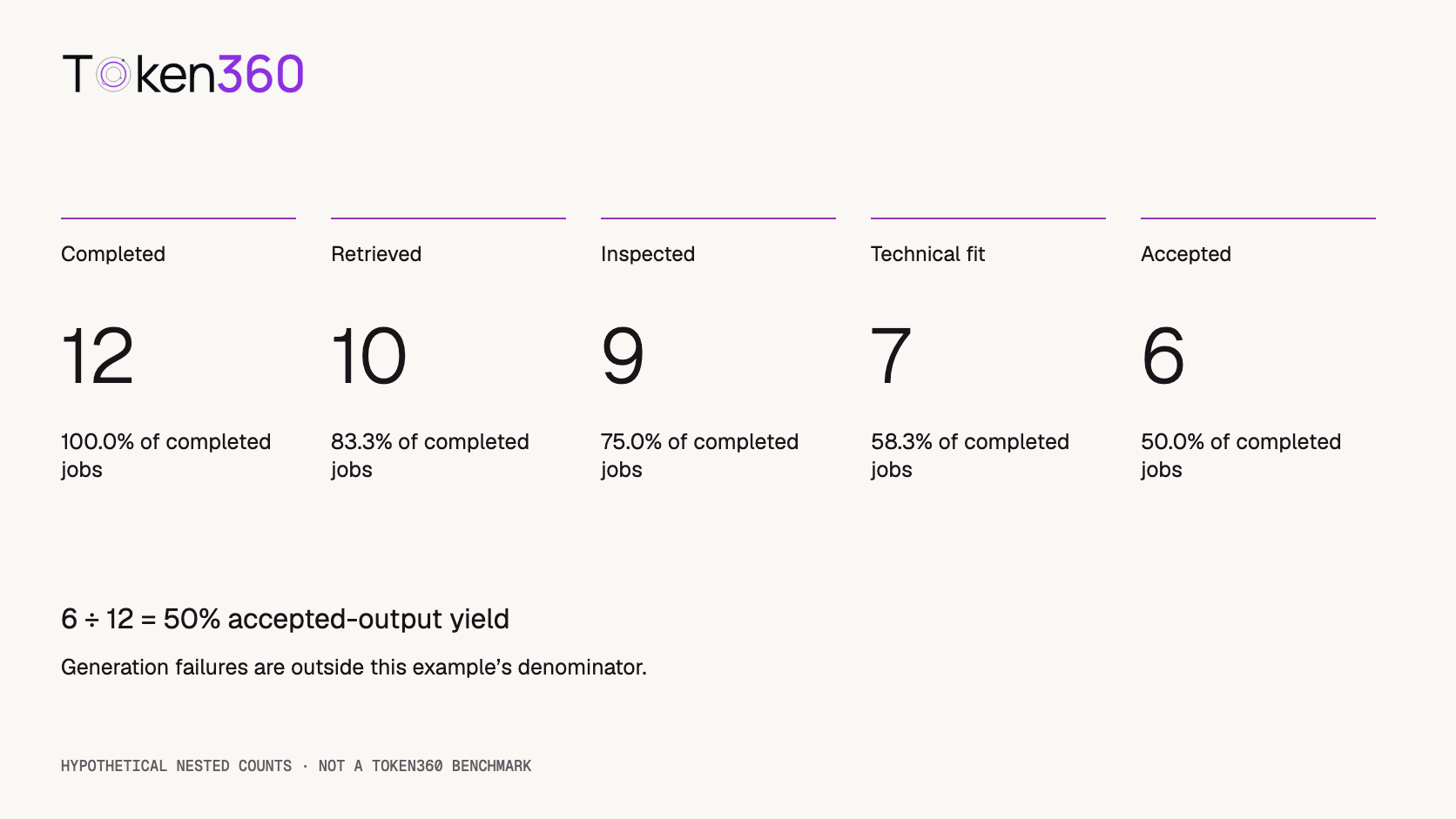
The stage differences identify two retrieval failures, one media-inspection failure, two technical mismatches, and one editorial rejection. They do not establish the underlying causes. Investigate before attributing the losses to a model, provider, network, or review policy.
If retrieval is later recovered, version the report or state its measurement cutoff. A snapshot taken before recovery should not be compared to a fully reconciled batch as if both had equal observation time. For cost analysis, use reconciled charges and accepted outputs from the same defined cohort; this example does not supply actual prices or claim savings.
Turn failures into targeted recovery work
A retrieval failure should first trigger investigation of the existing output reference and transfer path. A damaged local copy may be recoverable without new generation. A codec mismatch may call for a compatible export if your workflow allows it. A failed creative brief may require another generation, but preserve the original evidence and state what will change.
Keep validation results attached to a particular asset version and contract version. Store the decision, tool versions, review notes, and any derived-file relationship. If a file is replaced, earlier validation should not automatically transfer to the replacement.
The unique contribution here is a four-gate acceptance workflow and a reproducible denominator example. The arithmetic was checked locally. No real model output was decoded, no FFprobe report was produced, and no acceptance-rate benchmark was measured for this article.
Before applying the gates to a large batch, check the workflow with known fixtures: a valid clip, a non-media file with a video extension, a deliberately incompatible format, and an asset that violates your chosen contract. These fixtures test the validator’s decisions; they do not measure a generation model’s quality.
FAQ
Does a successful video job mean its output is ready to publish?
No. Retrieval, media readability, technical requirements, and content acceptance still need separate checks before delivery.
Is FFprobe enough to validate an AI video?
It provides useful media information, but metadata inspection alone does not prove complete decoding, target-player compatibility, or creative suitability. Combine it with the checks your delivery contract requires.
Should every video contain an audio stream?
No. Audio requirements depend on the model settings and delivery brief. A silent loop may be valid without audio, while a dialogue clip requires both audio and content review.
Should I regenerate when a download fails?
Investigate recovery of the existing output first. A transfer failure is not evidence that the generation itself must be repeated.
How should I report accepted-output yield?
State the accepted count, denominator, cohort, and measurement cutoff. Acceptance among completed jobs differs from acceptance among submitted requests or technically valid outputs.
Do edited or transcoded videos need another check?
Yes. Treat them as derived asset versions and validate them against the relevant delivery contract, preserving their relationship to the original output.
Read next: connect rejection decisions to AI video API cost optimization and preserve operational evidence with AI API observability.



 Tutorial
 Tutorial
 Tutorial