AI Video Prompt Versioning: Track Prompts, References, and Results
Version AI video prompts with references, model settings, and run records. Track controlled changes, review every attempt, and roll back complete recipes.
You find a video that works, copy its prompt, and try again a week later. The new result looks different. Was the wording changed, the reference cropped, the model switched, or the output simply variable? A prompt saved in a notes document rarely contains enough information to answer.
Quick answer: version the complete generation recipe: rendered prompt, reference assets, model identifier, supported settings, and application transformations. Give every generation attempt its own record linked to that recipe. Keep results and review decisions separate from the recipe so you can trace changes without rewriting history.
This guide provides an illustrative version record, a controlled revision example, and a six-run comparison plan. No video generation experiment was executed for this article. Versioning preserves evidence about inputs; it does not guarantee identical output pixels.
1. Version the generation recipe, not just the sentence
A recipe is the set of inputs your application can identify and preserve. It includes the final text sent to the model, the actual reference files, the selected model, and the effective settings. If your application rewrites a prompt or resizes an image, those transformations belong in the record too.
Layer
What to preserve
Why it matters
Prompt
Template version, variable values, and rendered text
The same template can produce different requests.
References
Asset versions, roles, order, and checksums
A reused filename can point to changed pixels.
Model
Exact public ID and returned version metadata when available
A provider family name is not a precise configuration.
Settings
Explicit parameters and known defaults
Duration or resolution changes can affect the task.
Application
Transformation rules and integration version
Client behavior can change the submitted input.
Review
Rubric version linked to each evaluation
A changed acceptance rule changes the meaning of a pass.
Token360’s Model Capabilities documentation emphasizes checking the exact model’s public schema and accepted parameters. Do not invent a seed field, a negative-prompt field, or a reference-image slot because a related model supports one.
If an effective default is unknown, record that uncertainty. “Omitted, provider default not captured” is more informative than filling in a guessed value. The same applies to internal model revisions or routes that are not exposed in the response.
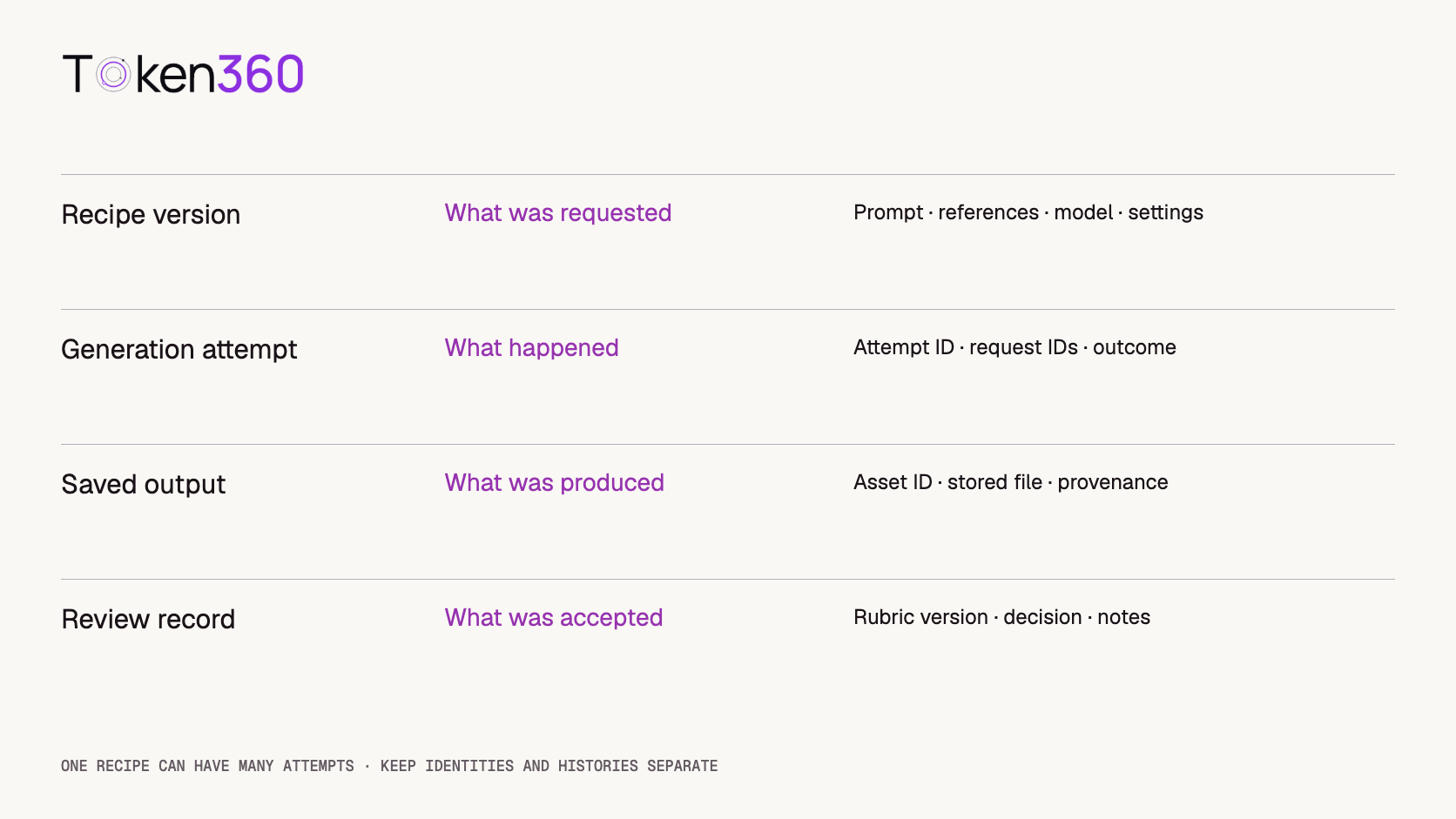
2. Give recipes, attempts, and assets different identities
A recipe version should remain stable after it is used. Each execution gets a new attempt ID even when every recorded input is unchanged. Each reference or output asset also needs an identity independent of a temporary download URL.
This produces a simple relationship: one recipe can have many attempts; each attempt can reference one or more input assets and produce one or more outputs. Reviews attach to the relevant output and rubric. Avoid using a single “version” column for all four concepts.
A reviewer may reject an output without changing the recipe. A developer may replace an expired access URL without changing the underlying reference bytes. Conversely, changing a crop while retaining the filename should create a new asset version and a new recipe that points to it.
Separate configuration history from execution history and evaluation history.
3. Start with a small, explicit recipe record
The following JSON is a proposed application format, not a Token360 request body or API schema. The model ID is deliberately unset. The record cannot be used for generation until the route is selected, its contract checked, and the reference resolved.
{
  "recipe_id": "shoe-static-camera",
  "version": "v2",
  "parent_version": "v1",
  "change_reason": "Replace camera orbit with a static camera",
  "model_id": null,
  "reference_asset_version": "shoe-front-v1",
  "prompt": "An ivory sneaker remains stationary on a neutral surface. Static camera. Soft studio lighting. Preserve the visible silhouette and seam placement.",
  "parameters": {},
  "validation_status": "model_contract_pending",
  "review_rubric_version": "product-shot-r1"
}
For a real request, add the validated model-specific settings and preserve the resolved references. If the application expands variables, retain both the template inputs and the final rendered prompt. If a prompt-enhancement feature exists in your workflow, record its setting and resulting text when available; do not assume it is supported by every route.
Make the record easy to inspect. A short human-readable ID helps collaboration; a content fingerprint can help detect accidental modification. A hash identifies the bytes included in its calculation, not the meaning or quality of the prompt. Define a stable serialization method if you hash structured records.
Keep credentials outside the recipe. A secret used to authorize a request is not part of the creative configuration and should not enter prompt history. Store protected assets with appropriate access controls instead of publishing reusable signed URLs in a repository.
4. Describe one intended change at a time
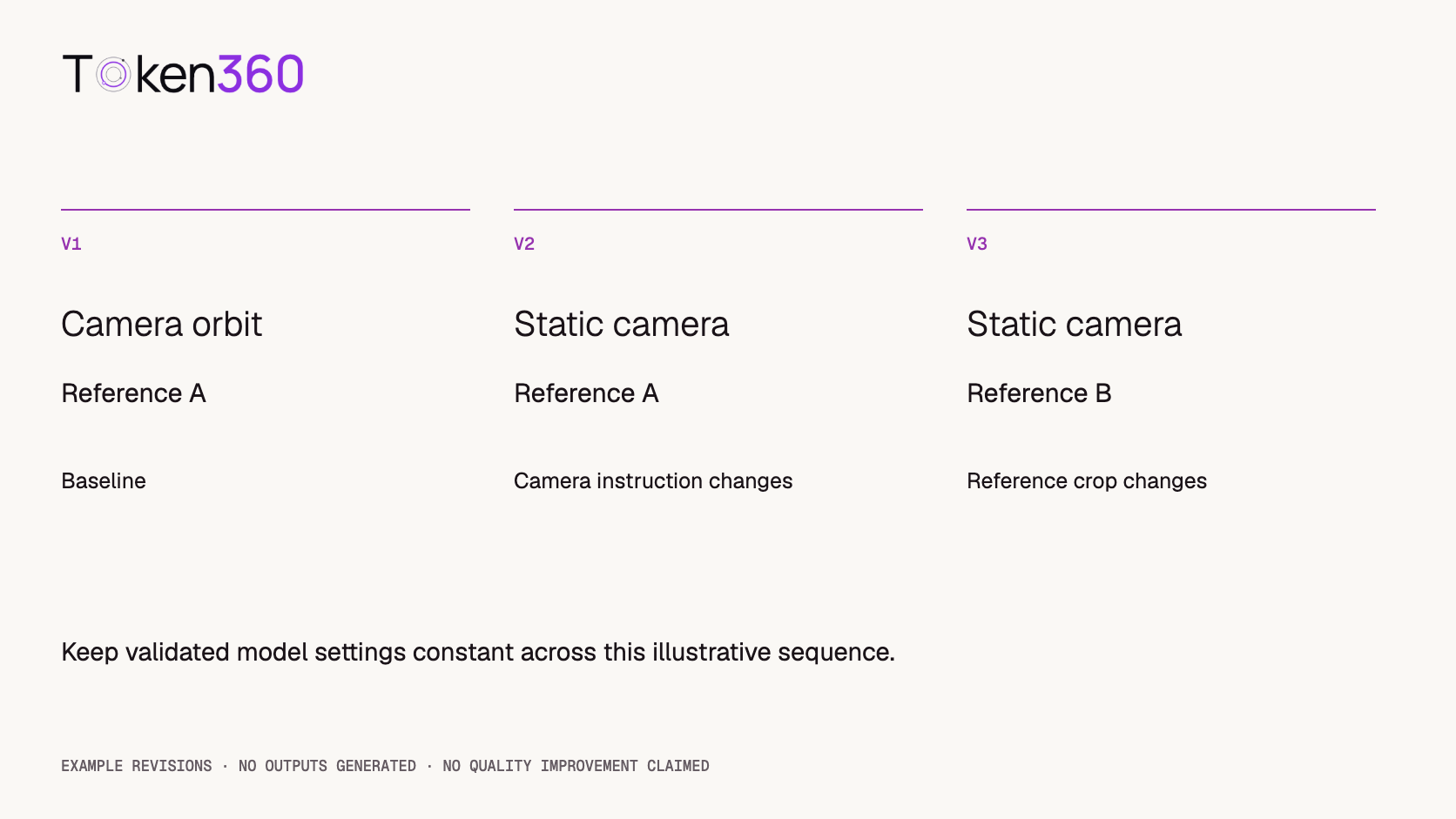
Consider this illustrative product-shot progression. The prompts and asset names are examples; no outputs are claimed.
Recipe
Intended change
Held constant
Interpretation
v1
Baseline camera orbit
Reference A and validated configuration
Baseline to be tested
v2
Replace orbit with a static camera
Reference A and the same configuration
Camera-instruction comparison
v3
Use a wider reference crop B
v2 prompt and configuration
Reference-composition comparison
The intended v1-to-v2 text difference could be recorded directly:
- The camera slowly orbits the stationary sneaker.
+ Static camera. The sneaker remains stationary.
Do not add a different model and longer duration to v2 and then attribute the outcome solely to the prompt edit. Multiple changes can be a valid product iteration, but they answer a different question: how the combined configuration behaves.
A change log should state the hypothesis, not just “improved prompt.” For example: “A static camera may reduce the need to infer hidden shoe geometry; check silhouette preservation.” That is a testable reason to try the change, not evidence that it worked.
Versioning also exposes changes that look minor in the interface. Reordering reference images, editing a template variable, or switching an image from transparent to an opaque background can change the effective request. Preserve those differences even if the user-facing prompt text stays the same.
Illustrative revisions. No quality improvement has been measured.
5. Compare repeated attempts without choosing only the best clip
A small exploratory plan might run v1 and v2 three times each, for six attempts. Use the same reference and validated settings, and define the rubric before viewing the results. Three attempts per version can reveal variation; they are not enough to establish a general win rate.
Interleave the versions rather than running all of one version first. Randomize the order within pairs when practical and retain that schedule. This can reduce some ordering confounds, but it does not eliminate changing service conditions or make the outputs deterministic.
Review item
Proposed criterion
Evidence to retain
Visible geometry
No obvious deformation of the visible shoe silhouette
Timestamped frames and reviewer notes
Seam placement
The visible seam stays on the same part of the shoe
Reference and output comparison
Requested camera behavior
Motion follows the recipe’s specified camera instruction
Full clip review
Technical completion
The output is complete and playable
Job status and validated media file
Because v1 and v2 ask for different camera behavior, score instruction following against each version’s own instruction. Compare shared product-fidelity criteria separately. A static shot should not be declared better merely because a rubric incorrectly requires every output to be static.
Keep every attempted generation in the report. Provider failures, incomplete outputs, and visually rejected clips should not disappear when calculating totals. Record settled charges when available and distinguish them from estimates. If the experiment has unresolved attempts, describe the partial result instead of presenting a complete comparison.
If a route supports a seed, record it and the applicable documented limitations. Reusing a seed is not a universal guarantee of identical output across models, revisions, hardware, or settings. Where seeds are unavailable, retain repeated observations and describe the remaining uncertainty.
6. Choose a storage approach that preserves the whole relationship
You can begin with versioned text records and controlled asset storage. Git’s documentation describes commits as snapshots of project state. That is useful for tracking prompt text and configuration together, provided the actual runtime resolves the version you recorded.
Keep large media files in storage suited to their size and access requirements, and link them using stable object identifiers and checksums. A repository commit cannot explain an output if the reference file was overwritten elsewhere or the only saved output URL expired.
For teams that need a registry, MLflow’s Prompt Registry documentation describes immutable prompt versions, aliases, and lineage features. Those concepts can inform the design, but this article has not tested an MLflow-to-Token360 video integration. A prompt registry does not automatically capture your video references, output files, or review process.
Choose the smallest system that reliably records what was used. A shared table can work initially if used recipes are protected from silent edits and assets remain traceable. Add tooling when ownership, access control, or review volume requires it, rather than assuming a new tool alone creates reproducibility.
7. Promote and roll back complete recipes
A label such as “production” can point to an approved version, but every attempt should also record the exact version that label resolved to. If the label moves later, old runs must remain attributable to their original configuration.
Approval should state the intended use, tested scope, reference requirements, reviewer, and unresolved limitations. “Approved for a static catalog shot with this reference class” is narrower and more useful than “best prompt.” Keep the acceptance evidence attached to the decision.
A rollback restores a prior configuration for future attempts. It does not restore an old output unless that file was saved, and it may not reproduce historical behavior if the provider no longer exposes the same model revision. Separate configuration rollback from recovery of generated assets.
Before promoting a recipe, verify that the referenced inputs are still available, the model contract is still valid, and the request can be assembled from the stored record without undocumented manual edits. If those checks fail, mark the version unavailable for new runs rather than silently substituting another model or asset.
FAQ
Is saving the prompt text enough?
No. Preserve reference assets, exact model identity, supported settings, rendered variables, and relevant application transformations alongside the text.
Does the same recipe produce the same video?
Not necessarily. Versioning preserves the input history you can observe. It does not guarantee deterministic generation or access to an unchanged underlying model.
When should I create a new recipe version?
When a recorded generation input changes: text, reference version or order, model, settings, or transformation behavior. A new attempt with unchanged inputs gets a new attempt ID, not necessarily a new recipe.
Should I save only successful outputs?
No. Retain attempted-run metadata and the outcomes needed to interpret the experiment, subject to your retention policy. Otherwise quality and cost summaries can become misleading.
Do I need a prompt registry to start?
No. Versioned configuration files and durable asset references can be sufficient for a small workflow. A registry helps only when its capabilities address your actual operational needs.
Can three runs per version prove one prompt is better?
They can provide exploratory observations, not a robust general superiority claim. Report all outcomes, the rubric, and the narrow scope before deciding what to test next.
Next step: take one existing successful clip and reconstruct its recipe. Mark every missing field explicitly. That gap list tells you what to capture before the next generation.
API
Video Generation
Developer Guide
Build faster with one AI API.
Use Token360 to call video, image, audio, and text models with one key and one bill.



 Tutorial
 Tutorial
 Tutorial