Keep AI content on brand with approved facts, voice examples and controlled visual assets. Check final outputs across teams, models and channels.
ENTERPRISE AI · BRAND CONSISTENCY
Keep AI-generated content on brand by giving each generation task current, approved rules and assets, then checking the finished content against those rules. Separate product facts, writing style and exact visual requirements. Use examples to guide flexible choices, and use templates or deterministic checks for elements that must match precisely.
For enterprise teams, “use our brand voice” is an incomplete brief. Sales may need a factual explanation, marketing a campaign headline, and support a calm service response. Those outputs can sound different while sharing the same product names, supported claims and visual identity. Consistency means preserving those standards across contexts, not making every asset identical.
Scope: This is a proposed enterprise content workflow, not a measured customer case study. Examples below are illustrative. Official sources were checked November 16, 2026. Token360 supplies model access; this article does not claim a native brand-validation engine, digital asset manager or automatic publishing approval.
What does “on brand” mean for AI-generated content?
Define on-brand content as a set of observable requirements: accurate claims, approved terminology, suitable tone, correct identity assets and appropriate channel presentation. Some requirements are exact; others need judgment. A useful review identifies which rule failed instead of reducing the whole asset to an unexplained brand-alignment score.
Dimension
Example requirement
Suitable review
Product truth
Do not turn a conditional offer into a universal promise
Compare each claim with an approved fact source
Terminology
Use the current product name and approved spelling
Use the original logo, prescribed typeface and specified background
Asset/template checks and final-image inspection
Channel fit
Preserve required context when shortening a message
Channel-specific review, including truncation and layout
A polished image can contain the wrong logo. A friendly paragraph can promise an unavailable service. A technically correct paragraph can still be unsuitable for a complaint response. Treat these as separate failures so the correction addresses the actual problem.
What belongs in an AI-ready brand brief?
Provide the subset of current brand guidance needed for the task, with a version and an owner. Include approved facts, audience and channel, terminology, voice examples, visual assets and prohibited transformations. Keep exact requirements distinguishable from creative preferences so neither the model nor the reviewer has to guess their priority.
A long brand PDF can remain the reference source, but a task brief should identify the relevant rules explicitly. For example, a product email needs the product's current scope and approved wording; it does not necessarily need every exhibition-booth specification. Conversely, a campaign image needs actual asset references and layout requirements, not only personality adjectives.
Brief field
What to supply
Version and ownership
Guideline version, approval owner and applicable market
Audience and purpose
Who will read or view it, and the specific decision or action it supports
Approved facts
Current capabilities, qualifications, offers and supporting source references
Language rules
Product glossary, preferred phrasing, prohibited claims and necessary qualifiers
Examples
Approved samples with short explanations of why they fit
Visual controls
Original identity assets, font files, color values and relevant layout constraints
Output and review
Format, required components, acceptance criteria and publication owner
Keep campaign-specific instructions subordinate to factual and identity constraints. “Make it more exciting” can change the rhythm or image composition; it should not authorize invented capabilities or a replacement logo. Where two approved documents conflict, resolve the source authority before generation rather than asking the model to choose whichever version sounds better.
How should you teach brand voice without vague adjectives?
Pair concise voice rules with examples that demonstrate them in the intended context. Explain which features matter: sentence length, directness, treatment of uncertainty, or the way a benefit is supported. Include different situations so the model learns the range of acceptable expression rather than copying one sample's structure everywhere.
Google's prompt-design documentation describes system instructions and few-shot examples as ways to guide style and tone. That supports using concrete examples, but it does not establish that a prompt guarantees brand consistency on every output or across different models.
Consider this fictional brand rule: “State the available capability and its limits in direct language; do not use unverified rankings.” An illustrative unacceptable sentence is “The world's best automation handles every request instantly.” A better draft is “Automate supported requests and route exceptions to your team.” The second sentence is still publishable only if those capabilities are verified.
Useful examples include both a campaign message and a service explanation. The campaign can be energetic; the service explanation should make next steps clear. Brand voice is not a reason to use the same upbeat phrasing when a customer reports a failure. The broader question of a model's default interaction style is covered in AI model communication style.
Do not put unmarked outdated claims into a prompt as “bad examples.” Label rejected wording clearly and keep authoritative facts in a separate section. Otherwise the brief itself gives the model conflicting material to reproduce.
Which visual elements should remain outside free-form generation?
Keep exact identity elements in controlled assets or editable templates whenever the production format allows it. Generate the scene or concept, then place the approved logo, typography, labels and exact-color surfaces through a controlled composition step. Inspect the exported image or video, because a correct source file does not prove a correct final render.
For example, if a guide specifies a title background by a hexadecimal color value, requesting “a similar neutral background” changes the requirement. Set that surface explicitly and sample the exported pixels in unobstructed areas. Photographic shadows and materials can still vary naturally elsewhere; the designated flat background and the photographic scene are different kinds of surface.
The same distinction applies to lettering. A generated approximation of a wordmark is a new drawing, not the approved asset. Use the original asset at the correct proportions and inspect clear space. If a product's physical appearance must be exact, a pleasing generated substitute should not pass merely because its colors match.
Video and audio need their own checks. A still frame can confirm the end-card logo but cannot establish that a product remains consistent through motion. A script can use the correct product name while a voice output pronounces it incorrectly. Review the delivered medium, including the actual audio, instead of treating a good prompt as evidence of compliance.
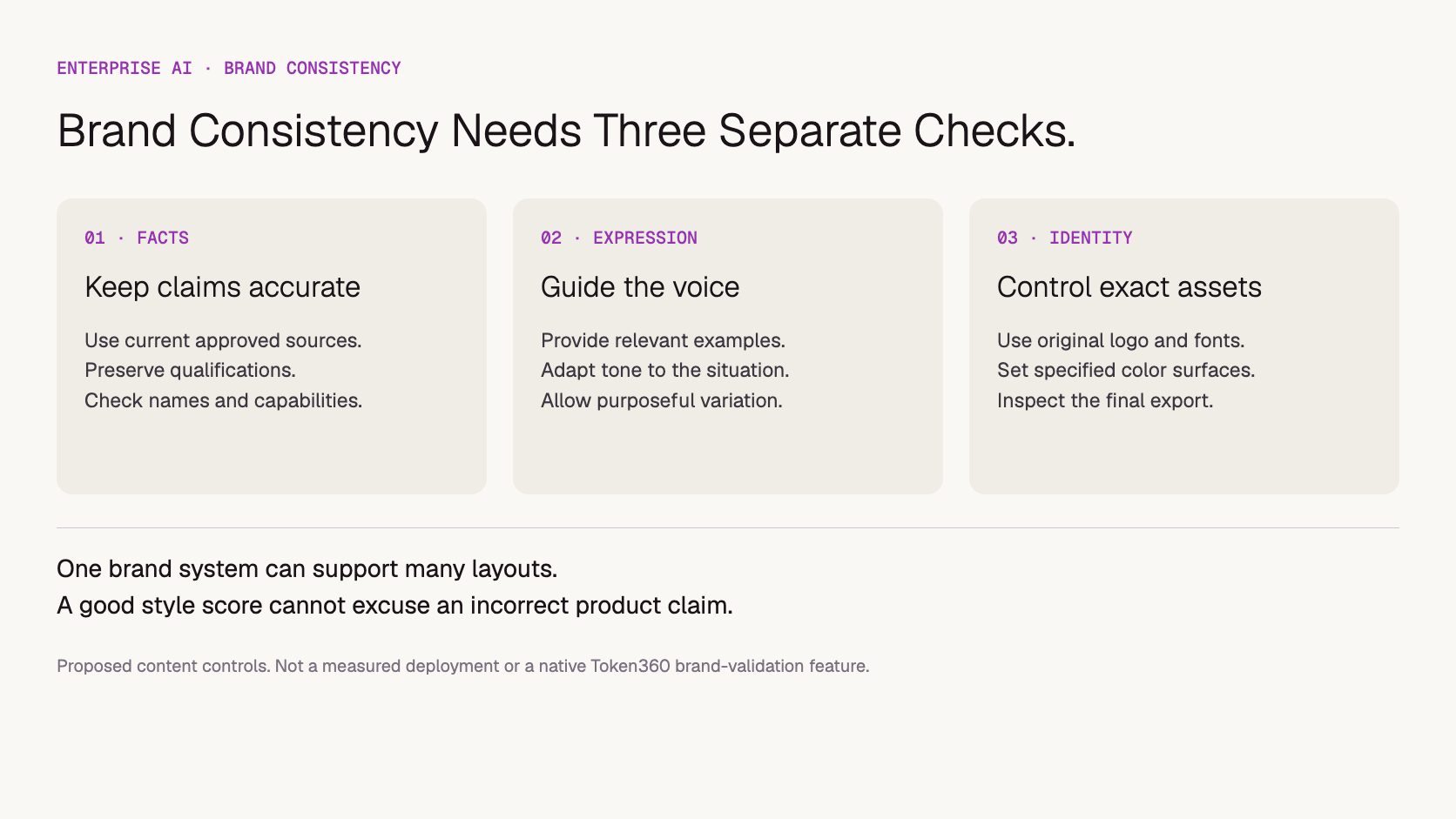
Proposed control layers: factual accuracy, expression and identity require different checks.
If the deliverable includes a logo, specify the file structure as well as the appearance. The editable AI logo delivery guide explains how to check paths, typography and export behavior before treating a concept image as an approved design asset.
What should be checked automatically, and what needs an editor?
Automate checks that have clear, machine-testable answers, and use editorial review for context and interpretation. Name, size and asset-version checks can catch specific defects. Tone, implied claims and product fidelity need more judgment. An automated score should help locate issues, not silently become permission to publish.
Adobe's GenStudio brand-validation documentation distinguishes content checks and describes reviewing flagged issues, revising variants and running checks again. It also notes that its brand-voice check applies to the whole variant. These are features of that Adobe product, not implied features of a general-purpose model API.
Check
What automation can help inspect
Remaining review
Names and required copy
Missing approved terms or forbidden exact phrases
Whether a paraphrase changes the meaning
Layout specifications
Dimensions, selected fonts and defined flat-color surfaces
Cropping, legibility and composition in the exported asset
Approved asset use
Referenced asset identifier and version
Whether transformations altered the intended appearance
Claims
Flag unsupported numbers or absent source references
Implied promises, qualifications and factual support
Voice
Flag likely deviations using a rubric
Whether the tone suits this audience and situation
Define critical failures separately from stylistic preferences. An incorrect guarantee should not be averaged away by strong spelling and layout scores. Likewise, a deliberate campaign variation should not fail simply because it differs from a past layout that was never mandatory.
Use review effort in proportion to the content's consequence and exposure. A high-visibility product promise deserves a different approval path from an internal brainstorming draft. Our guide to when enterprise AI needs human review covers that decision in more detail.
How do multiple teams and models stay aligned?
Share versioned brand requirements and acceptance criteria across teams, while allowing model-specific prompting and channel-specific expression. Record which guideline version, assets and model produced each approved output. When guidance changes, identify affected work and recheck it rather than assuming that every team's saved prompt has updated automatically.
A single model does not solve inconsistent briefs. Two teams can get conflicting content from the same model if they supply different product facts or different interpretations of the guide. Conversely, different models can be evaluated against a common set of requirements even when the wording of their prompts differs.
For each important change, keep a small set of representative briefs: a product explanation, a promotional variant, a service message and a visually constrained asset, as relevant to your business. Re-run and review these after model, prompt, template or guideline changes. Include situations where qualifiers are easy to lose, such as a short headline derived from a longer offer.
Track rejection reasons and revision effort by content type. Do not claim brand consistency improved merely because an automated score rose. If content becomes less accurate or requires more correction, investigate the change using the process in AI quality regression analysis.
What should enterprises ask before scaling branded content?
Ask who owns the rules, how approved assets reach generation, how failures are caught and which output is actually approved for publication. Demonstrate the workflow using your own permitted briefs. Evaluate the model-access layer separately from the content management, design and approval systems that make the result usable.
An illustrative acceptance exercise is to give two teams the same current brief and ask for different channel formats. Review whether product names and claims remain stable, required qualifiers survive shortening, and the correct identity assets appear. Different layouts are acceptable if the guide permits them. Record the findings rather than presenting this proposed exercise as a completed benchmark.
For an enterprise operating multiple brands or client accounts, also confirm that the brief and assets belong to the correct brand before each request. A perfectly executed competitor's style is still the wrong result. The article on multi-client creative production covers separation between client workflows.
Token360 offers model access across text, image, audio and video. Its enterprise offering supports discussions about model mix, pricing, capacity and contractual requirements. Confirm the scope needed for your workload; access to those models does not by itself provide brand asset management, validation or approval software.
A useful starting brief for that discussion names the content types, expected generation volume, reference-input requirements and acceptance criteria. Measure cost against content accepted through your actual workflow, including revision work, when you have test data. Do not infer lower production cost from a low per-generation price alone.
Frequently asked questions
Is uploading our brand guide enough?
It provides source material, but you still need task-specific instructions, approved assets and final-output checks. Confirm that the relevant rules were extracted correctly and that the current version is used.
Do all teams need to use the same AI model?
Not necessarily. Teams need shared factual and identity requirements plus a common review standard. Compare models on the intended content tasks and verify outputs rather than assuming one model guarantees consistency.
Does every asset need the same layout?
No. Preserve mandatory identity rules while varying composition to fit the subject and channel. A consistent brand system can support multiple layouts; only treat a layout as fixed when the guide requires it.
Can an AI brand score replace approval?
A score can support review, but it does not establish that every claim, visual detail or contextual choice is correct. Define publication authority and critical-failure rules separately from the score.
Enterprise AI
API
Bring your next idea to life.
Create a video scene in Creator, or explore models for images, audio, and text to find the right capabilities for your project.


 Guides
 Guides
 Guides