When Should an AI Assistant Ask a Clarifying Question?
Ask when missing details change the outcome. Learn when enterprise AI should clarify, draft with assumptions, or hold an action—and how to test it.
ENTERPRISE AI · CLARIFYING QUESTIONS
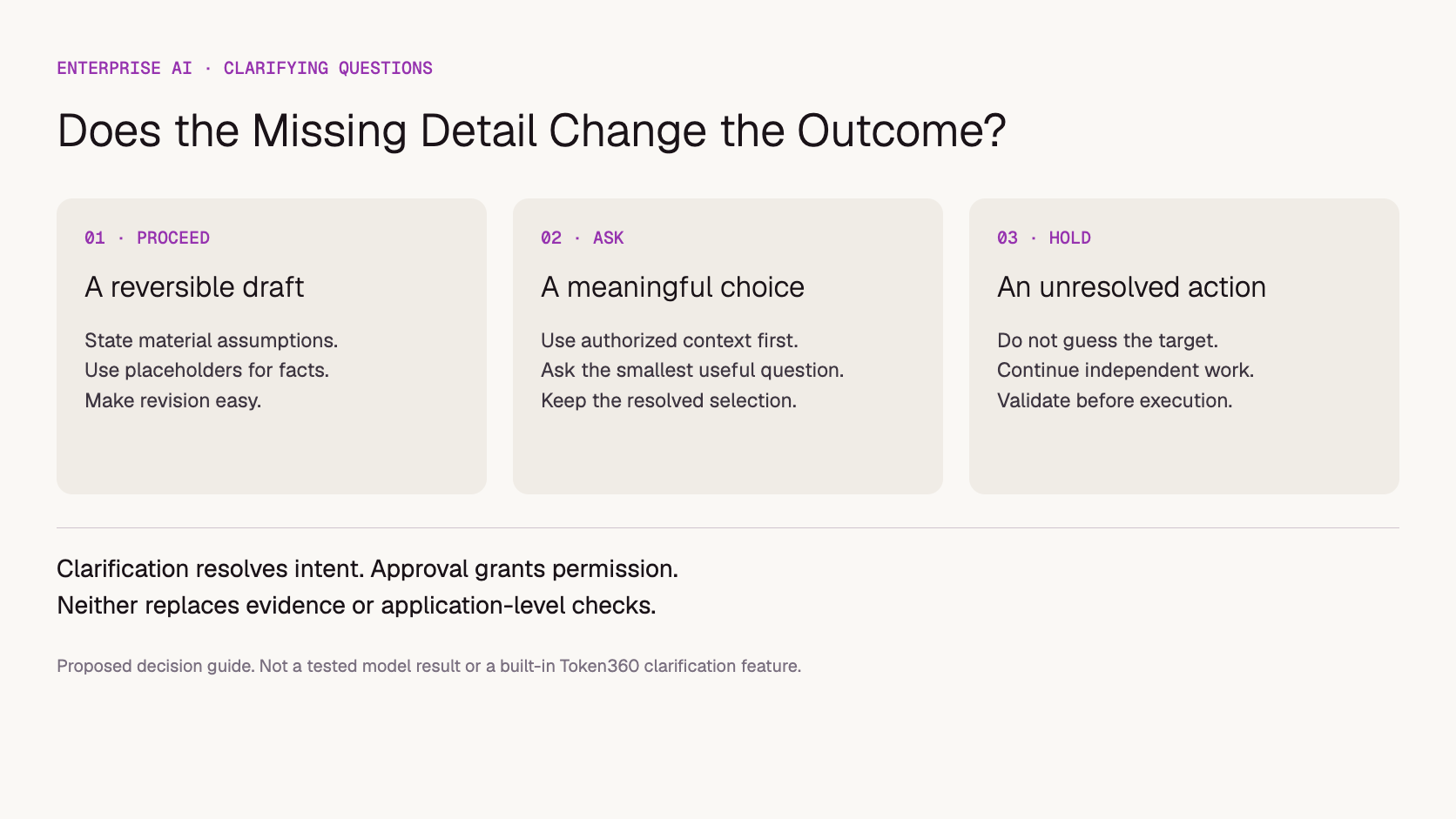
An AI assistant should ask a clarifying question when missing information changes the correct answer or action and cannot be resolved from authorized context. It can proceed with a visible assumption for low-impact drafts. It should pause the affected action when guessing could select the wrong customer, amount, record or destination.
For enterprise teams building on model APIs, this is a workflow decision as much as a prompt-writing problem. A fluent response is not useful if it confidently addresses the wrong account. But asking five questions before drafting a simple email can make the assistant slower to use than doing the work manually.
Scope: This is a proposed design and testing approach for business applications, not a measured Token360 feature or customer case study. Examples are illustrative. Official sources were checked November 15, 2026. No particular model is claimed to follow this policy reliably without testing.
What makes a clarification worth asking?
A clarification is worth asking when the user's answer would change the outcome enough to justify interrupting the task. Identify the unresolved choice, its consequence and whether the application already has trustworthy context. Ask about the smallest missing detail that separates the plausible interpretations, rather than requesting a complete new brief.
Microsoft's HAX guideline on uncertainty recommends disambiguation or a reduced scope of service when the system is unsure of the user's goal. In an enterprise application, that can mean drafting a message while holding its recipient selection, or explaining a general policy while withholding an account-specific conclusion.
Use this practical test: “If the user chose the other interpretation, would we need a different answer, a different business record or a different action?” If the difference is only a reversible wording choice, a draft may be enough. If it changes who receives information or which order is modified, resolve it first.
Do not invent a universal confidence percentage for this decision. A model's self-reported certainty is not a calibrated measure of whether it selected the right customer. Check concrete conditions such as multiple matching records, missing required fields and conflicting dates.
When can the assistant proceed without asking?
Proceed when the task is clear enough, the result is easy to inspect and revise, and unresolved details do not change a consequential decision. State an assumption if it materially affects the draft. Avoid treating stylistic preferences as mandatory inputs when the user has already supplied a usable goal and audience.
For example, “Draft a friendly reminder for an overdue invoice” can produce a template with placeholders if no invoice record is selected. The assistant should not invent a balance or due date. “Send the reminder to the customer” is different: the actual invoice, recipient and permitted action need to be established.
Situation
Recommended behavior
Illustrative response
Low-impact writing preference is missing
Draft with a reasonable, stated assumption
“Here is a concise version for an internal audience.”
Two authorized records match
Ask a focused selection question
“Do you mean the March renewal or the June renewal?”
A factual source is unavailable
State the evidence limit; retrieve or escalate
“I cannot verify the delivery date from the available record.”
Object is known but approval is required
Use the approval step
“The draft is ready for the authorized reviewer.”
A required action field remains missing
Hold that action; continue independent preparation
“I can prepare the message; which approved recipient should receive it?”
A useful assistant can make partial progress without concealing the limit. It might summarize the uploaded contract while holding the account-specific recommendation until the applicable entity is known. The output should distinguish completed work from the part awaiting input.
How is clarification different from approval or missing evidence?
Clarification resolves what the user means. Approval establishes permission to take a defined action. Missing evidence concerns whether the system can substantiate a claim. These problems need different responses: selecting an order does not authorize a refund, and asking the user for a preferred delivery date does not verify the carrier's actual schedule.
An assistant that asks “Is this correct?” after guessing a customer can blur all three issues. It is better to identify the precise unknown: which customer, what the source says, or whether an authorized person permits the action. Record those decisions separately in the application.
For workflows that need an approval gate, use the separate guidance on where enterprise AI requires human review. Do not add a generic confirmation to every turn and assume that makes ambiguous actions safe. The reviewer must see the relevant object, intended change and consequences.
If the problem is unavailable evidence, admit that limit. Asking users to supply a fact can help when they are the appropriate source, but it should not turn an unverified statement into an authoritative business record. Record its provenance and apply the workflow's normal validation.
What does a good clarifying question look like?
A good clarifying question names the unresolved choice in ordinary business language and offers enough context to answer. Give a small set of authorized options when possible, allow a correction or alternative, and explain why the detail matters when the consequence is not obvious. Avoid vague requests such as “Please provide more context.”
Google's conversation-design guidance recommends narrow-focus questions when context cannot resolve ambiguity. Its guidance concerns conversation design; it is not evidence of a particular language model's reliability or a Token360 implementation.
Compare these two questions for “Prepare the renewal for Acme.”
Too vague: “Can you clarify your request?”
Specific: “There are two Acme renewals you can access: the US support agreement and the UK software agreement. Which one should I prepare?”
The second question exposes the decision without forcing the user to restate the task. Only show records the user is permitted to see. If the options contain sensitive identifiers, use the application's approved display fields rather than revealing additional information merely to make the question easier.
For several missing details, group closely related questions when the user can answer them together. Do not ask for budget, tone, region, model, delivery format and legal entity before establishing whether the user wants a draft or an executed transaction. Prioritize the detail that determines the next useful step.
How do you prevent an endless clarification loop?
Keep track of what the user has already resolved, and ask a new question only when a remaining ambiguity blocks useful progress. After an unclear reply, narrow the options or offer a supported alternative. If the information remains unavailable, explain what can be completed and what requires a different channel or human assistance.
Suppose the assistant asks which renewal the user means and receives “the one expiring soon.” If authorized records contain an unambiguous nearest expiry, the application can use that evidence and show the selection. If both expire on the same day, ask about the distinguishing agreement rather than repeating the first question unchanged.
The application should preserve confirmed choices across turns. A model API may not retain history automatically; review how conversation history reaches an AI API before blaming the model for repeatedly asking a question. Store critical workflow fields explicitly rather than relying only on a growing transcript.
Also let users correct earlier answers. If they switch the selected account, invalidate dependent choices such as recipient or contract terms when necessary. Carrying old fields into a newly selected record can be worse than asking one additional, justified question.
What should the application enforce outside the prompt?
The application should enforce required fields, record access and action permissions independently of the model's wording. A prompt can request clarification, but it cannot guarantee that every ambiguous request will produce a question. Validate the selected object and inputs before invoking a consequential action, even when the generated response sounds certain.
Keep states such as “missing selection,” “ready for review” and “authorized to execute” distinct. A useful model response might contain a proposed question and candidate record references, but the application must check that those references are valid and visible to the user. Reject invented identifiers rather than presenting them as selectable options.
A follow-up answer should update only the fields it actually resolves. “The UK agreement” selects an agreement; it does not approve a new price or instruct the application to email the customer. The distinction between a model's tool call and actual function execution remains important after clarification.
Use approved context to avoid unnecessary questions, but do not mistake access for relevance. An account from yesterday's conversation may not be the account intended today. Show material selections in the draft or review step so a user can detect a wrong assumption before it becomes an external commitment.
How can you test whether the assistant asks appropriately?
Test both failures: guessing when a question is necessary and interrupting when the request is already clear. Use paired scenarios that differ in one meaningful detail, define the expected decision before running them, and inspect whether the eventual answer or action matches the resolved request. Counting questions alone cannot measure success.
Create a small review set from permitted, sanitized workflow examples. Include a complete request, two matching records, a missing required field, an already answered question, an ambiguous follow-up and a user correction. Add cases where the right response is an evidence limitation or approval step rather than another clarification.
For each case, score the decision to ask, relevance of the question, permitted information shown, preservation of prior answers and correctness of the next step. Record model and prompt versions alongside application rules. Evaluate repeated runs where variability matters; a single good dialogue does not establish reliability.
The blank clarification-policy worksheet provides columns for these decisions. It contains no benchmark results. Teams should define acceptable behavior according to the consequence of the workflow, then investigate real user friction through a separate AI answer feedback process.
Token360 provides enterprise model access across text, image, audio and video. Teams can use that access within an assistant that follows an application-defined clarification policy. The application still owns its records, conversation state and execution controls; changing the model does not automatically resolve missing business context or enforce permissions.
If evaluation identifies a capability or capacity requirement, discuss it through the Token360 enterprise offering. Pricing, capacity and contractual requirements depend on the engagement. This article does not claim a built-in clarification engine, tested model ranking or guaranteed reduction in errors. Company information is available in Token360's resources and About section.
When a clarification cannot resolve the request, define the handoff to a human.
Frequently asked questions
Should an AI assistant always ask before making assumptions?
No. Reasonable assumptions can help with reversible drafts when they are visible and do not invent facts. Ask when the unresolved choice changes a consequential answer or action. The policy should depend on the task, not a blanket instruction to ask every time.
Can we tell the model to ask whenever it is unsure?
That instruction can help express the desired behavior, but it is not an enforcement mechanism. Define observable triggers, such as multiple matching records or missing required fields, and validate action inputs in the application. Test cases where the model sounds confident but selects the wrong interpretation.
What if the user does not answer?
Keep the affected action pending or stop it according to the workflow. Do not treat silence as a selection or approval. Provide any independent draft or explanation that remains useful, and make the unresolved requirement clear.
Will more clarifying questions make an assistant more accurate?
Not necessarily. Questions help only when they obtain relevant information that the workflow then uses correctly. Repeated or irrelevant questions add effort without fixing missing sources, permissions or implementation defects. Evaluate the resulting task outcome as well as the interaction.
Enterprise AI
API
Bring your next idea to life.
Create a video scene in Creator, or explore models for images, audio, and text to find the right capabilities for your project.


 Guides
 Guides
 Guides