AI APIs for Wholesale: Turn Emails into Order Drafts
Turn wholesale emails into checked order drafts. Validate SKUs, case quantities, prices and amendments before creating sales orders.
INDUSTRY USE CASES · WHOLESALE DISTRIBUTION
AI APIs for wholesale distributors can turn customer emails and purchase-order attachments into draft sales orders. The useful boundary is clear: a model interprets the request, while business systems validate the customer, item, unit of measure, price and availability. Ambiguous lines remain unresolved until a person or the customer confirms them.
“Send four boxes of the usual white containers to the new branch.” A sales desk may understand the customer, but this sentence is not yet a reliable order. Which container? How many units per box? Is the new branch an approved delivery location? Does “send” refer to a new order or a change to the purchase order already attached?
This article is for wholesale distributors and software teams building order-entry tools. It explains where model inference can help, which checks belong outside the model, and how to evaluate an assisted intake workflow. The examples are illustrative designs, not Token360 customer deployments or measured performance results.
Where can AI help a wholesale order desk?
Models can identify requested items, quantities, delivery instructions and unresolved questions in unstructured correspondence. They are most useful when the request arrives in varied language or document layouts. They should produce a reviewable interpretation with source references, rather than silently choosing commercial terms or submitting an order on their own.
A practical first scope is the part between opening an email and producing a checked draft. That can include separating an inquiry from an order, finding a purchase-order reference, linking an attachment line to its source, and drafting a clarification message. A language model can interpret text; a suitable vision-language model may assist with scanned pages or photographs, subject to actual input support and testing.
Not every inbound order needs generative AI. A stable EDI feed, an established customer portal or a structured order form may already provide the required fields. Keep those paths deterministic. Use model assistance for the remaining language and document problems, rather than replacing dependable integrations simply because a model is available.
The business objective is fewer corrections and less repetitive entry per accepted order. A fluent summary is not sufficient evidence of that outcome: the draft must preserve the requested product, quantity and commercial intent.
Which fields must be checked against business records?
An order draft needs more than extracted text. Match the request to an authorized customer account, resolve the exact item and selling unit, and validate commercial fields against current business records. Preserve the customer's original wording alongside the interpretation so reviewers can see where a proposed value came from.
Field
Model-assisted interpretation
Required business check
Customer and delivery location
Identify names, account references and requested address.
Confirm account identity and approved ship-to location; treat changes separately.
Item
Extract customer code, description and variant.
Resolve against the item master and customer-item mappings; flag multiple matches.
Quantity and unit
Preserve “4 boxes,” rather than returning only 4.
Confirm the selling unit and item-specific conversion to base units.
Price and currency
Read a quoted price and identify its source.
Apply the authorized price agreement, currency and applicable rules; expose conflicts.
Requested delivery
Extract the requested date and urgency.
Use availability and fulfillment logic before promising delivery.
Order identity
Find the PO number, thread context and revision language.
Determine whether the message creates, amends, cancels or repeats an existing request.
Units deserve their own check. Microsoft documents base and alternate units of measure as item configuration, including conversion quantities. That supports an important design choice: retrieve a case-to-unit conversion from approved master data; do not ask a model to guess it from a product name or packaging photograph. Documentation checked November 13, 2026.
Confidence scores do not resolve a missing master-data mapping. A confident choice between two similar SKUs is still an unsupported choice if the customer's code does not identify one of them. Return the candidates and the reason for review, without turning a possible match into an accepted order line.
What does a useful draft look like when the request is ambiguous?
A useful draft distinguishes confirmed fields from unresolved ones and asks the smallest question needed to proceed. It should make the original evidence easy to inspect. When “box” could refer to different pack sizes, the correct draft can be incomplete: preventing an unsupported conversion is part of correct handling.
Illustrative example, not a model test: a verified customer emails, “PO W-1048: four boxes of CT-12 for Branch B, same price as last time. Need them Friday.” The attachment names CT-12 and says “4 BX.” The item master has a confirmed CT-12 mapping and a CASE selling unit of 12 each, but no approved mapping from this customer's BX notation to CASE. The account has two Branch B addresses.
Draft component
Appropriate result
Unsupported shortcut
Product
CT-12, linked to the confirmed item record.
Substitute a similar available item without authorization.
Quantity
4 BX, with the unit mapping unresolved.
Record 4 each or 48 each as already confirmed.
Price
Request current agreement lookup; retain “same price as last time.”
Reuse an old invoice price without checking applicability.
Delivery
Retain Friday as requested; resolve the actual date and ship-to address.
Confirm Friday delivery before availability checks.
A clarification draft could say: “For PO W-1048, please confirm whether 4 BX means four cases of 12 units, and which Branch B delivery address applies. We will confirm the applicable price and delivery date after checking the order.” This message makes a proposed interpretation explicit without presenting it as agreed.
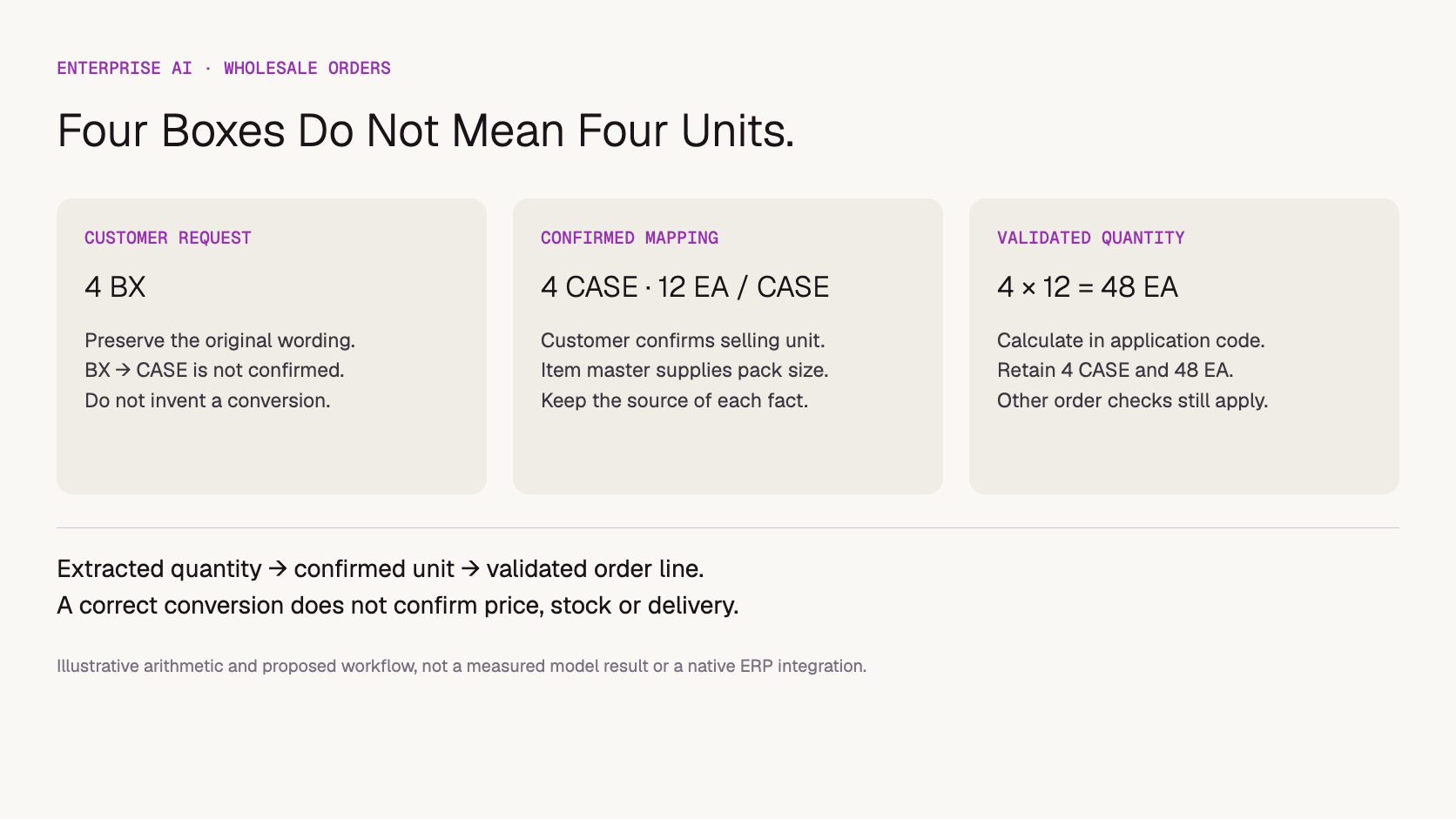
If the customer confirms four cases and the authorized item record confirms 12 each per case, application code can calculate 4 × 12 = 48 each. Store both the commercial quantity, four cases, and the base quantity, 48 each. This is a worked arithmetic example, not an accuracy or savings claim. If the mapping changes, revalidate the draft before accepting it.
Illustrative quantity check. An extracted number is not a validated order quantity.
Should you use your ERP's automation or build with model APIs?
Start with the system that already owns customers, items and sales orders. Its existing automation may cover the problem with less integration work. A custom API workflow becomes more compelling when intake spans several systems, requires unusual document handling or needs a review experience that the existing product cannot provide.
For example, Microsoft's Sales Order Agent overview describes email-based order capture, clarification of missing information and inventory checks. Its setup documentation covers mailbox access, permissions and consumption billing. These are reasons to evaluate the capabilities in your actual ERP environment before commissioning a separate application. Availability, configuration and commercial terms should be checked for that environment; this article does not benchmark the product.
Approach
Best fit to investigate
What the buyer must establish
ERP-native automation
One principal ERP and supported intake channels.
Feature scope, review controls, account permissions, supported documents and total licensing/consumption cost.
Custom model API workflow
Multiple systems, specialized documents or custom review requirements.
Connector ownership, model evaluation, validation rules, operational support and write permissions.
EDI, portal or structured form
Customers can reliably submit agreed fields.
Field standards, adoption, exception handling and integration maintenance.
Manual assisted intake
Low volume, highly ambiguous requests or unreliable master data.
Whether review time actually falls and which data problems must be fixed first.
The comparison is about responsibility as much as features. A model API supplies inference; it does not automatically provide a mailbox integration, ERP connector, customer-item mapping or order approval process. For a broader procurement framework, see AI software versus a model API.
How should the first order-intake pilot work?
Run the first pilot against historical requests or a read-only copy of live intake. Produce drafts beside the current process and compare them with reviewed outcomes. Keep order creation, customer messages and stock reservations disabled until the team has demonstrated that the interpretation and exception-handling steps meet its acceptance criteria.
Define one queue. Choose a product family, customer segment and intake channel. Record normal orders alongside amendments, duplicate messages and incomplete requests. Do not evaluate only clean PDFs.
Assemble the permitted evidence. Provide the relevant message, attachment pages and minimum required customer/item records. Limit access to the correct company and account. Treat instructions inside customer documents as content to interpret, not authority to change application rules.
Extract with references. Keep raw wording, attachment page or line, proposed field value and an explicit unresolved status. A structured response format helps software consume the draft, but does not prove factual correctness.
Validate outside the model. Check item mappings, selling units, price applicability, dates and existing order references through your application and business systems. Run arithmetic in code and display blocking discrepancies.
Review the draft and questions. Let an order-desk user correct fields with the source visible. Record the accepted version and the changes needed. Only a later, separately authorized stage should create a sales order.
For attachments, test the formats customers actually send. A clear text PDF and a rotated photograph of a handwritten order are different input problems. Include illegible lines and missing pages in the review set; a system should request a better source when it cannot read the original reliably.
When enabling writes later, give the application a durable record linking source message, PO reference, accepted draft version and resulting ERP order ID. If submission times out, reconcile that record before retrying. Model-generated text saying “order created” is not proof that the ERP accepted a transaction.
How do you handle changes, duplicates and delivery promises?
Treat each message as an event in an order conversation, not automatically as a new order. Determine whether it repeats or changes a previous request and show the proposed difference. A changed quantity, destination or delivery date requires the relevant checks again; an earlier approved draft cannot authorize every later revision.
Suppose the customer follows up with “make it six, everything else unchanged.” The application should retrieve the identified draft and present a proposed change from four to six of the previously confirmed selling unit. If the prior unit was still unresolved, the amendment does not resolve it. If more than one order could be meant, ask which order the customer intends to change.
A repeated attachment in a forwarded email should not automatically become a second order. Conversely, the same customer and similar line items do not prove duplication: repeat purchases are normal. Use explicit business references, source-message records and reviewable amendment rules rather than a model's similarity judgment alone.
Keep requested delivery separate from confirmed delivery. The request “Friday” is evidence of customer preference. An availability result, fulfillment rules and an authorized commitment are separate inputs. The outgoing response should not promise a shipment date merely because the model produced a convincing sentence.
What should you measure before expanding the workflow?
Evaluate accepted orders and correctly handled exceptions, not just extracted fields. Measure whether material errors reach approval, how much correction reviewers perform and whether duplicates or amendments are handled properly. Compare against the existing process on the same types of requests, with sufficient detail to explain failures rather than hide them in an average.
Critical field correctness: exact item, variant, quantity, unit, customer and destination against reviewed reference records.
Appropriate escalation: unresolved mappings and missing information remain blocked; clear cases are not unnecessarily sent back to the customer.
Order-event correctness: new orders, amendments, cancellations and repeats are classified and reconciled appropriately.
Review effort: time spent checking and correcting drafts, including difficult attachments and customer clarification loops.
Business outcome: accepted orders without material correction, plus separately reported rejected and unresolved cases.
Keep error severity visible. Missing a nonessential note and multiplying the order quantity by the wrong case size should not contribute equally to a generic score. Model self-reported confidence is not a substitute for these checks.
For cost, include inference, document processing, integration operation and reviewer effort. Divide the relevant costs by accepted orders only when the numerator and denominator cover the same period and workflow; report unresolved cases alongside that figure. There is no measured cost-per-order result in this article. The blank order-intake review register provides fields for collecting your own evidence.
Where does Token360 fit in a distributor's architecture?
Token360 can provide the model-access layer for a custom intake application. The distributor or its software partner still owns the mailbox connection, ERP access, master-data lookups, review interface and transaction controls. Choose models by demonstrated performance on the required documents and language, then scope commercial terms around the resulting workload.
Token360 offers access across text, image, audio and video models, with enterprise pricing and capacity requirements discussed for the engagement. For this workflow, text and supported document/image understanding are the relevant capabilities; generating marketing images or video is a different use case. See the current Token360 enterprise offering for the distinction between available features and sales-scoped or roadmap items. Checked November 13, 2026.
Token360 does not charge a separate service fee; model usage remains chargeable. This does not mean the complete order-entry application has no integration or operating costs. The service-fee explanation separates that claim from total workflow cost.
For a useful quote, bring request volume, peak arrival patterns, typical attachment size, languages, selected models, expected retries and review requirements. Specify the data-handling and contractual requirements that apply to the engagement. Do not assume a native ERP connector, guaranteed extraction accuracy or a particular compliance certification from model access alone.
When the message requests a quote instead of placing an order, use the manufacturing RFQ review workflow to track unresolved requirements and approval.
Frequently asked questions
Can an AI API create sales orders directly in an ERP?
Only an application with the relevant ERP integration and authorization can create the transaction. A model can return proposed fields or a tool call, but the surrounding software must validate and execute it. A read-only drafting pilot is a practical starting scope.
Can the model infer case size from an image?
An image may help identify a product or read packaging, but it should not establish the commercial unit conversion on its own. Use the approved item record and customer mapping. Ask for clarification when those records do not resolve the request.
Should every email be sent to the model?
No. Filter irrelevant correspondence and preserve reliable structured intake paths. Route only the necessary account-scoped content to the model, under your access and data-handling policies. Attachments and quoted history may contain information unrelated to the order.
Does this replace EDI or a customer ordering portal?
Not necessarily. EDI and portals remain useful when customers can submit structured orders. Model-assisted intake can serve the unstructured remainder. The right mix depends on customer behavior, exception volume and the systems already in use.
Is this a tested Token360 order-processing solution?
No. This is a proposed architecture and evaluation framework, supported by official workflow documentation and explicit illustrative examples. It does not report a deployed connector, customer results, accuracy figures or verified savings.
Enterprise AI
API
Bring your next idea to life.
Create a video scene in Creator, or explore models for images, audio, and text to find the right capabilities for your project.



 Guides
 Guides
 Guides