AI APIs for Corporate Training: From Sources to Lessons
Turn approved knowledge into lesson drafts, visuals and narration with AI APIs. Plan expert review, accessible media and source-linked updates.
INDUSTRY USE CASES · CORPORATE LEARNING
AI APIs for corporate training can help learning teams turn approved source material into lesson drafts, illustrations, narration and practice questions. The useful unit of work is a reviewed learning objective, not a generated video. Connect every asset to its source and objective, then verify accuracy, instructional usefulness and delivery before releasing the course.
This approach is relevant to corporate learning and development teams, training providers and learning-platform builders. Token360 supplies access to text, image, audio and video models; the organization still needs instructional design, subject expertise and a system for publishing and maintaining courses. Model access does not replace those responsibilities.
Read first: Choose AI models by business use case. This article applies model selection to training-content production, not employee monitoring, automated grading or a live tutoring product.
Which training tasks are suitable for AI APIs?
Start with bounded production tasks whose inputs and acceptance conditions are clear: drafting an explanation from approved material, proposing a scenario, illustrating a concept or narrating a reviewed script. Avoid treating a broad instruction such as “make onboarding training” as a complete specification for a usable course.
A product-enablement team might need to explain a new feature to sales staff. A training provider might adapt an existing module for different job roles. An internal learning team might update an onboarding lesson after a process change. These tasks share source material but may require different examples, vocabulary and practice activities.
Choose the learner's intended action first. “Understand the escalation process” is difficult to check. “Choose the correct escalation route for a missing order record” gives the designer a specific decision to teach and assess. A model can help draft the activity, but a knowledgeable reviewer must decide whether the decision and feedback are correct.
When is an API better than an AI course-authoring tool?
An API is useful when a team needs custom integration, repeated production or access to several model types inside its own workflow. A course-authoring tool may be the simpler choice when its editing, review and publishing features already meet the need. Compare the complete authoring process rather than generation features alone.
Need
Course-authoring tool
Custom API workflow
Build an occasional course
Often a practical starting point with an existing editor
Integration work may outweigh the benefit
Generate repeated drafts from an internal knowledge system
Check supported imports and integrations
Can be designed around specific source records
Combine models for text, visuals and audio
Evaluate the included capabilities
Allows task-specific selection, with orchestration work
Publish and track learning
Check publishing and learning-platform support
Needs a separate delivery and tracking solution
For a concrete example, Articulate's AI Course Drafts documentation, updated September 14, 2026, describes using source materials, editing learning objectives and exporting course details for stakeholder review. Those are authoring-product features, not capabilities automatically included with model access. An API buyer should budget for whichever workflow functions the existing stack does not supply.
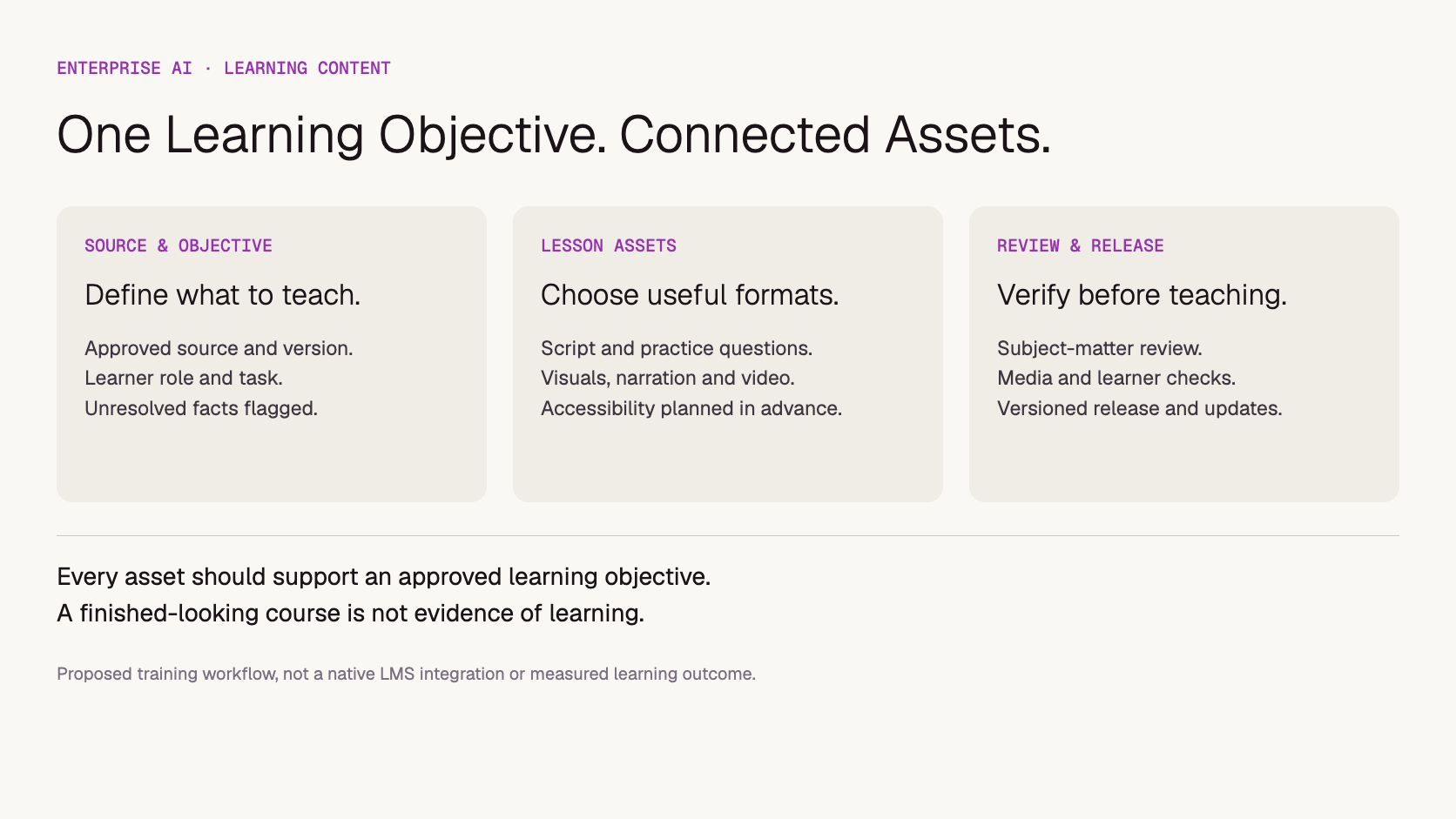
Approve the source version, audience, learning objective and factual boundaries before creating downstream assets. Identify which statements must be preserved, which examples may be invented and what the model must leave unresolved. If the source is missing a decision rule, generation should expose that gap rather than confidently fill it.
In a hypothetical customer-onboarding course, the approved guide may explain when a case goes to a specialist but omit what happens outside business hours. The course team should ask the process owner for that rule. A plausible generated fallback is still an invented company procedure, even if the wording sounds professional.
Maintain a short source record: document owner, version or review date, relevant section, permitted use and reviewer. Use approved or sanitized examples rather than unnecessary employee or customer records. Confirm the selected service's data-handling terms before submitting internal material; this article does not establish that every document is suitable for every model.
Instructional designers should also mark the intended difficulty. A first-day introduction and an advanced exception-handling exercise can use the same reference guide while requiring very different depth. That choice belongs in the brief, not in an assumption the model makes from the document length.
How do scripts, images, narration and video stay consistent?
Give each lesson a stable identifier and make its reviewed script the common reference for dependent media. Choose each modality for a teaching purpose, then check it against that purpose. Keep script, visual, narration and caption versions linked so a factual revision does not leave contradictory assets inside the course.
Track the relationship between source, objective and asset. Proposed training workflow, not a native Token360 learning-management integration.
Output
Useful role
Acceptance check
Text
Explanation, scenario and feedback drafts
Matches source rules and learner level
Image
Concept illustration or scenario setting
Clarifies the concept without inventing operational detail
Audio
Narration of an approved script
Correct wording, pronunciation and pacing
Video
Context or a reviewed demonstration
Shows the required sequence accurately, not merely plausibly
A generated animation can illustrate an abstract handoff between teams. It is a poor substitute for a verified screen recording when learners must locate an exact control in company software. If a visual invents the interface, it may teach the wrong action. Use the production method that preserves the information the learner needs.
Approve the script before paying for dependent narration or video, where the workflow allows it. If the final audio changes the wording, review the final audio rather than assuming script approval covers it. For the separate problem of keeping text aligned with speech, see subtitle synchronization.
How should generated practice questions be reviewed?
Review a practice question against the learning objective and the approved source, not just its grammar. Confirm that the intended answer is supported, alternatives are unambiguous and feedback explains the decision. A polished multiple-choice item can still test trivia or reward guessing instead of the skill the lesson is meant to teach.
For the hypothetical escalation lesson, ask the learner to choose a route for a specific case. Check that the case includes the information required to choose. If two routes are valid under the source policy, revise the question or explain the conditions; do not force a single answer merely because the output format expects one.
Have the reviewer assess the explanation for incorrect answers as well. Feedback that contradicts the reference may teach an error even when the answer key is right. Keep unresolved source questions visible in the review record and exclude those items from release until the process owner resolves them.
This is a content-production proposal, not validation for high-stakes automated assessment. A draft quiz and evidence that learners can perform a job task are different outcomes.
What accessibility work belongs in the production plan?
Plan accessible alternatives while scripting the lesson, rather than after all media is finished. Decide what learners need to hear, read or perceive visually, and preserve that information across the delivered formats. Generated captions and narration still require checks for accuracy, meaningful visual information and compatibility with the delivery player.
W3C's accessible audio and video guidance covers captions, transcripts, descriptions of important visual information and accessible media players. Use it to plan the media components appropriate to the course. Producing an audio track or a caption file alone does not establish accessibility compliance.
For example, narration that says “select the option highlighted here” is incomplete for someone who cannot see the highlight. Naming the option in the script can make the instruction more understandable across formats. Check final captions against the actual recording, especially names, technical terms and any words changed during editing.
Keep these checks separate from translation quality. A translated lesson can be fluent yet use the wrong process terminology, while accurate captions can still omit information conveyed only by a visual. Assign reviewers according to the requirement being checked.
What happens when the source procedure changes?
Use the source-to-lesson relationship to find affected assets, then review those assets before issuing a new course version. Do not assume that regenerating the main paragraph updates the quiz, voiceover and downloadable material. Each released component needs a clear relationship to the source version it reflects.
If an escalation destination changes, the explanation, worked example, answer feedback and narration may all be affected. If only the document owner's name changes, the teaching content might remain valid. Review the impact of the change instead of automatically recreating every asset or leaving every asset untouched.
Download the lesson source and review register to record source sections, learning objectives, dependent assets and approval status. It is a blank planning aid. The proposed tracking should live in the team's existing authoring or content system when that is more practical than maintaining another spreadsheet.
For approved material distributed across several channels, the publisher adaptation workflow shows how to connect each version to its source and correction record.
How should a training team evaluate model suppliers?
Evaluate suppliers with representative lesson tasks and the constraints of the production stack. Include source fidelity, media accuracy, review effort, output formats and commercial scope. Generation speed matters, but a quick draft that takes extensive expert correction may not improve the team's ability to release useful training.
For an initial pilot, choose a bounded module with an available subject reviewer. Compare the complete path from source to accepted lesson against the current method. Record expert correction time, media rework, accepted outputs and total model usage. If learner outcomes are evaluated, define a separate learning measure rather than using course completion as proof of skill.
Ask about the model types and reference inputs required, practical task limits, data handling and the expected production window. For a repeatable quote, state the expected mix of text, images, narration and video rather than asking only for a price per course. A course price depends on its asset mix and how much production work happens outside inference.
As checked November 11, 2026, Token360's enterprise page describes text, image, audio and video model access, custom enterprise pricing and tenant-wide key audit. Higher throughput is a contact-sales item; priority support and SLAs are marked coming soon. Confirm the scope needed for the engagement. No native LMS, course certification or guaranteed learning improvement is claimed here.
Frequently asked questions
Can AI APIs turn a company manual into a complete course?
They can help produce drafts and media from the manual. The team still needs to define objectives, resolve gaps, review facts, check practice activities and publish through its learning stack. A complete-looking output is not evidence of instructional quality.
Does Token360 replace an LMS?
No replacement is established in this workflow. Token360 provides model access; course delivery, enrollment, progress tracking and learning records need the appropriate learning platform or application. Verify integrations separately rather than assuming them.
Should every lesson include AI-generated video?
No. Use video when it communicates information more effectively for the task. A short explanation, diagram or verified screen recording may be more appropriate. Generating media without a teaching purpose can add review and maintenance work.
How can a team estimate the cost of AI training content?
List the required assets, expected generation attempts, review work and editing or publishing effort. Measure a representative module before extrapolating. Separate model usage from total production cost, and avoid treating a polished first draft as an accepted lesson.
Can the same course workflow support several job roles?
Yes, if the team specifies role-specific objectives, examples and depth while preserving the approved facts. Review each role's version against its intended task. Changing a role name in a prompt does not establish that the lesson meets that audience's needs.
Evidence scope: editorial workflow analysis, not a measured training deployment. Examples are hypothetical. Public sources checked November 11, 2026; no course-production savings, learner improvement or customer outcomes are claimed.
Enterprise AI
API
Bring your next idea to life.
Create a video scene in Creator, or explore models for images, audio, and text to find the right capabilities for your project.



 Guides
 Guides
 Guides