Fix subtitle sync after a video trim. Compare two downloadable WebVTT tracks and five browser checks to see which captions stay, shift or disappear.
By Yuki Yu
The first line appears as the demonstrator lifts the latch. The last line appears after the lid is already open. Between them, an editor removed a pause and a chime. If you drag the whole caption track earlier to fix the ending, the first line will now arrive before the demonstrator speaks.
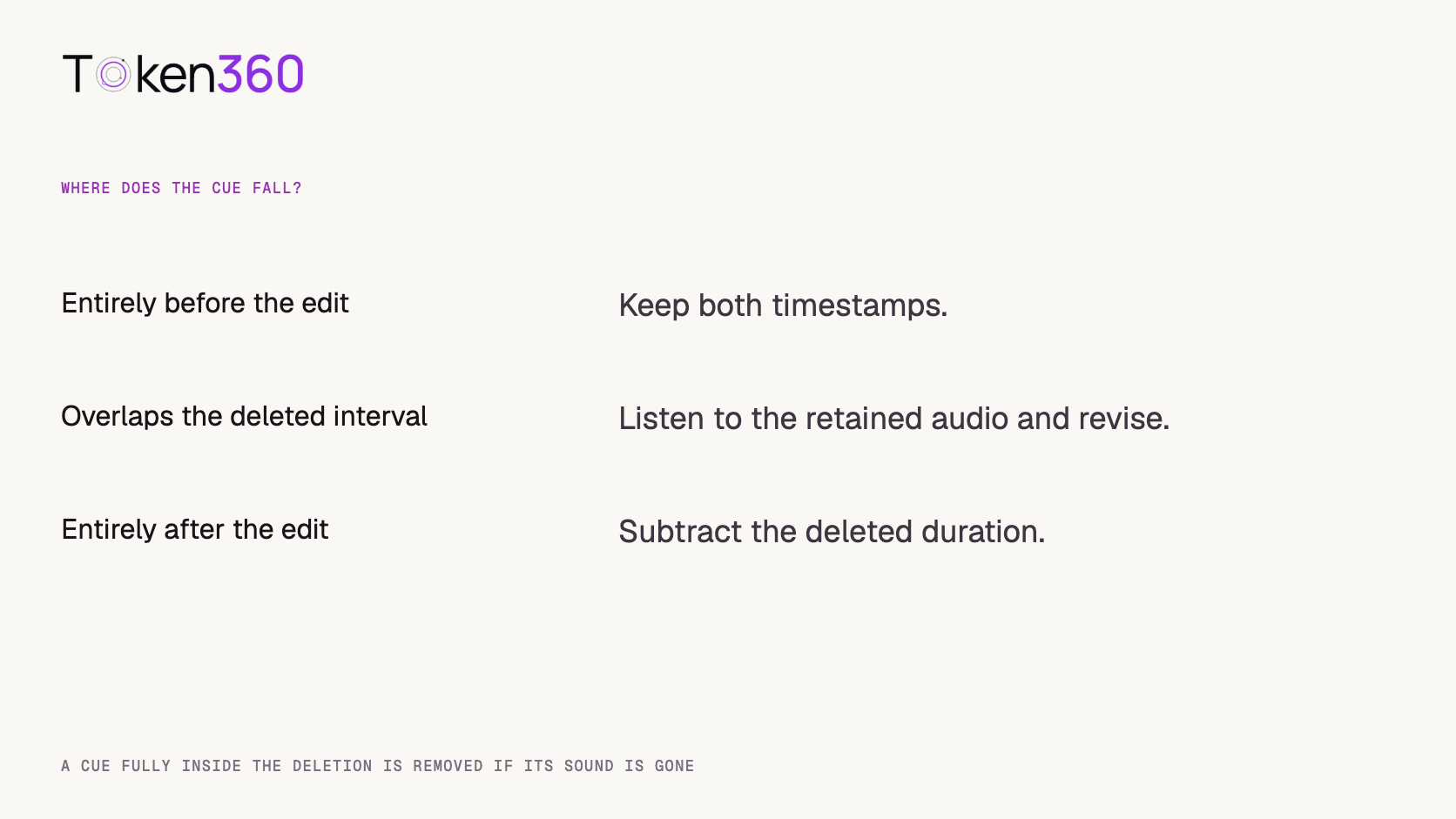
To fix subtitle sync after a trim, locate the edit on the original timeline. Removing time at the head shifts every surviving cue that comes after the trim. Removing time in the middle leaves earlier cues in place and shifts later cues by the length removed. A caption that overlaps the cut needs a listening decision about which words or sounds survived.
Read first. Confirm that you have the approved delivery file, including the intended audio and duration. A perfectly timed caption file for yesterday’s export can look like a player bug today. AI video output validation guide.
How can you tell which part of the caption track needs to move?
Check one identifiable event near the beginning and another near the end, then find the first event whose timing differs. A useful anchor is something you can hear precisely: the beginning of an unusual word, a short chime, or the first syllable after a clear pause. A shot boundary is only a useful anchor if the sound you are captioning changes there too.
What you observe
First thing to check
What to change if confirmed
All anchors are late by the same amount
A removed intro or a shifted track start
Offset the surviving cues and review the new beginning.
Early anchors align, later ones are equally late
A deletion between the two groups
Preserve earlier cues and retime the later group.
The error grows as the clip plays
A speed change or a different source timeline
Compare multiple anchors and establish the time mapping.
One caption is wrong while neighbors align
Its cue boundaries or transcription
Repair that cue and replay the surrounding passage.
These patterns narrow the investigation. Two independent edits can produce the same error at the last frame. Before making a bulk change, compare the actual revision with the edit notes and check an anchor between the suspected edits.
What happens when you remove 1.5 seconds from the middle?
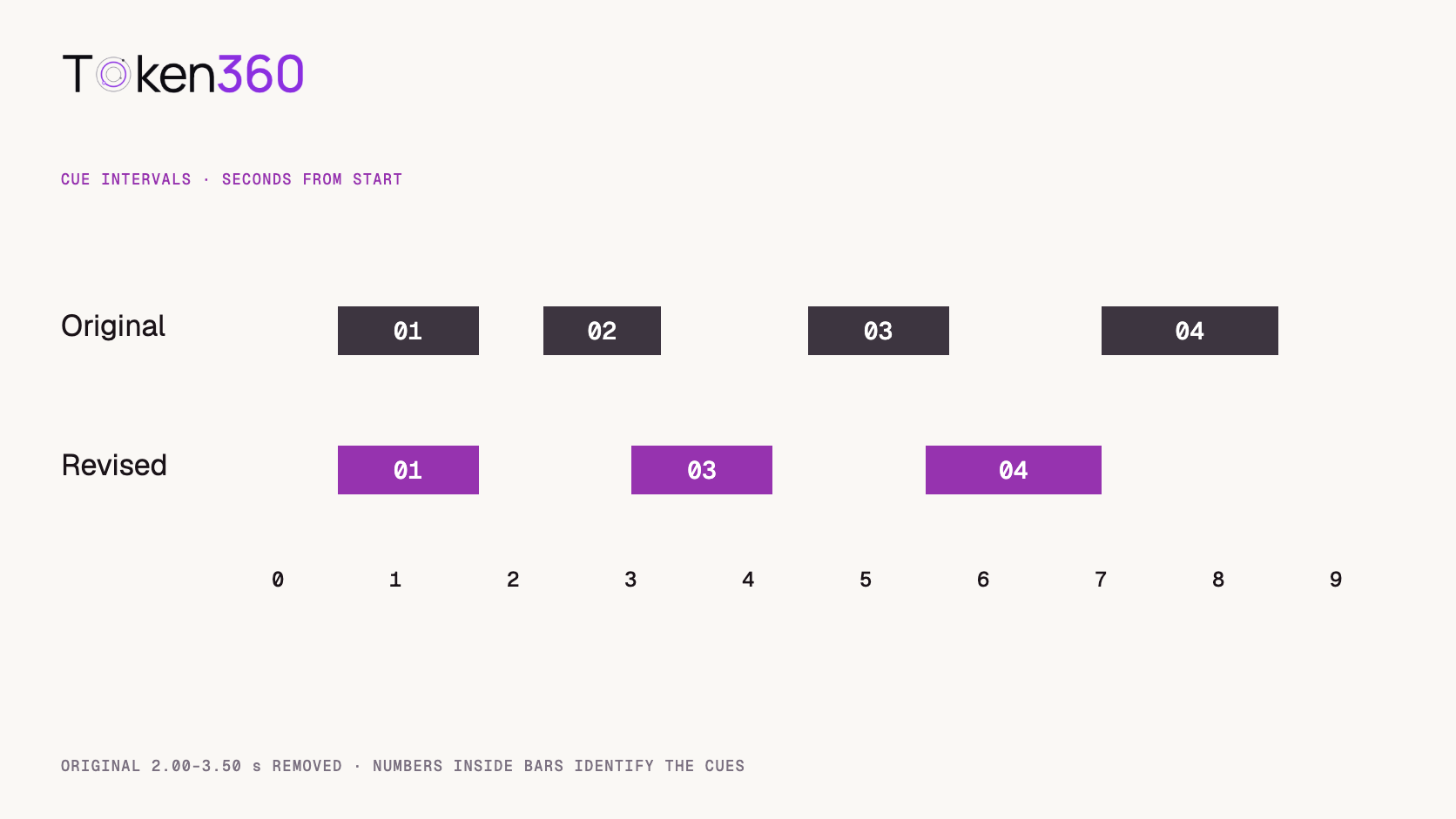
In our example, the editor removes the original interval from 2.00 to 3.50 seconds. Everything before 2.00 seconds keeps its time. An event originally at or after 3.50 seconds moves earlier by 1.50 seconds. A chime contained entirely within the deletion disappears from the revised soundtrack.
Cue
Original interval
Revised interval
Reason
01 · Lift the latch.
0.50–1.70 s
0.50–1.70 s
The whole line precedes the deletion.
02 · [Chime]
2.25–3.25 s
Removed
The entire sound falls inside the deleted segment.
03 · Turn the handle.
4.50–5.70 s
3.00–4.20 s
Both boundaries shift earlier by 1.50 s.
04 · The lid is open.
7.00–8.50 s
5.50–7.00 s
The same shift applies to the final line.
Compare that with removing the first 1.50 seconds instead. Cue 03 would land at the same revised time in both edits, so inspecting that line alone would give you false confidence. Cue 02, however, would still exist after a head trim and move to 0.75–1.75 seconds. Cue 01 would straddle the new beginning. An editor would need to hear its remaining fragment before deciding how to caption it.
How can you check a WebVTT correction in a browser?
Load the original and revised tracks against the same media clock and inspect the active cue at times safely inside the intervals. WebVTT gives each cue start and end timestamps and a text payload. A cue identifier lets you trace the same line across revisions even when another cue has been deleted. MDN’s WebVTT format reference.
We authored the two example files and loaded each into a native HTML text track in desktop Chrome on November 3, 2026. We used a ten-second silent WAV as the clock, set the track to hidden mode so the browser would process it, sought to each checkpoint and read the active cue IDs after seeking. The spoken lines and chime are an illustrative edit brief. This test checks the browser’s handling of timings, rather than a listener’s judgment of a recorded performance.
Copy demo-original.en.vtt from the complete source below · Copy demo-revised.en.vtt from the complete source below
WEBVTT

01
00:00:00.500 --> 00:00:01.700
Lift the latch.

03
00:00:03.000 --> 00:00:04.200
Turn the handle.

04
00:00:05.500 --> 00:00:07.000
The lid is open.
WEBVTT

01
00:00:00.500 --> 00:00:01.700
Lift the latch.

02
00:00:02.250 --> 00:00:03.250
[Chime]

03
00:00:04.500 --> 00:00:05.700
Turn the handle.

04
00:00:07.000 --> 00:00:08.500
The lid is open.
Playback time
Original active cue
Revised active cue
1.00 s
01
01
2.60 s
02
None
3.60 s
None
03
6.10 s
None
04
7.50 s
04
None
Each checkpoint catches a different mistake. At 1.00 second, a blanket offset would disturb the good opening line. At 2.60 seconds, an unchanged caption file would describe a sound that has been removed. At 7.50 seconds, a late caption from the old version would still be hanging over the end of the action. For your final review, turn captions on visibly and listen with the actual delivery file.
What if a spoken line crosses the cut?
Listen to the retained words on both sides of the edit before changing the cue boundaries. Suppose the original line says “Open the red latch, then turn the handle,” and the edit removes “the red latch.” Sliding the old caption would preserve words the viewer can no longer hear. Rewrite the text to match the approved audio and time the revised phrase.
The same principle applies to relevant non-speech information. If a warning tone survives the cut but the warning lamp is outside the frame, its caption may be the only indication that the machine sent an alert. If the tone was removed with the footage, leaving its caption in place creates an event that never happens. W3C’s media accessibility guidance includes speech and meaningful non-speech audio in its description of captions. W3C WAI guidance on captions and subtitles.
Do speed changes need a different calculation?
Yes. With a constant speed change, the distance between events changes. If an eight-second segment is played at twice its original speed, an event four seconds into that segment arrives two seconds after the segment begins. For an unchanged segment that follows it, slide later events by the four seconds that the sped-up segment saved.
For a variable-speed ramp, mark the words or events in the revised audio and use the editor’s time mapping where available. A single scale factor taken from total runtime can align the last cue while placing several middle lines too early. Also check whether dialogue was replaced or regenerated during the edit. In that case, use the new recording to establish the speech timing.
Which version should be delivered to the publisher?
Pair the final video and caption file with a shared revision identifier. Keep the language label, source timeline and edit decision with that pair. A filename such as demo-v3.en.vtt is much easier to verify against demo-v3.mp4 than a folder containing several files named final.vtt.
For switchable web captions, confirm that the page points to the revised track and that the player exposes the expected language. If captions have been burned into the picture, timing changes require a new picture export. Review the published version from beginning to end on the smallest supported screen. Check word timing, line breaks, and whether the caption covers a control or product detail the viewer needs to see.
When reviewing several languages, carry the same picture revision into every handoff. A change to the source audio can affect both timing and wording. Give the language reviewer the revised clip and identify the edited interval so they can concentrate on the lines likely to have changed.
Frequently asked questions
Should I subtract the trim duration from every timestamp?
Only for cues entirely after a removed interval. Earlier cues retain their original times. Review any cue that touches the deleted material.
Why do the opening captions look right while the ending is late?
A deletion in the middle is one plausible cause. Find the first mismatched anchor and compare its position with the edit record.
Can a valid VTT file still be out of sync?
Yes. A player can parse the file and display each cue exactly on its timestamps even when those timestamps belong to a different cut.
Should a deleted caption be left as an empty numbered slot?
The example removes the deleted cue and preserves the identifiers of surviving cues for comparison. Readers can trace cue 03 in both downloads.
What if my audio continues across the picture cut?
Follow the sound that conveys the words or event. A picture trim that leaves dialogue in its original place may require a different caption change from a synchronized audio and video deletion.
Can a browser checkpoint test replace a caption review?
It verifies which cues become active at selected times. A human review of the finished clip is still needed to judge transcription, readability, placement and whether meaningful sounds are described.
Read next. If you generate a soundtrack with the picture, identify the events that must remain synchronized before exporting the next revision. AI video native audio guide. Additional production resources from Token360.
Editorial revision: November 4, 2026. Test dates and dated source snapshots remain as stated in the article.
Video Editing
Media Validation
Tutorial
Build faster with one AI API.
Use Token360 to call video, image, audio, and text models with one key and one bill.


 Prompt Library
 Insights
 Insights