Can You Trust AI Meeting Summaries and Action Items?
Check AI meeting summaries against what was agreed. Verify conditions, owners and deadlines, then review action items before they become commitments.
ENTERPRISE AI · MEETING RECORDS
Treat AI meeting summaries as drafts until important decisions, owners, deadlines and conditions have been checked against the source. A readable recap can still turn a suggestion into a commitment or assign work to the wrong person. Keep evidence links, separate discussion from decisions, and require confirmation before creating consequential tasks.
For enterprise teams, the risk is not just an awkward sentence. An internal recap can become a project plan, a customer email or a CRM update. Once copied into another system, an unsupported commitment may look like an agreed fact. The useful question is therefore not whether the summary sounds professional, but whether it preserves what participants actually agreed.
Scope: This is a proposed review framework, not a meeting-model benchmark or a Token360 meeting-assistant feature announcement. The transcript example is fictional and has not been run through a model. Official documentation was checked November 16, 2026.
What should an AI meeting summary preserve?
A useful summary preserves the meeting's decisions, unresolved questions, objections and agreed next steps, including conditions that change their meaning. Separate these categories instead of merging them into a single confident narrative. Readers should be able to distinguish an approved action from an idea that participants only discussed.
Record type
What belongs here
What must not be inferred
Discussion
Options, questions and concerns raised
That mentioning an option approves it
Decision
A choice explicitly accepted in the meeting
Agreement from silence or a vague acknowledgment
Action item
A specific next step with supported ownership and status
A deadline, assignee or authorization absent from the source
Open issue
A dependency, disagreement or unresolved question
That it was resolved because the discussion moved on
A compact executive recap and an action register serve different purposes. The recap can group topics; the register must retain individual commitments and their evidence. One polished paragraph is a poor place to hide several owners, contingent dates and unresolved approvals.
Microsoft's summarization documentation distinguishes extractive summaries, which select source sentences, from abstractive summaries, which generate condensed wording. That distinction helps explain the review task: selecting a relevant sentence and correctly interpreting a commitment are separate requirements. Neither presentation style removes the need to verify business meaning.
How can a plausible action item change what was agreed?
An action item becomes misleading when it removes a condition, changes a proposed date into a deadline, or turns permission to investigate into permission to act. Check the complete exchange around the statement, including later corrections. The shortest sentence is not always the most faithful description of the next step.
Consider this fictional transcript fixture. The speaker names and time positions are invented to make the review reproducible; they are not a customer recording.
Position
Speaker
Statement
02:10
Maya
“If finance approves the budget, I can send the revised quote on Friday.”
02:18
Jon
“Please do not promise Friday to the customer yet.”
02:25
Maya
“Agreed. I will check with finance tomorrow. Sending the quote is still pending.”
An unsupported recap: “Maya will send the revised quote Friday.” It keeps the person and a date but removes the condition and ignores the correction. It can therefore mislead even though every word looks connected to the conversation.
A faithful action record: “Maya will check with finance tomorrow. Sending the revised quote remains pending approval; Friday is not a customer commitment.” Keep the original relative date unless the meeting date and relevant timezone are known. A calendar conversion should remain traceable to that context.
The review must include the full exchange, not only the first timestamp. The same principle applies when a participant withdraws a proposal later in the meeting. Preserve the final status while keeping the evidence that explains why it changed.
Can speaker labels tell you who owns the task?
Speaker labels help locate who spoke, but they do not by themselves establish a person's name, role or acceptance of a task. Verify the mapping to participants and distinguish the speaker from the proposed assignee. Someone saying “Alex could handle this” is not evidence that Alex accepted the work.
Amazon Transcribe's speaker partitioning documentation describes labeled speaker segments and timestamps. Labels such as spk_0 are useful evidence coordinates; mapping them to actual meeting participants is a separate step in an application. This is an AWS example, not a statement that every model or Token360 endpoint returns the same fields.
Shared microphones, overlapping speech and an unknown voice should trigger verification where ownership matters. If the source does not support a named owner, retain “owner unconfirmed” and route it for review. Do not substitute the meeting organizer or the most frequent speaker to make the task list look complete.
Transcription and summarization also need separate acceptance checks. The speech-to-text and text-to-speech comparison explains the input/output distinction. For this workflow, a correctly summarized but incorrectly transcribed sentence is still an unreliable meeting record.
What evidence should accompany each important item?
Attach enough evidence for a reviewer to inspect the commitment without replaying the entire meeting. Keep the source segment, its location, verified speaker identity, action status and any conditions. Where multiple statements establish or revise the item, include those locations together rather than citing a convenient but incomplete sentence.
A practical record can include the meeting identifier, transcript revision, source range, proposed owner, due-date wording, normalized date if justified, dependencies and review status. Preserve “not stated” values rather than asking the model to fill every field. A valid data structure does not prove the contents are supported.
Use timestamps when the recording and transcript provide them; use turn or line identifiers for text-only notes. Do not manufacture precise audio times from an untimed transcript. If recordings are unavailable, label the evidence as notes or transcript text so reviewers understand what they can verify.
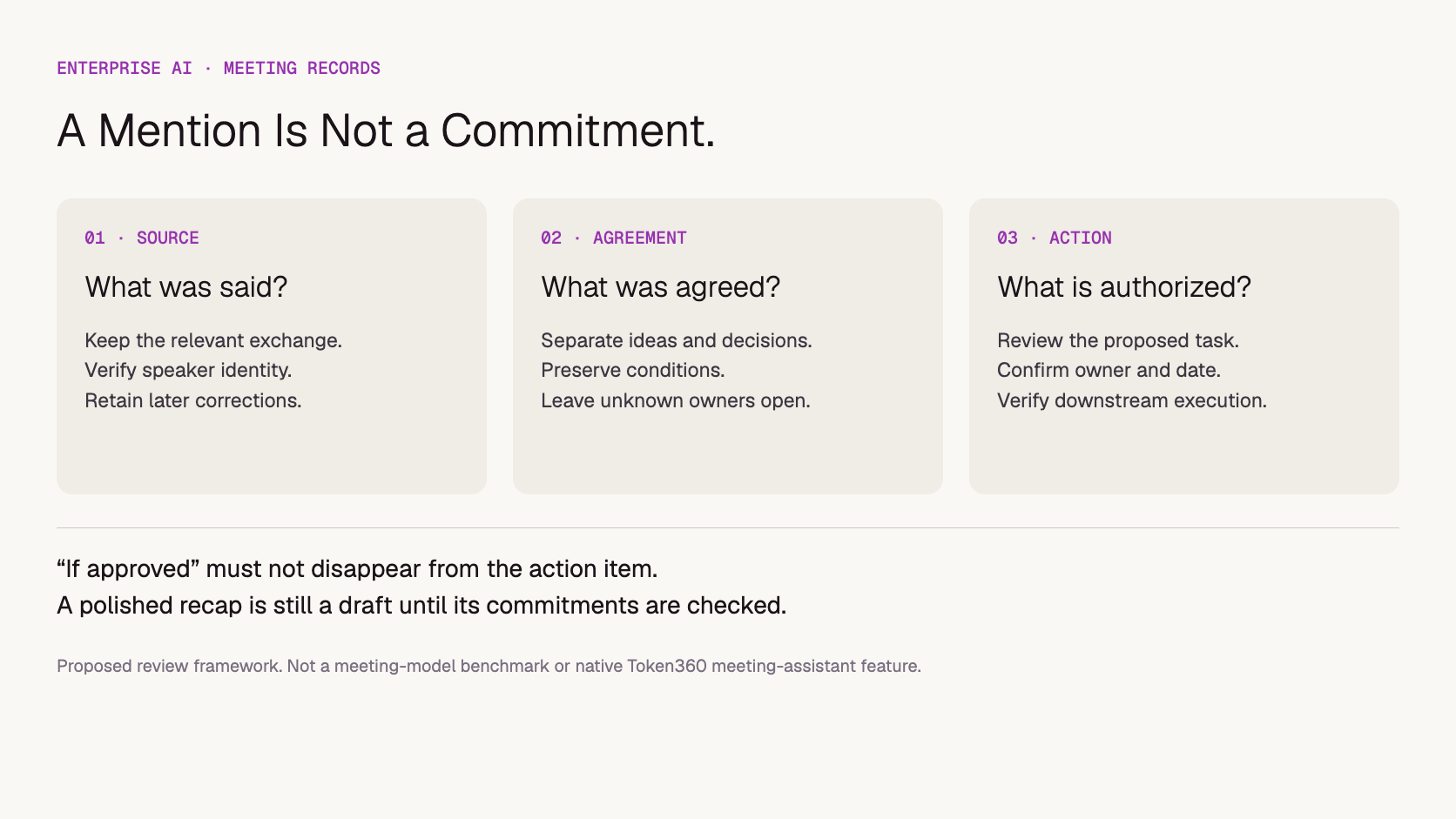
Proposed review: a source statement, an agreement and permission to execute are different checkpoints.
Should AI automatically create tasks or send the recap?
Separate drafting from committing changes to business systems. An application can prepare proposed tasks, but consequential assignments, customer promises and external messages should follow the team's approval policy. Show reviewers the evidence and intended destination, then record which version they approved before execution.
For example, the fictional quote discussion could produce a draft task to check with finance. It should not silently schedule a Friday customer delivery or send a promise to the buyer. Task creation also needs ordinary operational controls: identify the source item, avoid duplicates when processing the same meeting again, and report whether the destination actually accepted the change.
These controls belong to the surrounding application. A model's statement that it created a task is not execution evidence. See whether an AI tool call actually executes a function for that separate boundary. This article focuses on whether the meeting supplied a valid basis for the proposed action.
How should enterprises evaluate a meeting-summary workflow?
Evaluate agreement fidelity separately from readability. Use representative meetings with reference decisions and action items, then check unsupported commitments, omitted conditions, incorrect owners and missed corrections. Include incomplete and ambiguous conversations. A system that leaves an owner unconfirmed can be more useful than one that confidently invents an assignment.
Test case
Review question
Conditional commitment
Does the dependency survive in the action record?
Later correction
Does the final status reflect the correction?
Unassigned proposal
Does the owner remain unconfirmed?
Relative date
Is any conversion supported by meeting date and timezone?
Overlapping or unclear speech
Is uncertainty surfaced instead of guessed away?
No decision reached
Does the topic remain open rather than become an approved action?
These are proposed tests, not reported model results. Start with an annotated transcript to examine summarization behavior, then test the complete audio-to-summary path separately. That split helps distinguish a transcription problem from a summarization problem without assuming either stage is correct.
Track unsupported items and missed agreed actions separately, alongside reviewer correction time. Define what counts as one item and which errors block release before comparing models. Do not turn a small test into a claimed universal accuracy rate. The fictional exchange above can serve as one acceptance fixture, but it cannot establish performance on your company's meetings.
Where does Token360 fit in the workflow?
Token360 can be considered for the model-access portion of an enterprise workflow; meeting capture, participant mapping, storage, review and task-system integration must be scoped separately. Confirm the selected model's actual inputs and outputs. Access to audio models does not mean every audio model can transcribe a meeting or identify its speakers.
Token360 focuses on enterprise access across text, image, audio and video models. Its enterprise offering provides a route to discuss model mix, volume pricing, capacity and contractual requirements. This article does not claim a native meeting bot, guaranteed diarization or automatic action-item verification.
For a pilot, document expected recording length, languages, speaker conditions, output structure and review requirements. Assess the cost of the whole accepted record, including transcription, summarization and corrections. Compare a built application with a ready-made meeting product based on the workflow you need, not merely the price of one text request.
Use only meeting material your organization is authorized to process. Assign access, sharing and retention rules to recordings, transcripts and summaries individually; they may expose different amounts of information. An API capability alone does not settle those organizational requirements.
Frequently asked questions
Can an AI meeting summary replace approved minutes?
Only if it has passed the organization's process for approving the meeting record. A generated draft does not gain approval simply because participants received a link to it.
Should every action item have a named owner and deadline?
Only when the evidence supports them. Missing ownership or dates should remain explicit and be confirmed by the team, rather than invented to complete a template.
Does a timestamp prove an action item is correct?
No. The linked passage must actually support the item, including its conditions and any later correction. A timestamp makes review easier; it does not replace review.
Will a larger model remove the need for review?
Do not assume so. Compare candidates on your annotated meetings and the full input pipeline. Clear audio, correct participant mapping and evidence-aware review remain separate requirements from model size.
Enterprise AI
API
Bring your next idea to life.
Create a video scene in Creator, or explore models for images, audio, and text to find the right capabilities for your project.


 Guides
 Guides
 Guides