Contain an AI API outage, track unfinished jobs, coordinate supplier updates, and verify recovery before reopening customer workflows.
ENTERPRISE AI · INCIDENT RESPONSE
During an AI API outage, first contain customer impact, appoint one response owner, and preserve the state of work already submitted. Separate confirmed failures from requests whose outcome is unknown. Communicate what users should do, escalate with traceable evidence, and reopen traffic only after representative workflows pass recovery checks.
A supplier returning to normal does not automatically mean your business has recovered. Customers may still be waiting, queued work may be stale, and a timed-out generation may already exist. The enterprise response must cover those unfinished obligations, not just a green infrastructure dashboard.
Scope: This is a proposed enterprise response plan, not a report of a Token360 outage or a promise of specific support response times. Examples are illustrative. Official references were checked November 15, 2026. The guide focuses on coordination and business recovery; linked articles cover retry implementation, fallback design, and contractual SLAs.
When should you treat an API problem as an incident?
Declare an incident when the disruption threatens an important business workflow and requires coordinated action. You do not need a confirmed root cause first. Assess affected customers, task criticality, duration, and whether work can be recovered. A single critical workflow can justify an incident even if aggregate availability looks healthy.
Examples include a support assistant failing to respond, product videos remaining stuck before a campaign deadline, or an internal workflow silently producing incomplete documents. A timeout, authentication failure, and model-specific error need different investigations, but each can have customer impact. Avoid declaring that the entire provider is down from one failed request.
Observed impact
Initial business response
Question to resolve
One noncritical task fails; normal retry path works
Track and investigate through normal operations
Is the failure isolated or growing?
A customer-facing workflow repeatedly fails
Assign an incident owner and publish a scoped notice
Which customers and operations are affected?
Submitted jobs have unknown outcomes
Preserve identifiers and hold unsafe resubmission
Was the original work accepted or completed?
Outputs may expose restricted information
Activate the security response process and contain exposure
What access and evidence must be restricted?
This table is a proposed starting policy, not a universal severity scale. Set your escalation thresholds before launch. If responses arrive but their content deteriorates, the AI quality regression guide provides a different diagnostic path.
Who should own the response inside the company?
Choose one person to coordinate decisions, one operational lead to manage mitigation, and one communications owner to keep stakeholders informed. Small teams may combine roles, but ownership should remain explicit. Keep a shared timeline and decision log so that supplier updates, application changes, and customer commitments stay consistent.
Google's incident-response guidance separates incident command, operations, and communications. An enterprise using external models can adapt that division without copying Google's staffing structure. The useful principle is that the person investigating failures should not also have to answer every stakeholder message.
Assign a business owner for the affected workflow as well. Engineering may be able to reroute requests, but the business owner must decide whether a slower, limited, or manually reviewed service still satisfies the customer need. Give responders authority to pause new work within a documented scope rather than waiting for improvised approvals.
Use one agreed incident channel and an escalation contact that remains reachable if the affected product is unavailable. Record who can approve reopening, who can authorize a changed model, and who will handle unfinished customer work. At a shift change, hand over pending decisions as well as technical observations.
What should you pause, preserve, or keep running?
Pause the smallest affected scope that limits harm, preserve the state of every submitted operation, and keep unaffected services running where possible. Distinguish queued, submitted, completed, failed, and unknown work. Do not treat a missing response as proof that nothing happened, or clear a queue merely to make a dashboard look healthy.
For an illustrative creative workflow, new video generation might be temporarily unavailable while customers can still download approved files. For a support workflow, the AI drafting feature might stop while human ticket handling continues. Degradation should be a deliberate product state with a clear message, not a silent substitution.
The AI API fallback guide covers how a replacement path preserves requirements. During the incident, use only a fallback already approved for the data, output quality, modalities, and commercial conditions involved. A newly selected provider can introduce a different failure or processing boundary.
Hold unknown submissions for reconciliation. The duplicate-generation recovery guide explains why immediately resubmitting a timed-out job can create multiple outputs and charges. The same operational concern applies to downstream actions: do not replay an entire workflow merely because its final notification failed.
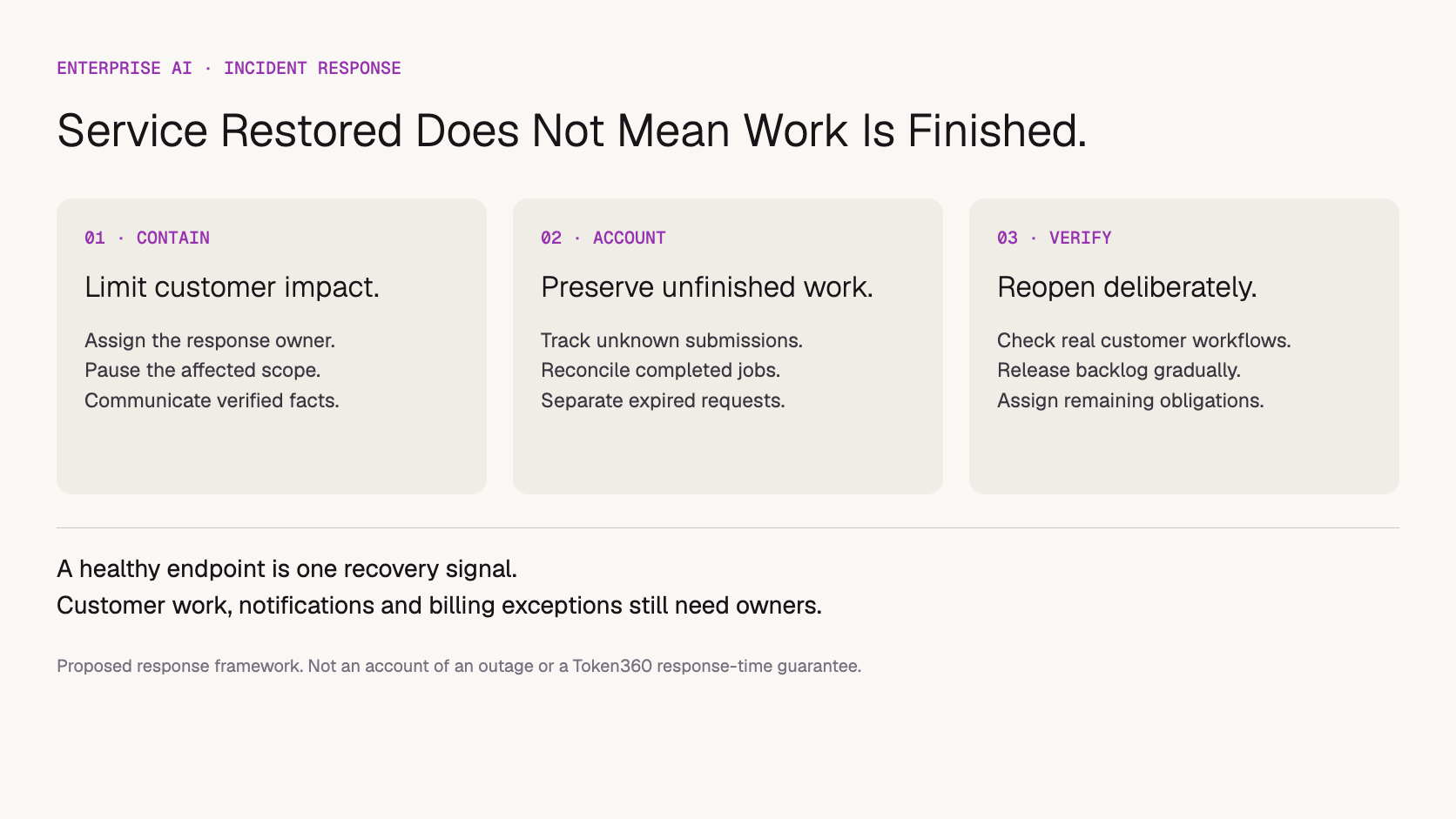
Proposed response sequence. Recovery includes the customer backlog, not only new requests.
What should you tell customers while the cause is unknown?
Tell customers which function is affected, what happens to existing work, what action they should take, and when they can expect the next update. State uncertainty directly. A reliable update cadence is more useful than an invented restoration time, and confirmed impact is more useful than premature blame.
A reusable message structure is:
We are investigating a disruption affecting [specific workflow]. [Confirmed impact on submitted work]. Please [safe customer action]. [Available alternative, if verified]. We will provide the next update by [time and time zone], even if the investigation is still ongoing.
Fill the brackets only with verified facts. If preservation of submitted work has not been established, say its status is being checked. Do not promise that no data was lost, no charges occurred, or all jobs will complete unless you have evidence. Avoid telling customers to resubmit while original outcomes remain unknown.
Maintain separate external and internal records. The customer notice should explain impact without exposing prompts, account details, credentials, or speculative internal findings. Internal responders need timestamps, affected paths, owners, and evidence supporting each change in status.
What evidence should you send to the API supplier?
Send a concise incident summary with the affected model and endpoint, timestamps with a time zone, representative request identifiers, observed errors, and business impact. Separate what you know from what you suspect. Use the agreed support channel and protect customer content; broad log dumps are rarely the best first escalation.
The summary should also say what still works, when the problem was first observed, whether your application changed recently, and which mitigations you have attempted. Include a small, sanitized reproduction when available, without delaying an urgent impact report until the reproduction is perfect.
For the technical attachment, follow the reproducible API bug report guide. Keep API keys out of tickets and shared incident documents. Request IDs and timestamps help correlate events, but they do not by themselves prove the cause or establish whether a charge should be reversed.
Ask the supplier for the affected scope, a safe workaround if one exists, the next update, and the evidence needed to reconcile unknown jobs. Keep one company contact responsible for consolidating replies. Opening multiple disconnected tickets can produce conflicting instructions and duplicate investigation work.
When is it safe to restore normal traffic?
Restore traffic after the affected workflows pass representative checks, the chosen mitigation remains within approved boundaries, and the team has a plan for the backlog. Reopen gradually with an owner and stop conditions. A provider status change is useful evidence, but it does not verify your integration or settle previously submitted work.
Test the path customers actually use. For text, check completion and delivery rather than an HTTP status alone. For generated media, check submission, completion, retrieval, and usability. For a workflow with actions, confirm that an operation is executed once and its result reaches the right user. Keep the tests bounded and observable.
Then classify pending work: still useful and safe to resume, already completed, cancelled, expired, or unresolved. A campaign asset due yesterday may no longer be worth regenerating. A customer who switched to a manual process may not want delayed automation to run afterwards.
AWS's guidance on queue backlogs explains why accumulated asynchronous work can prolong recovery. Apply that lesson by limiting the backlog release rather than sending every held job at once. Watch new work and recovery work separately, and stop the release if service deteriorates again.
How do you close the incident without losing unfinished work?
Separate service restoration from final incident closure. New requests may be healthy while old jobs, customer notifications, and financial questions remain unresolved. Assign those items to named owners with deadlines. Close the incident only against defined criteria, or explicitly move residual work into a tracked follow-up process.
Closure check
Evidence to retain
Owner to assign
Customer workflow restored
Representative results and observation window
Operational lead
Pending work reconciled
Completed, cancelled, expired, and unresolved job list
Application/workflow owner
Customers informed
Final scoped notice and unresolved individual cases
Communications owner
Usage and charges reviewed
Attempt-to-job mapping and financial exceptions
Finance or billing owner
Prevention work assigned
Action, owner, due date, and verification method
Incident coordinator
Use the billing reconciliation guide for charge investigation. Do not assume failed delivery means unbilled inference, or that every duplicate-looking request qualifies for a refund. Preserve the evidence and apply the relevant terms.
The review should distinguish the trigger from factors that enlarged the impact. An upstream outage may have triggered the incident, while uncontrolled retries, missing customer notices, or a stale backlog prolonged it. Choose concrete follow-ups such as testing a pause control, documenting an escalation route, or adding an unknown-job review—not simply “improve reliability.”
What should enterprises agree with Token360 before launch?
Agree the support route, escalation contacts, required incident evidence, and responsibilities for recovery before production use. Confirm which response targets or contractual remedies apply to the engagement. Model access and enterprise pricing do not automatically establish a particular incident response time, recovery guarantee, or customer communication service.
Token360's enterprise page describes access to text, image, audio, and video models and enterprise commercial coordination. As checked November 15, 2026, the page marks priority support and SLAs as “Coming Soon.” Treat any engagement-specific commitment as something to confirm in writing rather than infer from a general enterprise label.
The AI API SLA checklist covers contractual definitions. This response plan covers your team's actions when a problem occurs. Copy the blank incident response register to record impact, ownership, decisions, supplier updates, recovery gates, and outstanding work. It is a preparation tool, not a record of actual incidents.
Include a plan for bounding AI agent loops when retries can multiply load during an incident.
Frequently asked questions
Should we switch models as soon as errors increase?
Only if the alternative is approved and suitable for the affected task. Check compatibility, data handling, output requirements, and capacity. A model switch is a mitigation decision; it is not evidence that the original cause has been found or that outstanding jobs have disappeared.
Does a healthy supplier status page rule out an incident?
No. Your account, model, region, integration, or workload can experience a problem without a broad service notice. Investigate the observed scope and provide traceable evidence. Conversely, do not attribute your issue to a published outage without checking whether its affected scope matches.
Should billing review delay restoring service?
Usually the two can proceed separately. Preserve identifiers and usage evidence while the operational team restores service. Restrict unsafe replay if it could create additional unwanted work or charges, but do not require a final financial settlement before communicating verified recovery.
How can a company prepare without causing a real outage?
Run a tabletop exercise using a fictional disruption. Walk through who declares it, who pauses work, how unknown jobs are tracked, what customers are told, and who authorizes reopening. Record missing decisions and owners. This checks readiness without claiming a live resilience test.
About this guide: Written by Yuki Yu for Token360. The tables, message template, and response register are proposed operational tools. No customer incident, recovery time, or tested reliability result is asserted.
Enterprise AI
API
Bring your next idea to life.
Create a video scene in Creator, or explore models for images, audio, and text to find the right capabilities for your project.


 Guides
 Guides
 Guides