Bound AI agent runs with step, time and resource limits. Detect stalled progress, preserve partial results and hand off without silently restarting.
ENTERPRISE AI · AGENT RUN LIMITS
Stop unproductive AI agent loops with application-enforced run limits, explicit progress checks and a defined handoff when the task cannot continue. Bound steps, elapsed time and resource consumption together. Before another model or tool call, check whether the previous result changed the task state. Preserve completed work when stopping instead of reporting an unfinished task as successful.
An enterprise agent may keep searching for an unavailable contract, rewriting a draft against contradictory requirements, or repeating a tool call that cannot succeed with its current permissions. Every individual API response can look normal while the overall job produces no useful progress. This is a task-control problem, not simply an API availability problem.
Scope: This article proposes controls for applications using model APIs, including Token360. It is not a tested implementation, customer incident report or claim that Token360 provides an agent-loop controller. Examples are illustrative; official sources were checked November 16, 2026.
What counts as an unproductive agent loop?
An unproductive loop repeats decisions or actions without making the task more complete or resolving a relevant uncertainty. Repetition alone is not enough to diagnose it: checking a job's status can be legitimate. The question is whether the repeated step has a justified purpose, an expected state change and a bounded path to completion.
In an illustrative supplier-review task, an agent searches the same approved document store with slightly different wording and keeps receiving the same three files. It still lacks the required insurance certificate. Another query may be reasonable if it targets a new source; endlessly rephrasing the same search does not supply missing evidence.
Look for patterns such as unchanged results, alternating between the same two plans, repeated permission failures, or revisions that never satisfy an unclear evaluator. A short run can be wasteful, while a long run can make steady progress. Use both behavior and resource limits rather than treating duration alone as proof of a loop.
If the work has a fixed sequence, consider whether it needs open-ended planning at all. The separate agents-versus-workflows guide covers that architecture decision; this article focuses on controlling a run after the task has started.
Why isn't a prompt saying “stop when done” enough?
A prompt describes desired behavior but does not impose a reliable execution boundary. The model may misread completion, receive ambiguous tool output or propose another attempt despite unchanged evidence. The application should decide whether a proposed step is admissible and retain the ability to stop independently of the model's own recommendation.
Anthropic's Building Effective Agents, originally published in December 2024, describes stopping conditions such as maximum iteration counts as a way to maintain control. That architectural principle does not establish a universal safe limit or guarantee that a specific model will terminate correctly.
Define completion in observable terms. “Research the supplier thoroughly” leaves the stopping point open. “Prepare a review with a cited finding for each required field and mark unavailable evidence” makes a partial but honest outcome possible. Missing information should be a permitted result, not a reason to search forever.
For a writing-and-review loop, specify what the evaluator checks and which issues block acceptance. If reviewers disagree on tone, another automatic rewrite may simply move between preferences. Record the conflict and route it to a decision owner instead of allowing the agent to invent a compromise indefinitely.
Which limits should every run have?
Use a combination of step, time, resource and action limits because each bounds a different risk. Set them for the business task and check them before dispatching more work. Include tool costs, nested retries and parallel work where relevant; limiting only the output length of one model response does not limit the whole job.
Limit
What it constrains
What it does not guarantee
Model or orchestration steps
How many decision cycles may start
A fixed number of network attempts or dollars
Elapsed deadline
How long the job may remain active
Immediate cancellation of external work already accepted
Usage or estimated cost budget
Resources admitted for the job
An exact final charge when metering arrives later
Tool-specific attempts
Repeated work against one operation or dependency
Progress toward the overall business objective
Consequential actions
External changes the run may initiate
Authorization or correctness of those changes
A framework's step counter may have its own semantics. LangGraph documents its recursion-limit error as reaching the maximum steps before a stop condition; it notes that legitimate complex graphs can also hit the limit. A limit error therefore calls for diagnosis, not an automatic conclusion that the model failed or an automatic increase.
Choose initial bounds from representative tasks and review where legitimate work stops early. No universal iteration count fits both a short account lookup and a multi-document research job. If a run needs more resources, require an explicit extension tied to its current state and remaining objective.
For parallel workers, use one shared run budget and reserve capacity before launching branches. Otherwise, several workers can each believe the same remaining budget is available. Reconcile actual usage later and allow for already-started work; do not advertise an exact spend ceiling without verifying enforcement and billing behavior.
How can the application detect that nothing is changing?
Compare the proposed action and relevant result with recent task state. Useful signals include the same tool arguments returning the same result, no new accepted evidence, no reduction in unresolved requirements, or repeated failure of the same check. Combine signals and task context so legitimate polling or revision is not stopped merely for repeating a step.
Store a compact progress record: completed requirements, missing information, last meaningful change and the reason for the next attempt. Tool results should distinguish “not found,” “not authorized,” “temporarily unavailable” and “still processing.” If every failure becomes an empty string, the agent loses information needed to choose a different path.
For the supplier example, progress could mean finding a previously missing document, validating a field against a source or completing a review section. A new paragraph explaining the same missing document is not necessarily progress. The criterion should reflect the business deliverable, not the volume of generated text.
When a repeated action is justified, record why: a scheduled external state change, a new permission grant or a corrected input. This makes exceptions reviewable. A model-written “trying again may help” should not, on its own, reset the run's counters.
How do you separate agent loops from API retries?
An agent loop chooses another logical step; a retry repeats an attempt to perform an existing step. They can multiply each other. Keep both budgets visible, classify recoverable failures and prevent the agent from restarting a tool indefinitely after its internal retry policy is exhausted.
For example, one logical search step may trigger several HTTP attempts inside an SDK. If the agent then repeats that step, the number of calls can exceed the visible step count. The SDK automatic-retry guide covers this lower layer. Give the orchestration layer a clear final outcome and cumulative usage rather than concealing all retries behind “failed.”
Account-wide budget alerts and spend limits are another layer. They protect a broader account scope but do not determine whether one task is productive or provide a useful handoff. A job should normally finish, pause or fail with its own explanation before an account-level control interrupts unrelated work.
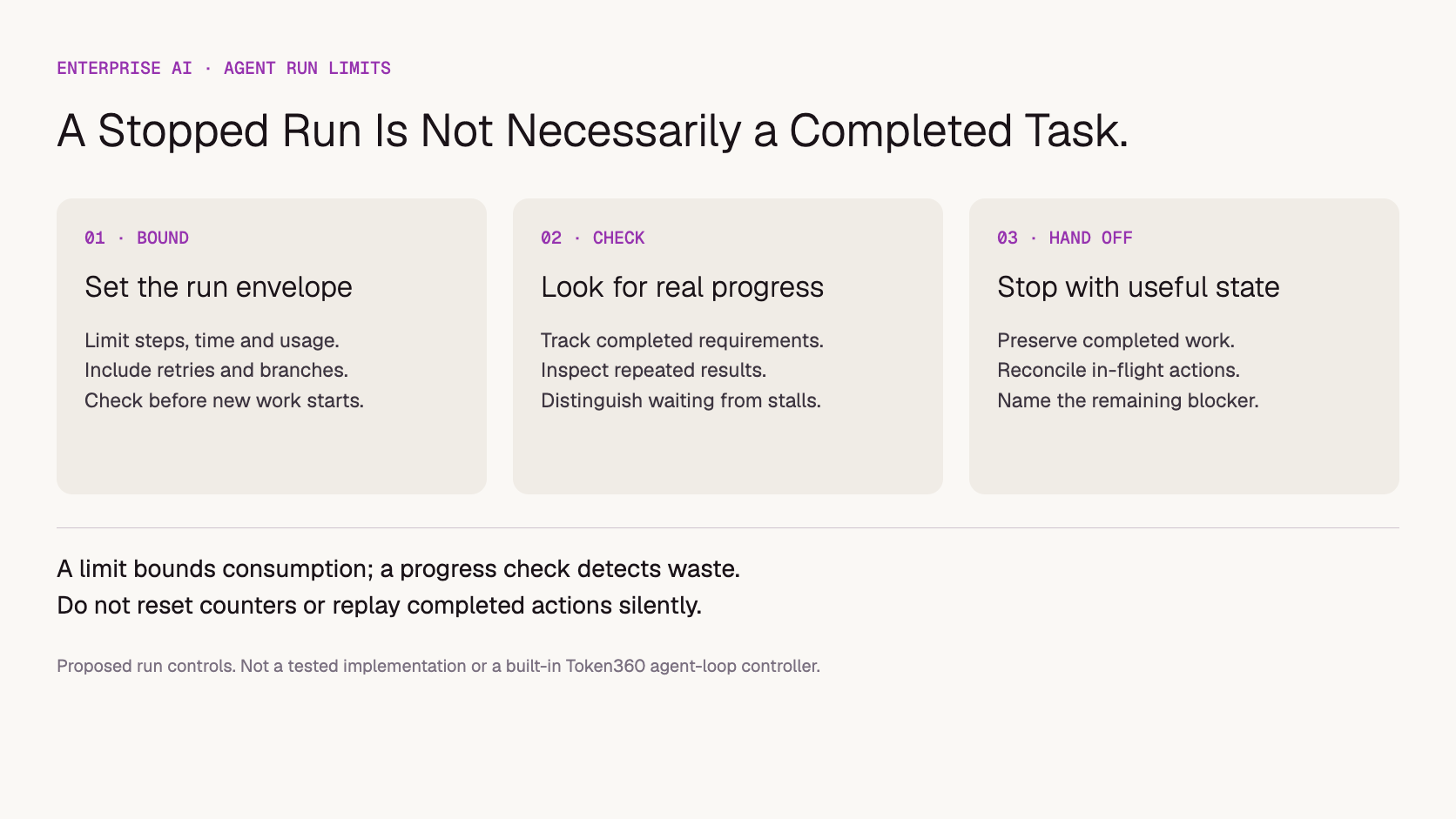
Proposed run-control model. Resource limits and progress checks serve different purposes.
What should happen when a run reaches its limit?
Stop admitting new work, preserve the current state and report the actual outcome. Identify completed items, unresolved requirements and any external actions whose status still needs confirmation. A limit should produce a controlled partial result or escalation, not a fabricated final answer or a silent restart with fresh counters.
A useful handoff might say: “Three required documents were reviewed. The insurance certificate was not available in the authorized sources. No supplier approval was issued. Further review requires that document.” This is more actionable than either “Task complete” or an unexplained timeout.
If an external operation is already in flight, stopping the agent does not establish that the operation stopped. Record the operation identifier and reconcile its final status through the supported mechanism. Do not blindly repeat a write after resuming: the first attempt may have succeeded despite a lost response.
Resume from a checkpoint only after verifying which information and actions remain valid. An extension should preserve the cumulative record, even if the business owner authorizes a new budget. Otherwise a repeated restart can turn a bounded run into an unbounded process.
How should an enterprise test these controls?
Test intentional stalls alongside successful tasks. Create controlled cases with missing evidence, repeated tool failures, contradictory review criteria and parallel branches near their shared limit. Verify that the application stops for the right reason, preserves useful output and does not duplicate external actions during recovery. This is more informative than checking only whether the model eventually replies.
Repeated result: return the same search results and check the no-progress decision.
Permission failure: ensure unchanged credentials do not trigger an unlimited sequence of attempts.
Legitimate waiting: confirm bounded polling is distinguished from an unproductive planning loop.
Slow external operation: reach the run deadline and inspect in-flight status handling.
Parallel work: verify shared-budget accounting before branches start.
Resume after interruption: check that completed writes are not executed twice.
Useful long task: make sure the policy can support justified progress through an owned extension.
Use a sandbox and synthetic data for side-effect tests. Record the application version, model, prompts, limits, tool behavior and observed stop reason. The blank agent-run test worksheet supports this review; it contains no measured results or recommended numerical thresholds.
Track task completion and quality alongside prevented waste. A system that immediately stops every job spends little but delivers little. Review premature stops, unresolved handoffs, repeated extensions and resource consumption per accepted task to understand the tradeoff.
Where does Token360 fit in run control?
Token360 supplies enterprise access to text, image, audio and video models. The application orchestrating those calls should own the task state, limits and stop decision unless a specific service agreement assigns that function elsewhere. Access to multiple models does not by itself prevent a loop or establish that switching models will resolve it.
The Token360 enterprise offering can support discussions about model access, capacity, pricing and contractual requirements for the workload. Confirm available usage evidence and cancellation behavior for the specific API. This article does not claim built-in agent-loop detection, guaranteed per-job spend enforcement or tested savings. Company information is available in Token360's resources and About section.
Frequently asked questions
Should we increase the step limit whenever a run fails?
No. Inspect whether the run was making progress and whether the completion condition was reachable. A larger limit may help legitimate complex work, but it can also fund more repetition. Change the limit with evidence and retain other controls.
Does a token limit stop an entire agent?
Not necessarily. A token limit may apply to one response or request. The application can still initiate more calls or tools. Define and enforce the complete run's resource budget separately, including the relevant tool and retry costs.
Can another model automatically fix a stuck agent?
Not reliably. A different model may help with a capability problem, but it cannot supply a missing document, grant permission or repair an impossible success criterion. Diagnose the blocker and test any model change against the same task requirements.
Is stopping at a limit the same as completing the task?
No. Completion means the defined acceptance conditions were met. A limit is a reason execution stopped. Preserve distinct statuses for complete, partial, blocked and failed outcomes so downstream teams do not act on unfinished work as if it were verified.
Enterprise AI
API
Bring your next idea to life.
Create a video scene in Creator, or explore models for images, audio, and text to find the right capabilities for your project.



 Guides
 Guides
 Guides