Find unapproved workplace AI use, assess data and action risks, and move useful tasks into an owned, approved workflow employees can actually use.
ENTERPRISE AI · SHADOW AI
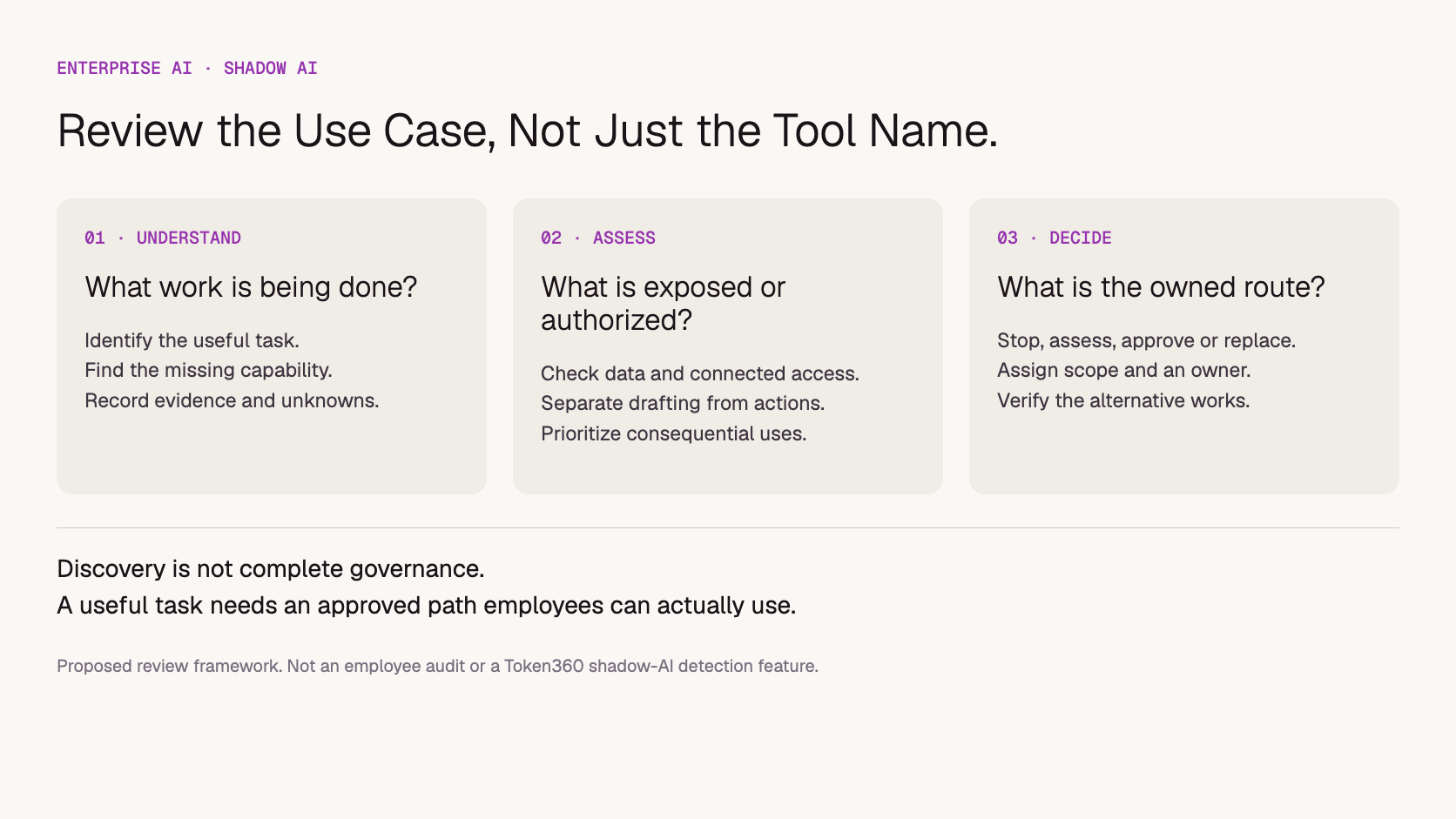
Handle shadow AI by finding the work employees are doing, assessing its data and action risks, and giving useful tasks an approved path. Pause clearly unsafe activity, but avoid treating every unapproved tool as the same problem. Record an owner and decision for each use case, then verify that the replacement actually meets the team's needs.
An employee using a personal chatbot to rewrite public copy creates a different situation from an unreviewed agent connected to customer files. Both may be outside company policy. The response should reflect what information moved, what authority the tool received, and whether the organization can preserve the useful work under appropriate controls.
Scope: This is a proposed management approach, not an audit of any company or a claim that Token360 discovers employee AI usage. Examples and the worksheet are illustrative. Official sources were checked November 15, 2026. “Shadow AI” here means unapproved workplace use, not model shadow testing.
What counts as shadow AI at work?
Shadow AI is workplace use of AI tools or capabilities outside the organization's required approval and oversight. It can involve a personal subscription, an unreviewed browser extension, a developer's API script, or an AI feature enabled inside existing software. The boundary is the approved use, not whether the product is free or paid.
IBM's definition of shadow AI centers on unsanctioned AI use without formal IT approval or oversight. For a company implementing that definition, approval should identify the account, task, data, and permissions involved. Approving a tool for public copywriting does not automatically approve uploading confidential client records.
Keep three categories distinct: an approved use, an unreviewed use, and a prohibited use. “We have not assessed it yet” is not the same finding as “we assessed it and rejected this activity.” That distinction helps teams report uncertainty without having to decide the risk themselves.
Why are employees using tools outside the approved route?
Ask what the employee is trying to accomplish and where the approved workflow falls short. The gap may be access, model capability, ease of use, turnaround time, or missing integration. Discovering the unmet task helps the company choose between approving a tool, improving an existing service, or stopping an unsuitable activity.
In an illustrative marketing team, employees might use an external tool because the approved assistant handles text but not product images. A developer might create a script because the approved interface cannot process a recurring batch. Buying another general chatbot seat may not resolve either problem.
Use a short conversation: What task are you doing? What information do you provide? What comes back? Does the tool connect to other systems? What would an approved alternative need to do? Request categories and sanitized examples first, rather than asking employees to copy sensitive conversation histories into a new shared document.
The goal is evidence about work and exposure, not a popularity contest among tools. A frequently used product may deserve assessment, but usage alone does not establish acceptable data handling or business value.
How can you discover usage without assuming you can see everything?
Combine employee reporting with authorized organizational evidence, such as software purchases, managed application inventories, approved network telemetry, and integration permissions. Each source has gaps. A lack of expense records does not prove there is no free-tool use, and a connection to an AI service does not establish what content was submitted.
Microsoft's Global Secure Access documentation describes a network-based approach that identifies AI service traffic and surfaces applications, users, and usage information. This is one discovery mechanism, not proof that every device, account, or embedded AI feature is covered in an organization's deployment.
Use the company's approved monitoring scope, employee notices, and access controls. Keep discovery records limited to what is needed for assessment. Do not request personal account passwords or assume investigators should browse private accounts. Where stronger evidence is required, use the established security and privacy process.
Evidence source
What it can help reveal
What it does not establish alone
Employee disclosure
The task and reasons for using a tool
A complete organization-wide inventory
Purchasing records
Paid subscriptions and named purchasers
Free or unreimbursed use
Managed network or endpoint evidence
Observed applications and connections
Every prompt, purpose, or off-network activity
Integration and permission review
Connected systems and granted scopes
Whether every permission was exercised
Label findings as observed, reported, or unknown. Avoid describing an inventory as complete when its coverage is limited. Assign an owner to unresolved entries so the exercise produces decisions rather than a growing list of names.
Which uses should you review first?
Prioritize the potential consequence of the use: sensitive information, access to business systems, external publication, autonomous actions, or dependency on an unmanaged account. A tool's brand name is only one input. The same application can support a modest drafting task or a much more consequential connected workflow.
Illustrative use
Main question
Proposed next step
Rewrite already public product copy
Are account terms and output review acceptable?
Assess a bounded drafting approval
Summarize an internal customer file
Was that data permitted to leave its system?
Pause unapproved uploads and review data exposure
Agent connected to email or CRM
What can it read, send, or change?
Review access and action authority promptly
Production script using a personal API account
Can the company control continuity and revoke access?
Plan an owned replacement with a responsible maintainer
AI feature added to an existing SaaS product
Did processing or permissions change?
Review the feature's actual scope before relying on prior approval
This is a triage aid, not a legal classification or universal severity score. If sensitive information may already have been exposed, use the company's incident process. Moving future work to an approved tool does not reverse a previous upload or settle its retention status.
Should you block the tool, approve it, or replace it?
Choose a disposition for the specific use case: stop it, approve it within a defined scope, allow a controlled evaluation, or move it to an alternative. Record the decision owner and conditions. A broad tool-level label is insufficient when different data categories and actions carry different requirements.
Immediate restrictions may be appropriate for an unacceptable exposure or unapproved action authority. For lower-risk uncertainty, a limited evaluation can establish whether the tool is useful and whether its settings, account arrangement, and processing terms satisfy the company's requirements. An exception should have an expiry and a review owner.
If replacing the tool, test the actual task before declaring the problem solved. Preserve useful workflows, templates, and approved assets where rights and access permit. Do not bulk-import unknown personal conversation histories into a company system merely to make the migration feel complete.
The AI software versus model API guide helps distinguish a ready-to-use employee application from infrastructure for a custom workflow. A procurement team should not replace a usable interface with API credentials and assume employees now have an equivalent service.
Proposed review path: assess the use case before selecting its destination.
What does an approved alternative need to include?
An approved alternative needs a usable workflow, clear permitted data, accountable ownership, and support when the task fails. Model access is only part of that package. Employees also need to know how to obtain access, what they may submit, which outputs need review, and how to request a missing capability.
For a company-managed assistant, define the audience, supported tasks, data boundaries, output checks, retention arrangements, and administrator responsibilities. For a custom API workflow, additionally assign the integration, credential management, monitoring, and maintenance work. Approval should match what is actually deployed.
Publish a short task-based directory: “Use this service for public copy drafts,” “Use this workflow for approved internal summaries,” and “Request review before connecting a tool to customer systems.” A directory of product logos without usage conditions leaves employees to infer the rules.
Make the request route workable. Name the person or team that reviews new use cases, explain what information is required, and provide a way to check progress. Do not promise a review deadline the organization cannot support. Repeated requests for the same missing task are evidence for improving the approved offering.
Where can Token360 help, and where does it not replace governance?
Token360 can support enterprise model procurement and approved application workflows across text, image, audio, and video. It does not replace the company's employee policy, discovery tooling, or end-user application design. Consolidating model access can support oversight of traffic that uses the approved path; it cannot reveal unrelated activity outside that path.
Token360's enterprise page describes multimodal model access, custom pricing, and tenant-wide inference-key audit. These are relevant when a company builds or operates an approved model-based service. They do not establish that Token360 scans employee devices, discovers personal subscriptions, or automatically blocks other AI tools.
Bring the actual use cases to a supplier discussion: task, required modality, data restrictions, expected volume, and who will operate the employee-facing workflow. Discuss capacity, pricing, contracts, and applicable requirements for the engagement. Keep any needed capability that has not been confirmed out of the employee promise.
The AI procurement consolidation guide covers the commercial decision. This article focuses on moving previously unreviewed work into an owned, usable route rather than requiring every team to use one model.
How do you know the response is working?
Measure resolved use cases and reduced exposure alongside adoption of approved alternatives. A lower count of detected tools can reflect better control, weaker visibility, or employees moving elsewhere. Check whether the important tasks still get done, whether decisions are implemented, and whether employees can report unmet needs.
Track the number of reported uses awaiting review, owners assigned, high-priority findings resolved, approved migrations completed, and recurring requests for missing capability. For selected tasks, verify that the replacement produces acceptable outputs and that old integrations or credentials are handled according to the agreed plan.
Review approvals when the tool gains new connectors, changes its processing scope, or moves from drafting to acting. Employee turnover and vendor changes also need an owner. The AI API governance implementation guide covers the broader controls after a workflow is approved.
Copy the blank shadow AI use-review worksheet to record the task, evidence source, data category, connected permissions, business value, decision, owner, alternative, and review date. It is a planning artifact, not a completed inventory or security assessment.
Is a company email address enough to make a tool approved?
No. A company email can identify a user without establishing that the account, processing terms, permissions, and use case have been reviewed. Record the scope of approval separately from the login method.
Does shadow AI always mean the employee acted maliciously?
No. Unapproved use describes a governance status, not intent. Investigate the task and evidence. The response should address unsafe activity while making it practical to report useful work and obtain an approved alternative.
Can one approved model eliminate shadow AI?
Not by itself. Teams may need different modalities, integrations, or interfaces. Start from supported tasks and provide a path for exceptions or new requirements. A model catalog only helps if employees can use it within a suitable workflow.
Should employees delete everything from the old tool immediately?
Do not issue a blanket deletion instruction when there may be an incident, retention obligation, or investigation. Use the responsible team's process to preserve necessary evidence, stop further unapproved processing, and address stored data and access. Do not assume deleting a local chat removes every retained copy.
About this guide: Written by Yuki Yu for Token360. The examples and review path are proposed operational guidance. No employee monitoring, customer incident, or measured reduction in shadow AI is claimed.
Enterprise AI
API
Bring your next idea to life.
Create a video scene in Creator, or explore models for images, audio, and text to find the right capabilities for your project.



 Guides
 Guides
 Guides