AI Video Download URL Expired? Recover and Store the Original Output
Recover expired AI video download URLs without immediately regenerating. Check resource availability, refresh access where supported, and verify saved files.
Your video job says “completed,” but yesterday’s download link no longer opens. Before generating another clip, separate the status of the video from the status of the link. A temporary access URL can stop working while the underlying output still exists. Regenerating immediately may spend more money and produce a different result.
Quick answer: retrieve the original job or resource record, confirm that the output is still available, and request a fresh download URL through the documented mechanism where supported. If you need durable access, copy the authorized output into storage you control and verify that copy. Keep the resource identifier as the reference; do not use a temporary URL as the asset’s permanent identity.
This is an implementation guide with a reproducible transfer-budget example and a proposed six-case validation matrix. It is not a report of a live Token360 recovery test. No universal link lifetime, retention period, or recovery guarantee is assumed.
There are at least three independent states to track: whether generation completed, whether the stored output still exists, and whether your current access link is valid. A fourth state matters in your own application: whether a verified copy has been saved to your storage.
State
Question it answers
What it does not prove
Generation completed
Did the generation workflow finish?
The result will remain downloadable forever.
Resource available
Does the service still retain an accessible output?
A previously issued URL still works.
Link valid
Can this access mechanism retrieve the output now?
Your application has archived the bytes.
Copy verified
Did your application save and validate its own copy?
The copy is backed up or retained indefinitely.
Token360’s Security and Data Handling documentation distinguishes signed-URL expiration from underlying resource deletion and says that a documented download mechanism can provide a fresh URL where supported. It also separates retention by data type. Confirm the policy for the specific model, route, and account rather than assuming one lifetime for all media.
For comparison, Amazon S3 documents presigned URLs as time-limited access whose validity also depends on credentials and permissions. That explains the general distinction between storage and access. It does not establish that Token360 uses S3 for your output or inherits S3’s expiration rules.
2. Diagnose a failed download before refreshing anything
Capture the job or resource identifier, the time of the failed download, the HTTP status, and a sanitized error category. Check the original job record through an authenticated server-side path. Avoid copying a full signed URL into public bug reports, analytics events, or screenshots.
Symptom
Next check
Unsafe assumption
403 or access denied
Expiry, permissions, signing context, and the resource record
Every 403 means the link expired.
404 or missing resource
Correct identifier, account scope, and documented retention
Every 404 means permanent deletion.
Download works, player fails
Media format, content type, codec, and browser behavior
A new generation will fix playback.
Transfer stops midway
Network error, partial file, and supported restart behavior
The partial file is a complete output.
Resource is still processing
Job status and the expected completion workflow
A result URL must already exist.
Inspect the documented error response rather than classifying solely by status. A browser can also conceal the underlying cause behind a generic playback message. If the application uses a proxy or CDN, identify whether the failure came from your layer or the original media host.
Do not modify a signed URL’s query parameters or switch request methods casually. AWS specifically notes that method, headers, and query-string differences can cause signature mismatch. For an unknown delivery system, follow its documented download method instead of assuming that a HEAD probe is interchangeable with GET.
3. Recover access using the original resource identity
Keep a durable application record containing your asset ID, provider resource ID, model ID, creation time, generation state, and storage state. Store the most recent access URL only as replaceable delivery information. If expiration metadata is returned, record its source and timestamp; otherwise leave the expiry unknown.
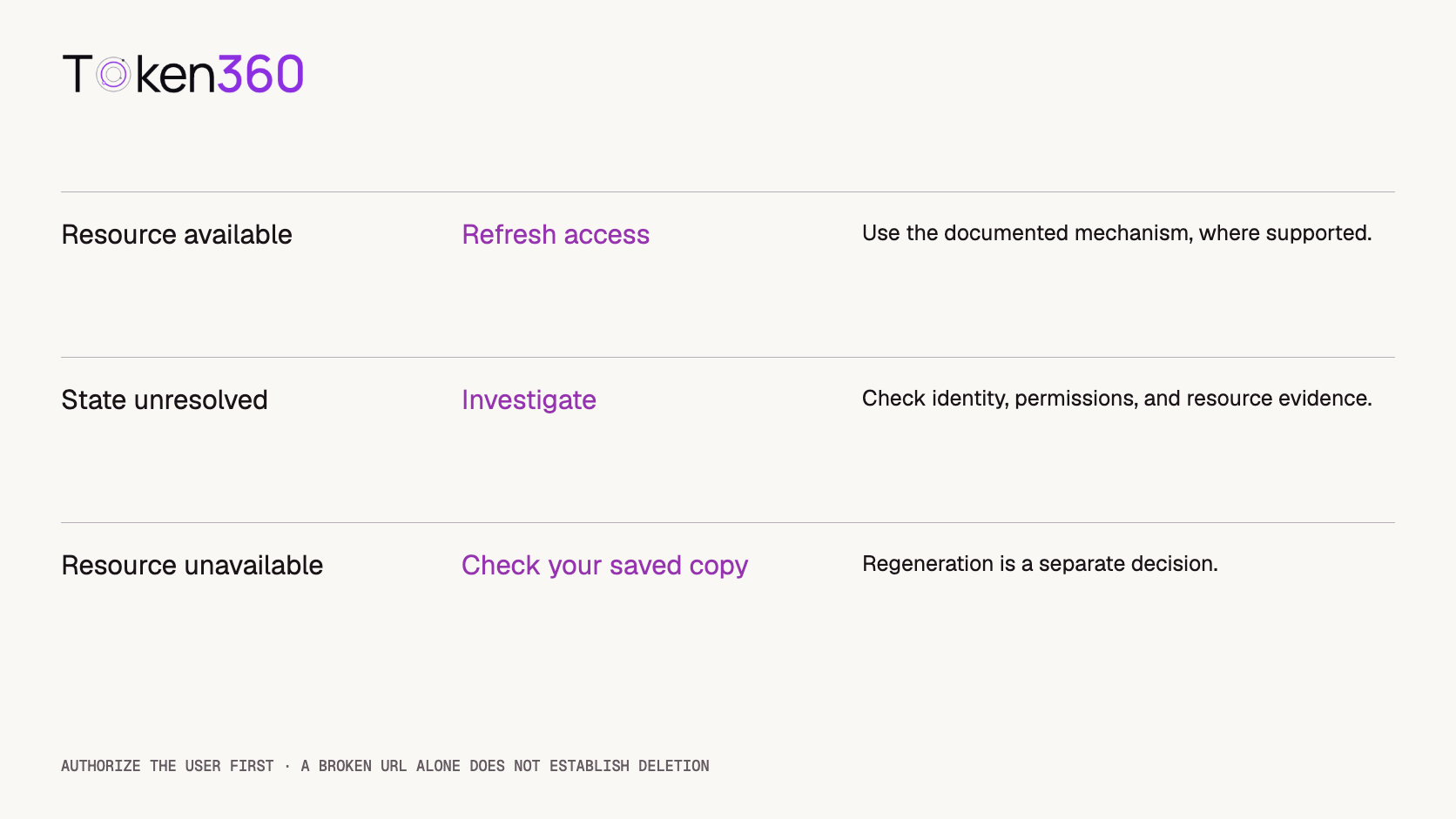
A recovery handler should first authorize the current user for the application asset. It can then inspect the original resource and, where supported, obtain a fresh access URL. Never expose a server API key to the browser to let it perform that lookup directly.
Illustrative application flow — not an API schema

1. Authorize user access to application_asset_id.
2. Load the stored provider_resource_id.
3. Inspect the resource through its documented API.
4. If available and refresh is supported, obtain a fresh URL.
5. Download or deliver using the documented method.
6. If unavailable or unresolved, preserve the record and explain why.

No generation request is part of this recovery flow.
Bound the refresh attempts. If a newly obtained link fails for the same reason, investigate permissions or availability instead of looping. A refresh mechanism also needs rate control: multiple browser tabs should not trigger an unlimited number of identical refresh requests.
If the provider no longer retains the asset and your application has no valid copy, the original bytes may be unrecoverable. Offer regeneration as a separate action with its own cost and a clear warning that the result may differ. Do not present regeneration as restoration of the same file.
Decisions depend on resource evidence, not the broken URL alone.
4. Persist the output before declaring delivery complete
If the product promises later downloads, design an ingestion step after generation. Fetch the authorized media, write it to a temporary object, validate it, and only then mark the application asset ready. A completed provider job and a persisted application asset should remain separate states.
Use a stable destination key derived from the application asset identifier, not the signed URL. Record byte count, media type, source resource ID, and a local checksum. If the source provides a trustworthy expected checksum, compare it. A checksum calculated only after download helps detect later changes to that copy; it does not independently prove equality with the original source.
Validate more than the HTTP status. An HTML error page saved with an MP4 extension is not a usable video. Check the file signature or container, inspect expected streams, and run a representative playback check. Treat an interrupted transfer as incomplete until validation succeeds.
Make ingestion safe to repeat. A duplicate completion notification should resolve to the same application asset, not create unrelated copies. Serialize competing writes or use storage preconditions so one failed attempt cannot overwrite an already verified object. Keep partial files isolated and remove them through a documented cleanup process.
Copying a file also creates a new data-retention responsibility. Choose access controls, lifecycle rules, deletion behavior, and backup requirements for the destination. Verify that your intended storage and distribution are permitted by the applicable terms. Neither “stored by us” nor “URL refreshed” means “public forever.”
5. Budget for transfer time, not only link lifetime
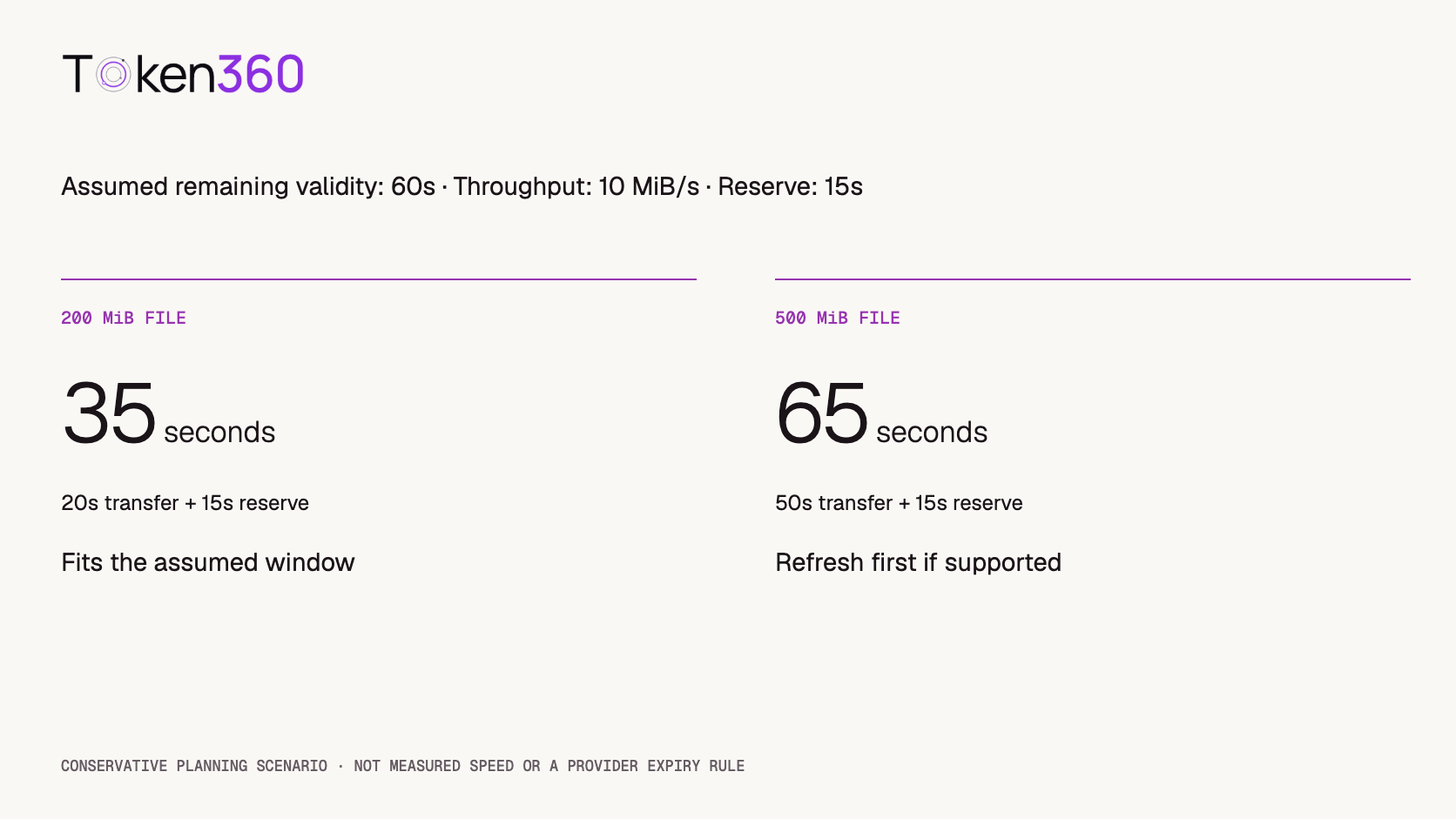
Suppose your application knows that a link has 60 seconds of remaining validity. Use an illustrative effective throughput of 10 MiB per second and a 15-second reserve for startup and variability. These are planning inputs, not measured provider performance.
Conservative transfer budget = file size / effective throughput + reserve

200 MiB / 10 MiB/s + 15 s = 35 s
500 MiB / 10 MiB/s + 15 s = 65 s
The first transfer fits inside the assumed 60-second window; the second does not fit this conservative budget. If refresh is supported, obtaining a fresh URL before starting the larger transfer is a reasonable application policy. If expiration is unknown, the calculation cannot establish a safe window.
Assumed file size
Transfer estimate
Reserve
Total budget
Against 60 seconds
200 MiB
20 seconds
15 seconds
35 seconds
Fits the assumed window
500 MiB
50 seconds
15 seconds
65 seconds
Refresh first if supported
This is deliberately conservative, not a universal storage rule. S3, for example, documents checking expiry when the request starts: a download started before expiry can continue, while a later restart can fail. Your media host may behave differently. Confirm both initial-request and restart behavior before relying on an expiry estimate.
Calculated planning scenario. Transfer speed, reserve, and remaining validity are assumptions.
6. Test recovery as a separate delivery feature
A successful generation test does not exercise delayed downloads. Use the following proposed matrix before promising durable access. These cases have not been executed against Token360 for this article; they define what a production validation should establish.
Case
Expected application behavior
Valid URL and authorized user
Fetch and verify the output without generating again.
Expired URL, retained resource
Refresh where supported and retrieve the same resource.
Resource inaccessible for unclear reason
Preserve evidence and investigate; do not declare deletion.
Unauthorized application user
Deny before issuing a new access URL.
Interrupted download
Keep the partial object unready; restart or resume only as supported.
Duplicate completion or recovery events
Converge on one verified asset record without redundant generation.
Record the model and route, resource identifier, initial and refreshed retrieval outcomes, timestamps, byte counts, and destination validation result. Keep signed URLs out of the public test report. If a feature is unsupported, record that outcome rather than treating it as a failed implementation of a promised capability.
For operational monitoring, separate generation success from persistence success and delivery success. Track the age of completed-but-unpersisted jobs and unresolved recovery requests. A generation success rate can remain healthy while every delayed download is failing.
FAQ
Does an expired video URL mean the video was deleted?
No. Access validity and resource retention are separate. Inspect the original resource using the documented mechanism before deciding whether the output still exists.
Can I refresh every Token360 video link?
Do not assume so. The documentation describes fresh download URLs where supported. Confirm the relevant resource API, route, retention policy, and account permissions.
Should I generate the video again when the download fails?
First attempt to recover access to the existing resource or use a verified saved copy. Regeneration is a new operation that can cost money and produce a different clip.
Can I put a signed URL directly into a permanent blog post?
A temporary URL is a fragile publishing dependency. For media you are permitted to publish, use an approved durable hosting workflow and a stable publishing URL, with an appropriate retention policy.
Is a 403 enough to diagnose expiration?
No. Permissions, signing details, and access policies can also produce access failures. Use the response details and resource state to narrow the cause.
Does downloading the file prove it is safely archived?
No. Verify the completed file, record provenance, control access, and define retention and backup behavior. A partial download or an unverified object should not be marked ready.
Next step: confirm your output’s retention and supported download mechanism in Token360’s data-handling documentation, then test delayed retrieval before committing to a customer-facing download promise.
API
Video Generation
Developer Guide
Build faster with one AI API.
Use Token360 to call video, image, audio, and text models with one key and one bill.



 Tutorial
 Tutorial
 Tutorial