Evaluate AI product shadows using official examples, a pump-bottle delivery exercise and checks for product fidelity, lighting and usable files.
An AI shadow generator can help ground a product cutout in a finished image, but a convincing shadow is only half the job. The product must stay accurate. For enterprise catalog work, specify whether you need a finished composite or an editable shadow, then evaluate contact, lighting consistency and product preservation before committing volume.
Consider a catalog team placing approved product cutouts onto a common campaign background. The edges are clean, but the objects look pasted on. A shadow may solve that particular visual problem without requiring a new product photograph. A model that redraws the label or changes the bottle base while adding depth, however, has created a different approval problem.
This article is a documentation-based purchasing guide, not a measured comparison or a completed Token360 shadow-generation test. It focuses on adding shadows to approved product images. Availability of a specific shadow model, masked editing control or layered output through Token360 has not been verified.
Official example: compare the input and two shadow outputs
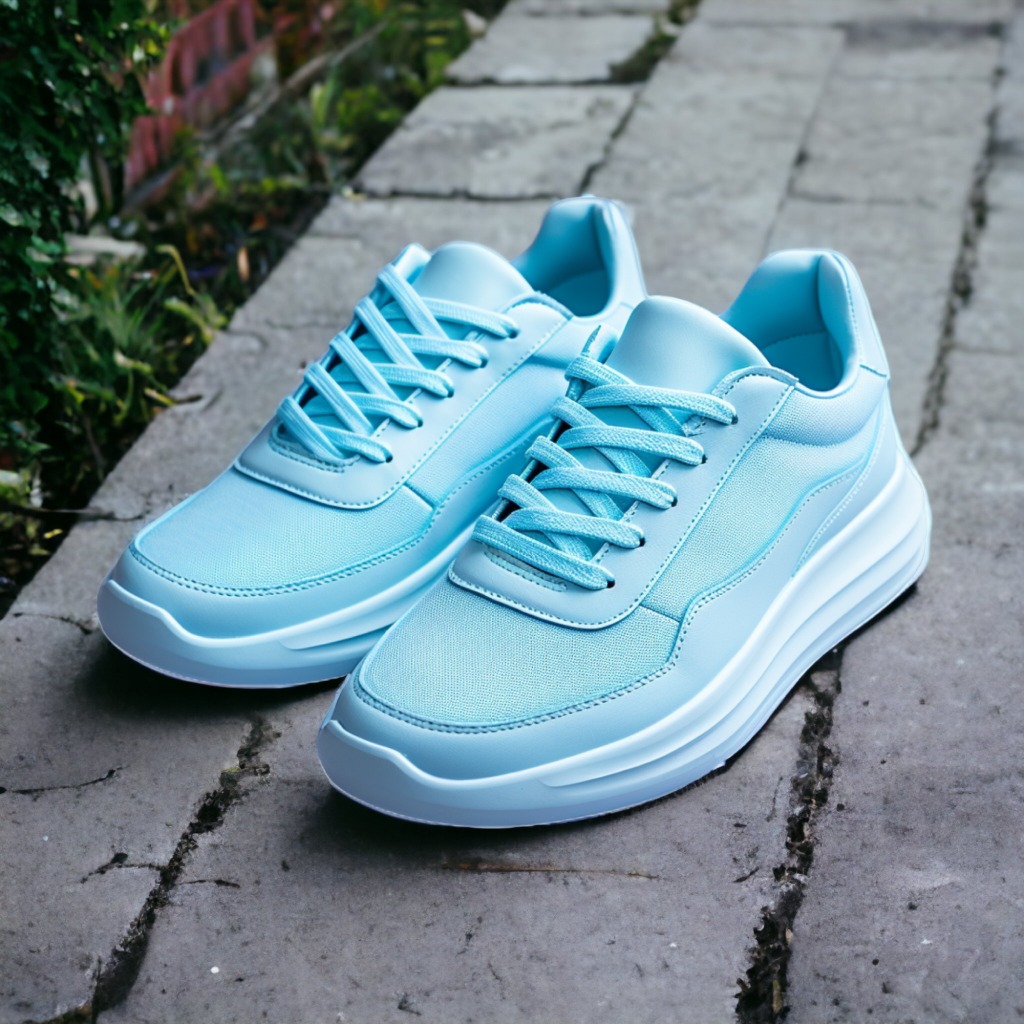
Provider documentation reviewed November 26, 2026; not a Token360 experiment. The Photoroom AI Shadows documentation shows one shoe image beside two outputs labeled with softness values 0.3 and 0.7. The figures below are linked directly from that source.
Official input image. Source: Photoroom AI Shadows documentation; provider demonstration, not a Token360 test.Official result: softness 0.3. Source: Photoroom AI Shadows documentation; provider demonstration, not a Token360 test.Official result: softness 0.7. Source: Photoroom AI Shadows documentation; provider demonstration, not a Token360 test.
The original includes paving; the outputs place the shoes on white. The 0.7 example has a more diffuse shadow boundary than 0.3. These are visible differences, not a measurement of product fidelity. Background, canvas and scale also differ, so this is not an isolated pixel comparison.
The documented request writes an edited image. These figures show composite appearance, not a shadow-only layer. For controls and a preview interface, see the official Add Shadows overview and official demo. Confirm actual file structure separately.
Inspectable teaching delivery pack: a pump bottle, shadow and composite
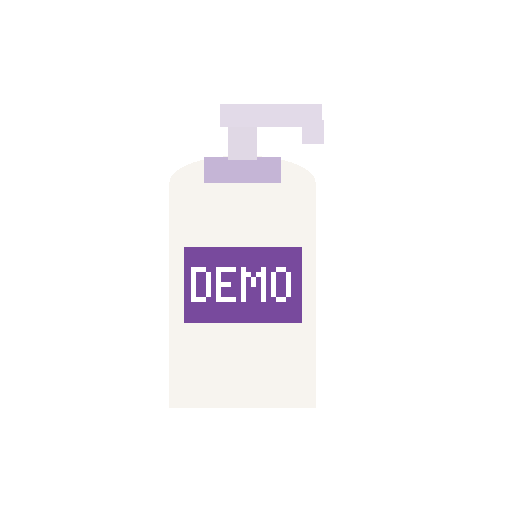
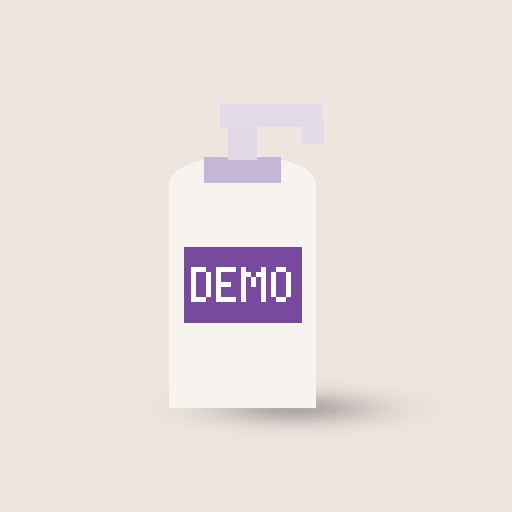
Authored teaching fixture, not AI output, a customer result or a real product photograph. These three PNG files form a small delivery pack: the DEMO pump-bottle cutout, its independent shadow on the same canvas, and a deterministic composite. The files are available individually below; the dimensions, alpha ranges, sizes and hashes were checked on the uploaded bytes.
Open the original and shadow PNGs as separate aligned layers on a 512 × 512 canvas. Place the bottle above the shadow; do not resize either file.
Toggle the shadow layer off. Only the shadow should disappear; the bottle is a different file. This is the independent adjustment missing from a flattened JPEG.
Place the layers over light and dark backgrounds to inspect transparency and the contact at the bottle base. A transparent viewer may display the shadow very faintly until you add a background.
Compare the supplied composite, which uses a solid RGB background of 237, 230, 222. That composite is fully opaque and is not a reusable alpha asset.
What was actually verified?
In the deterministic teaching composition, all 39,839 fully opaque source-product pixels retain the same RGB values in the composite: zero mismatches in that defined region. This checks our authored source-over-shadow assembly only. It does not measure an AI model, verify semitransparent edges or establish real-product fidelity.
Checksums identify these exact files; they do not establish model quality. A future job must attach its own source, result and review. If a supplier returns only a flattened JPEG, it fails an independently editable shadow requirement even when the finished picture looks good.
Choose a shadow workflow when the product cutout and background are already approved and only the grounding needs work. A new scene, camera angle or product illumination is a broader editing task. Choose whether the editor needs the finished composite, reusable transparent layers or independent shadow adjustment before evaluating appearance.
A useful shadow brief separates the fixed product from the editable surroundings. Supply the approved source, intended surface and light direction, then identify the label, outline, color and base that must not change. Define whether the new shadow replaces an existing one, and describe the required file deliverable independently of the visual instruction.
Keep an untouched source for comparison. If the cutout still contains a photographed shadow, decide whether to preserve, remove or replace it. Adding another shadow without resolving the original can make the product appear lit from incompatible directions. Do not assume an automatic background-removal step has made that decision correctly.
Describe the visible relationship rather than relying only on “realistic.” A contact shadow is the darkening immediately where the product meets the surface. A cast shadow extends away from the product. Its direction and softness should fit the surrounding light. A glossy floor reflection is another effect, not a substitute for either shadow.
Example evaluation brief—not a tested prompt: Keep the supplied pump bottle’s shape, pump, label, color and position unchanged. Add a restrained contact shadow at the base and a soft cast shadow extending to the right, consistent with light from the upper left. Keep the background unchanged. Do not add a reflection or extra objects.
Attach the selected delivery scope from the teaching pack to this visual brief. It is an acceptance specification, not tested API syntax.
When the highlights on the actual product contradict the requested light direction, reconsider the brief. Changing only the shadow may not produce a coherent photograph. That broader problem belongs in product-photo relighting, where surface appearance and material changes also require approval.
How do you judge whether the shadow actually works?
Review the source and output side by side at both delivery size and close inspection. Accept the shadow only when it grounds the product, matches the scene and leaves protected details intact. A more polished image is not automatically a more accurate catalog asset, especially when subtle changes affect a label or silhouette.
Begin at the base. A detached shadow can make a resting object look suspended. A dark halo around the entire outline may conceal a poor cutout instead of establishing contact. Check handles, feet, gaps and thin supports individually: one broad blur can fill areas that should remain open.
Suggested acceptance checks, not results from a completed experiment.
Ground contact
What the reviewer should inspect: Where the approved product touches the intended surface
Reason to reject or revise: A floating base, missing contact or an unexplained dark rim
Light agreement
What the reviewer should inspect: Shadow direction and softness alongside visible highlights
Reason to reject or revise: Conflicting light cues that make the composite look assembled
Product fidelity
What the reviewer should inspect: Label, silhouette, cap, openings and color against the source
Reason to reject or revise: A changed product, even if the shadow looks attractive
Edge and background behavior
What the reviewer should inspect: The exported file on its actual destination background
Reason to reject or revise: Opaque fill, colored fringe or a shadow that clips at the image boundary
Transparent packaging deserves its own sample. The product may transmit light or reveal the background, so a solid silhouette shadow can be visually inappropriate. Reflective objects also need separate attention because their highlights may strongly imply a particular environment. These are reasons to test representative assets, not claims that any named model fails those materials.
Assign product accuracy to someone who knows the SKU and visual approval to the editor or art director. A single “looks good” vote can miss whether the item still matches the catalog. Record the rejected detail so the next attempt responds to a specific problem.
Will one good result work across a whole catalog?
One accepted image validates that image, not an entire catalog. Test the same shadow brief on representative shapes and materials, then compare the outputs as a set. The goal is a coherent lighting treatment that respects each product’s geometry, rather than forcing identical shadow shapes or accepting unrelated visual styles.
Include a simple opaque product, an item with openings or thin parts, and a difficult material from your real catalog. Use only assets you are authorized to upload. Choose the sample from actual inventory rather than adding artificial difficulty that does not affect the business.
Keep product scale, canvas placement and background treatment controlled during the review. If all of those change at once, the team cannot tell whether an inconsistency comes from the shadow brief or from a different composition. Compare like-for-like outputs before evaluating lifestyle scenes or alternative lighting.
Review a contact sheet at the size customers will see, then inspect flagged images individually. An image can look acceptable alone and still stand out in a product grid because its shadow is much heavier or points in another direction. Catalog consistency is a set-level decision.
Set a stop condition before generating more variants: protected product details must remain acceptable, the requested export must be usable, and unresolved problem classes should trigger a different workflow. Repeated generation without a recorded defect is not a substitute for fixing the brief or choosing conventional editing.
What should an enterprise confirm before buying this workflow?
Send the authorized source, lighting target and chosen deliverable to Token360’s enterprise team. Confirm the available model, actual input controls, returned files, billing unit and retry treatment. Include manual compositing and review when they are separate work; another provider’s documented shadow tool does not establish Token360 availability.
For company scope, see About Token360. Resolve confidential-asset handling before uploading unreleased products.
Frequently asked questions
Does the official example prove the original product pixels are unchanged?
No. It shows a provider’s original and edited images with different backgrounds, canvas sizes and scale. It is not a registered pixel-preservation test. Exact preservation requires an appropriate workflow and verification of the delivered files.
Does Token360 already offer the documented Photoroom endpoint?
This guide has not verified that availability. Confirm the actual model route, controls and output against the selected delivery scope before buying.





 Guides
 Guides
 Guides