Choose a normalized or supplier-native video request on Token360. Check the header, JSON body and model requirements using four local parsing examples.
By Yuki Yu
You have a working video request from a model supplier. Your team wants to run it through Token360. Can you copy the JSON across? Start with the selected model’s Token360 request example. If its standard fields express the action you need, use those fields. If the model documents a supplier-native request for that action, use its native body and enable the Token360-Native-Params header for that call.
Read first. Choose the endpoint that produces the output your application needs. Once you know the endpoint and model, you can decide which request format to send. Token360’s API selection guide.
Which request format fits a video feature?
Suppose an editor needs a four-second product shot. Look up the model’s allowed durations and its example body. If the standard request expresses the shot, submit it there. If the editor later asks for a supplier-specific camera control, look for that exact control and a documented request format. Its appearance in another supplier’s example gives you a question to verify before adding it to your product.
What you have established
What to send
What to keep with your integration
The normalized example supports the requested control.
The documented Token360 body with its standard field names.
The model ID, accepted value and resulting task ID.
The model documents the feature in a native body and supports passthrough.
The supplier-shaped JSON object with the native header enabled on this request.
The model-specific example, field type and response handling.
Only a different model or provider lists the feature.
Defer the control until you verify a supported route.
The missing capability and what evidence would confirm it.
In a client that serves several models, keep the mode with the model’s request builder. A shared HTTP client can still supply authentication. Setting the native header globally makes the format of unrelated requests depend on an earlier integration decision. Token360 model capability checks.
What changes on the wire?
For a supported native video call, send the supplier-shaped body as a JSON object to Token360. Use your Token360 credential and the public model ID. The gateway still handles authentication and routing. For an asynchronous video job, retain the returned Token360 task ID so your existing status and download flow can find the result. Native parameter contract · Video task lifecycle.
This command shows the transport for a model that documents native video input. First save the model’s complete native JSON example as native-video.json, replace the public model ID and media references with your own, and set your credential in the local environment. Submitting the command starts a generation if accepted.
Token360 also documents native bodies for image generation and speech synthesis. Verify support on the individual model before applying this pattern to either endpoint. A transcription workflow has a separate input contract. Token360 API reference overview.
Why can a duration that looks right still fail?
A form field can turn the number 4 into the string "4". Both survive a JSON syntax check, but a model expecting a number can distinguish them. Other failures happen earlier, before an individual parameter can be inspected.
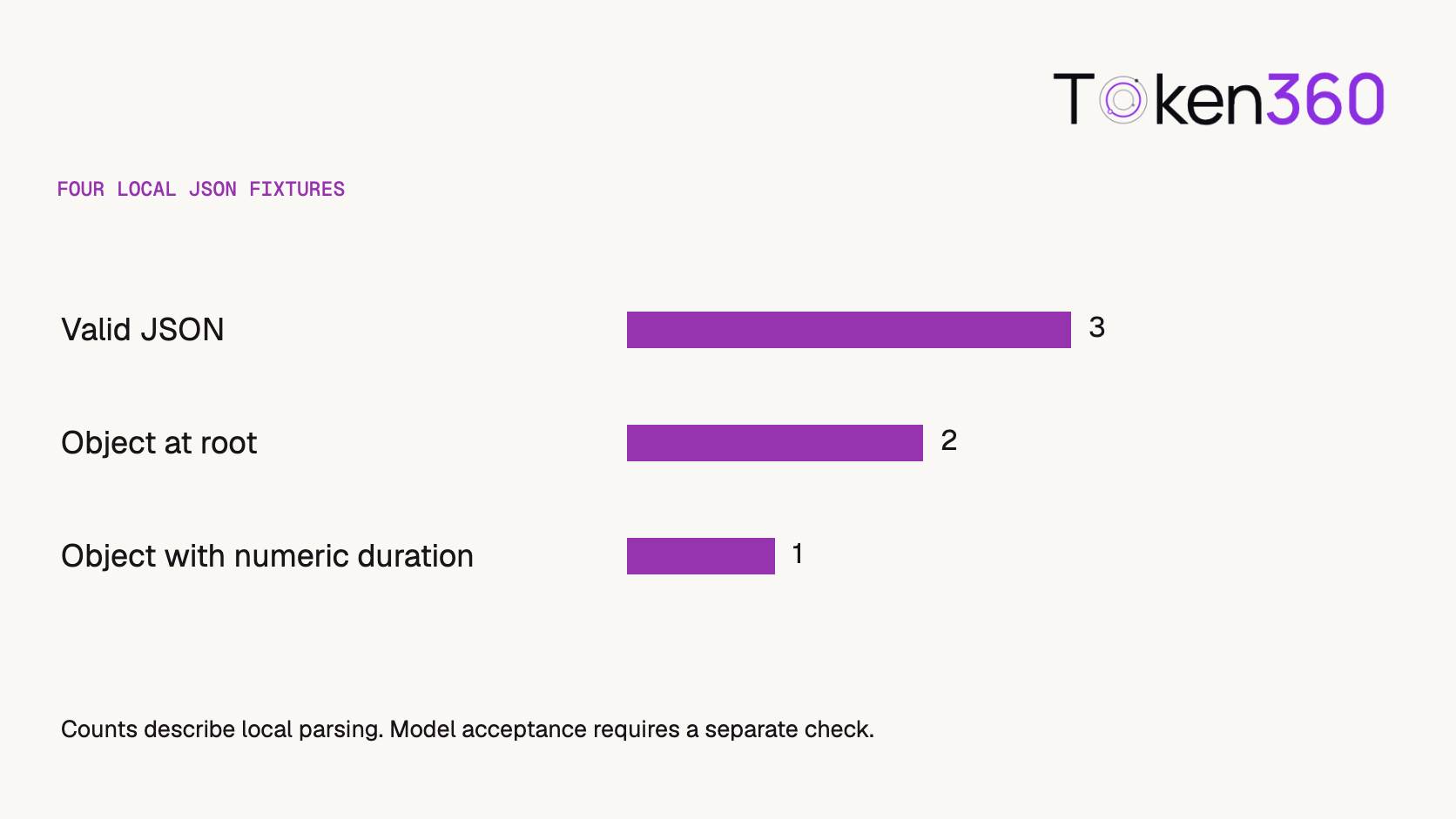
We parsed four small fixtures locally with Python’s JSON parser. They isolate one field so a developer can reproduce the distinction without a key or a generation charge. These fragments illustrate parsing only. A complete request also needs the fields and allowed values specified by the selected model.
Fixture
Local result
Next check
{"duration":4}
Object with an integer
Does the chosen model accept four seconds?
{"duration":"4"}
Object with a string
Does the model require a number?
[{"duration":4}]
Array
Native requests require an object at the root.
{"duration":4,}
Parse error
Remove the trailing comma before validation.
Each check narrows the four fixtures. Model-specific acceptance still requires the selected model’s contract.
Three fragments parsed, two had an object at the root, and one of those two carried a numeric duration. Preserve that distinction in error messages. “Enter a number” gives a user a clear fix for the quoted value. “Choose an allowed duration” applies after the value has the right type. JSON objects, arrays and numbers in RFC 8259.
What should you check if the JSON passes but the request fails?
Check the model, asset and operation separately. Start with the model’s smallest documented native example. Add the one control your feature depends on. If a managed asset is involved, verify its public Token360 asset ID and accessibility to the calling account. An unavailable asset can block a correctly shaped request.
Keep a redacted copy of the submitted body and record the header mode alongside the task or error identifier. During review, verify that the requested control changed the output as intended. For the product shot, an accepted task establishes that submission worked. The delivered clip and its duration answer the editor’s question.
What should you retain when comparing normalized and native calls?
Save the actual request body and the mode used for each attempt. Two snippets that contain the same prompt can still reach different validation paths if one includes the native-mode header. Record the public model name, content type and sanitized header names alongside the returned task identifier.
Start with a documented example in one mode, then add one required control. If it fails, compare the transmitted types and media references before rewriting the creative prompt. Do not copy a successful native body to another model merely because both models generate video.
Keep the comparison narrow: successful submission demonstrates that the request was accepted, while the output shows whether the desired control had the intended effect. A four-second returned clip does not by itself prove that every other native parameter was applied.
Do not invent the missing native body
A model-specific normalized/native pair requires two documented bodies for the same supported operation. The generic transport command above is insufficient to infer the supplier’s fields. Until that pair is available, use a request comparison sheet rather than a plausible-looking JSON example that may charge for the wrong operation.
Compare
Keep or verify
Identity
Same public model and intended operation
Mode
Record whether the native header is enabled
Input roles
Confirm which reference is a starting image, subject reference or video source
Values
Preserve documented types and allowed values instead of mechanically renaming fields
Outcome
Save both returned task identities and review the requested control in each output
The native-mode contract establishes the header and JSON-object requirement, not a universal vendor payload. For a usable worked pair, export the selected model’s two complete examples with credentials removed. If one mode cannot express the operation, record that limitation rather than declaring the bodies equivalent.
Frequently asked questions
Do I need my supplier’s API key?
Authenticate the Token360 request with your Token360 key. Native mode changes the expected body format. The request still goes through the gateway.
Where do I put Token360-Native-Params?
Place it in the HTTP request headers and set its value to true for the documented native call. Put the model and its parameters in the JSON body.
Can I send a multipart video upload in native mode?
The native video endpoint expects a JSON object. Use a media reference supported by the chosen model and represent it in the model’s documented body.
Can I reuse a native body when switching models?
Compare the new model’s field names, types, allowed values and media references. Reuse only the fields that its contract supports.
Does using native parameters change where I poll a video?
Use the returned Token360 video task ID with the Token360 status endpoint. Keep it associated with the model and request body that created the job.
Does a successful local parse prove the request will work?
It confirms JSON syntax. Root shape, parameter types, model capabilities, account access and media availability each require their own check.
Read next. After you can submit the job, verify the returned media before handing it to the editor. AI video output validation guide.


 Prompt Library
 Guides
 Guides