AI API CORS Errors: Why curl Works but Browsers Fail
A successful curl request does not prove browser access works. Check preflight, actual response headers and API errors before resubmitting an AI job.
BROWSER INTEGRATION · BLOG 158
By Token360 · Editorial review: November 5, 2026
An AI API request can work in curl yet fail in a browser because the browser applies cross-origin access checks that curl does not enforce. Diagnose the preflight and the actual response separately. A browser error does not always mean the server received no request, so check execution state before submitting a replacement generation.
We reproduced four cases using two local HTTP servers and a headless Chrome browser. In two cases, JavaScript received a TypeError. Yet one server record contained only an OPTIONS request, while the other contained both OPTIONS and POST. The same visible failure therefore concealed different execution histories.
This was a synthetic browser experiment, not a Token360 outage test. It used no API key, model generation or paid request. The result explains a diagnostic distinction; it does not establish the CORS configuration of any live Token360 endpoint.
Read first: Token360’s authentication guidance says to call the API from a backend and keep its key out of browser code. This article addresses browser-response diagnosis, not the broader credential lifecycle.
Why does curl success not prove browser access?
Curl can show the HTTP exchange without enforcing a browser’s cross-origin sharing rules. A browser additionally decides whether page JavaScript may access the response. Compare the origin, method, headers and credentials of both requests before calling them equivalent; a successful command-line test establishes only what happened for that particular command.
MDN’s CORS guide describes a header-based mechanism governing cross-origin access. Some requests require an OPTIONS preflight before the actual method is sent. JSON content types or an Authorization header commonly make that step relevant. An origin includes the scheme, host and port, so a different development port can create a different origin.
The fal FAQ asks whether developers can call fal from the browser and recommends a backend proxy that keeps the API key secure. That question prompted this article. A browser integration still needs to diagnose its own application endpoint; hiding a provider key does not automatically configure browser access to your backend.
What did the four local tests actually show?
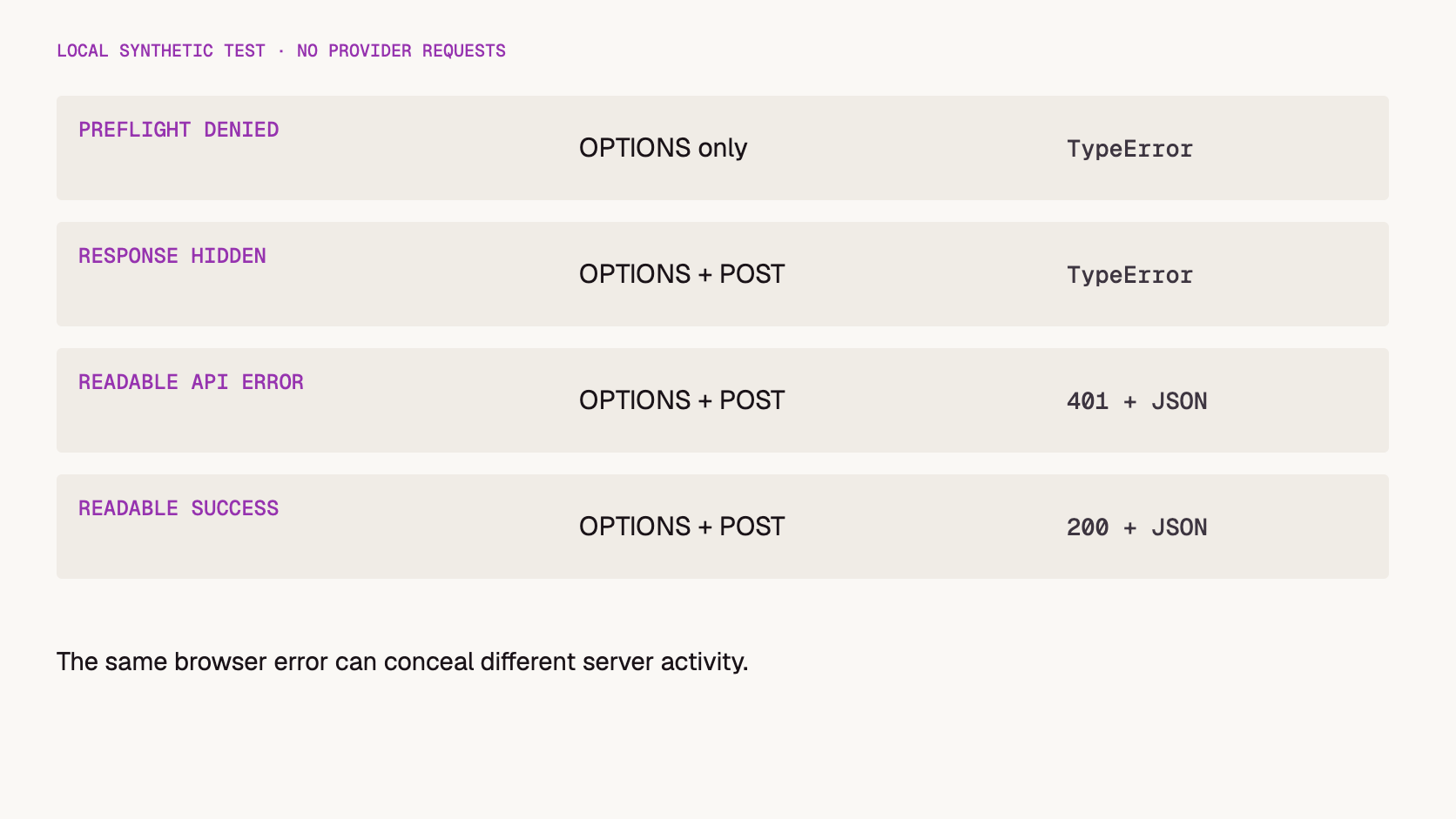
The local tests separated failed preflight, unreadable actual response, readable API error and readable success. Two cases produced the same JavaScript error despite different server activity. This shows why the browser message alone is insufficient: inspect both the browser’s network record and the server’s correlated request history before deciding what failed.
Method: on November 5, 2026, we ran Chrome 156.0.8078.80 in headless mode. One loopback server hosted a page; a second, on a different port, accepted JSON POST requests. Each test used a separate path. The fixture controlled CORS headers and mock response status and recorded the methods received. No cookies or real authorization credentials were used.
Local case
Server received
Browser JavaScript observed
Interpretation
Preflight response omitted permission headers
OPTIONS only
TypeError; no readable response
The browser did not send POST in this case.
Preflight allowed; POST response omitted the origin permission
OPTIONS, POST
TypeError; no readable response
POST reached the mock server, but its response was not readable.
Preflight and response allowed; mock API returned 401
OPTIONS, POST
Readable status 401 and JSON body
Browser access worked; the mock API reported an authentication error.
Preflight and response allowed; mock API returned 200
. These observations cover one browser version, simple local servers and four controlled cases. They do not test credentials mode, CDN caching, redirects, streaming or a production security configuration.
The practical consequence for AI applications is conservative: a frontend failure is not enough evidence to recreate a billable job. Our mock POST only returned JSON; a real POST might start work. Reconcile its identifier or server record first when execution is uncertain.
How do you tell a preflight failure from a hidden response?
Find the affected request in the browser’s Network panel and look for its OPTIONS exchange and actual method. If preflight failed and no actual request followed, investigate the permission response. If the actual request was sent, inspect its response and server record. Keep the distinction explicit rather than grouping both as an API outage.
Four observed local paths. “Readable” describes JavaScript access, not whether inference succeeded.
MDN’s CORS error guidance directs developers to browser diagnostics because JavaScript receives limited error detail. Record the console reason and network exchange together. Also check whether the URL changed through a redirect or whether an application edge returned the response instead of the intended handler.
Our fixture always used fresh paths in a fresh browser context. In a deployed app, a missing visible OPTIONS entry does not by itself prove that preflight was unnecessary: cached permission can affect the observed sequence. Capture the complete reproduction conditions and use server evidence to resolve ambiguous execution.
When the browser cannot read a response, avoid displaying a fabricated HTTP status such as “401” or “500.” If your application only knows that fetch failed, say so in the diagnostic record and investigate the real response separately.
Which request details belong in the diagnostic record?
Record the exact page origin, destination, method and requested header names, then compare them with the preflight and actual response. Include whether cookies or other browser credentials were requested. Keep secrets out of shared exports. The aim is to identify a mismatched boundary, not to collect every piece of user content.
Field
Why it matters
Record safely
Page origin and destination URL
Identifies the cross-origin boundary.
Remove secret-bearing query values.
Method and request header names
Defines the requested operation and preflight permissions.
Keep names; remove credential values.
OPTIONS status and response headers
Shows the preflight reply.
Record relevant access-control headers.
Actual request seen by the server
Separates no submission from unreadable response.
Use a correlation ID and timestamp.
Actual response status and access headers
Separates API outcome from browser readability.
Sanitize sensitive response content.
Browser credentials mode
Affects the applicable permission requirements.
Record the setting, not cookies.
The Fetch Standard’s CORS protocol defines the permission checks. For credentialed cross-origin access, a wildcard origin is not a substitute for the required explicit origin and credentials permission. Authentication and authorization for the actual operation remain separate application responsibilities.
Copy blog158-cors-diagnostic-record.csv:
UTC time,Page origin,Destination without secrets,Method,Header names only,Credentials mode,OPTIONS status,OPTIONS allow headers,Actual request reached server,Actual status,Actual allow headers,Correlation ID,Browser message,Conclusion/unknowns
,,,,,,,,,,,,,
. Use it to compare a failing browser request with the working terminal request and to identify which server or edge configuration owner needs the evidence.
How can you inspect preflight without submitting generation work?
Replay only the OPTIONS request against an endpoint you are authorized to inspect, matching the browser’s origin, intended method and requested header names. This can reveal the server’s permission response without intentionally sending the generation POST. It is a diagnostic aid, not a browser-equivalent test or proof that the actual response will be readable.
Salesforce’s CORS testing guide demonstrates inspecting preflight with curl. The illustrative command below uses a reserved example domain; replace it with your own approved application endpoint, not an arbitrary third-party service.
No provider key belongs in this preflight probe. Match the actual browser header list if it differs. A 2xx status alone is insufficient: inspect the relevant permission headers and then test the real browser flow. Our local fixture returned 204 in both allowed and denied preflight cases, with different header content.
If your infrastructure requires application authentication before answering every OPTIONS request, review how it handles browser preflight. Do not fix that by removing authentication from the actual generation operation. The two requests have different purposes.
Why are no-cors and client-side response headers not fixes?
Changing a request to no-cors does not grant JavaScript access to a protected cross-origin response. Adding an access-control response header to your client request also does not change the server’s permission decision. Fix the appropriate server boundary and verify the resulting browser behavior instead of hiding the visible error while losing useful output.
MDN’s Request mode reference explains that no-cors restricts usable methods and headers and produces an opaque response whose body and headers are unavailable to JavaScript. That does not solve an AI app’s need to read generated text, a job ID or a structured error.
Disabling browser protections during development likewise does not establish that customers can use the application. A test that succeeds only under altered browser security settings should not close a production CORS issue.
For a backend you control, configure the intended origins and operations deliberately. For a service you do not control, use its supported integration path rather than assuming that you can change its response policy from the browser.
Where should a Token360 web application place the boundary?
Keep the Token360 credential in your application backend and let the browser call an application-owned endpoint. The backend can authenticate the user, authorize the operation and call the upstream API. If browser and backend use different origins, configure that boundary explicitly. Server-to-server success still needs a separate browser-facing integration check.
Token360’s authentication documentation, checked November 5, 2026, specifies backend calls and warns against exposing keys in browser JavaScript. This article does not claim a universal Token360 CORS allowlist or a built-in proxy feature. The application backend described here is a design responsibility of the integrating team.
For a same-origin application route, the browser-to-backend request avoids that particular cross-origin boundary. It does not remove the need for user authorization, request validation or spending controls. Those broader security controls belong in the application’s security design, not in an assumption that CORS protects an exposed relay.
These answers keep browser permission, API success and execution state separate. Use the Network panel and correlated server records to establish what happened in your application. The local experiment does not cover every browser or deployment layer, and it should not be used to infer a provider’s live configuration or billing outcome.
Does CORS failure mean the server did nothing?
No. In one local case the server received POST but JavaScript could not read its response. Check the request history before resubmitting work.
Is a readable 401 a CORS failure?
Not in our fixture. JavaScript could read the status and body; the mock API was reporting an authentication failure.
Does a 204 OPTIONS response prove preflight passed?
No. Our allowed and denied cases both used 204. Permission headers and the requested operation matter.
Should I use a public CORS proxy with my Token360 key?
Use an application backend you control and trust, following the documented credential boundary. Do not hand a private inference key to an arbitrary relay.
What should a regression check include?
Verify both a readable successful response and a readable expected API error. Also confirm that a denied preflight does not submit the actual request in the tested flow.
Developer Guide
API
Build faster with one AI API.
Use Token360 to call video, image, audio, and text models with one key and one bill.


 Guides
 Guides
 Guides