Add AI Video Generation to a Chat App: An Async Workflow
Add AI video generation to a chat app with async task cards, duplicate protection, refresh recovery, and a locally tested lifecycle simulator.
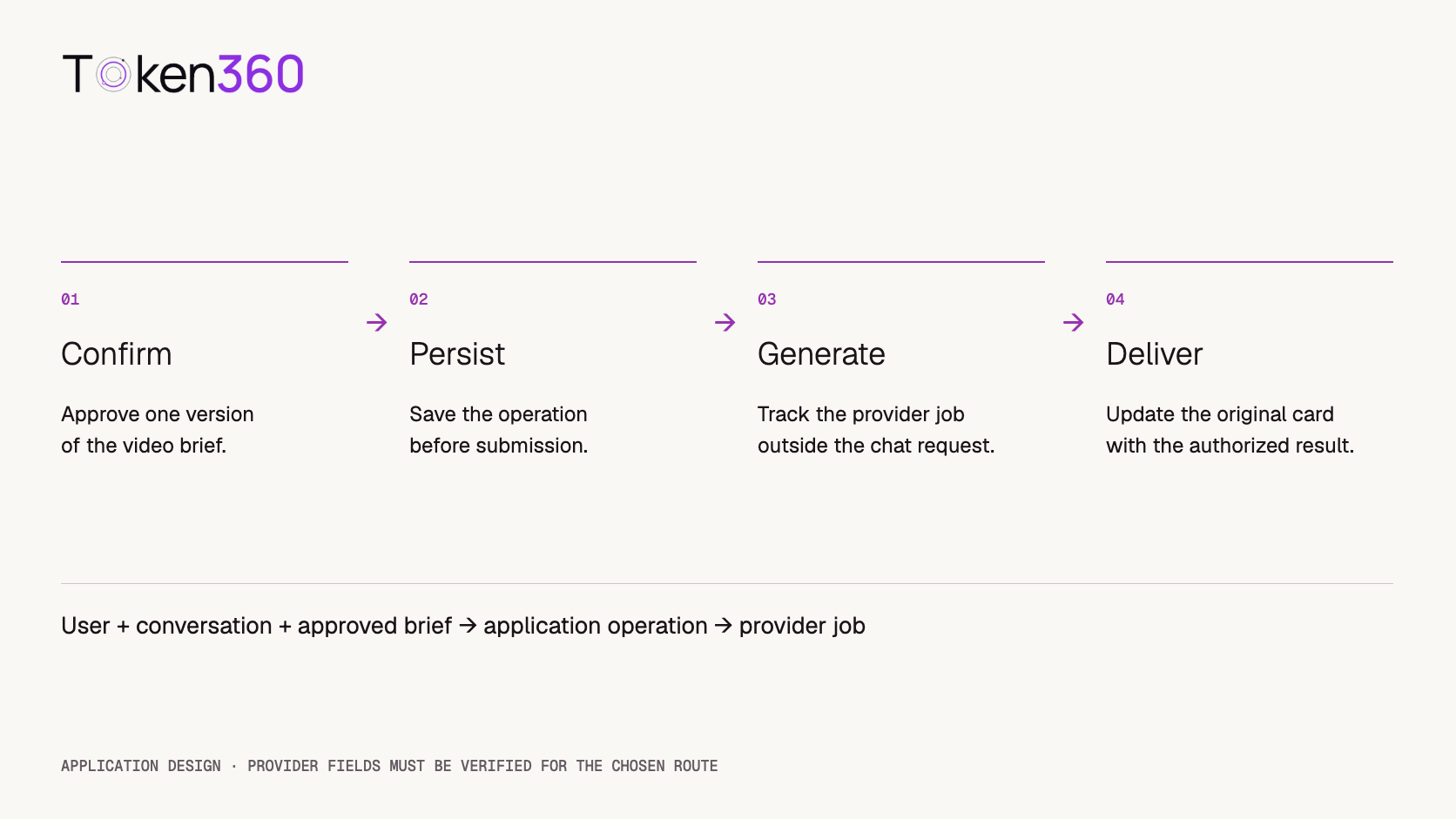
To add AI video generation to a chat app, turn an approved video brief into a separate background job. Keep the conversation responsive, persist the job's identity, update one task card, and deliver the result when it is available. A delayed response should not automatically trigger another paid generation.
The chat message and the video job have different lifetimes. A user can ask a follow-up question, close a tab, or lose their connection while generation continues. Your application needs a durable link between the conversation and that work.
Prepared by Token360; documentation checked October 23, 2026. The companion simulator makes no network requests and generates no video. Its local checks demonstrate application-state behavior, not Token360 API reliability, billing, latency, or production readiness. A live authenticated integration remains to be verified.
Read first: our AI video API architecture guide explains the wider system. This walkthrough focuses on what happens inside a chat product after a user asks for a video.
Separate the chat response from the video job
A useful first response is a brief confirmation card: the prompt, chosen model, duration, aspect ratio, audio setting, and applicable cost estimate or budget limit. The assistant can explain the planned shot immediately. The application should only say the generation was submitted after the appropriate submission evidence exists.
For example, the user asks for a four-second clip of a paper sailboat drifting across a still pond. The assistant proposes a fixed camera and no generated audio. The user confirms that version of the brief, and a task card appears in the conversation. Later messages remain available while the task is running.
Do not treat an LLM tool proposal as proof that a provider accepted a job. Let your backend validate the proposed parameters, authorize spending, and record the operation. The model should not control arbitrary provider URLs, credentials, or unbounded repeat submissions.
The application owns the conversation-to-job association. Provider work continues separately.
Validate and approve a specific brief
Confirm a structured brief, not an evolving paragraph. Check the selected route's allowed duration, resolution, media inputs, audio options, and required fields. If the user edits the brief after confirmation, create a new version and obtain approval for that version.
Keep the cost language accurate. A quote is an estimate unless your billing rules establish a fixed charge. If the route has no verified price available to your application, show that uncertainty and require a configured spending limit before enabling production generation.
A confirmation button helps prevent accidental work, but disabling it is only a user-interface measure. It cannot stop two tabs, network retransmissions, or concurrent server requests. A production application also needs a durable operation record and a database uniqueness rule for the approved operation.
Persist an application operation before submitting
Use an application-owned operation ID to connect the user, conversation, message, approved brief version, and provider job. The record should exist before a worker attempts the provider call. Keep authorization on the server: knowing an operation ID must not allow someone to access another user's clip.
Field
Why the chat app needs it
operation_id, user_id, conversation_id
Ownership, duplicate handling, and restoration of the correct conversation.
brief_version and approved settings
The exact request the user approved.
provider_job_id
The identifier returned by a confirmed provider submission; initially absent.
state, timestamps, last_status_error
Current lifecycle and observation history without treating a polling error as a failed generation.
asset reference and delivery status
Result retrieval and playback availability, separately from generation completion.
estimated cost and actual charge
Budget context and reconciliation when billing evidence is available.
In your own API, returning 202 Accepted with an operation ID can mean “the application accepted this work.” It does not mean “the video is ready,” or necessarily “the provider has accepted it.” MDN's explanation of HTTP 202 makes that distinction between acceptance and completed processing. This is an application contract recommendation, not a claim about Token360's response code.
Close the duplicate-click path, then handle the uncertainty gap
Use the same application operation ID when the client repeats the same confirmation. Within a transaction, return the existing authorized operation if it already exists; otherwise insert it and enqueue work durably. Reject attempts to reuse an operation ID with a different approved brief.
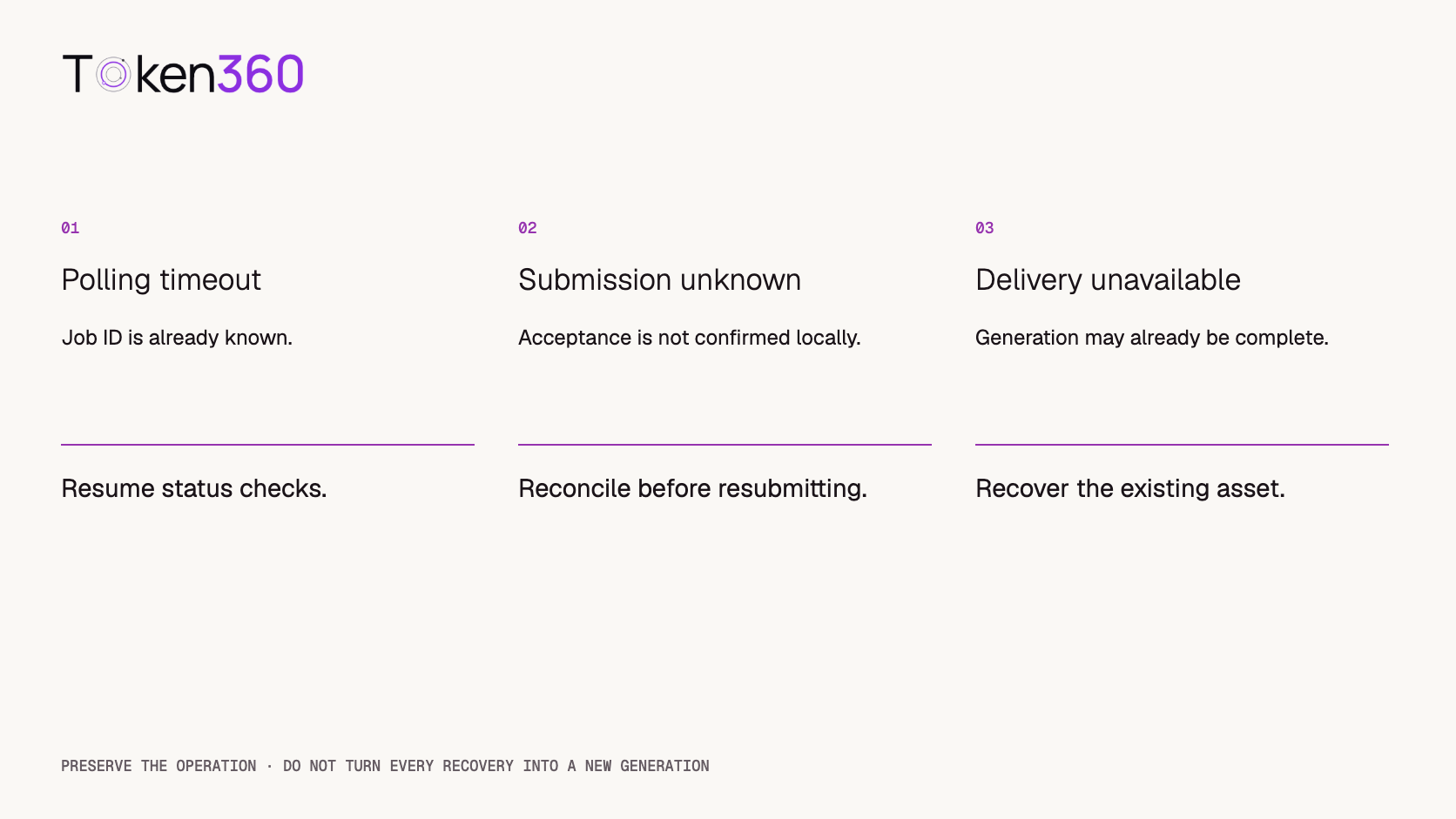
A database transaction and outbox protect the local handoff; they do not make an external provider call exactly once. A worker can send the request, the provider can accept it, and the connection can fail before the job ID is saved. Mark that condition submission_unknown. Do not blindly submit again.
If the chosen provider documents idempotency or lookup by a client reference, implement and verify that mechanism. Otherwise reconcile using available provider records or an operator workflow. Do not add an invented idempotency header and assume duplicate billing has been prevented.
Connect a verified video route through a small adapter
The public Token360 Veo 3.1 model page shows a create request at POST https://api.token360.ai/v1/videos and a status request at GET https://api.token360.ai/v1/videos/VIDEO_ID. It also lists model-specific request options. These are useful integration entry points, but the page alone is not a successful execution trace.
Keep the provider adapter server-side. Verify the live create-response ID field, status values, error body, result location, and authentication behavior before mapping them into your application's lifecycle. The adapter should preserve the raw response for secure diagnostic logging while exposing a small normalized shape to the chat layer.
Application adapter interface — illustrative contract

submit(approvedBrief) → confirmed provider job ID
getStatus(providerJobId) → queued | running | completed | failed
retrieveResult(providerJobId) → authorized asset reference

On uncertain submission: reconcile; do not auto-create another job.
On status-read failure: retain job identity and retry observation.
The normalized states above belong to your application. They are not asserted to be Token360's literal response enums. No browser API key, fabricated JSON response, or unverified webhook parameter is needed to explain this boundary.
Update one task card and restore it after refresh
The task card should display the best known state: submitting, queued, running, completed, failed, or submission uncertain. Show percentages only if the route provides meaningful progress information. A timer can show elapsed time without pretending to predict completion.
On refresh, load the conversation's operations from your backend, then reconcile active jobs. Do not submit again from a page-load effect. Associate the eventual result with its original message even if newer messages have arrived; a clip should not appear to answer the wrong prompt.
Start with polling when the route supports it. Use a bounded retry policy, backoff and jitter, and honor applicable retry instructions. A webhook can reduce polling, but only after you verify that the particular route supports it, authenticate its events, and handle duplicates and out-of-order delivery. Provider capabilities are not interchangeable: fal documents its own queue, polling, and webhook lifecycle; that documentation does not establish the same behavior for Token360.
Keep “stop watching,” “cancel the provider job,” and “start another generation” as separate actions. Closing a tab does not prove cancellation. A cancellation request does not establish a refund. Reflect the provider's confirmed outcome instead of promising either.
Inspect the local simulator’s six checks
A local chat-to-video lifecycle simulator was used to exercise the six cases below. It contains a mock confirmation, a persistent task card, a simulated provider-call counter, and controls for status changes. No API key is required, no paid generation is submitted, and the synthetic asset ID is not a playable video. The simulator is not hosted on this article page; the table records the local checks and their limits.
Local check
Expected and observed behavior
Scope
Normal completion
One mock create; queued → running → completed.
Application-state simulation.
Repeated confirmation
The same operation remains; mock create count stays at one.
Sequential clicks in one browser, not distributed concurrency.
Polling timeout
Observation pauses; job identity survives; later checks complete it.
Injected local event, not a real network timeout.
Browser reload
Saved operation and mock job ID are restored without a new create.
Browser local storage, not server durability.
Lost submission acknowledgement
Repeated confirmation does not resubmit; mock reconciliation restores the known job.
Simulated provider evidence, not a supported lookup API.
Unavailable delivery link
Delivery is marked unavailable; mock create count remains one.
No real URL expiry or asset retrieval tested.
All six checks were exercised in local browser automation on October 23, 2026. These are functional checks, not six model generations or a success-rate benchmark. The demo deliberately omits authentication, a backend database, a real worker, and real billing. Its storage is for learning and must not be used to hold production secrets.
Recover the known work before offering another generation.
Verify the live handoff before shipping
Replace the simulator only after a controlled authenticated run establishes the provider adapter. Save a redacted create response, job ID, status responses, final playable asset, applicable charge, model configuration, and timestamps. Record whether timing is instrumented or manual, and distinguish queue time from time the client spent waiting.
Then test concurrent duplicate confirmations against the database constraint, restart the worker after submission, interrupt a status read, and reload the chat. Confirm that unauthorized users cannot read the job or asset. A successful happy path does not establish recovery behavior.
Result delivery needs its own policy. If a provider URL expires, recover the existing result when supported or use an authorized copy stored under your retention policy. Do not automatically regenerate the creative content just to repair a broken download link. If retrieval is impossible, tell the user and ask them to approve any new paid attempt.
Next step: choose the intended route from the Token360 model catalog, verify its request and response contract, and connect it behind the application-owned job record. Keep the simulator available as a repeatable UI check while the live adapter is validated.
FAQ
Should the chat request wait for the video to finish?
Usually the chat should acknowledge the approved operation and show a task card while the background job runs. Completion can update the same card later; the original chat request does not need to stay open.
How do I prevent duplicate paid generations?
Reuse an application operation ID for repeated confirmations, enforce uniqueness server-side, and reconcile uncertain provider submissions. Button disabling alone is insufficient, and provider idempotency must be explicitly documented and tested.
Should I use polling or webhooks?
Use a mechanism verified for the chosen route. Polling needs bounded retries; webhooks need authenticated, duplicate-safe processing. Either way, persist the job independently of the browser.
Does a timeout mean the video failed?
No. A status-read timeout may only mean the client stopped receiving updates. If submission itself timed out before you saved a job ID, treat the outcome as uncertain and reconcile before resubmitting.
Can the browser call the video API with my key?
Keep a privileged provider key on your server. The browser should call an authenticated application endpoint that checks ownership, validates the approved brief, and enforces spending limits.
Is this simulator a working Token360 integration?
No. It is a locally tested lifecycle demonstration with a mock provider and synthetic asset identifiers. A real integration still needs verified response mapping, durable backend storage, authenticated requests, and live failure testing.



 Tutorial
 Tutorial
 Tutorial