Video ideas, brought to life.

Turn a prompt or image into a video clip.

Describe a scene or start with a reference image. Choose a video model in Creator, review the generated clip, and download it for your project. Developers can use the integration guide below for application workflows.

multi-model accessteam usage visibilityone platform agreement
api.token360.ai/v1VIDEO
POST /V1/VIDEOS

A cinematic macro tracking shot of a single clear glass prism on a graphite studio table. A narrow violet light beam refracts through the glass and travels smoothly across the table as the camera slides left to right. Crisp geometry, deep charcoal background, subtle reflections, one continuous shot, no text.

kling-4.05s clip · 720p · 16:9

Generated for this page with Kling 4.0.

From input to output

Start with a prompt.
Or bring an image.

Build video generation around the inputs your users already have. Explore a scene from a written brief, or use a reference image as a starting point.

Text → Video

Turn a brief into a clip.

Explore visual concepts, generate scene variations, and add prompt-based video creation to your application.

Kling 4.0 · 5 s · 720p · 16:9
View the prompt

One continuous overhead shot of a cobalt-blue paper boat drifting slowly across a shallow rain puddle. Soft concentric ripples and warm streetlight reflections move across the water. Keep the boat in frame, with natural motion and no cuts or text.
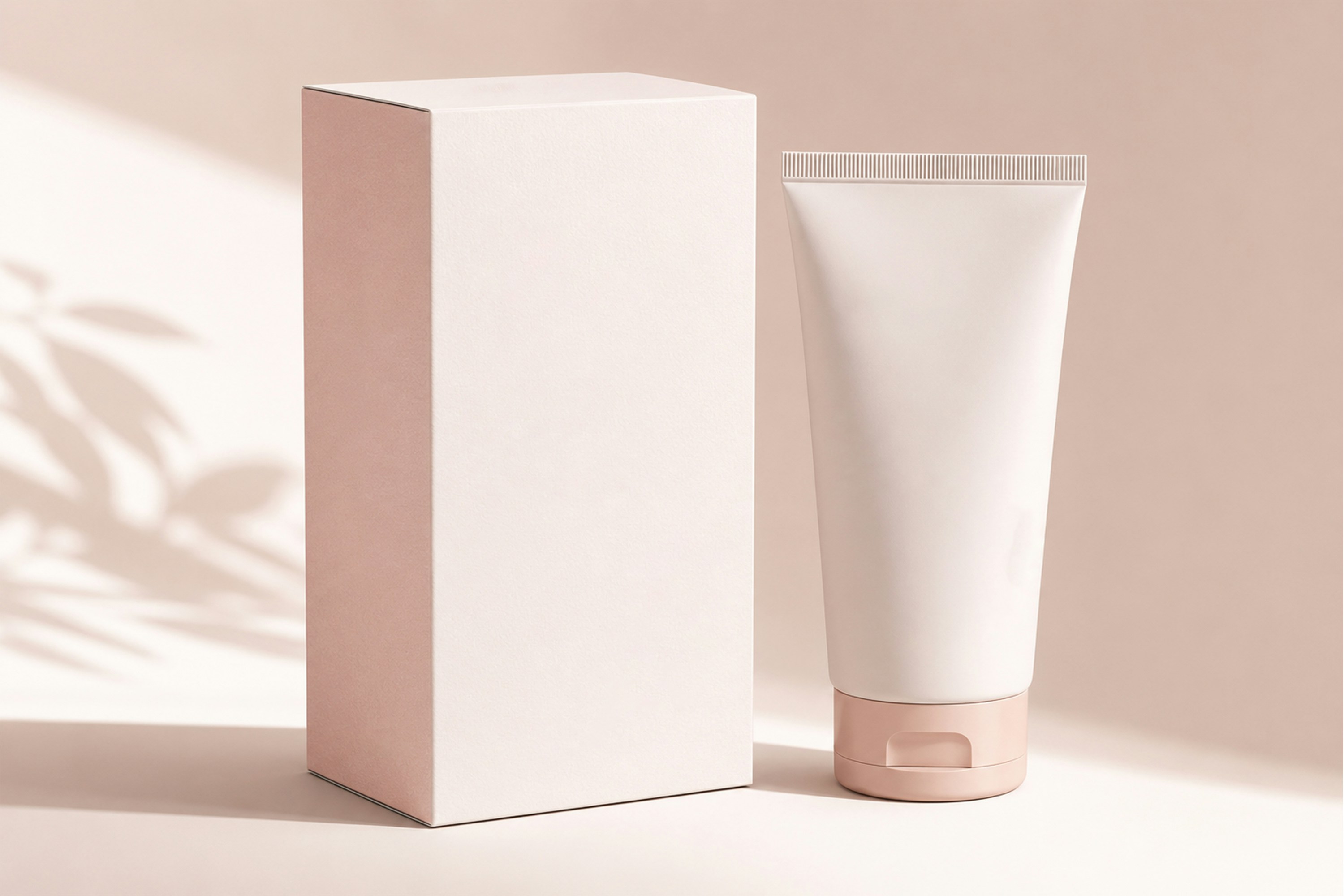
Image → Video

Give a reference image motion.

Start with a product shot, illustration, or scene. Compare how supported models interpret the same input.

Reference photo of a blank pink-and-white skincare tube and box
Input · Reference photo
Output · Kling 4.0 · 5 s · 1164 × 776 · 3:2
View the prompt

Start from the supplied skincare photograph. In one continuous shot, slide the camera gently to the right with a nearly fixed framing. Keep the blank paper box and pink-capped tube completely visible from top to bottom, with space around both. Preserve their shape, color, and relative position. Warm steady light, no added text.

Input types, durations, resolutions, and other options vary by model. Review supported parameters before generating.

Why Token360

Find the right model
for your next scene.

Start with your creative brief, review the generated results, and choose the capabilities that fit your video project.

01

Evaluate before
you commit.

Compare outputs in the playground using your own briefs and reference images. Judge quality, generation time, and cost before building a model into your workflow.

02

Integrate when
your project needs it.

Access supported video models through Token360’s API as your model choices evolve. Review model-specific parameters for each route.

03

Manage usage
across your team.

Bring model access, API keys, usage visibility, and billing into one platform as more people and applications start generating video.

Model evaluation

Choose the model
that fits your brief.

Product animation, atmospheric scenes, and motion-heavy clips place different demands on a model. Compare results against the work you need to deliver.

Developer workflow

From your first request
to a usable video.

01

Choose a model and prepare your input.

Review input requirements and select the available duration, resolution, and other options.

02

Submit your generation request.

Create a video task through the API. Retain its task ID so your application can track the generation.

03

Check status and retrieve the result.

On success, download and save the clip. Generated outputs are retained for about 7 days under the Data Retention Policy. On failure, inspect the task error before retrying.

QUICKSTART · FIRST-FRAME IMAGE TO VIDEO
# Set IMAGE to a local JPEG and export TOKEN360_API_KEY first.
IMAGE="./skincare-reference.jpg" python3 - > kling-request.json <<'PYTHON' &&
import base64, json, os
from pathlib import Path

image = base64.b64encode(Path(os.environ["IMAGE"]).read_bytes()).decode()
prompt = "Start from the supplied image. In one continuous studio shot, make a slow, shallow camera push-in toward the pink-and-white skincare tube and its box. Keep both fully in frame. Preserve the straight box edges, the tube's crimped top, and the pink cap. Keep the packaging blank and the warm lighting steady."
print(json.dumps({
    "model": "kling-4.0",
    "prompt": prompt,
    "duration": 5,
    "resolution": "720p",
    "watermark": False,
    "frame_images": [{
        "type": "image_url",
        "frame_type": "first_frame",
        "image_url": {"url": "data:image/jpeg;base64," + image},
    }],
}))
PYTHON
curl -fsS \
  https://api.token360.ai/v1/videos \
  -H "Authorization: Bearer ${TOKEN360_API_KEY:?Set your API key}" \
  -H "Content-Type: application/json" --data-binary @kling-request.json

# Set VIDEO_ID to the id from the submit response.
curl -fsS "https://api.token360.ai/v1/videos/${VIDEO_ID:?Set the task ID}" \
  -H "Authorization: Bearer ${TOKEN360_API_KEY}"

# Once status is completed, save the result.
curl -fsSL "https://api.token360.ai/v1/videos/${VIDEO_ID}/content" \
  -H "Authorization: Bearer ${TOKEN360_API_KEY}" -o skincare-demo.mp4

Save the sample JPEG in your working directory and export TOKEN360_API_KEY. Run the submission block, then set VIDEO_ID from its response. Poll the task until it returns completed or failed. See the download reference for retrieving the completed clip.

Cost planning

Understand the cost
of the video you need.

Compare pricing alongside output settings. Review the billing unit and supported options for your selected model before planning a test or production workload.

Model pricing 27 video models

Token360 model catalog reference prices in USD, checked November 9, 2026. Scroll to browse. Select a model to see its Token360 pricing by resolution, input type, and other settings.

For production planning, measure the cost of an accepted output across all attempts, including generations that do not meet your quality requirements.

Enterprise operating model

Plan for
production volume.

Bring us your expected volume, concurrency needs, target turnaround times, and model requirements. We’ll work with you to scope capacity, support, and commercial terms.

  • Capacity scoped to your workload
  • Tenant-wide access and usage management
  • One US-domiciled platform agreement
  • Data-handling and routing requirements reviewed

Capacity and service terms depend on the agreed scope.

Common questions

Before you
integrate.

What is an AI video generation API?

It lets your application submit inputs such as text prompts or reference images and retrieve generated video outputs. Your application manages the request, tracks its status, and uses the completed result.

Can I use text and image inputs?

Available input types depend on the selected model. Review the model catalog and API documentation for supported inputs and output settings.

Which video models can I use?

The live model catalog lists currently available models and versions. Check each model’s inputs, output options, and pricing before integrating.

How long does generation take?

Generation time varies by model, settings, demand, and service conditions. Test representative requests to understand turnaround times for your workload.

What happens if a generation fails?

Check the task status and handle reported errors before submitting another request. Consult the API documentation for error handling and the applicable pricing terms for failed-task billing.

How is my data handled?

Review Token360’s Privacy Policy and Data Retention Policy. Contact the team before moving production traffic if you have specific data-handling or routing requirements.

Build with Token360

Test your first
video workflow.

Start with a real brief. Evaluate the output, review the cost, and take the next step toward integration.