MP4 Fast Start for AI Video: Where Is the Playback Index?
MP4 fast start moves the playback index ahead of video data. See byte offsets from seven AI video files and a verified before-and-after container edit.
By Yuki Yu
A ceramic cup settles on a wooden table. The generation job has finished, the video downloads, and the file opens locally. Embed the same clip on a product page and there is another question to answer. How soon can the browser find the information it needs to play the file?
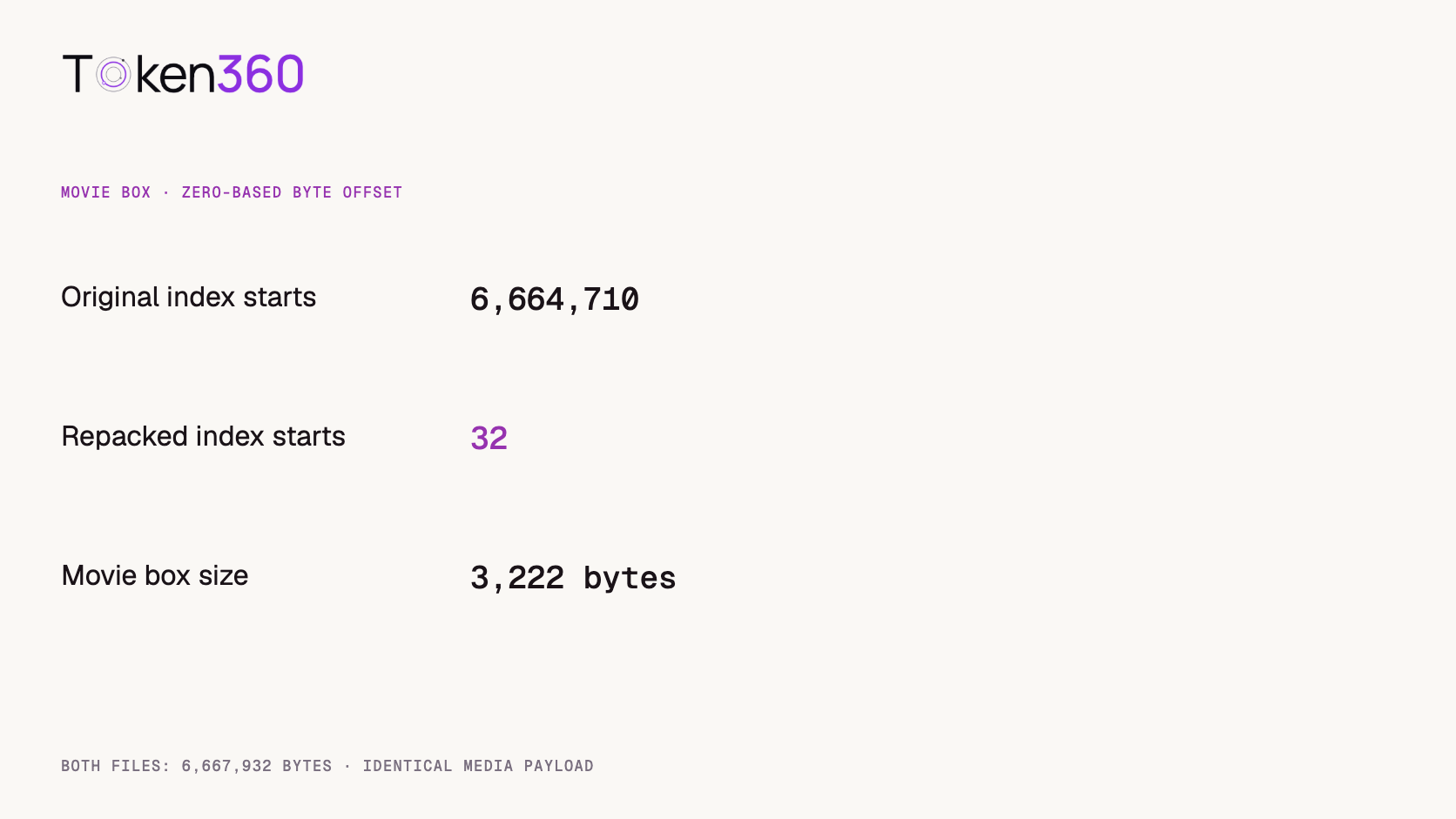
MP4 fast start places the movie metadata near the front of an ordinary MP4 so a player can read it early during progressive download. In seven archived Token360 editorial clips, the movie metadata followed the media data every time. On a working copy of the cup clip, we moved that metadata from byte 6,664,710 to byte 32 while preserving the media payload byte for byte. Here is what that change buys you, how to inspect your own deliverable and what still needs a browser test.
Read first. For a newly generated clip, check that the asset downloads and has the duration and tracks your application expects. AI video output validation guide.
What is the player looking for inside an MP4?
For the ordinary, non-fragmented MP4 files examined here, the player needs information in the moov box to interpret media samples stored in mdat. Think of the former as the movie’s track description and sample index. The latter holds the compressed media. Their order on disk matters when the player has only received the beginning of a file.
A file with the index at the end can still be a valid video. A local player can seek to the end. A web player may request the tail separately when the server and browser support byte ranges. On a connection that delivers only a forward stream, metadata at the front becomes particularly valuable. FFmpeg documents its fast-start option for moving the MP4 index ahead of the media. FFmpeg MOV and MP4 muxer documentation.
What did seven archived AI video files contain?
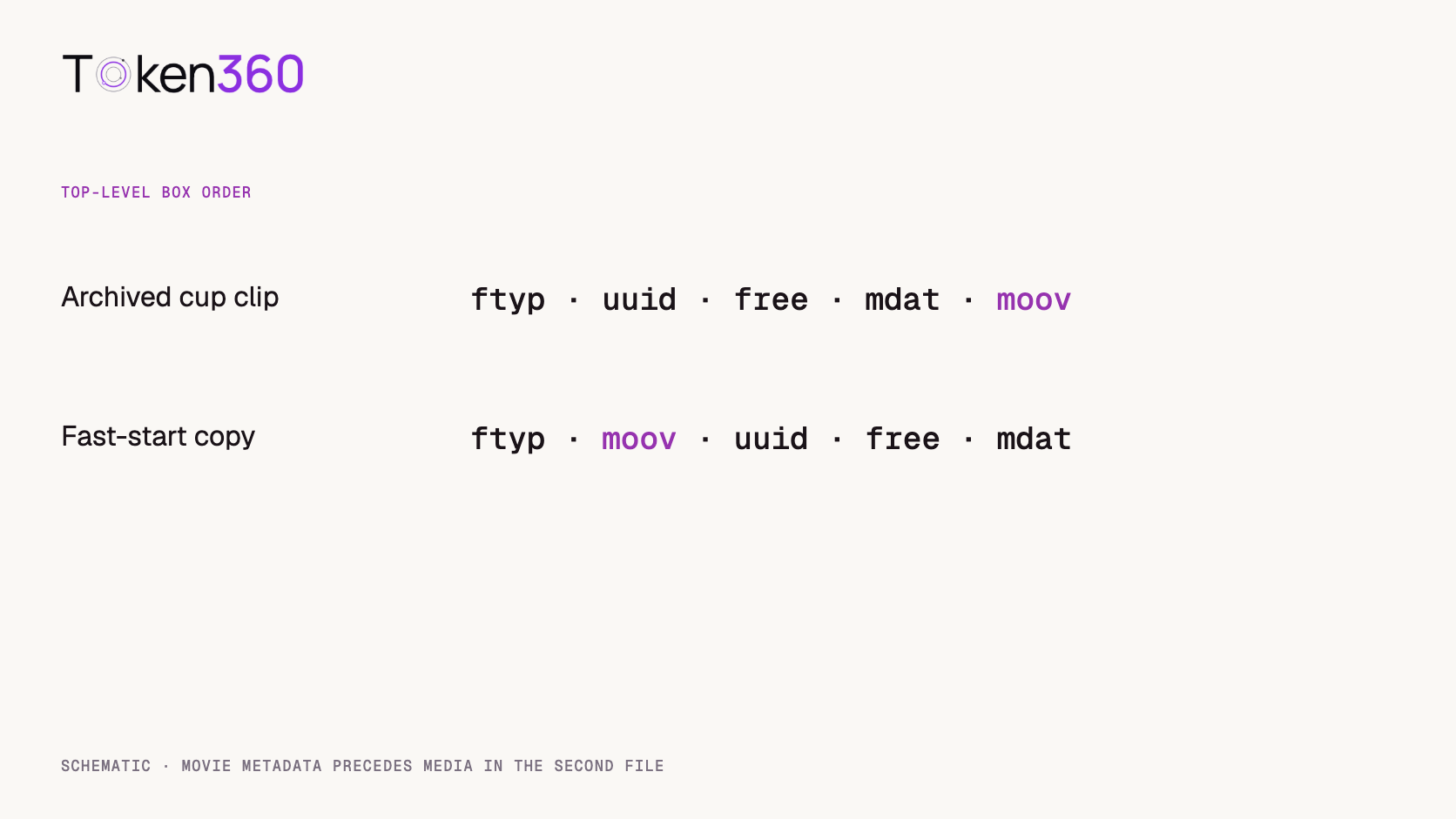
All seven had the same top-level order: ftyp, uuid, free, mdat, then moov. We inspected every MP4 in the local numbered-blog asset directories matching this audit’s selection pattern. The files cover five editorial folders and seven shots. They share an export pattern, so treat them as a related set of production assets.
Archived clip
File size, bytes
Start of moov, zero-based byte
Ceramic cup
6,667,932
6,664,710
Sunrise river glide
9,666,400
9,663,154
Bottle reference reveal
7,260,965
7,257,751
Lantern swing loop
4,944,735
4,941,569
Bottle campaign shot
5,719,342
5,716,140
Teapot steam
5,159,850
5,156,643
Camera push
8,341,609
8,338,391
We read each box’s declared size and type, then advanced by that size to the next top-level header. That detail matters. Searching the file for four text characters can match a sequence inside compressed data and produce an apparent offset with no structural meaning. The figures in the table are offsets of box headers in the stored files. We did not time a website or sample different API providers for this audit.
Schematic order for the cup clip. Box widths are illustrative.
What changed in the ceramic cup file?
Only the container arrangement and the offsets needed to address the moved media changed in our working copy. The original file began with a 32-byte file-type box. We placed its 3,222-byte movie box immediately after that header, moved the other boxes after it, and updated the 32-bit chunk offsets inside the movie metadata. The resulting file still contained 6,667,932 bytes.
The full movie box was available within the first 3,254 bytes of the copy. In the original, a strictly sequential reader reached its end only after receiving the whole file. Both media payloads produced the same SHA-256 digest. That directly verifies that the bytes inside the media-data box were preserved in this comparison. It also explains how two equal-size files containing the same picture can behave differently when served over a network.
A byte offset cannot tell you how many seconds a visitor will wait. A range-capable player might fetch the original index in a small second request. A player with the front index might still wait on a later media request, decoder initialization or its own buffering policy. The actionable finding is precise: the repacked file makes the index accessible in its first small prefix.
Prepare a fast-start copy
For an ordinary MP4 with compatible streams, create a separate output using stream copy and the MP4 fast-start flag. The following command is an FFmpeg recipe for a conventional audio/video deliverable. Our byte-offset experiment above used a container-level relocation on the archived file.
This selects the first video stream and optional audio streams. If your delivery includes subtitles, multiple camera angles, chapters or custom metadata, inventory them before choosing a stream map. Retain the original and inspect the output you intend to upload. The exact offsets in the table belong to our controlled relocation. A different muxer can write different metadata and still produce a suitable web deliverable.
Stream copy is appropriate when the target player already supports the media codecs. A container rewrite cannot give an unsupported decoder a new capability. If the file still fails on the target device, inspect the codec, profile and track configuration before spending another generation credit. Re-encoding has its own rationale when a delivery specification requires a different codec, resolution or bitrate.
How can you test the actual hosted file?
Use the URL embedded in the final page. Inspect a small range request, then watch the browser’s media requests while playing the clip with an empty cache. An origin URL and the public delivery URL can take different paths through storage, signed redirects or a CDN.
For a server honoring that single range, look for a final 206 Partial Content response with a suitable Content-Range. A 200 response can contain the entire object. The first 1,024 bytes in this example are enough to see our repacked file’s movie-box header, although the complete box spans more bytes. Use the browser’s network view to observe what the player actually requests. MDN guide to HTTP range requests.
For a timing comparison, serve both versions through the same host, use the same browser and device, and start each run under the same cache and network conditions. Choose one event to measure, such as user activation to the first displayed video frame. Keep a separate record of metadata availability. Fetching metadata and displaying a frame are different events with different dependencies.
Where does this fit in an AI video pipeline?
Put the check after download and before publishing the delivery asset. The model creates the shot. Your delivery step can then preserve the source, inspect the container, build the web copy when needed and test the URL handed to the page. This gives the editor a way to resolve a playback concern without altering an approved performance.
Write the decision into the asset record. Keep a source identifier, output filename, stream inventory, top-level box order and the result of a hosted playback check. If a distributor later repackages the file, check its version again. A useful acceptance note identifies the object tested and the browser in which it played. “Video generation succeeded” describes an earlier part of the workflow.
Frequently asked questions
Does fast start make the generated video smaller?
Its purpose is early access to metadata. Our controlled example stayed exactly the same size. A general remux may produce a different size because the muxer rewrites parts of the container.
Does a trailing moov box mean the MP4 is damaged?
No. Local playback and clients that fetch the tail can read a valid file with that layout. Check the delivery path before diagnosing corruption.
Does moving the index change image quality?
Moving metadata while retaining the compressed samples preserves the encoded picture. We verified identical media payloads in the cup example. Changing encoding settings is a separate operation.
Will fast start fix a slow generation job?
It acts on the completed file. Measure submission-to-completion time separately from the time between pressing play and seeing a frame.
Should I apply this check to fragmented MP4?
Fragmented delivery uses a different organization with an initialization structure and media fragments. Evaluate it against the player and packaging requirements for that delivery format.
What evidence should I keep before publishing?
Record which delivery file you inspected, the index location, expected streams and the result of a playback test at the public URL. A byte-layout check and a viewing test answer complementary questions.
Read next. Place source capture, generation and delivery approval into a repeatable sequence. Text-to-video API workflow. More production resources from Token360.
Editorial revision: November 4, 2026. Test dates and dated source snapshots remain as stated in the article.
MP4
Video Delivery
Fast Start
Build faster with one AI API.
Use Token360 to call video, image, audio, and text models with one key and one bill.


 Prompt Library
 Insights
 Insights