MCP vs Inference API: What Does Your AI Agent Call?
MCP connects agents to tools and context; an inference API runs a model. Map both paths and separate tool success from completed generation.
ARCHITECTURE & INTEGRATION · BLOG 145
By Token360 · Editorial review: November 5, 2026
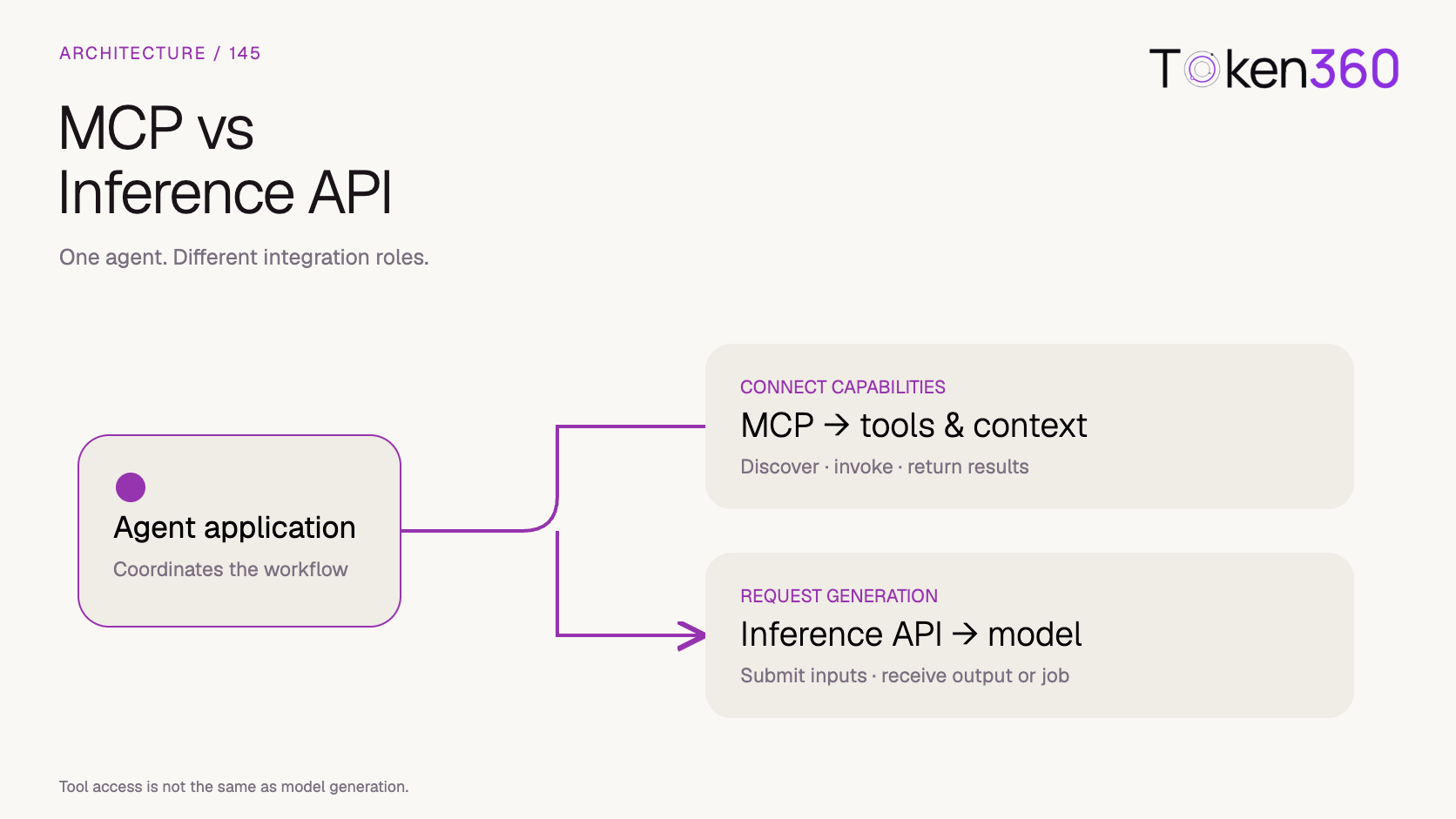
MCP connects an AI application to tools and context. A model inference API runs a model. An enterprise agent can use both in the same task—and a successful MCP connection does not prove that model generation, permissions or the final business result will work.
This distinction matters when an assistant must do more than answer a question. A request to create a product clip may require reading an approved brief, selecting a model, submitting a generation request and checking the returned asset. Calling all of this “the AI API” hides the point at which each operation can fail.
Read first: Token360’s model capability guide explains why a shared endpoint does not imply identical model features. This article focuses on the connection between an agent’s tools and its model calls.
What is the difference between MCP and an inference API?
MCP standardizes how an AI application obtains capabilities and context from servers. An inference API accepts model inputs and returns generated output or a generation job. These interfaces operate at different boundaries: an MCP tool may call an inference API internally, while an application may also call that API directly.
The official MCP architecture overview separates the host application, its clients and connected servers. It explicitly leaves the application’s use of LLMs outside the protocol’s scope. In this article, “inference API” means the interface used to request model computation—not every API an enterprise operates.
Decision criterion
MCP interface
Model inference interface
What are you integrating?
Discoverable capabilities and context for a compatible host.
A selected model and its accepted request format.
Typical interaction
Discover a tool, then request its execution.
Submit input; receive output or a job identifier.
What determines availability?
The server, client compatibility and access granted.
The endpoint, model, account access and supported parameters.
What does success establish?
The requested protocol operation returned successfully; inspect its result.
The model request succeeded at that stage; inspect the output or job state.
Can they be combined?
A tool implementation can wrap a model request.
The same inference service can serve direct applications and tool wrappers.
For example, discovering a tool named create_clip tells a host that the tool is exposed. It does not establish which video model the implementation uses, whether a specific aspect ratio is supported, or whether the user has approved a paid generation.
Is model function calling the same as MCP?
Model function calling and MCP are related but separate interfaces. Function calling lets a supported model propose a named operation with arguments. MCP provides a standardized way for an application to discover and invoke server capabilities. The application must connect those contracts; the model’s proposed operation is not proof of execution.
Token360 documents a tool-calling loop for supported models: provide tool definitions, execute the returned call in the application, return the matching result and continue the conversation. Models that do not advertise tool support should not be assumed to gain it through routing. See the tool and function calling requirements.
MCP servers can expose tools, resources and reusable prompts. The official server concepts guide describes tool discovery and execution, including tools/list and tools/call. Resources and prompts are distinct capabilities; connecting a server does not mean every item it exposes is an executable tool.
An implementation therefore needs a deliberate mapping: which discovered operations should the model see, how should arguments be validated, and which results belong in the conversation? Passing an entire tool catalog to a model without that design is an integration choice, not a requirement of MCP.
Where would both appear in a Token360 media workflow?
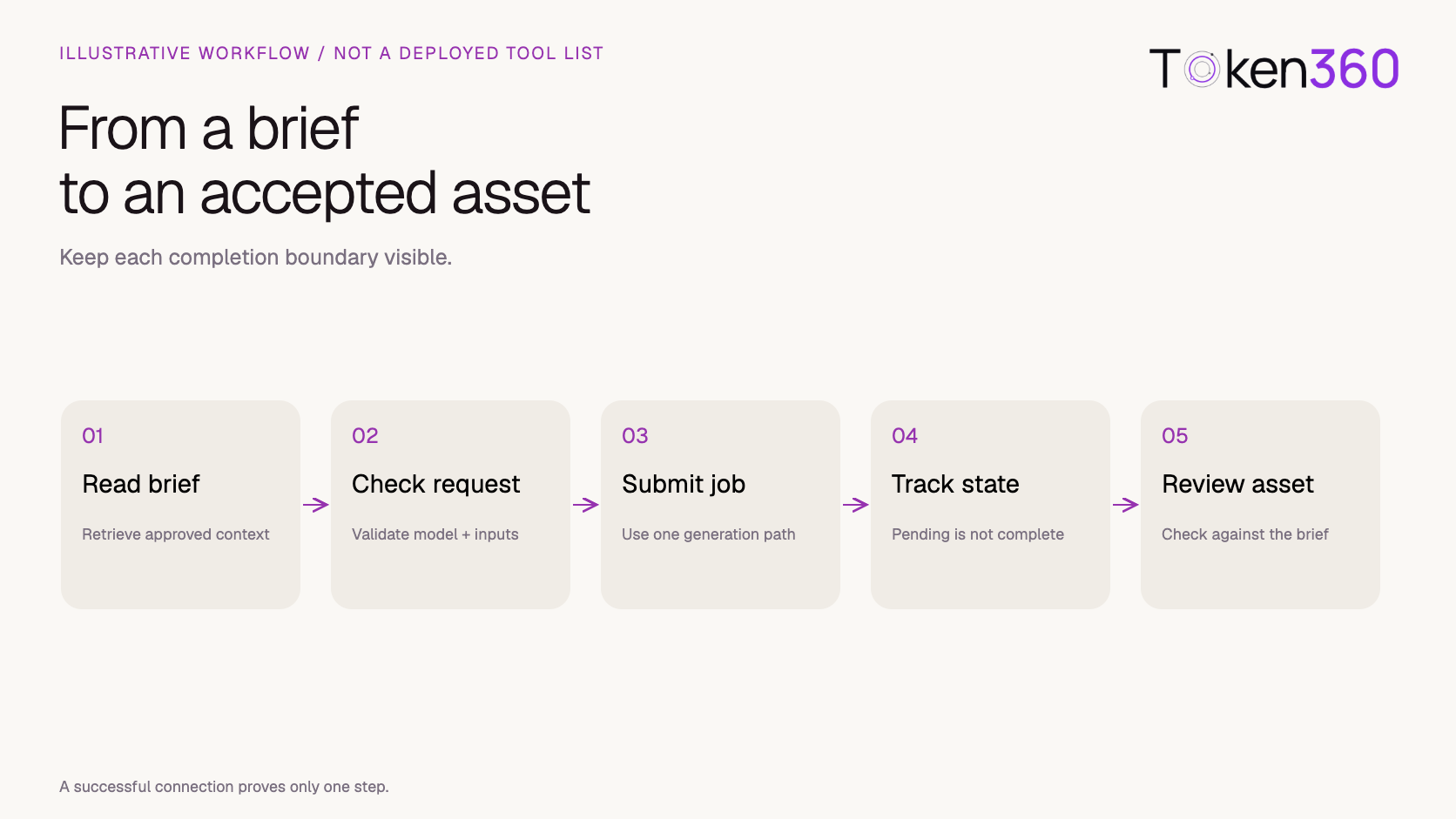
An enterprise media assistant could use MCP to retrieve an approved brief, then use an inference API to request a video. Alternatively, a custom MCP tool could wrap that generation request. Both designs still need a selected model, accepted parameters and an explicit completion check. The example below is architectural, not a tested deployment.
Proposed application design. These labels are not names of existing Token360 MCP tools.
Retrieve the brief. A read-only tool returns the approved product description and asset references. A successful read establishes that context was retrieved, not that a video was made.
Check the requested generation. The application verifies model availability, accepted inputs and the requested output settings. Unsupported values should be handled before submitting the job.
Submit once through the chosen path. The application either calls the inference API directly or invokes a custom tool whose implementation makes that call. Avoid making both calls for the same intended generation.
Track the job. If the operation returns a pending job, preserve that state and its identifier. An agent should not announce a finished asset while generation remains pending.
Inspect the result. Confirm that an output is accessible and evaluate it against the brief before treating the business task as complete.
Token360 provides access to text, image, audio and video models. For an actual integration, start with the Token360 MCP entry page and verify the current connection instructions and exposed capabilities. This article does not assert that the illustrative brief-reading or clip-generation tools are currently included in that offering.
How can you tell connection success from task success?
Use separate acceptance checks for discovery, authorization, execution and output. A server can be reachable while a tool is unavailable. A tool can run while its downstream generation remains pending. A finished model result can still violate the brief. These states need separate evidence rather than one overall “connected” badge.
The following review matrix is an original design aid. It contains no measured Token360 error rates or claims that these outcomes have occurred in a deployed integration.
Observation
What it establishes
What to check next
The client connects.
A connection was established.
Can the intended operation be discovered and invoked?
A tool is listed.
The server exposes that tool in this context.
Are the required arguments understood and access granted?
The model proposes a call.
The model requested an operation.
Did the host validate and execute it?
A tool returns a job ID.
A downstream job may have been submitted; inspect status.
Is it pending, failed or complete?
A video URL is returned.
An output reference exists.
Can it be retrieved, and does the video meet the brief?
Keep a workflow identifier in your own application that links the user request, tool invocation and downstream job. The exact field names depend on the implementation. A shared application identifier helps an operator locate the failure without pretending that MCP, a model API and a business workflow use the same identifier scheme.
Which controls still belong in the application?
The application still needs to decide what an agent may do, what data it may send and when a task is complete. MCP does not turn a proposed action into an approved business operation. The design should distinguish reading a brief from spending money on generation or changing an enterprise account.
For this example, a useful boundary is to allow brief retrieval separately from generation submission. A production system might require approval for a new paid job, enforce a job-count limit, or restrict generation to approved models. These are proposed policy choices; they are not claims about default Token360 MCP behavior.
Credentials and data handling also need their own review. Token360’s security and data handling documentation distinguishes the application, gateway, upstream providers and optional media services. Check which layers receive a brief or output, rather than assuming one connection setting governs all of them.
Do not paste inference credentials into prompts or tool descriptions. The component that performs a downstream request should obtain credentials through its configured mechanism. Whether a particular integration uses an API key, delegated authorization or another supported arrangement must be verified against that integration’s instructions.
Should your team integrate MCP, the inference API, or both?
Choose a direct inference integration when your application already knows the operation and request it must submit. Consider MCP when you need to expose reusable capabilities to compatible AI hosts. Use both when an agent needs external context or actions alongside model generation. Decide from the workflow boundary, not the protocol label.
A fixed form that submits one approved video configuration may gain little from adding a tool-discovery layer. A reusable enterprise assistant serving several hosts may benefit from a common tool contract. Neither choice alone establishes lower cost, faster generation or better media quality; those outcomes require measurements of the implemented workflow.
Before accepting an integration, request evidence for one complete task: discover or select the operation, validate its inputs, submit it, handle an intermediate state and inspect the final result. Add one deliberately unsupported input to verify that the system reports the problem instead of silently changing the user’s request. This is a proposed acceptance exercise, not a test already run for this article.
No. An MCP tool can wrap model inference, but the computation still happens through an underlying implementation. Direct model calls can also remain part of the host application.
Will an MCP connection make every model support tools?
No. Server capabilities and a model’s function-calling support are different contracts. Verify the selected model and how the host maps operations into it.
Does a successful tool response mean a video is ready?
Not necessarily. Read the response contract. A result may acknowledge a pending job; the application must establish completion before presenting a finished asset.
Have the example tools been tested on Token360?
No. The workflow and acceptance matrix are design examples. No paid requests, performance benchmark or end-to-end MCP deployment was executed for this article.
Can MCP improve the generated video itself?
This article provides no evidence of a quality improvement. Better access to approved context may help a workflow, but output quality must be evaluated separately from connection success.
Read next: use Token360’s API documentation to identify the actual request and completion contract for the selected model. Keep the MCP connection contract alongside it rather than treating either one as a substitute for the other.


 Insights
 Guides
 Guides