Hear a J cut and an L cut using the same rain recording. Compare three six-second edits and choose when sound should lead or follow a picture change.
By Yuki Yu
You can hear rain on the garden leaves while the door is still closed. By the time the picture cuts outside, you already have a sense of the place. Reverse the sequence and let that same rain linger after the door closes. Now it gives a quiet interior some memory of the garden. One recording can do both jobs. The edit determines which one the audience hears.
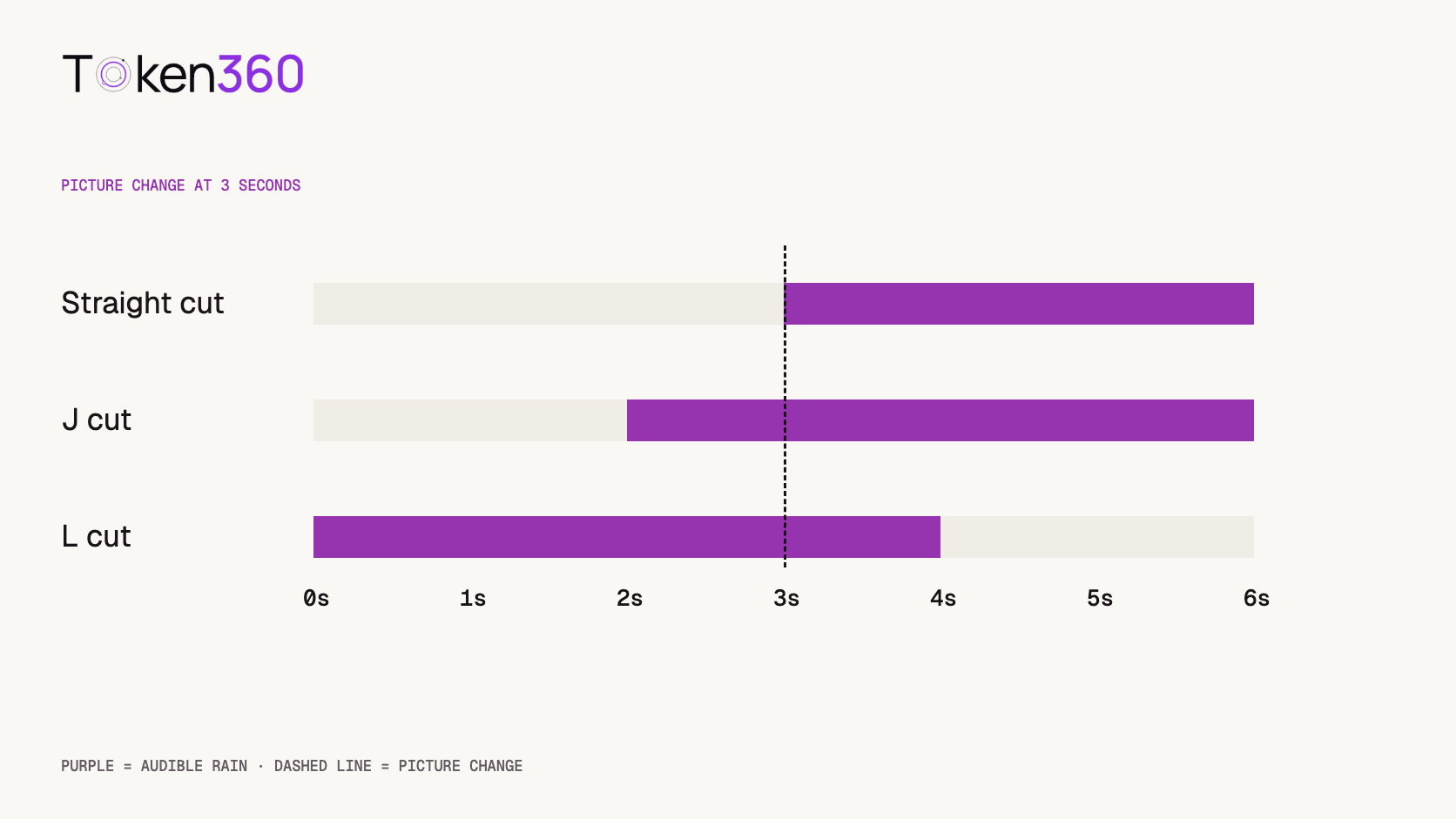
Choose a J cut when the audience should hear the incoming scene before seeing it. Choose an L cut when sound from the outgoing scene should continue over the next picture. A straight cut, with sound and picture changing together, is a helpful third option when a sudden change belongs to the story. Adobe’s split-edit reference.
Read first. If your generator produces a soundtrack with the image, identify which cues are tied to visible actions before moving audio on the timeline. Token360’s AI video native audio guide.
What changes when the rain arrives one second early?
The viewer gains one second to recognize the next location before seeing it. Play the straight cut first and watch the scene label. In the second example the label changes at exactly the same point. The rain now starts while the interior is still on screen. Listen for the moment you begin to imagine the garden.
Straight cut · Scene changes at 0:03J cut · Scene changes at 0:03L cut · Scene changes at 0:03
The third example reverses the direction of travel. Start in the garden, watch the label switch to the interior, then listen for the second of rain that follows you inside. For a fair comparison of early versus simultaneous entry, use the first two examples. The third demonstrates a different narrative decision about leaving a place.
All three six-second examples use the opening of the same Sonilo rain recording from our earlier nine-run sound-effects pilot. We converted the stereo source to mono at 22.05 kHz and applied 20-millisecond fades at each audio boundary. The scene cards stand in for pictures to isolate the timing choice. The offsets and fades are settings used for this demonstration. Original rain prompt and listening notes.
Which track crosses the picture cut?
Find the moment the image changes and identify where the sound belongs. If the incoming location becomes audible on the outgoing picture, you have a J cut. If the outgoing location remains audible on the incoming picture, you have an L cut. The same sound can occupy either position depending on the direction of the edit.
In an actual session there may be ten audio tracks under a single change of picture. Call out the track by name as you review. “Start the garden ambience twelve frames before the exterior” is something an editor can reproduce. “Make the transition smoother” leaves open whether to move the rain, the dialogue, the music or the picture itself.
When does a J cut make a scene easier to follow?
Give the next sound a head start when recognizing its source helps the audience read the next shot. A train approaching off screen can prepare a cut from a passenger’s face to the platform. In a product film, a motor winding up can prepare a close view of a machine that is already running when the shot begins.
Ask what information the sound gives away. Rain before a door opens can establish weather. An alarm before a product appears may suggest a fault that the picture never explains. Play the outgoing shot with the proposed lead and stop just before the cut. Ask a reviewer what they expect to see. If their expectation points to an entirely different story, shorten the lead, choose a more specific cue or let the image introduce the source first.
Leave room around speech. A new location can enter under the last line of narration, but a sharp onset on the product name may divert attention at the wrong instant. Try the cue under the pause after that name. That small change can preserve anticipation while giving the audience time to understand the sentence.
When does an L cut earn its extra time?
Carry the outgoing sound forward when it gives meaning to the new image. Let the end of a question play over the listener’s expression. Let the resonance of a machine settle over the result it produced. In each case, the outgoing sound gives the viewer a reason to look closely at the incoming shot.
Choose an endpoint you can describe. For the garden example, that point might be the door latch catching, the start of a quiet interior line or the first close view of a dry surface. Listen through that moment at normal speed. A tail that seemed beautifully gradual in isolation can make a closed room feel exposed to the weather. If the sound should remain physically present beyond the door, consider a quieter or more distant version to establish the change of perspective.
An L cut can also rescue a useful reaction shot. Suppose the speaker finishes a thought a moment after the best frame for leaving their face. Cut the picture to the listener while the sentence finishes. Check their expression against the words they have heard at that point. A reaction placed before the revealing word can make the performance seem oddly prescient.
Which sounds should stay synchronized with the image?
Keep a sharp, visible contact anchored when the audience can see its cause. A cup hitting a table, a latch closing or a switch clicking offers a precise reference frame. Move the ambience around that anchor and watch the sequence again. Moving an entire mixed soundtrack can shift both the atmosphere and the contact, creating extra work elsewhere in the shot.
For generated video, inspect the assets you actually have. Separate ambience, speech and effects give you independent edit points. A single mixed track may contain rain, a footstep and a final consonant in the same fraction of a second. Audition that region before extending it over another picture. If the footstep suddenly seems to belong to someone in the new shot, trim the mixed track and build the bridge from a separate ambience recording.
A continuous room tone can sit beneath several cuts without belonging exclusively to either shot. In that situation, the practical question is whether the space stays believable as the camera changes position. Play the sequence with and without the bed. A well-chosen room can connect views even when every visible contact remains exactly where it was placed.
How much overlap should an editor try?
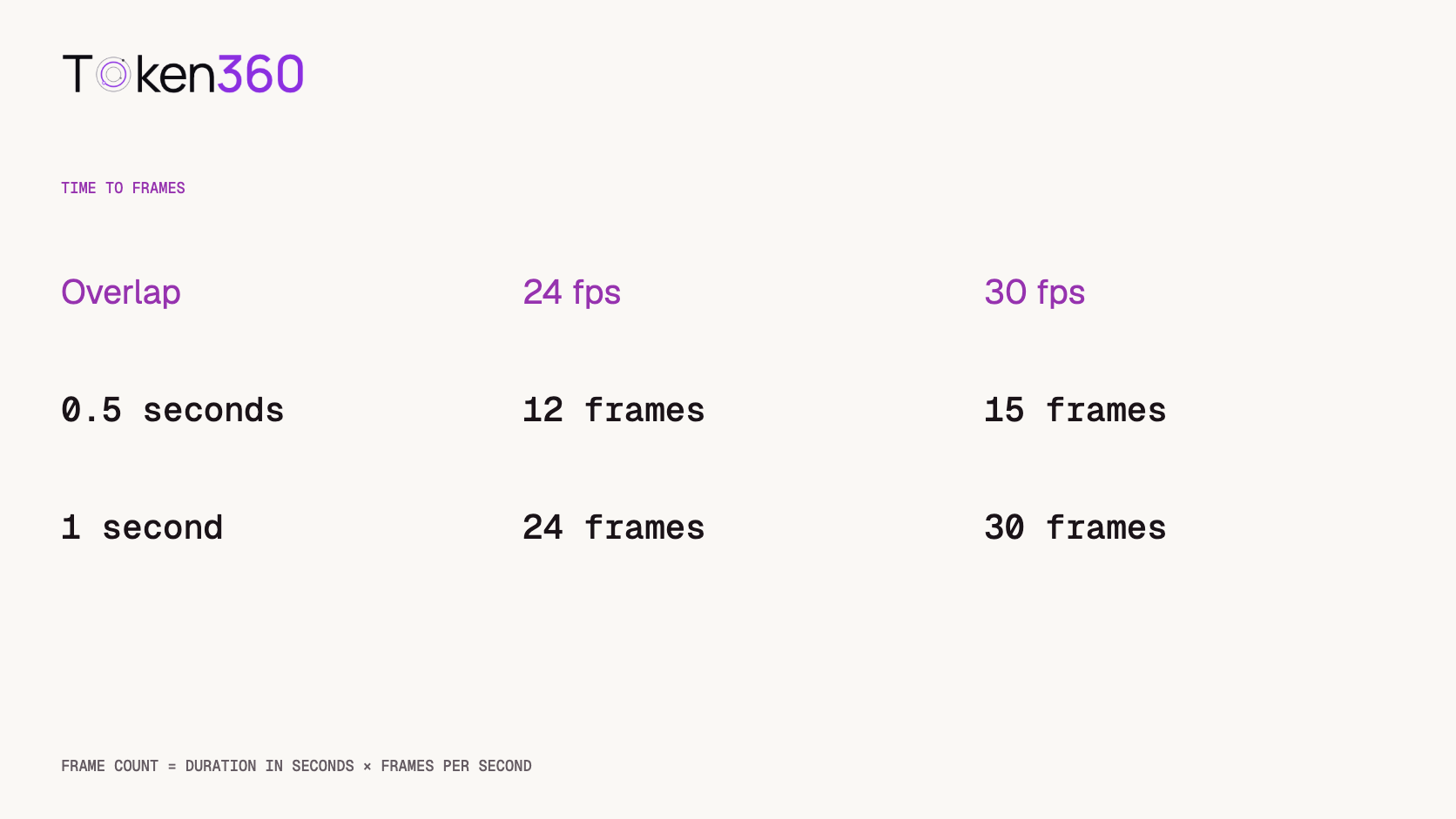
Use a small number of offsets that are easy to compare, then choose by listening in context. Try a straight cut, a half-second overlap and a one-second overlap on the same picture. At 24 frames per second those offsets are 0, 12 and 24 frames. At 30 frames per second they are 0, 15 and 30 frames. Hold the listening level and the picture cut fixed across versions.
Write the observation that changes the decision. Perhaps the one-second lead makes the garden easy to anticipate but covers a soft word. Perhaps twelve frames lets the listener hear rain just as the character looks at the door. Both are more informative than recording a preference for version B. The winning offset can change again when the final voice track arrives.
Review the transition once without watching the timeline. Watching a playhead approach a marker tells you exactly when something is about to happen. The audience gets no such warning. Then replay the sequence with the sound muted to see whether the picture itself establishes the change of place. If the visual geography remains ambiguous, an extra second of rain may simply make the ambiguity more audible.
What should travel with the approved cut?
Hand off the picture version, source cue, reference frame, audio in- or out-point and the reason for the overlap. A concrete note might read “Garden entrance, cut at 00:03.000, rain starts at 00:02.000, leave the latch on the picture cut.” The mixer can then adjust level and perspective while preserving the editor’s timing decision.
Record the frame rate when sharing offsets in frames. Also keep a short reference export with the approved sound attached. If a later picture revision shortens the outgoing shot, the mixer can hear whether anticipation, continuity or surprise was the intended effect and decide which relationship to preserve.
Frequently asked questions
How do I remember J cut versus L cut?
Ask where the audible cue comes from. Hearing the next place early gives you a J cut. Still hearing the previous place after the picture changes gives you an L cut.
Can ambience alone create a split edit?
Yes. A location-specific sound such as the garden rain can introduce or carry a scene without dialogue. The examples above use only one ambience recording.
Is a crossfade required?
The timing relationship defines the split edit. A fade shapes the level at its boundary. Choose its length by listening for clicks, abrupt changes in space and the intended dramatic effect.
What if my AI video arrives with a single mixed soundtrack?
Listen for visible events in the part you want to extend. If they need to stay attached to the picture, use a separate recording for the bridge and preserve the mixed track around those events.
Why does the L-cut example start outdoors?
The rain belongs to the outgoing garden in that example. Reversing the scene order lets you hear the same source linger over a new location.
Did the pilot measure which transition viewers preferred?
The original pilot assessed the raw rain take. This article supplies three authored timing examples for comparison. Viewer preference for a finished scene would require a separate test with the actual picture.
Read next. When planning generated shots, mark which action establishes the next sound source and how much footage the edit needs on either side. Text-to-video production workflow. More production references from Token360.
Editorial revision: November 4, 2026. Test dates and dated source snapshots remain as stated in the article.
Audio
Video Editing
Tutorial
Build faster with one AI API.
Use Token360 to call video, image, audio, and text models with one key and one bill.


 Prompt Library
 Insights
 Insights