Choosing AI Background Music for Video When Several Takes Fit the Brief
Choose AI background music for video by testing the narration, reveal and ending. Hear four Sonilo takes and compare level measurements from nine tracks.
By Yuki Yu
Two instrumentals passed the same brief for a calm product explainer. The listener described the second as more pop-like, with a bigger change in energy. If the narrator is explaining the product’s most important feature just as that arrangement lifts, which take would you put under the line?
Choose AI background music for video by auditioning the passage that carries the most information. For narration, listen for room around the words. For a product reveal, line up the musical lift with the moment the product becomes visible. For an ambient ending, play through the transition into the next scene. Each test can give you a reason to select one of several acceptable tracks.
Read first. The original Sonilo pilot includes the generation settings, prompts, prices and all nine recordings. This listening session returns to those recordings with a different question about placement in a cut. Sonilo Text to Music nine-run test.
What can we learn from nine approved music takes?
A brief can yield several acceptable arrangements with different uses in an edit. In Token360’s October 2026 pilot, one listener accepted all nine thirty-second instrumentals. Each brief produced three takes. The clearest recorded distinction was between the first two explainer beds, which makes them a good starting point for a side-by-side audition.
The explainer brief asked for electric piano, warm chords and a light pulse. The reveal brief asked for a sparse opening, a fuller second half and a resolved ending. The ambient brief called for sustained pads, occasional piano and a fade in the last five seconds. Those instructions give an editor three different things to listen for, even though all the files have essentially the same running time.
For this follow-up, we decoded the nine original stereo MP3s at 44.1 kHz and divided the first 30 seconds of each into six consecutive five-second windows. Within each window we averaged squared sample values across both channels, then expressed that energy in decibels relative to digital full scale. Figures below are RMS levels rounded to one decimal. They describe signal level. A melody can draw attention even when that number barely changes.
Which music bed leaves more room for a voiceover?
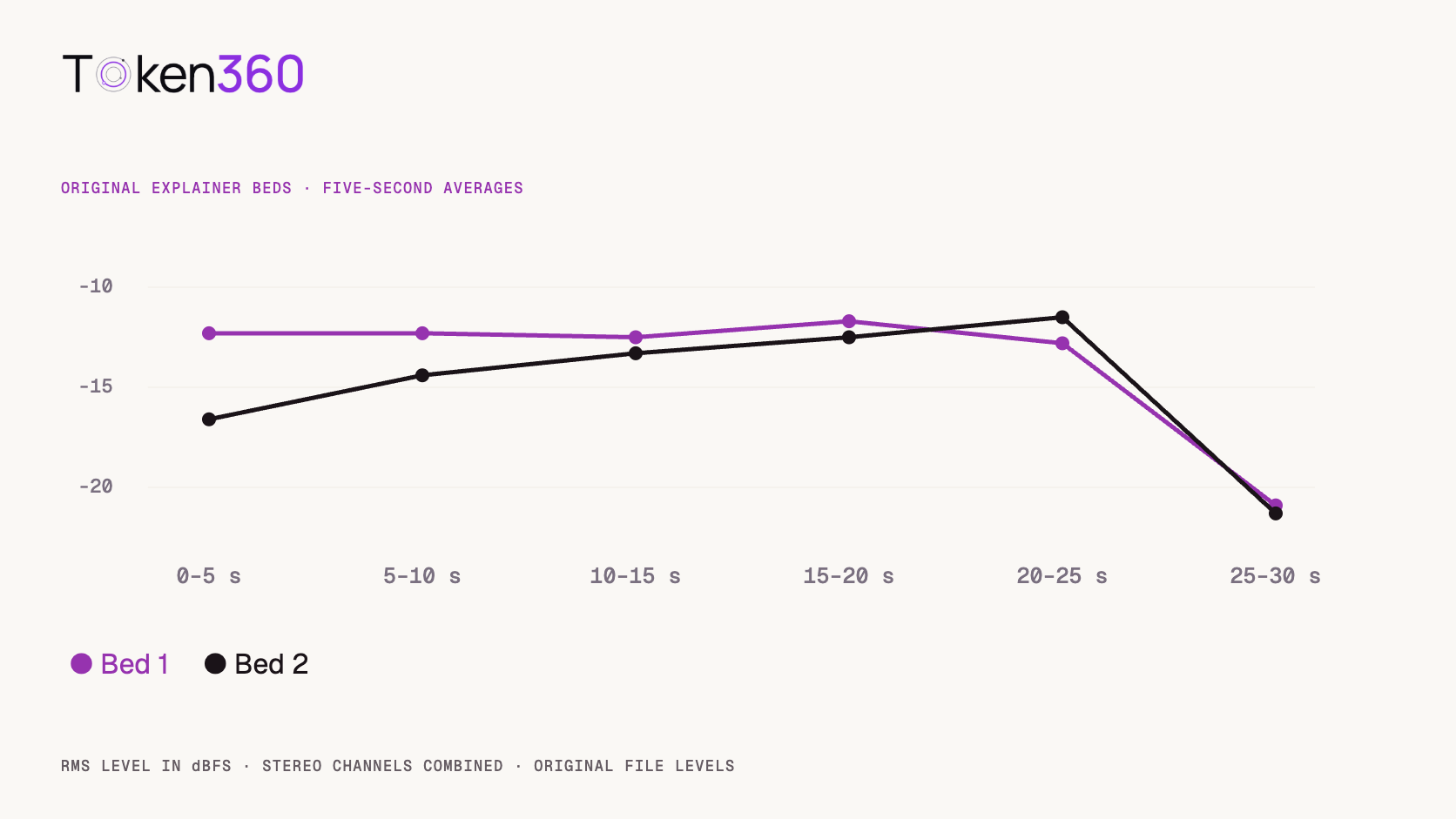
Start with the bed that holds its level through the sentence, then check both candidates under the actual voice. In the first 25 seconds of Bed 1, the five window averages stayed between −12.8 and −11.7 dBFS, a spread of 1.1 dB. Bed 2 rose from −16.6 to −11.5 dBFS across the same five windows. The gentler opening of Bed 2 could be an advantage if the narrator introduces the product early and leaves space for music later.
Bed 1 · The original listener accepted this take for the calm explainer brief.
Bed 2 · The same listener described a more pop-like arrangement and greater variation.
Window averages from the original MP3s. The final window is included in the chart and excluded from the opening-to-body comparison.
For a practical comparison, duplicate the same picture edit and voice track. Set each candidate to a comfortable starting balance against the first sentence. Keep the speech level fixed. Listen again from a few seconds before the line containing the unfamiliar product name or number. Can a colleague repeat that line after one pass? Ask where their attention went before telling them which track had the steadier readings.
There are two distinct decisions here. First, choose the arrangement. Then decide how much automation it needs. When the melody works and a few words disappear, lowering the music during those words may preserve a good performance. Adobe Premiere can create editable gain keyframes against dialogue. Listen to the return of the music during short pauses so the gain changes feel intentional. Adobe’s guide to automatic audio ducking.
Where should the musical lift land in a product reveal?
Choose the frame the viewer should notice first, then audition the build into it. That frame might be when a lid clears the product, when a display turns on or when an interface shows the result. These moments can fall several seconds apart in the same shot.
Reveal 1 · Listen to the build and the room left for the final chord.
Reveal 1 had its strongest five-second average between 15 and 20 seconds at −11.6 dBFS. Its first five seconds averaged −17.1 dBFS. These readings give you a section to audition. The strongest musical accent could sit anywhere inside a window, and the editor may prefer a quieter accent for a restrained visual reveal.
Suppose a twelve-second cut opens on the closed box and the product appears at second seven. Mark that frame and move the candidate music underneath it. Play from the beginning of the cut. Sliding a striking accent onto second seven may leave too little introduction or cut off the chord at the end. In that case, audition the next take with the same picture markers. Compare how much of the cue survives at both ends before moving the picture to accommodate the music.
How much space does the ambient ending leave?
Play the last ten seconds against the transition out of the scene. A quiet ending can give a spoken tag, a door close or a moment of silence its own space. The amount of room depends on what the audience needs to hear immediately afterward.
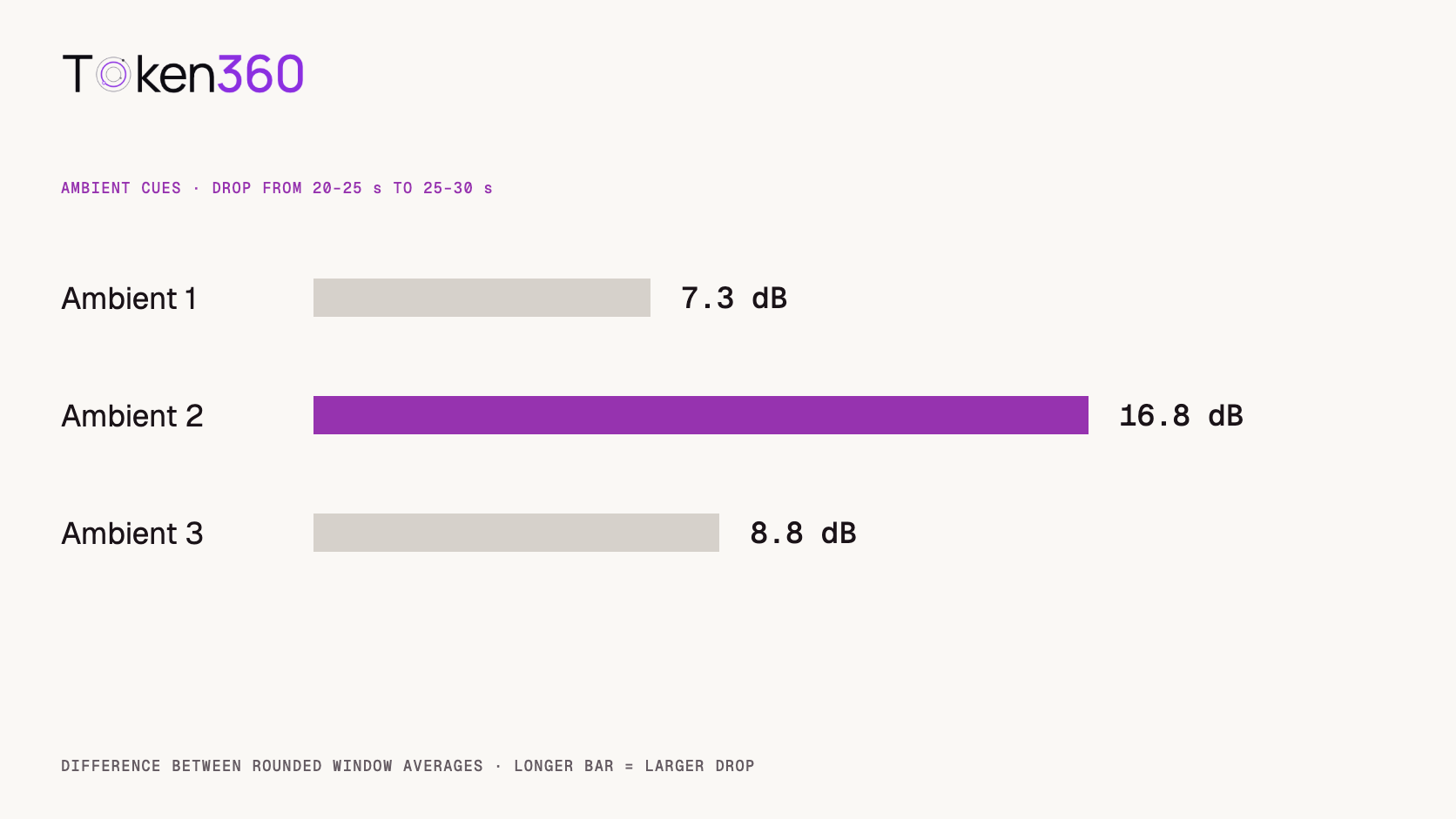
Ambient 2 · Compare its penultimate and final five seconds.
Original take
20–25 seconds
25–30 seconds
Drop between windows*
Ambient 1
−16.3 dBFS
−23.6 dBFS
7.3 dB
Ambient 2
−13.0 dBFS
−29.8 dBFS
16.8 dB
Ambient 3
−13.2 dBFS
−22.0 dBFS
8.8 dB
*Differences calculated from the displayed rounded averages. Ambient 2 gives the largest drop by this measure. Audition it first for a spoken tag near the end. If the tag needs a sustained bed beneath the final word, one of the other two takes may feel more continuous. A five-second average cannot tell you exactly when a fade begins or whether the last sample reaches silence.
When is another generation worth adding to the shortlist?
Order another take when you can name a requirement the current candidates miss in the assembled scene. For example, the narrator may still be speaking at the moment all three candidates introduce their strongest motif. A new brief can specify a quiet opening through that line and reserve the lift for the transition afterward.
Each generation in the original pilot cost USD 0.0874125. Three takes for one brief cost USD 0.2622375. The incremental cost of one more at that observed charge would be USD 0.0874125, plus time to hear it in context. The manually timed waits ranged from 12.85 to 69.11 seconds. A long wait tells you little about where a musical phrase will land. Keep timing and musical suitability in separate columns when reviewing your shortlist.
Before requesting a variation, write one sentence an editor can verify on playback. “Leave the words ‘one tap’ exposed, then bring in the pulse when the result appears” gives the next listener two concrete markers. “Make it more premium” leaves the editor to guess what went wrong with the first three tracks.
What should the editor hand off with the selected music?
Send the take ID, picture version, music in-point, intended cue point and any gain changes. Attach a short review note explaining what the selection did for the scene. For an explainer, the note might say that the product name stays clear on the first viewing and the music returns during the demonstration.
Keep the original recording available. A shorter cutdown may remove the pause where the full-length version lets the music rise. With the source take and the cue point documented, the next editor can find another phrase without repeating the whole audition. If the creative team is also generating sound with the picture, agree which effects and musical accents each track should carry. Token360’s guide to AI video native audio.
Frequently asked questions
Does a steady signal level mean the narration will be clear?
Speech clarity depends on the voice, arrangement and mix. A short piano phrase can compete with a product name at a fairly constant level. Listen under the actual line at the intended playback volume.
Should the loudest moment always coincide with the reveal?
Use the moment that gives the intended impression. A quiet harmonic change can suit a subtle interface reveal. A stronger accent may suit a sudden physical transformation.
Why use five-second windows?
Six equal windows let readers compare the broad shape of thirty-second files. Use a waveform and playback at the edit point when you need to locate a specific beat, transient or fade boundary.
Are these figures loudness targets for publishing?
They are measurements of the original files using a stated RMS calculation. Check the final mix against the delivery specification for your destination.
Which tracks can I hear here?
The four players contain Bed 1, Bed 2, Reveal 1 and Ambient 2. They retain the original levels. Use the linked pilot to audition the remaining five tracks.
Did one of the nine tracks win a finished-picture test?
The original listener reviewed the music against its briefs. The proposed narration and picture auditions are ways to make the next editorial decision. A final selection depends on the voice and cut you bring to the session.
Read next. Use a consistent review sheet when several editors compare alternate takes. AI model evaluation framework. Production resources from Token360.
Editorial revision: November 4, 2026. Test dates and dated source snapshots remain as stated in the article.
Audio
Video Editing
Tutorial
Build faster with one AI API.
Use Token360 to call video, image, audio, and text models with one key and one bill.


 Prompt Library
 Insights
 Insights