Black Bars on Video: Are They in the File or the Player?
Find out whether black bars on video come from the source file or the player. Toggle a live example and compare two measured 320-pixel layouts.
By Yuki Yu
A landscape clip looks right in the editing suite. In a square product card, two black strips appear above and below the picture. The designer asks for a square export. The editor says the delivered file is already square. Both can be right: a square file can contain a wide picture surrounded by black pixels.
To diagnose black bars on video, change the fill behind the picture and inspect a frame from the delivered asset. If the strips follow the fill color, that area belongs to the display surface. If the strips are visible inside the extracted frame, they travel with the file. The distinction determines whether you should change a player setting, request another export or approve the existing composition.
Read first. Identify the exact asset and revision your page is using before opening the editing project. AI video output validation guide.
How can two different files produce the same black bars?
A player can leave space around a wide picture to preserve its proportions. Alternatively, an editor can place a wide picture inside a square sequence and export the entire square, including the empty-looking margins. On a black player surface the results can look alike. Only the second file contains those margins as picture data.
We constructed both cases from the same archived river frame. Source A was a 480 × 270 image. For Source B, we placed those same pixels in the middle of a 480 × 480 black image, leaving 105 rows of black pixels above and below. We displayed each source in a 320 × 320 CSS box in desktop Chrome, centered it and used object-fit: contain. This is a controlled still-frame demonstration of display geometry. It avoids relying on a video codec, a network connection or the behavior of a particular commercial player.
The CSS property controls how an image or video is sized inside its box. With contain, the browser preserves the source proportions and fits the entire source into the available space. With cover, it preserves proportions and fills the box, clipping the parts that extend beyond it. MDN object-fit reference.
What does changing the player background reveal?
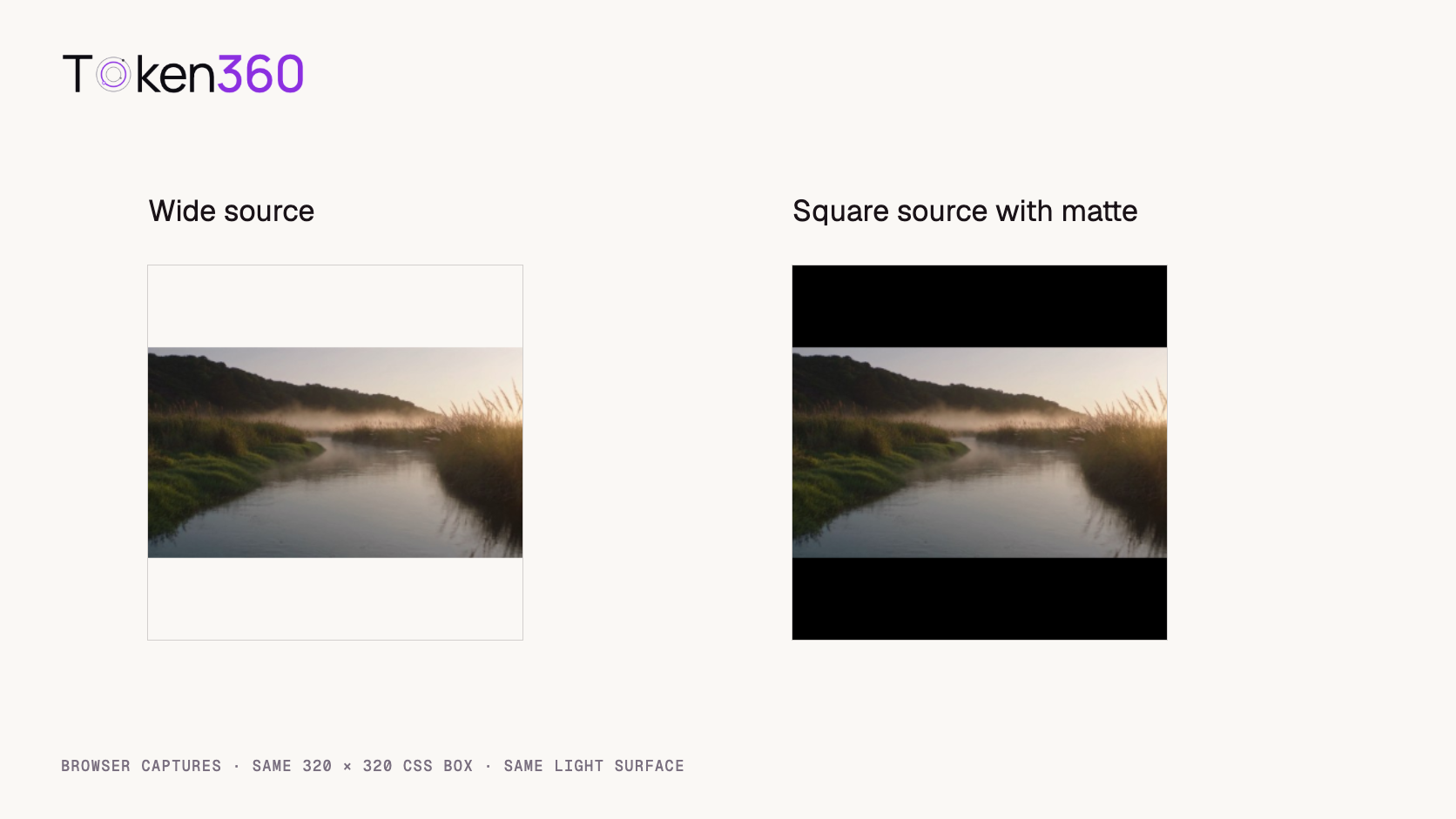
Compare the captured light-background condition below. In the wide-source case, the bands take the player surface color. In the square-source case, the bands remain black because those pixels are part of the file.
Actual 320 × 320 browser captures from the light-background condition.
We also sampled pixels in the browser screenshots at a device pixel ratio of one. The coordinates below use a top-left origin. We chose y = 10 to sample well inside the band and y = 160 to sample the river. Near the boundary, resampling a baked-in edge can introduce blended pixels that would complicate a one-pixel test.
Source
CSS background
Upper band (160, 10)
River center (160, 160)
Wide
Black
RGB 0, 0, 0
RGB 135, 119, 104
Wide
#FAF8F5
RGB 250, 248, 245
RGB 135, 119, 104
Square, baked matte
Black
RGB 0, 0, 0
RGB 135, 119, 104
Square, baked matte
#FAF8F5
RGB 0, 0, 0
RGB 135, 119, 104
On a real site, change the background of the element directly behind the video content. A wrapper can sit behind an opaque video element or a player overlay. Changing the wrapper alone and seeing no difference leaves the diagnosis open. Inspect the file itself before labeling the bars permanent. Also press play: a poster image can have its own crop or padding, so a band seen only before playback may belong to the poster.
Why are the bands 70 pixels high?
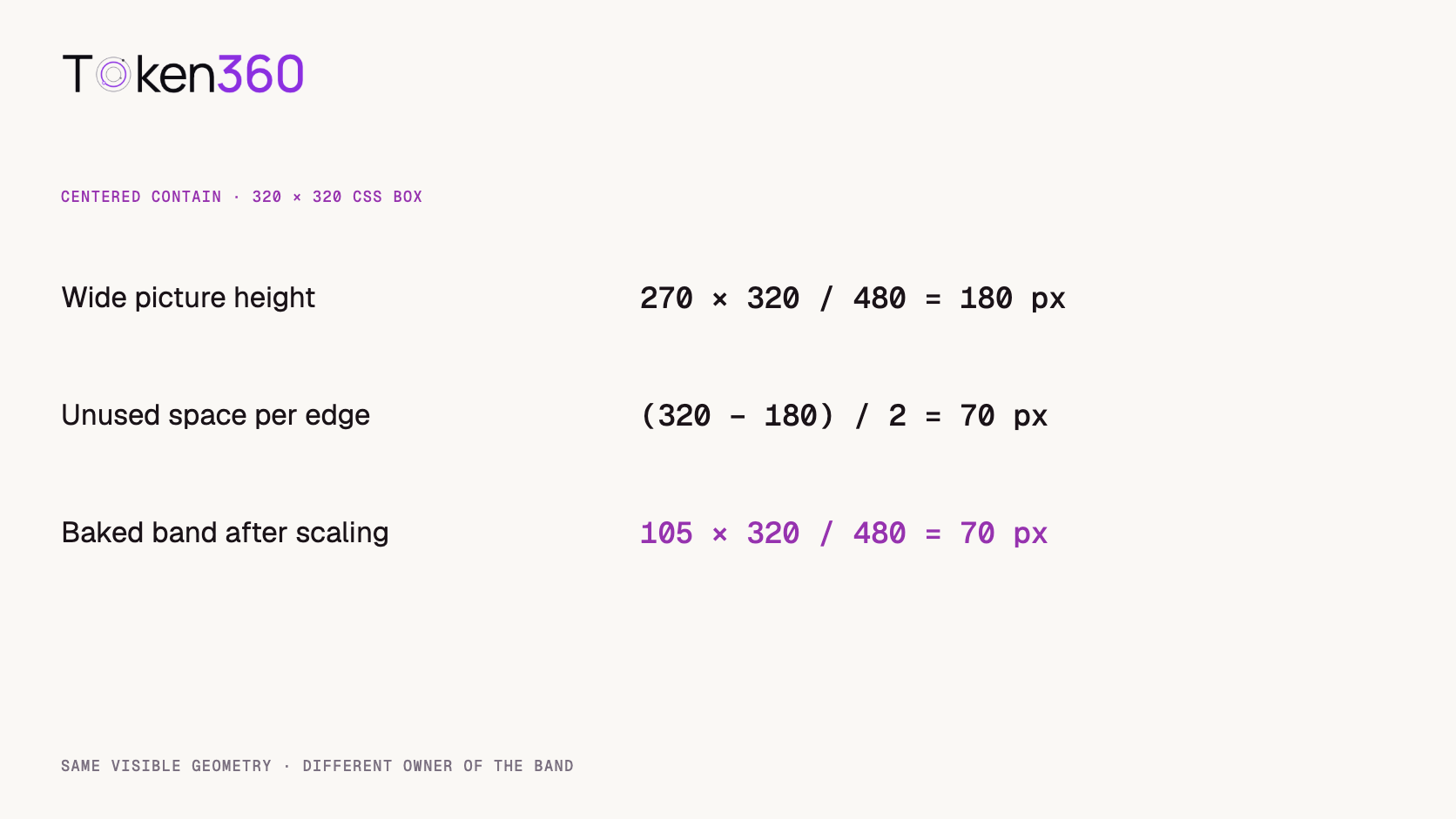
Fitting a 480-pixel-wide source into a 320-pixel-wide square scales it to two thirds of its original width. Its 270-pixel height scales to 180. The square has 140 rows left over. Centering the picture divides those rows evenly into two 70-pixel bands.
The square matted file takes a different route to the same geometry. Its entire 480 × 480 canvas scales to 320 × 320. Each 105-pixel source band becomes 70 display pixels. The equal dimensions explain why a screenshot on black cannot tell you who owns the bars. A file-inspection tool that reports only “320 square” or “480 square” cannot tell you how much of the encoded area contains the active shot, either.
When does switching to cover help?
It helps when the player owns the space and the shot can tolerate cropping. In our square card, a wide source displayed with cover must scale to 320 pixels high. The visible square corresponds to 270 × 270 source pixels. With a center crop, 105 source pixels disappear from each side. Before choosing that treatment, check what occupies those side regions over the entire shot.
For the river, a centered view may still communicate the location because the open water runs through the middle. For a two-person conversation, the same crop could remove the person who is speaking. Set an explicit focal point if changing the alignment keeps the important action visible. The object-position property controls how the content sits within its element. MDN object-position reference.
For the square file in the square box, cover already fits the full source exactly. The baked black pixels remain visible. An extra zoom can hide them, at the cost of more cropping and enlargement. If the wide master is available, start from that master and frame the dedicated square version before adding text or captions. It is easier to preserve a moving subject when you can choose the crop for each shot.
What if the bars are present in only part of the video?
Inspect frames on both sides of the change. One shot in a compilation may already have been matted before it reached the final sequence. If all other shots fill the player, a global zoom can damage those good shots while fixing the odd one. Isolate the affected shot and compare it with its source.
Use a bright frame as well as a dark one. A wall, a letterbox matte and an unlit area of the scene can all look black in a single image. Check whether the boundary stays fixed while the camera moves. Inspect corners and the transition into the next shot. If subtitles or graphics occupy the band, removing it may also remove material the audience needs. In that case the editor needs a new layout, not just a tighter crop.
What should you send back to the editor or developer?
Send the asset version, a frame timestamp, the encoded dimensions, the player box size and the fit setting. Include one extracted frame and a screenshot of the page at the affected breakpoint. A note such as “the downloaded frame fills 16:9; the 320-square card adds 70 pixels above and below under contain” gives the developer a specific decision to make.
For a baked matte, ask for the active picture and intended delivery dimensions. For player padding, ask whether the design values the whole shot or an edge-to-edge card. Record the answer per placement. A product page can keep the whole frame while a browse card uses a tighter crop. Verify both on the actual page, with its poster, play button and caption controls in place.
Frequently asked questions
Does a square MP4 guarantee a square active picture?
No. The encoded canvas can be square while its active picture is wide. Inspect a decoded frame to see what the file contains.
Do black bars mean the video needs to be generated again?
First inspect the delivered file and player settings. Many cases can be resolved through display layout or a new export from the approved master.
Why do bars appear above and below rather than on the sides?
Under centered containment, a source wider in proportion than its destination leaves vertical space. A narrower source leaves horizontal space, producing side bands.
Can I stretch the image to fill the player?
Stretching independently in each direction changes the shapes of objects. Compare the product silhouette and faces against the approved source before accepting that treatment.
Why does the poster look fine until the video starts?
The poster and the video may use different assets, dimensions or framing. Compare the poster with an extracted video frame and inspect the fit rules during both states.
What did this experiment measure?
We measured the rendered pixels of two controlled image fixtures in one desktop browser. The test isolates file pixels and display space. It does not measure device-specific playback behavior or user preference.
Read next. Add the target placement and required crop to the deliverable brief before handing the shot to the next editor. Text-to-video production workflow. More resources from Token360.
Editorial revision: November 4, 2026. Test dates and dated source snapshots remain as stated in the article.
Video Editing
Media Validation
Tutorial
Build faster with one AI API.
Use Token360 to call video, image, audio, and text models with one key and one bill.


 Prompt Library
 Insights
 Insights