Should Your Token360 Video App Edit or Extend a Clip?
Choose video editing for changes within a clip and extension for new footage after it. Check Token360 source roles and review each result separately.
By Yuki Yu
A user uploads a four-second shot of a sailboat crossing a table and clicks Remix. “Make the sail purple” asks for a change inside the existing shot. “Keep sailing until the boat leaves the frame” asks for new footage after its ending. In the Token360 Video API, those instructions give the source clip two different jobs. On a model that supports the operation, mark it as edit_source for the first request or extend_source for the second.
Read first. The Token360 API selection guide identifies the endpoint for video generation. Here the decision comes one step later: how should that endpoint use the video the user already has?
What should the app ask when someone clicks Remix?
Ask the user to point to the time where the change belongs. If they can point to something already on screen, ask what should change and what should stay recognizable. If they point beyond the last frame, ask for the next action. If they only like the look of the clip, treat it as a creative reference and check the selected model’s reference support.
What the user says
Role to check
Question for the reviewer
“Keep the crossing. Change the sail to purple.”
edit_source
Did the sail change throughout the shot while the hull and travel direction remained recognizable?
“Continue the crossing until the boat exits right.”
extend_source
Does the boat continue from its last position and complete a new action?
“Use this paper texture for a new harbor scene.”
reference, where supported
Does the new shot use the requested visual cues?
A request such as “make it longer and turn the sail purple” contains two decisions. Ask whether the original four seconds also need the color change. If they do, one practical approach is to approve the edited shot first and use that approved result as the extension source. This creates two jobs. Keep each task ID associated with its own input so the reviewer can tell which step introduced a change.
How does Token360 know which clip to modify?
Token360’s normalized POST /v1/videos request uses media roles to infer the intended workflow. The input_references list identifies the media and its purpose. A source video belongs in a video reference entry. The separate frame_images field identifies still frames such as a requested first or last image. Token360 video request fields and reference roles.
The following fragment illustrates the part of an edit request that identifies its source. Replace the example URL with media the service can read. Add the public model ID and prompt required by the selected model. For an extension, change the role to extend_source and write the action that should follow.
Before enabling either button in your product, inspect the selected model’s request example and parameter schema. Verify the role, source media type, accepted duration and any required model-specific fields together. A model that generates video from text may offer a different set of input operations. Google’s own extension documentation illustrates how supported models and source constraints vary by service. Token360 model capabilities · Google’s video extension requirements.
How would you review the same boat shot twice?
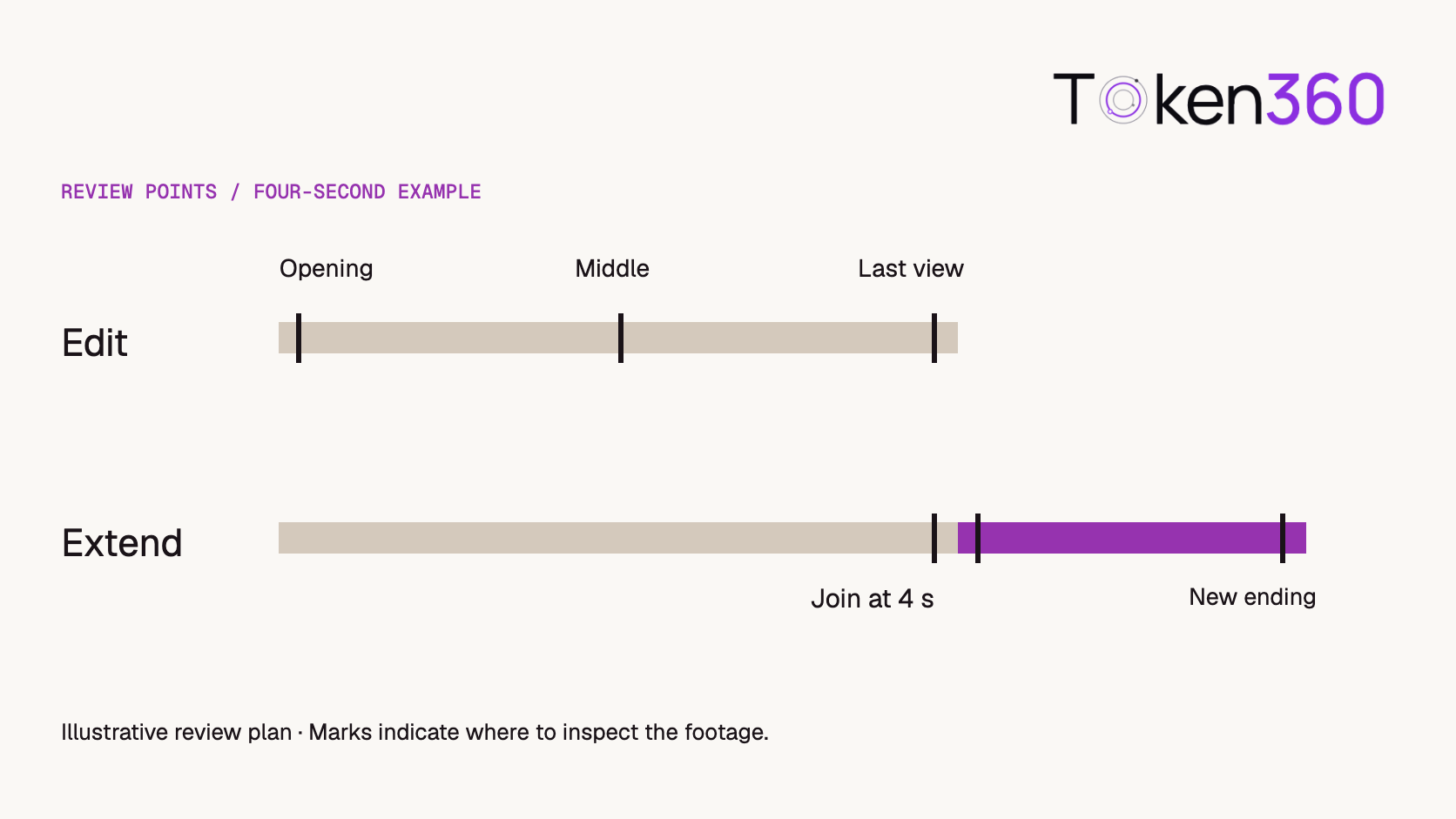
Use a short source with a visible direction of travel and an object that can be tracked across the shot. The following four-second example is an editorial test design. The times specify proposed review points. They do not represent a model benchmark or a promise about available output lengths.
Choose review points according to where the requested change belongs.
Edit brief. “Change the paper sail from cream to purple throughout. Preserve the hull, tabletop and left-to-right crossing.” Inspect the first clear view, the middle and the last clear view. A purple sail in the opening frame alone misses a color reversal halfway through. A consistently purple sail on a different boat misses the preservation requirement. Record both judgments before approving the output.
Extension brief. “Continue the boat’s motion to the right at the same pace. Keep the camera fixed as the boat exits.” Compare the last source frames with the first new frames. Then inspect the end of the new footage. A clean join can still lead to a boat that never exits. Conversely, an exit can satisfy the prompt while a jump at the join makes the result unusable.
Review the returned asset before assembling a final timeline. Establish whether your selected workflow returns a continuation segment or an already combined clip. A preview that shows the original opening again is a reason to inspect the file before appending it. If the source contains sound, listen across the join as a separate pass; a visually smooth exit can still contain an audible restart.
What should the application retain after approval?
Keep the source version, intended operation, public model ID, prompt, returned task ID and reviewer decision together. If the user approves the purple sail and then requests a continuation, point the extension at the approved edit. Accidentally selecting the original cream-sail clip can create a perfectly continuous extension of the wrong shot.
Once the job completes, retrieve the media and review it against the identified source. The task’s completion state confirms processing has finished. Creative acceptance requires checking the requested change and the details the user asked to preserve. Retrieve a completed Token360 video.
What if the edit succeeds but the extension fails?
Keep the approved edit and recover the extension as a separate operation. A failure to continue the boat does not invalidate a usable purple-sail edit. Give each job its own source version, result and approval record so a retry does not silently change the already accepted shot.
Before joining the results, inspect whether the extension output contains only new footage or also includes the source. Then check the transition for position, direction, lighting and sound. Appending a combined clip to its own source would repeat footage even if both files were technically valid.
If the customer changes the original sail color after approving the extension, mark the continuation for review. Its source has changed. Reuse it only after checking the new join; otherwise the workflow can deliver two individually plausible clips that disagree about the same object.
Keep edit and extension acceptance records separate
For the boat shot, approve two different contracts. An edit changes an identified property inside existing footage. An extension adds footage after an existing endpoint. A longer file alone cannot establish which operation occurred, and a correct scene description cannot replace the source-role fields required by the selected route.
Review field
Edit
Extension
Protected source
Boat identity and action not requested to change
The approved source ending
Requested change
A named property within the shot
A new action after the source endpoint
Critical inspection
Changed property plus unintended changes
The join plus continuity of the added action
Audio
Confirm whether the intended soundtrack survives
Review the sound across the join separately
This record can accompany the application’s Remix choice, but it is not a successful API trace. Save the exact documented source reference, operation and returned asset for each call. When only one operation is supported, disable the unsupported choice instead of sending the same request body with a different natural-language instruction.
Frequently asked questions
Can a prompt alone tell the API to extend a clip?
Describe the next action in the prompt and identify the source with the role required by your model’s request example. Check explicit extension support before sending the job.
Is a last-frame image equivalent to an extension source?
A still captures one moment. A source clip also contains the movement leading up to that moment. Use the input contract documented for the operation you want and review motion at the join.
Can I edit only the final second?
Confirm whether the selected model exposes temporal controls for that edit. A prompt mentioning the final second expresses the creative goal. To verify the result, review the preceding footage for unintended changes as well.
Does extension preserve the source audio?
Check the selected workflow’s audio behavior and inspect the returned file. Include a distinctive sound near the boundary when testing an application that promises audio continuity.
Does a longer requested duration count as extending an uploaded video?
Duration describes a requested length where supported. An extension also identifies a source clip and asks for continuation from its ending. Verify these separately in the request.
Which result should I use for the next revision?
Use the version the reviewer approved. Keep a source-to-result record for each job so a later revision can start from the correct clip.



 Prompt Library
 Insights
 Insights