Why Did Token360 Playground and API Token Counts Differ?
Two Token360 chats returned READY with 28 and 18 total tokens. See where the ten-token difference appeared and how to compare your own requests.
By Yuki Yu
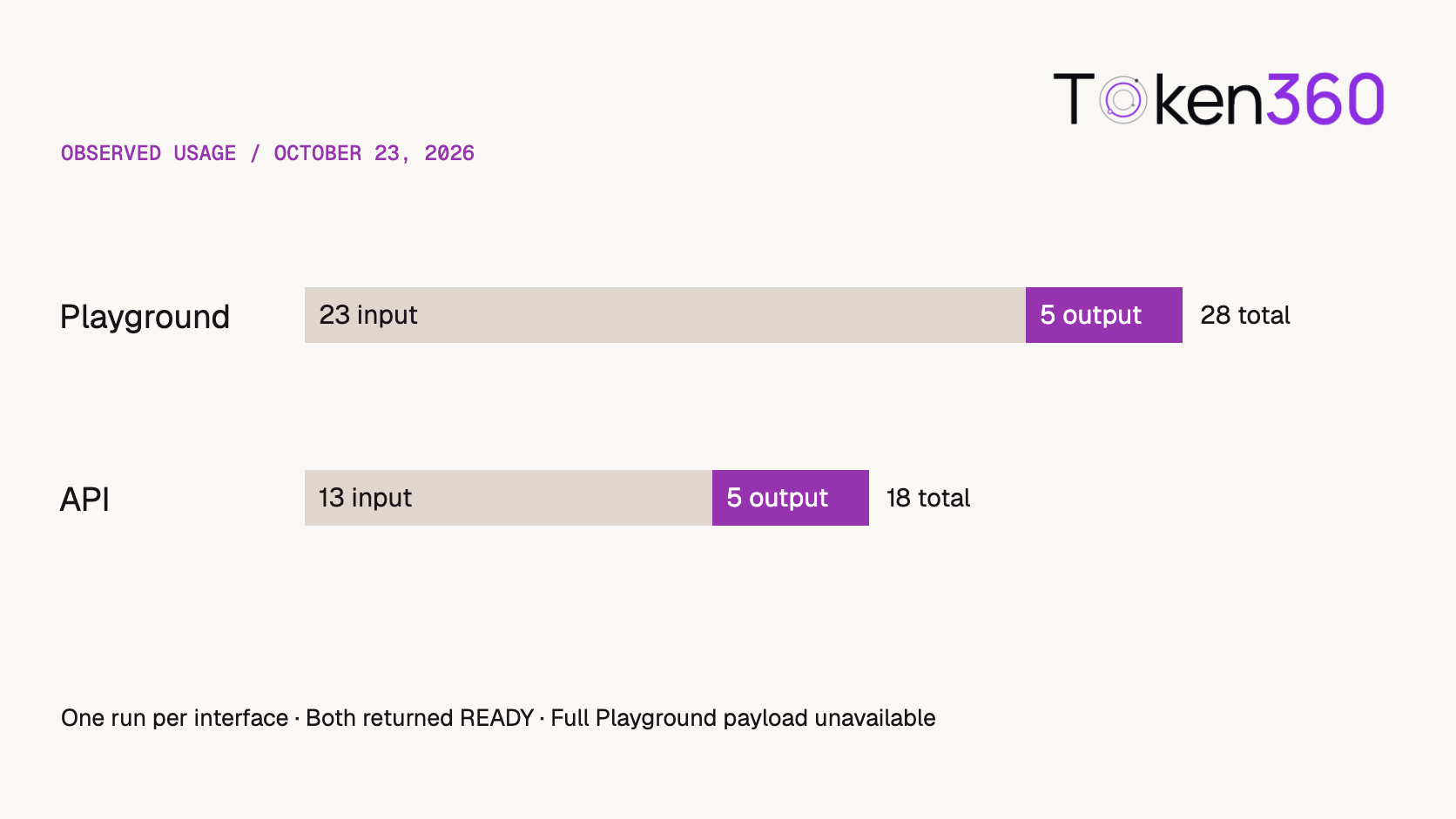
Two Token360 chat runs returned the same word, READY. The Playground showed 28 total tokens. The API response reported 18. All ten tokens of difference were on the input side. That tells a developer where to investigate first: the conversation submitted to the model. The screenshots alone cannot identify what accounted for those ten tokens.
Read first. Use the Token360 quickstart if you still need a successful API response. This comparison starts once both the Playground and your own client can return an answer.
What did the two Token360 runs actually show?
On October 23, 2026, a tester asked GPT-6.1 Sol to “Return exactly READY and nothing else.” The Playground displayed READY. A separate terminal request to Token360’s chat completions endpoint used the public ID gpt-6.1-sol, one user message and stream: false. It returned HTTP 200 and the same visible answer.
Tester’s record
Input tokens
Completion tokens
Total tokens
Visible reply
Playground display
23
5
28
READY
API response body
13
5
18
READY
Playground minus API
+10
0
+10
Same text
Evidence. The values are transcribed from two tester-supplied screenshots, one observation per interface. The API screenshot shows the submitted message list. The Playground screenshot shows the reply and usage counters, with no complete outgoing request body. We can reconcile the arithmetic in each row. We cannot establish that the model received identical inputs or that the Playground consistently uses ten extra tokens.
Both completion counts are five. The full difference in reported totals comes from the input counts.
What should you capture before comparing a Playground chat with code?
Save the public model ID, the endpoint, the ordered messages and the response’s usage fields. The prompt in the text box is only one part of the request. Token360’s chat endpoint accepts messages with roles, including system, user, assistant and tool. A prior answer included in the next request becomes part of that request’s input. Token360 chat completion reference.
Compare
What to retain
How to interpret it
Model and protocol
Selected public ID, endpoint, returned model when available
Resolve any mismatch before comparing counts.
Conversation
Roles, exact text, message order, attachments
An earlier turn or a trailing newline can make two visible prompts different inputs.
Optional settings
Tools, response format and model-specific settings you supplied
Record omitted fields as omitted. Check the model contract before assigning a default.
Response
Visible text, finish reason and usage fields as returned
Preserve a missing value as unknown. A missing completion count and a reported zero are different observations.
When comparing saved JSON, ignore indentation outside strings and preserve array order. Moving a JSON object field such as model above messages leaves the object’s meaning intact. Reordering entries inside messages changes the conversation. Spaces inside a message’s text are part of its value. These distinctions follow the JSON standard’s object, array and string definitions.
Run a controlled follow-up
Start a fresh text chat in the Token360 Playground. Choose a model available in your workspace, copy its public ID and send the single instruction below. Save the answer and its counters. If you can inspect the actual outgoing payload, retain a redacted copy. A model page’s example request is a template and may differ from the request sent by the Playground.
This is the request body from the historical API example. To repeat it, submit it to POST /v1/chat/completions using the same currently available model you selected in the Playground. Keep the credential out of the saved example. Compare the same usage fields across the two results. If your application receives input/output field names instead of prompt/completion names, keep the raw names next to the normalized counts. Check the selected model’s capabilities and supported parameters.
Now change one thing in your API client: add a prior user turn and its assistant reply before the final instruction. Keep the final message, model and other settings fixed. The change in reported input usage measures the effect of adding those particular messages in your run. Even if it happens to be ten tokens, you still need the original Playground payload to attribute the historical difference to conversation history.
Decide what to investigate next
If the output count matches and the input count differs, inspect the request first. If the input count matches and the reply differs, compare completion settings, finish reasons and the generated content. Matching counts tell you two lengths agree; different strings can have the same token length.
You have both payloads. Compare the ordered messages and supplied options, correct one difference, then rerun. Log the model and time so another engineer can repeat the comparison.
You have only the UI result. Record “same visible prompt and answer; full UI payload unknown.” A screenshot supports the numbers it displays. It leaves the cause open.
You need to explain a charge. Use the request’s billing record and applicable rates. A ten-token input difference by itself gives no dollar amount. See the per-request billing reconciliation guide.
How can you compare payloads without exposing private content?
Compare the requests locally before sharing a diagnostic record. First compare the model and endpoint, then ordered message roles, message content, attachments, tool definitions and explicitly supplied options. Keep absent fields distinct from values your client filled in automatically.
A public report can list which fields differed without reproducing confidential messages or authorization headers. A checksum can establish that two saved byte sequences differ, but it cannot explain the token difference. Retain the original evidence securely and publish only the minimum needed to support the conclusion.
If both payloads match but reported usage still differs, record the response metadata and ask the platform to investigate those requests. The historical screenshots do not resolve that case. Repeating the visible prompt alone would leave the original uncertainty in place.
Frequently asked questions
Does Token360 Playground always add ten input tokens?
The two October records establish a ten-token difference for that pair. Establishing a recurring difference requires repeated comparisons with known request bodies and a fixed model.
Why did one visible word use five completion tokens?
Five is the reported completion usage in each capture. A word count alone cannot reconstruct a provider’s accounting. Keep the recorded value and inspect any token details the selected route actually returns.
Does opening a new chat make the requests identical?
A new chat removes the earlier visible turns from your test setup. Compare the selected model, submitted payload and effective settings before treating the requests as equivalent.
Should I set temperature to zero to match input usage?
Temperature controls output sampling on models that support it. For an input-count discrepancy, first compare the message contents, ordering, model and any additional inputs.
Can I use this pair to estimate API savings?
Use repeated representative traffic and actual billing records for a savings estimate. This pair contains a single short response per interface and no measured charge comparison.
What should go in a support report?
Include the test time, public model ID, endpoint, redacted message structure, raw usage field names and observed values. Keep the request ID for support correlation if available. Remove authorization headers and private conversation content before sharing.
Read next. If the discrepancy you care about is elapsed time, the Token360 latency measurement guide explains how to choose matching start and finish events for the comparison.


 Prompt Library
 Insights
 Insights