What Should an AI Audio Generation Result Include?
Play two original Sonilo MP3s and see how a generated audio result can pair a preview and download with its prompt, duration, charge and review notes.
Token360 editorial team · November 4, 2026
Give each completed take a player, a clearly named download and the prompt that produced it. Show the length of the file beside the player. Put generation time and the actual charge in the take details. An editor trying to fit a cue into a cut needs to know how long the clip plays, even if the request finished much faster.
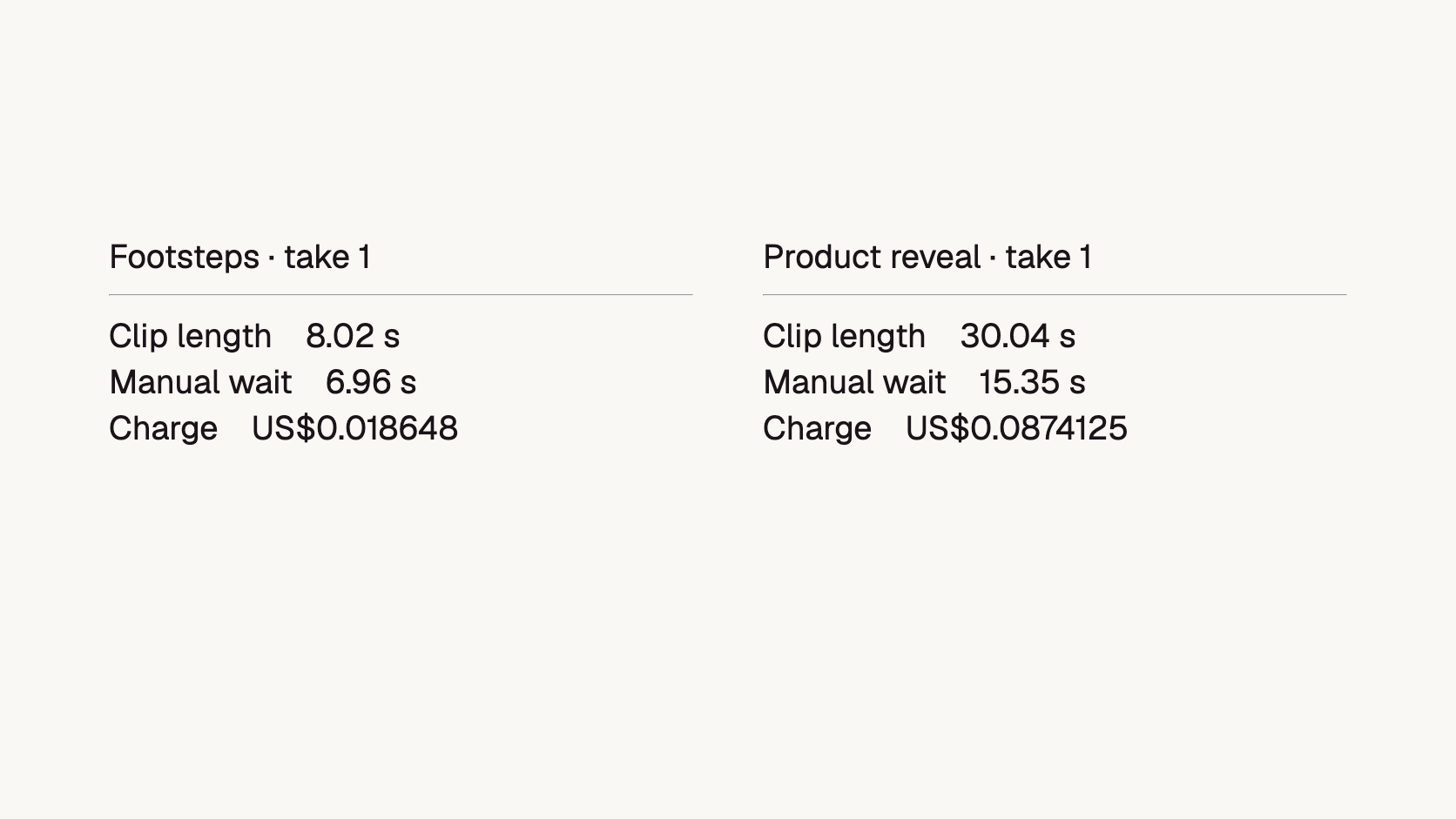
Try the two players below. Each download points to the same local MP3 as its preview. These are original takes from earlier Token360 tests. The prompts, manual waits, charges in USD and listening judgments come from those sessions. The players expose playback duration after loading metadata. The rounded lengths shown here describe the intended listening scale; the separate container estimates are not exact browser playback clocks.
Three slow footsteps in leather shoes on a wooden floor, distinct separated steps, a quiet indoor room. No voices, no music.
The tester counted seven steps against a brief asking for three. The original remains useful for auditioning the surface sound. An editor cutting to three footfalls would need to trim or request another take.
Create a 30-second instrumental cue for a product reveal. Begin with sparse, soft piano. In the middle, gradually add warm strings and light percussion so the second half is clearly fuller than the opening. Resolve on a final chord and let it decay naturally before the clip ends. No vocals, humming, or spoken words.
The tester accepted this take against the reveal brief. Listen for how the sparse opening leaves room before the fuller arrangement arrives. A reviewer can approve this version while keeping a different cue for another cut.
Charges and manual waits are historical tester records from October 19, 2026. The MP3 container estimates were 8.02 and 30.04 seconds; these may differ slightly from a player’s decoded duration. Use the loaded player clock when setting an edit point.
Which fields belong next to the player?
Show the take name, media type and playback duration where people listen. Put the full prompt, model ID and generation settings one click away. For a sound effect, the editor may want to count discrete events. For music, the same editor may want to audition the transition into a chorus or a reveal. A short, editable listening note makes either decision traceable.
Use distinct labels for “Clip length” and “Generation wait.” Our reveal file plays for about twice the manually measured wait. Writing “15.35 seconds” on the player without a label would make that file look too short for a 30-second cut. Display a billed amount only when a usage record or recorded charge supplies it. These two historical charges are individual examples.
What should happen when someone requests another take?
Save a new take with its own file, prompt snapshot and review status. Suppose an editor shortens the footstep prompt and generates again. If the result screen overwrites the MP3 behind the old player, a teammate who approved the original could download a different performance. Give each take its own asset identifier and have both the player and download resolve that identifier.
Separate generation status from creative approval. The footstep request delivered a playable file. Its event count still missed the brief. “Ready to play” can appear as soon as the media loads. Let a reviewer mark “Approved for this cut” after listening. If playback later fails, offer to reload the existing asset before offering a new generation that could incur another charge.
How should the result page handle playback and download failures?
Recover access to the existing take before starting a new generation. A player error concerns delivery or decoding; it does not establish that the generation failed. Keep the take identifier and review history visible while the application checks the asset.
Observed state
Useful next action
What stays unchanged
The player has not loaded metadata
Show loading or duration unavailable
The saved request and take identity
Playback fails but the file is still available
Retry retrieval or offer the same download
The generated performance
An access link expires
Use the application's supported asset-recovery path
The original generation record
The clip plays but misses the brief
Mark the review outcome; choose editing or a new take
The original file and its charge
Do not replace a failed player's source with a newly generated performance under the same take name. If a new generation is requested, make its additional cost and separate identity clear. The two embedded examples demonstrate the preview/download relationship; they are not a test of production link-expiry recovery.
Frequently asked questions
Should previewing a take start another generation?
Play the asset already attached to the take. In the examples above, playback and download use the same stored file. A web app can use native browser controls for this. See the HTML audio element documentation.
Should users see an estimated cost per minute?
For an individual take, show the recorded charge and actual clip length first. If you add a derived rate, label the denominator clearly. Normalizing by generation wait produces a different number from normalizing by minutes of playable audio.
How can an editor share the right take?
Share a stable take link inside the workspace and include its version in the downloaded filename. A colleague should be able to open the same recording and see the brief and note that led to approval.


 Prompt Library
 Insights
 Insights