What Does the Remaining Balance on a Token360 API Key Mean?
A Token360 key limit is an allowance, not funded credit. Compare key remaining limits with account spendable balance and handle unknown values correctly.
By Yuki Yu
A newly created Token360 test key showed US$1.00 remaining. Could its owner spend a dollar immediately? The key page answered only half the question. It showed how much the key was allowed to spend under its cap. To find the funds available to pay for a request, the owner needed an account balance reading as well.
Read first. The Token360 quickstart covers the first API call. If you already have a key and want to interpret the dollar amount beside it, start with the two readings below.
What did the $1 test-key screen actually show?
On October 23, 2026, a tester captured a Token360 key detail page with a lifetime spend limit of $1.00. The page displayed $0.00 used, $1.00 remaining, zero requests in the displayed window and “Never” for last use. The arithmetic is consistent with an unused dollar of key allowance. The screen contained no wallet or credit snapshot.
Question about that test
What the record supports
How much key budget did the screen show?
$1.00 remaining under a $1.00 lifetime limit.
Did the account have $1.00 in funds?
Unknown. The captured page described one key.
Was $1.00 awarded as promotional credit?
The screenshot provides no evidence of a credit grant.
What did the next request cost?
That requires the individual request’s billing record.
This is a transcription of one tester-supplied screen. The values reflect the time of capture. Neither a current balance nor a platform-wide offer can be inferred from that historical example.
Which Token360 endpoint answers each balance question?
Read GET /v1/key with the inference key whose allowance you want to inspect. Read GET /v1/billing/balance for the authenticated account’s spendable funds. Keep the results under separate labels in your application, especially when several keys share one account.
Label for the reader
Response fields
How to read them
Remaining on this key
data.limit_remaining, data.limit_reset
The remaining allowance in the key’s current window. A null remaining limit indicates an uncapped key. A null reset indicates a lifetime window.
The account funds available at the timestamp returned. On this endpoint the total sums available wallet funds and available credit.
Recorded cost of one generation
Billing lookup using the request identifier
Use the charge record when the question concerns an individual call.
The two null values above belong to different fields. A key with a finite $1 cap can have a null reset because the $1 must last for the key’s lifetime. Displaying that key as “unlimited” would misread the reset schedule as a budget. Check the fields against the current key reference and the account balance reference.
How can you check both readings without submitting a generation?
Run the two read-only requests below in a terminal where TOKEN360_API_KEY already contains your inference credential. To display only the relevant fields, these examples use jq. Each command retains missing or null fields for inspection. The first reads the calling key. The second reads its account context.
Check that the requests succeeded before interpreting the numbers. If a lookup fails, show “balance unavailable” and keep the time of the last successful reading. Displaying zero after an authentication failure would send the user to top up before they have even checked the credential. For the projection syntax used above, see the jq manual.
How should an app explain different readings?
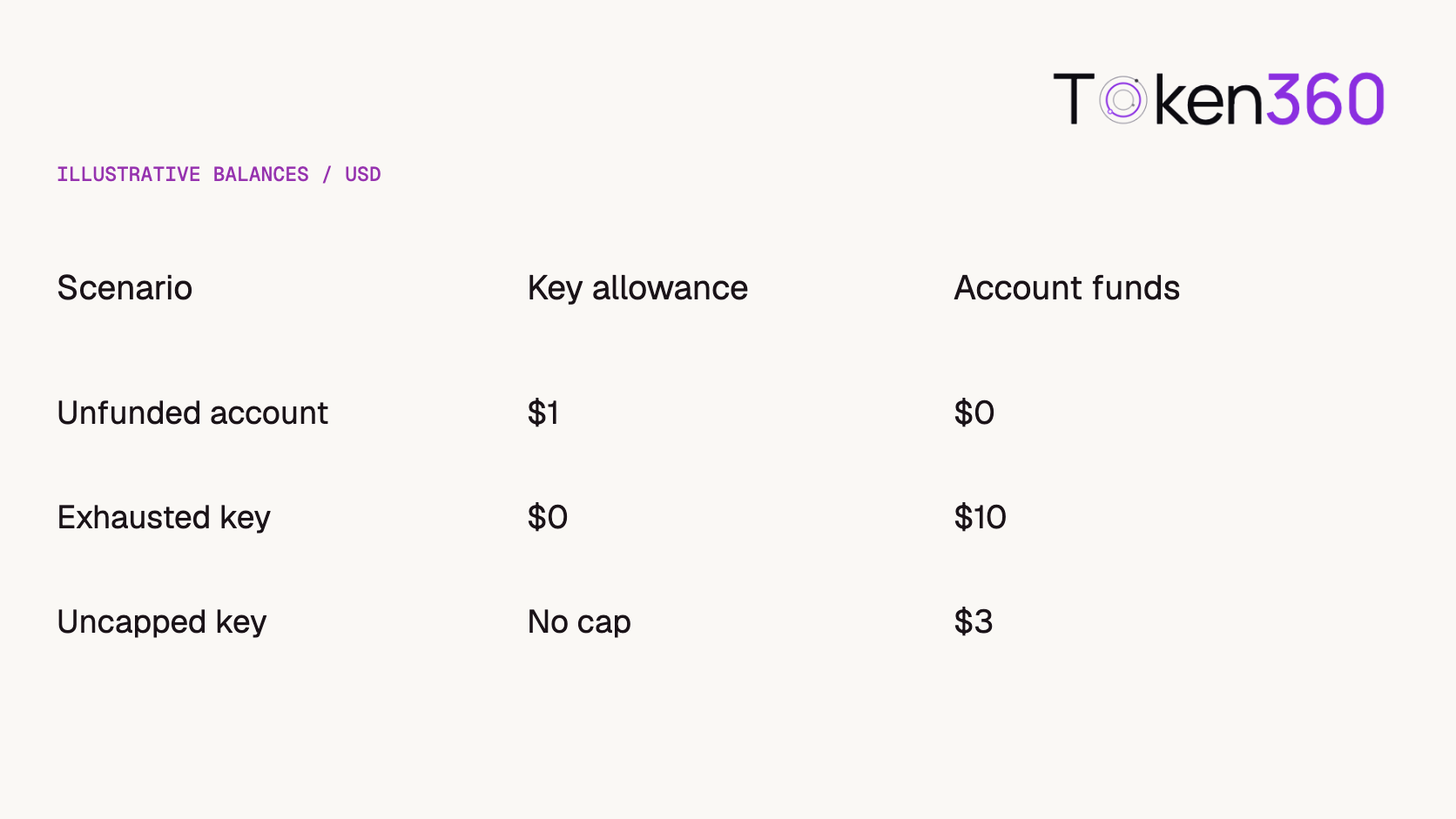
Display both values with their scope. Consider the three illustrative snapshots below. They use invented account values so you can review your interface without entering a real key. Only the earlier $1 key screen came from the tester.
Illustrative USD snapshots. Each column answers a separate user question.
$1 remaining on the key, $0 spendable in the account. The key has room under its cap, while the account reading shows no funds. Raising this key’s limit cannot fund the account.
$0 remaining on the key, $10 in the account. The account has funds. Inspect this key’s cap and reset schedule before asking the owner for another top-up.
Uncapped key, $3 in the account. Show “No key cap” beside the $3 account reading. Converting null to zero would incorrectly tell the user that the key allowance was exhausted.
Two positive readings still leave other conditions to check, including daily spend protection and the selected model’s access requirements. Balance snapshots can also change between reading them and submitting work. If several keys show the same account balance, adding those readings together counts the same funds more than once.
What changes for an enterprise account?
Choose the credential according to whose funds you need to inspect. A developer checking their own inference key can read its allowance with /v1/key. For a new tenant-level balance monitor, Token360’s enterprise guide directs administrators to GET /enterprise/v1/billing/balance using a management credential scoped to tenant:billing:read. Enterprise postpay credit has its own exposure and authorization rules. Use the enterprise response for that dashboard. Token360 enterprise API guide.
A negotiated model rate or capacity agreement does not establish funded credit, an unlimited key allowance or automatic postpay eligibility.
Does a successful balance check guarantee the next call?
No. A balance lookup is a snapshot. Other requests may consume funds or key allowance after you read it, and model access or other limits can still reject the next operation. Display the account scope and check time rather than presenting a balance as a reservation.
Preserve the distinction between zero, unlimited and unknown. The key reference documents a null limit as unlimited; a missing or failed account-balance response does not establish free spending or zero funds. Keep the last successful reading visibly dated if a refresh fails.
For application budgeting, track admitted but unsettled work separately and reconcile it against recorded charges. Do not subtract your own reservation from a provider balance twice. The account-balance reference defines the reported spendable amount; it is a different quantity from the key's remaining limit.
Frequently asked questions
Does creating a $1 API key give me $1 in free credit?
A $1 limit sets the maximum allowance for that key. To establish whether you received promotional credit, check the account’s credit records and the applicable offer.
Does an unlimited key mean unlimited generations?
An uncapped key removes that key-level spending ceiling. Account funds, credit rules and other request policies still apply.
Should I add frozen wallet funds to the spendable total?
Use the total returned by the balance endpoint. It already includes available wallet funds and available credit. Frozen funds appear separately.
Will a key budget reset refill my wallet?
A reset starts another budget window for the key. The account balance records wallet funds and credit separately. Check it when you need to confirm available funds.
Can I identify the cost of one request by subtracting two balances?
Other keys and settlement activity can affect the interval. Look up the individual request’s billing record to identify its recorded charge.
What is the clearest label for the number on a test key?
Use “Remaining on this key” and display the reset period beside it. Put “Account spendable balance” on a separate line with the currency and snapshot time.
Commercial scope reviewed November 4, 2026. Token360 pricing and engagement scope are company-confirmed; individual discounts, capacity commitments and compliance evidence require a written proposal. Token360 enterprise page. Historical test charges remain dated observations, not current universal quotes.
Editorial revision: November 4, 2026. Test dates and dated source snapshots remain as stated in the article.
API
Developer Guide
Build faster with one AI API.
Use Token360 to call video, image, audio, and text models with one key and one bill.


 Prompt Library
 Insights
 Insights